1OPERATION_.pdf - 第284页
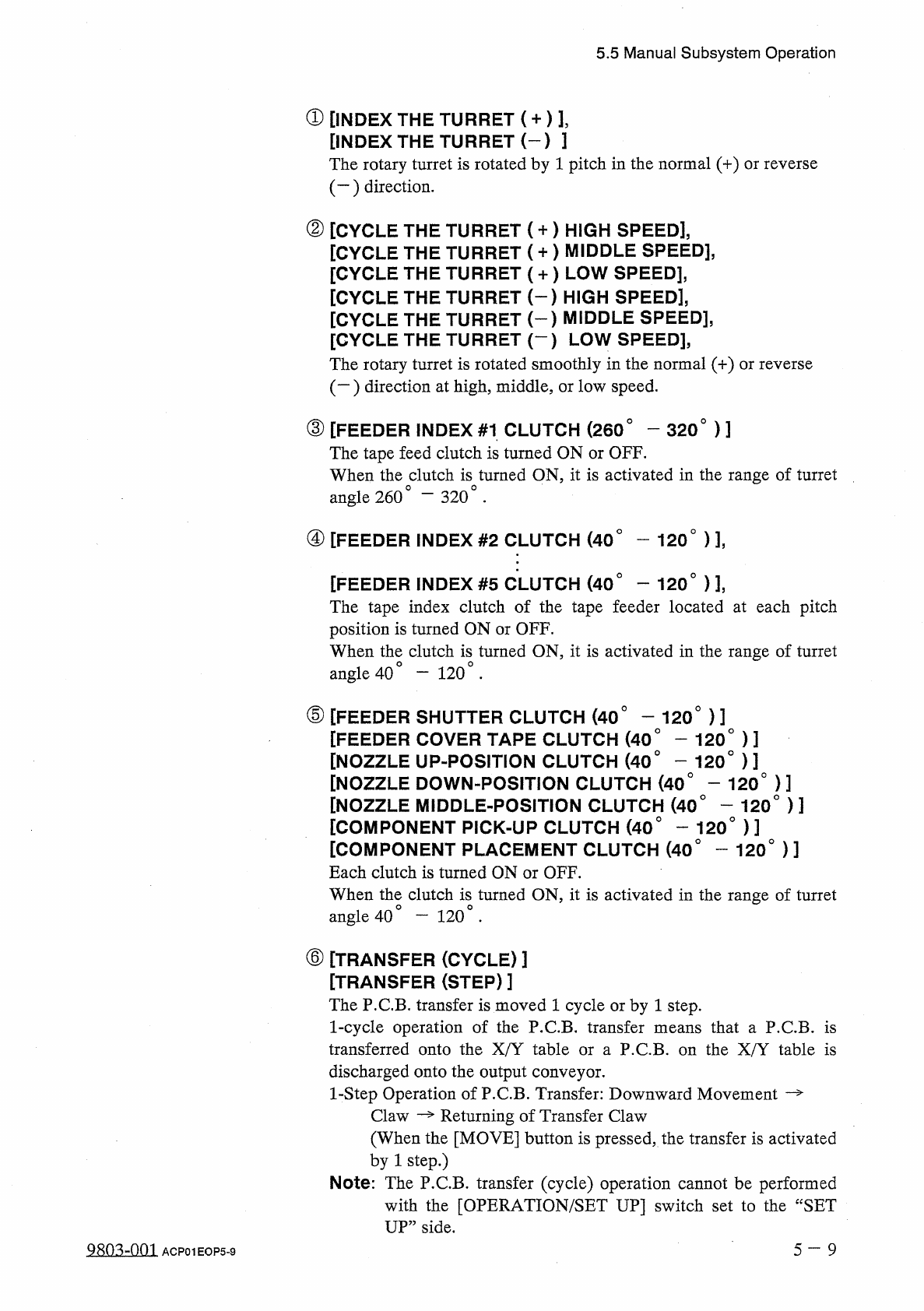
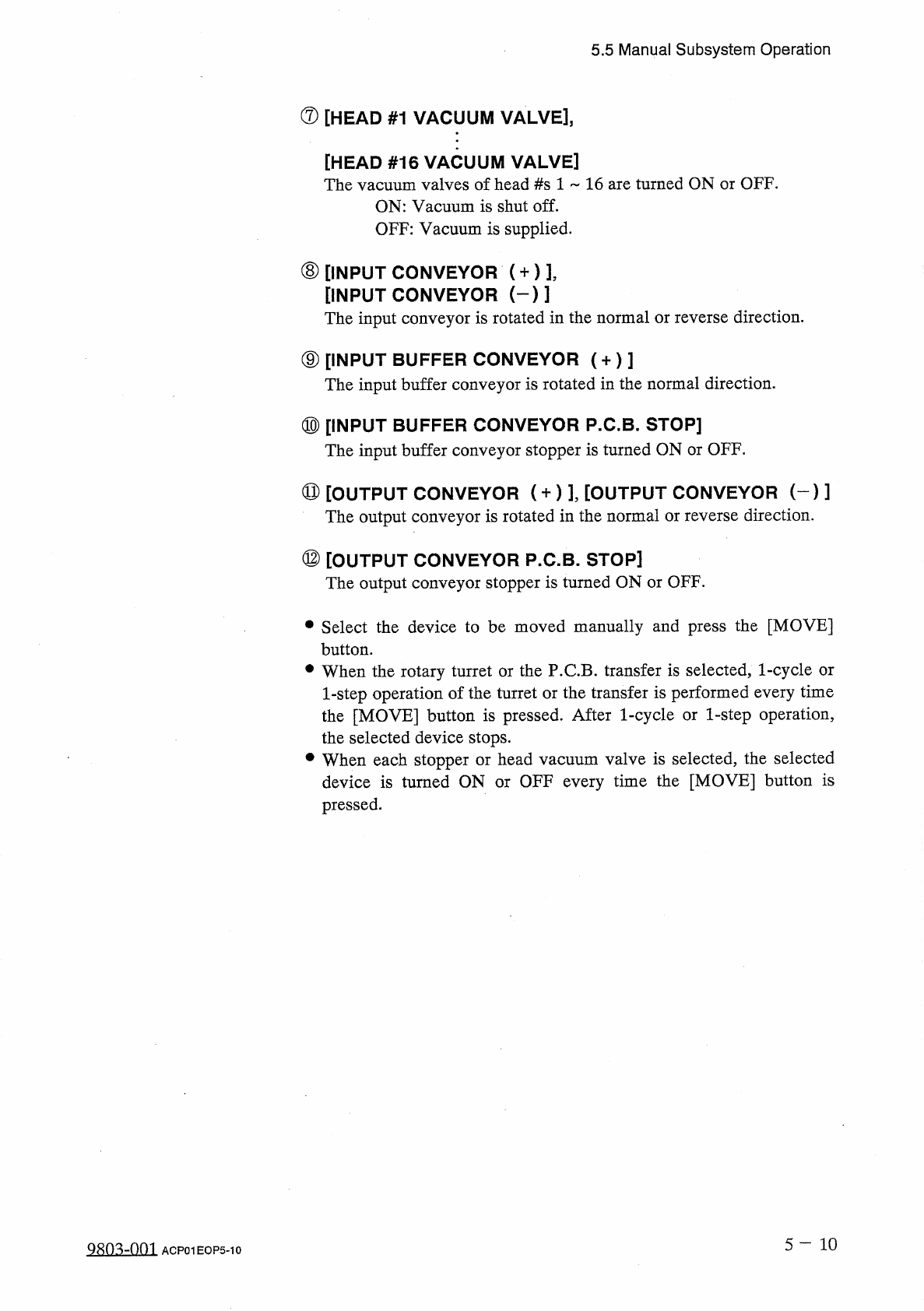
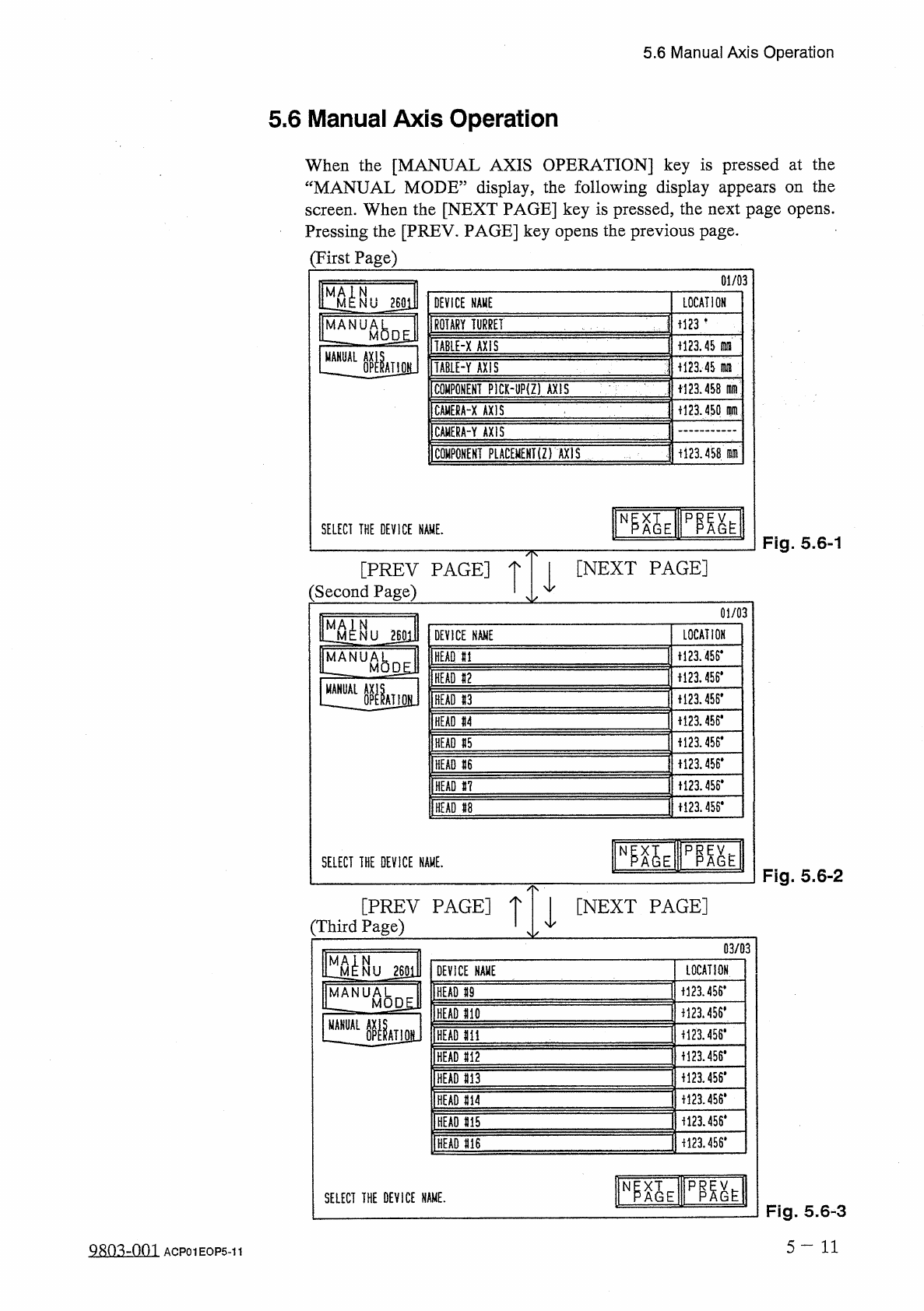
5.5 Manual Subsystem Operation ⑦ [ HEAD # 1 VACUUM VALVE ] , [ HEAD # 16 VACUUM VALVE ] The vacuum valves of head # s 1 ~ 16 are turned ON or OFF . ON : Vacuum is shut off . OFF : Vacuum is supplied . ⑧ [ INPUT CONVEYOR …
5.5
Manual
Subsystem
Operation
①
[
INDEX
THE
TURRET
(
+
)
]
,
[
INDEX
THE
TURRET
(
-
)
]
The
rotary
turret
is
rotated
by
1
pitch
in
the
normal
(
+
)
or
reverse
(
一
)
direction
.
②
[
CYCLE
THE
TURRET
(
+
)
HIGH
SPEED
]
,
[
CYCLE
THE
TURRET
(
+
)
MIDDLE
SPEED
]
,
[
CYCLE
THE
TURRET
(
+
)
LOW
SPEED
]
,
[
CYCLE
THE
TURRET
(
-
)
HIGH
SPEED
]
,
[
CYCLE
THE
TURRET
(
-
}
MIDDLE
SPEED
]
,
[
CYCLE
THE
TURRET
(
—
)
LOW
SPEED
]
,
The
rotary
turret
is
rotated
smoothly
in
the
normal
(
+
)
or
reverse
(
一
)
direction
at
high
,
middle
,
or
low
speed
.
③
[
FEEDER
INDEX
#
1
CLUTCH
(
260
°
-
320
°
)
]
The
tape
feed
clutch
is
turned
ON
or
OFF
.
When
the
clutch
is
turned
ON
,
it
is
activated
in
the
range
of
turret
angle
260
°
④
[
FEEDER
INDEX
#
2
CLUTCH
(
40
°
-
120
°
)
]
,
-
320
.
[
FEEDER
INDEX
#
5
CLUTCH
(
40
°
—
120
°
)
]
,
The
tape
index
clutch
of
the
tape
feeder
located
at
each
pitch
position
is
turned
ON
or
OFF
.
When
the
clutch
is
turned
ON
,
it
is
activated
in
the
range
of
turret
angle
40
⑤
[
FEEDER
SHUTTER
CLUTCH
(
40
°
-
120
°
)
]
[
FEEDER
COVER
TAPE
CLUTCH
(
40
°
-
120
°
)
]
[
NOZZLE
UP
-
POSITION
CLUTCH
(
40
°
—
120
°
)
]
[
NOZZLE
DOWN
-
POSITION
CLUTCH
(
40
°
-
120
°
)
]
[
NOZZLE
MIDDLE
-
POSITION
CLUTCH
(
40
°
-
120
°
)
]
[
COMPONENT
PICK
-
UP
CLUTCH
(
40
°
—
120
°
)
]
[
COMPONENT
PLACEMENT
CLUTCH
(
40
°
-
120
°
)
]
Each
clutch
is
turned
ON
or
OFF
.
When
the
clutch
is
turned
ON
,
it
is
activated
in
the
range
of
turret
angle
40
°
—
120
°
.
一
120
.
⑥
[
TRANSFER
(
CYCLE
)
]
[
TRANSFER
(
STEP
)
]
The
P
.
C
.
B
.
transfer
is
moved
1
cycle
or
by
1
step
.
1
-
cycle
operation
of
the
P
.
C
.
B
.
transfer
means
that
a
P
.
C
.
B
.
is
transferred
onto
the
X
/
Y
table
or
a
P
.
C
.
B
.
on
the
X
/
Y
table
is
discharged
onto
the
output
conveyor
.
1
-
Step
Operation
of
P
.
C
.
B
.
Transfer
:
Downward
Movement
—
Claw
—
Returning
of
Transfer
Claw
(
When
the
[
MOVE
]
button
is
pressed
,
the
transfer
is
activated
by
1
step
.
)
Note
:
The
P
.
C
.
B
,
transfer
(
cycle
)
operation
cannot
be
performed
with
the
[
OPERATION
/
SET
UP
]
switch
set
to
the
“
SET
UP
”
side
.
9803
-
001
ACP
01
EOP
5
-
9
5
—
9
5.5
Manual
Subsystem
Operation
⑦
[
HEAD
#
1
VACUUM
VALVE
]
,
[
HEAD
#
16
VACUUM
VALVE
]
The
vacuum
valves
of
head
#
s
1
~
16
are
turned
ON
or
OFF
.
ON
:
Vacuum
is
shut
off
.
OFF
:
Vacuum
is
supplied
.
⑧
[
INPUT
CONVEYOR
(
+
)
]
,
[
INPUT
CONVEYOR
㈠
]
The
input
conveyor
is
rotated
in
the
normal
or
reverse
direction
.
⑨
[
INPUT
BUFFER
CONVEYOR
(
+
)
]
The
input
buffer
conveyor
is
rotated
in
the
normal
direction
.
⑩
[
INPUT
BUFFER
CONVEYOR
P
.
C
.
B
.
STOP
]
The
input
buffer
conveyor
stopper
is
turned
ON
or
OFF
.
⑪
[
OUTPUT
CONVEYOR
(
+
)
]
,
[
OUTPUT
CONVEYOR
(
—
)
]
The
output
conveyor
is
rotated
in
the
normal
or
reverse
direction
.
⑫
[
OUTPUT
CONVEYOR
P
.
C
.
B
.
STOP
]
The
output
conveyor
stopper
is
turned
ON
or
OFF
.
•
Select
the
device
to
be
moved
manually
and
press
the
[
MOVE
]
button
.
•
When
the
rotary
turret
or
the
P
.
C
.
B
.
transfer
is
selected
,
1
-
cycle
or
1
-
step
operation
of
the
turret
or
the
transfer
is
performed
every
time
the
[
MOVE
]
button
is
pressed
.
After
1
-
cycle
or
1
-
step
operation
,
the
selected
device
stops
.
•
When
each
stopper
or
head
vacuum
valve
is
selected
,
the
selected
device
is
turned
ON
or
OFF
every
time
the
[
MOVE
]
button
is
pressed
.
5
—
10
Q
廳
-
om
ACP
01
EOP
5
-
10
5.6
Manual
Axis
Operation
5.6
Manual
Axis
Operation
When
the
[
MANUAL
AXIS
OPERATION
]
key
is
pressed
at
the
“
MANUAL
MODE
”
display
,
the
following
display
appears
on
the
screen
.
When
the
[
NEXT
PAGE
]
key
is
pressed
,
the
next
page
opens
.
Pressing
the
[
PREV
.
PAGE
]
key
opens
the
previous
page
.
(
First
Page
)
01
/
03
DEVICE
NAME
LOCATION
m
-
ROTARY
TURRET
TABIE
-
X
AXIS
i
!
23.45
fllil
_
AL
iU
H
23
.
45
fWIl
TAB
1
E
-
Y
AXIS
COMPONENT
PICK
-
UP
(
Z
)
AXIS
+
123.458
dim
+
123.450
m
CAMERA
-
X
AXIS
CAMERA
-
Y
AXIS
COMPONENT
PLACEMEHT
(
Z
)
AXIS
i
123.458
.
m
SELECT
THE
DEVICE
NAME
.
Fig
.
5.6
-
1
[
NEXT
PAGE
]
[
PREV
PAGE
]
:
Second
Page
)
01
/
03
LOCATION
NU
260
H
DEVICE
NAME
1121
456
*
MANUA
HEAD
HI
M
HEAD
11
ii
23.456
#
HEAD
#
3
+
123.456
*
HEAD
«
4
H
23
.
W
HEAD
15
1123
.
456
*
HEAD
«
6
十
121455
.
HEAD
#
7
+
123.456
*
HEAD
U
SELECT
THE
DEVICE
NAME
,
Fig
.
5.6
-
2
[
PREV
PAGE
]
[
NEXT
PAGE
]
(
Third
Page
)
03
/
03
m
:
-
LOCATION
DEVICE
NAME
1123.4
S
6
*
HEAD
59
MANUAL
U
_
M
0
D
£
J
1
HEAD
110
MANUAL
f
123.456
*
HEAD
m
1123.456
#
HEAD
M
2
f
!
23.456
#
HEAD
m
M
23.456
.
HEAD
M
1123.456
*
HEAD
m
M
23.456
*
HEAD
m
臨
E
PP
.
N
SELECT
THE
DEVICE
NAME
.
Fig
.
5.6
-
3
5
-
11
ACP
01
EOP
5
-
11