1OPERATION_.pdf - 第286页
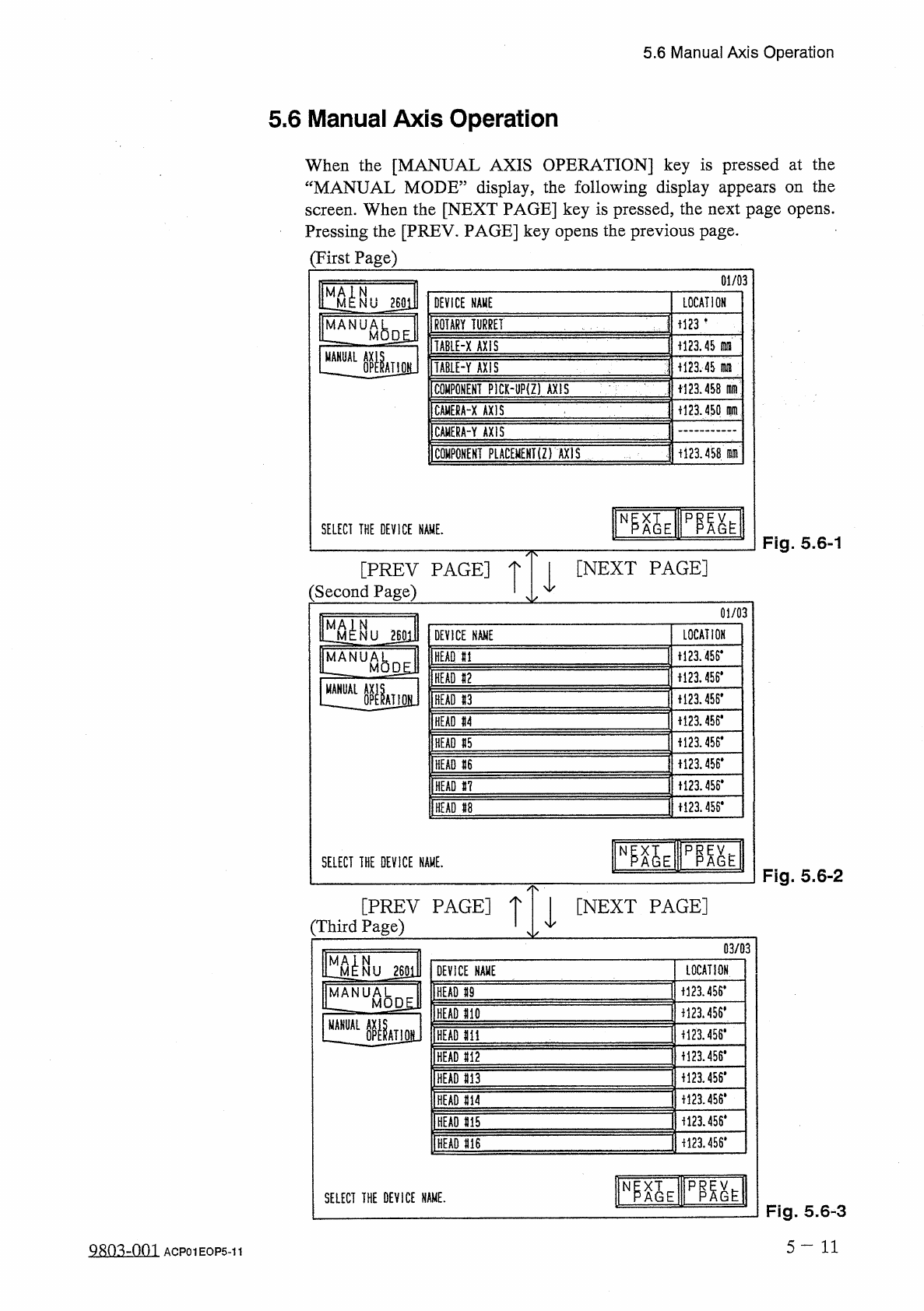
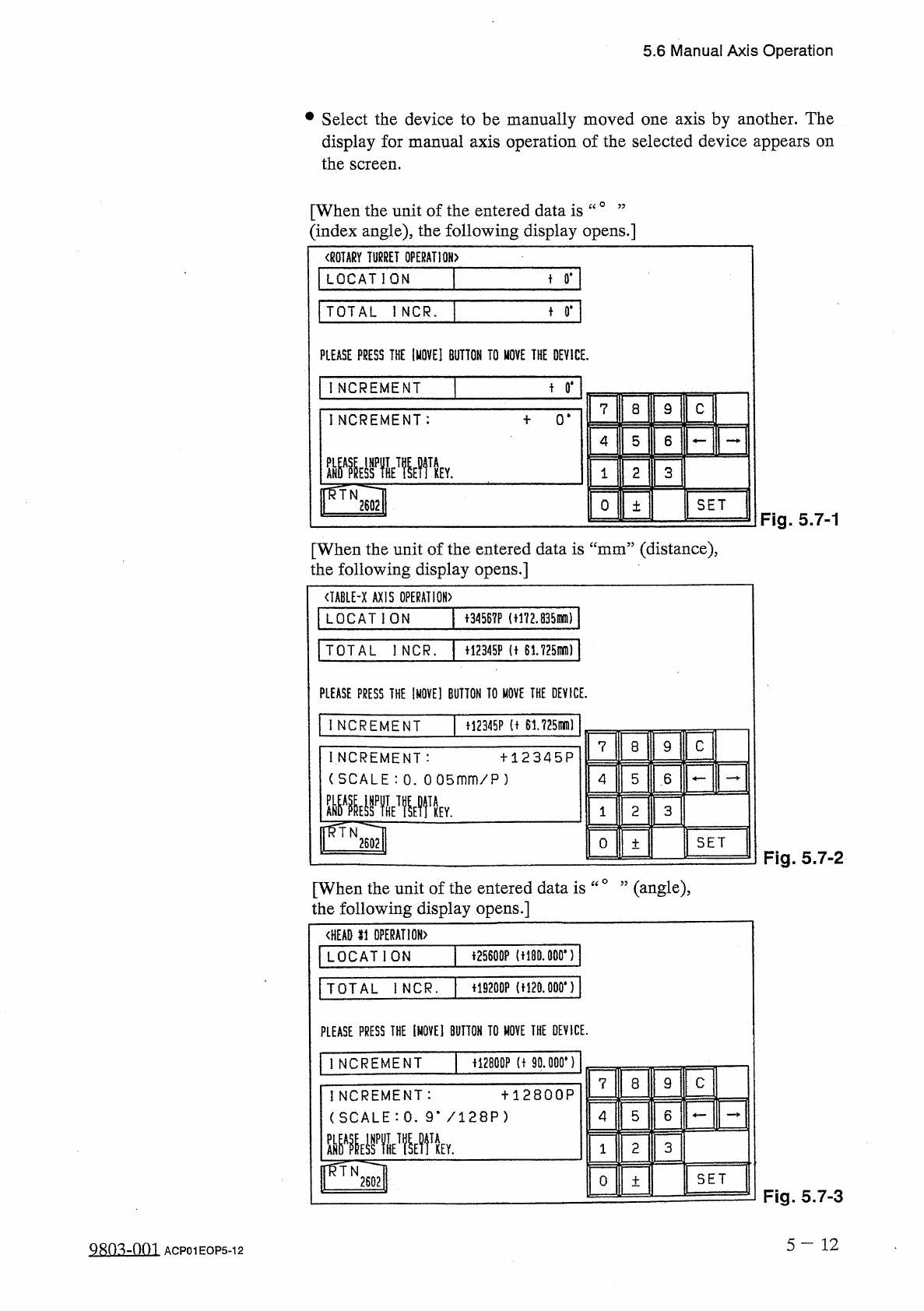
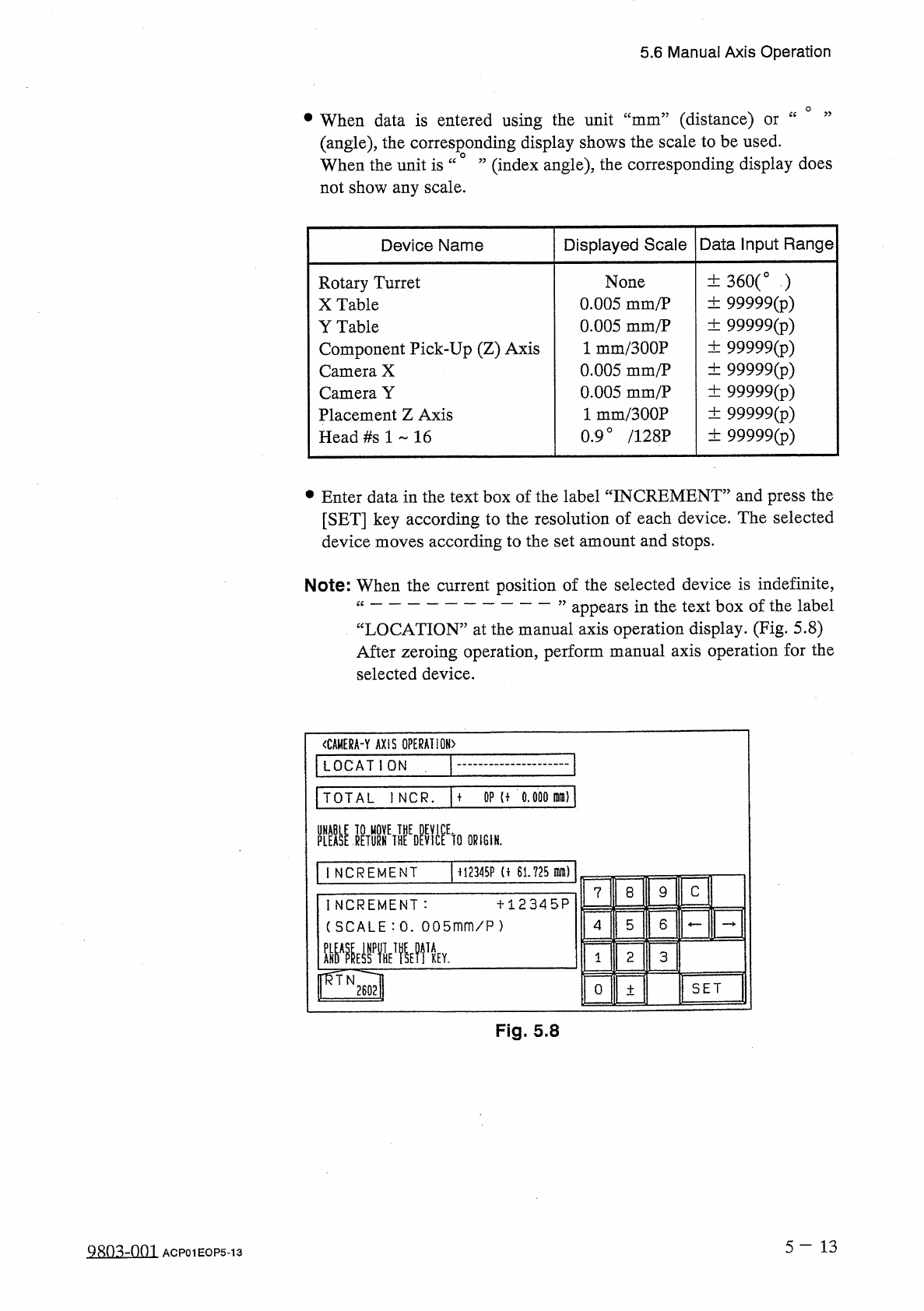
5.6 Manual Axis Operation • Select the device to be manually moved one axis by another . The display for manual axis operation of the selected device appears on the screen . [ When the unit of the entered data is “ 0 ’ ’…
5.6
Manual
Axis
Operation
5.6
Manual
Axis
Operation
When
the
[
MANUAL
AXIS
OPERATION
]
key
is
pressed
at
the
“
MANUAL
MODE
”
display
,
the
following
display
appears
on
the
screen
.
When
the
[
NEXT
PAGE
]
key
is
pressed
,
the
next
page
opens
.
Pressing
the
[
PREV
.
PAGE
]
key
opens
the
previous
page
.
(
First
Page
)
01
/
03
DEVICE
NAME
LOCATION
m
-
ROTARY
TURRET
TABIE
-
X
AXIS
i
!
23.45
fllil
_
AL
iU
H
23
.
45
fWIl
TAB
1
E
-
Y
AXIS
COMPONENT
PICK
-
UP
(
Z
)
AXIS
+
123.458
dim
+
123.450
m
CAMERA
-
X
AXIS
CAMERA
-
Y
AXIS
COMPONENT
PLACEMEHT
(
Z
)
AXIS
i
123.458
.
m
SELECT
THE
DEVICE
NAME
.
Fig
.
5.6
-
1
[
NEXT
PAGE
]
[
PREV
PAGE
]
:
Second
Page
)
01
/
03
LOCATION
NU
260
H
DEVICE
NAME
1121
456
*
MANUA
HEAD
HI
M
HEAD
11
ii
23.456
#
HEAD
#
3
+
123.456
*
HEAD
«
4
H
23
.
W
HEAD
15
1123
.
456
*
HEAD
«
6
十
121455
.
HEAD
#
7
+
123.456
*
HEAD
U
SELECT
THE
DEVICE
NAME
,
Fig
.
5.6
-
2
[
PREV
PAGE
]
[
NEXT
PAGE
]
(
Third
Page
)
03
/
03
m
:
-
LOCATION
DEVICE
NAME
1123.4
S
6
*
HEAD
59
MANUAL
U
_
M
0
D
£
J
1
HEAD
110
MANUAL
f
123.456
*
HEAD
m
1123.456
#
HEAD
M
2
f
!
23.456
#
HEAD
m
M
23.456
.
HEAD
M
1123.456
*
HEAD
m
M
23.456
*
HEAD
m
臨
E
PP
.
N
SELECT
THE
DEVICE
NAME
.
Fig
.
5.6
-
3
5
-
11
ACP
01
EOP
5
-
11
5.6
Manual
Axis
Operation
•
Select
the
device
to
be
manually
moved
one
axis
by
another
.
The
display
for
manual
axis
operation
of
the
selected
device
appears
on
the
screen
.
[
When
the
unit
of
the
entered
data
is
“
0
’
’
(
index
angle
)
,
the
following
display
opens
.
]
〈
ROTARY
TURRET
OPERATION
〉
LOCATION
+
0
.
TOTAL
iNCR
.
t
0
#
PLEASE
PRESS
THE
[
MOVE
]
BUTTON
TO
MOVE
THE
DEVICE
.
t
0
*
INCREMENT
9
C
7
8
INCREMENT
:
0
*
5
6
4
3
2
1
fRTN
2602
SET
0
土
Fig
.
5.7
-
1
[
When
the
unit
of
the
entered
data
is
“
mm
”
(
distance
)
,
the
following
display
opens
.
]
<
IABLE
-
X
AXIS
OPERATION
)
LOCATION
十
34567
P
(
t
!
72.835
mm
)
TOTAL
l
NCR
.
+
12345
F
(
t
61725
mD
)
PLEASE
PRESS
THE
IMOVE
]
BUTTON
TO
MOVE
THE
DEVICE
.
INCREMENT
H
2345
P
(
t
61.725
刪
I
C
7
8
9
INCREMENT
:
(
SCALE
:
0
.
0
05
mm
/
P
)
罪霍
十
12345
P
5
6
4
3
2
1
Y
.
pTN
2602
SET
O
土
Fig
.
5.7
-
2
[
When
the
unit
of
the
entered
data
is
“
°
”
(
angle
)
,
the
following
display
opens
.
]
<
HEAD
li
OPERATION
)
音
25600
P
(
t
!
80.000
,
)
LOCATION
+
19200
P
(
H
20.000
*
)
TOTAL
I
NCR
.
PLEASE
PRESS
THE
[
MOVE
]
BUTTON
TO
HOVE
THE
DEVICE
.
f
!
2800
P
(
t
90
.
000
*
)
1
NCREMENT
C
7
8
9
十
12800
P
INCREMENT
:
(
SCALE
:
0
.
9
m
/
128
P
)
5
6
4
TA
2
3
KEY
.
1
rvi
SET
O
土
Fig
.
5.7
-
3
5
一
12
QRO
^
-
nm
ACP
01
EOP
5
-
12
5.6
Manual
Axis
Operation
(
distance
)
(
angle
)
,
the
corresponding
display
shows
the
scale
to
be
used
.
(
index
angle
)
,
the
corresponding
display
does
•
When
data
is
entered
using
the
unit
ce
cc
mm
or
When
the
unit
is
“
not
show
any
scale
.
Displayed
Scale
Data
Input
Range
Device
Name
土
360
(
。
)
土
99999
(
p
)
土
99999
(
p
)
土
99999
(
p
)
土
99999
(
p
)
土
99999
(
p
)
土
99999
(
p
)
土
99999
(
^
)
None
0.005
mm
/
P
0.005
mm
/
P
1
mm
/
300
P
0.005
mm
/
P
0.005
mm
/
P
1
mm
/
300
P
0.9
°
/
128
P
Rotary
Turret
X
Table
Y
Table
Component
Pick
-
Up
(
Z
)
Axis
Camera
X
Camera
Y
Placement
Z
Axis
Head
#
s
1
16
•
Enter
data
in
the
text
box
of
the
label
“
INCREMENT
”
and
press
the
[
SET
]
key
according
to
the
resolution
of
each
device
.
The
selected
device
moves
according
to
the
set
amount
and
stops
.
Note
:
When
the
current
position
of
the
selected
device
is
indefinite
,
“
”
appears
in
the
text
box
of
the
label
“
LOCATION
”
at
the
manual
axis
operation
display
.
(
Fig
.
5.8
)
After
zeroing
operation
,
perform
manual
axis
operation
for
the
selected
device
.
<
CAMERA
-
Y
AXIS
OPERATION
)
LOCATION
TOTAL
1
NCR
.
M
OP
U
0.000
M
)
PLEASE
]
ETURHETHEEDEVlCEEtO
ORIGIN
.
M
2345
P
(
f
61.725
m
)
INCREMENT
C
9
8
7
INCREMENT
:
(
SCALE
:
0
.
005
mm
/
P
)
十
12345
P
6
5
4
mmvrn
TA
2
3
KEY
.
1
SET
0
土
Fig
.
5.8
5
-
1 3
QRo
^
-
om
ACP
01
EOP
5
-
13