1OPERATION_.pdf - 第94页
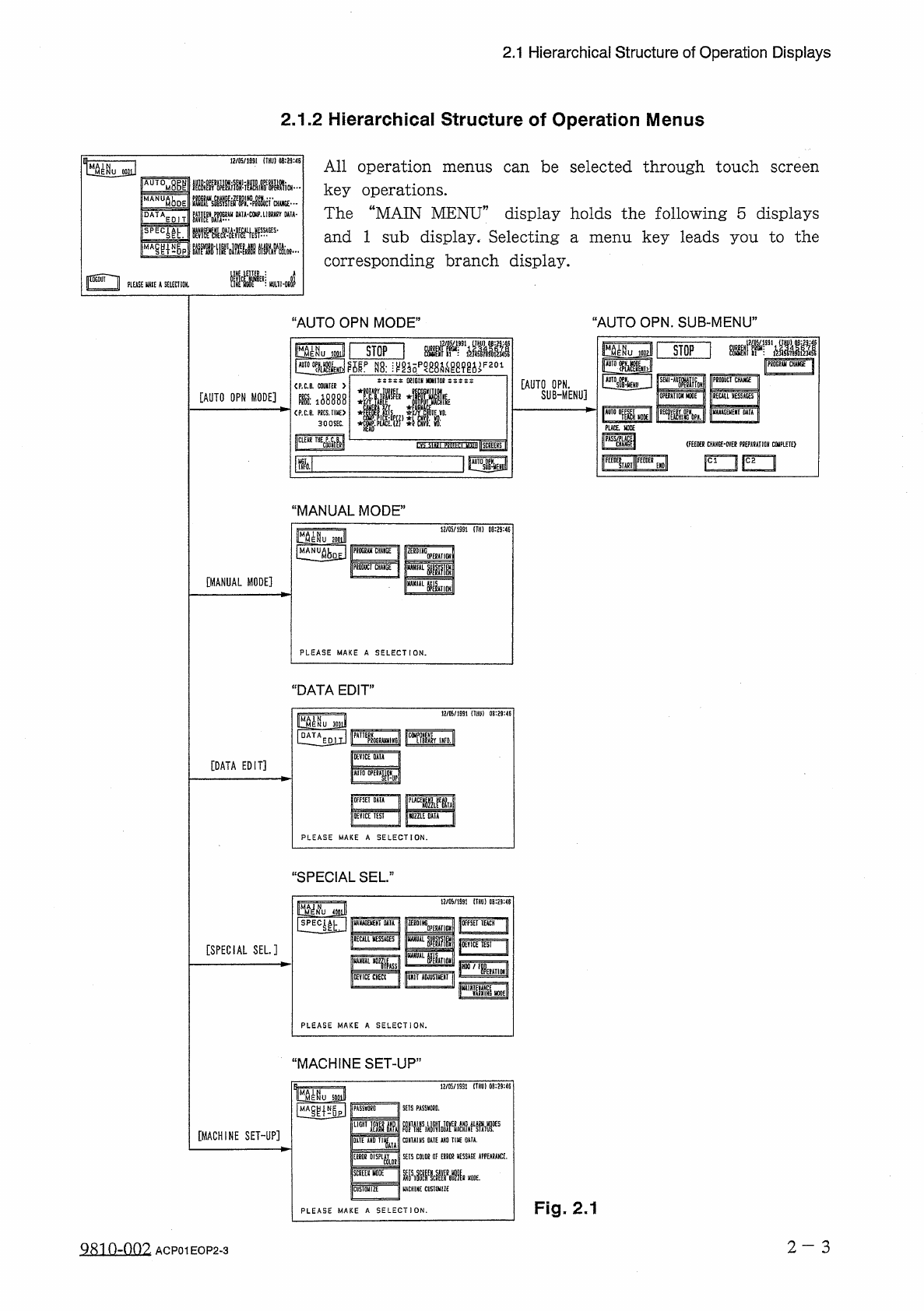
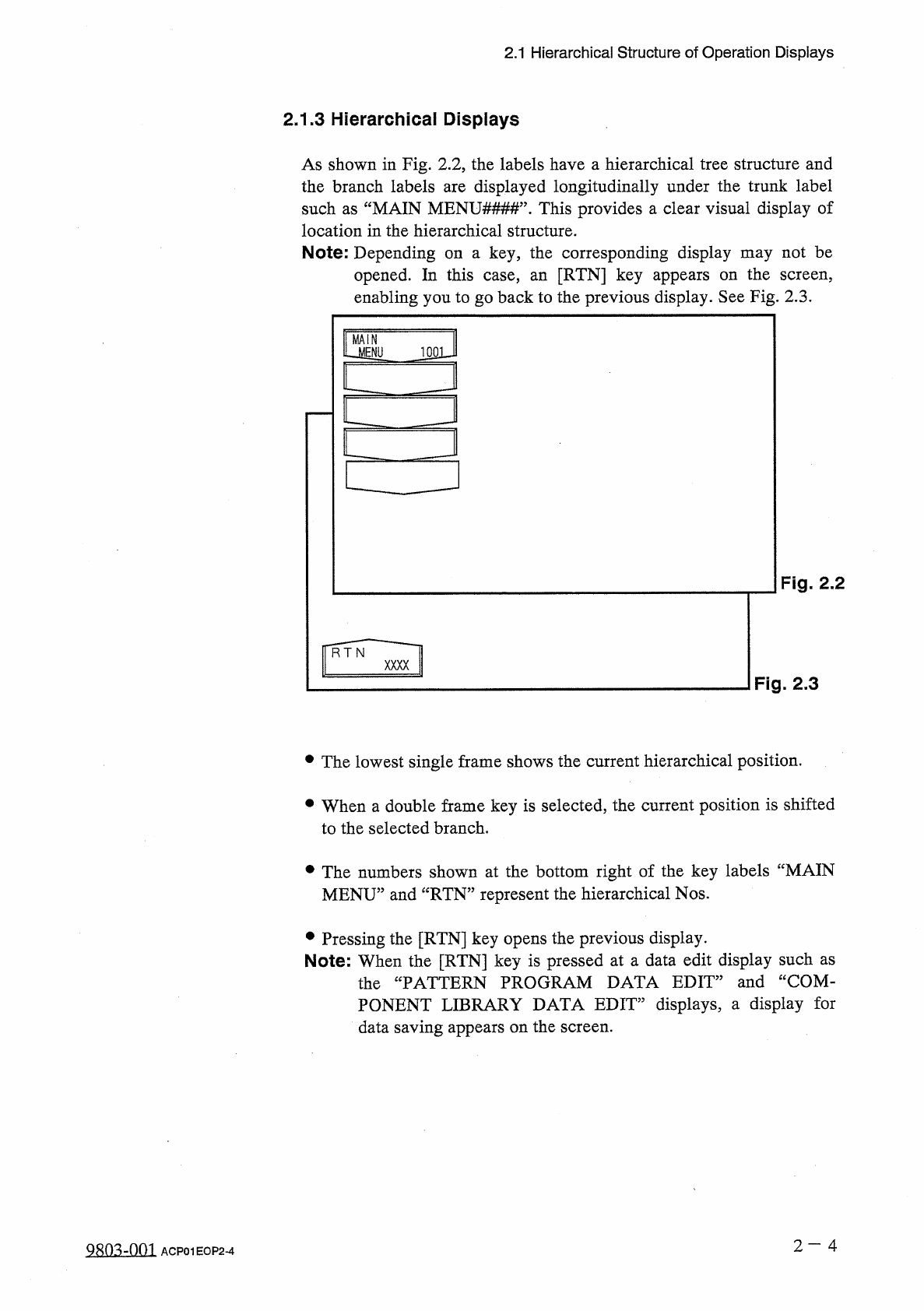
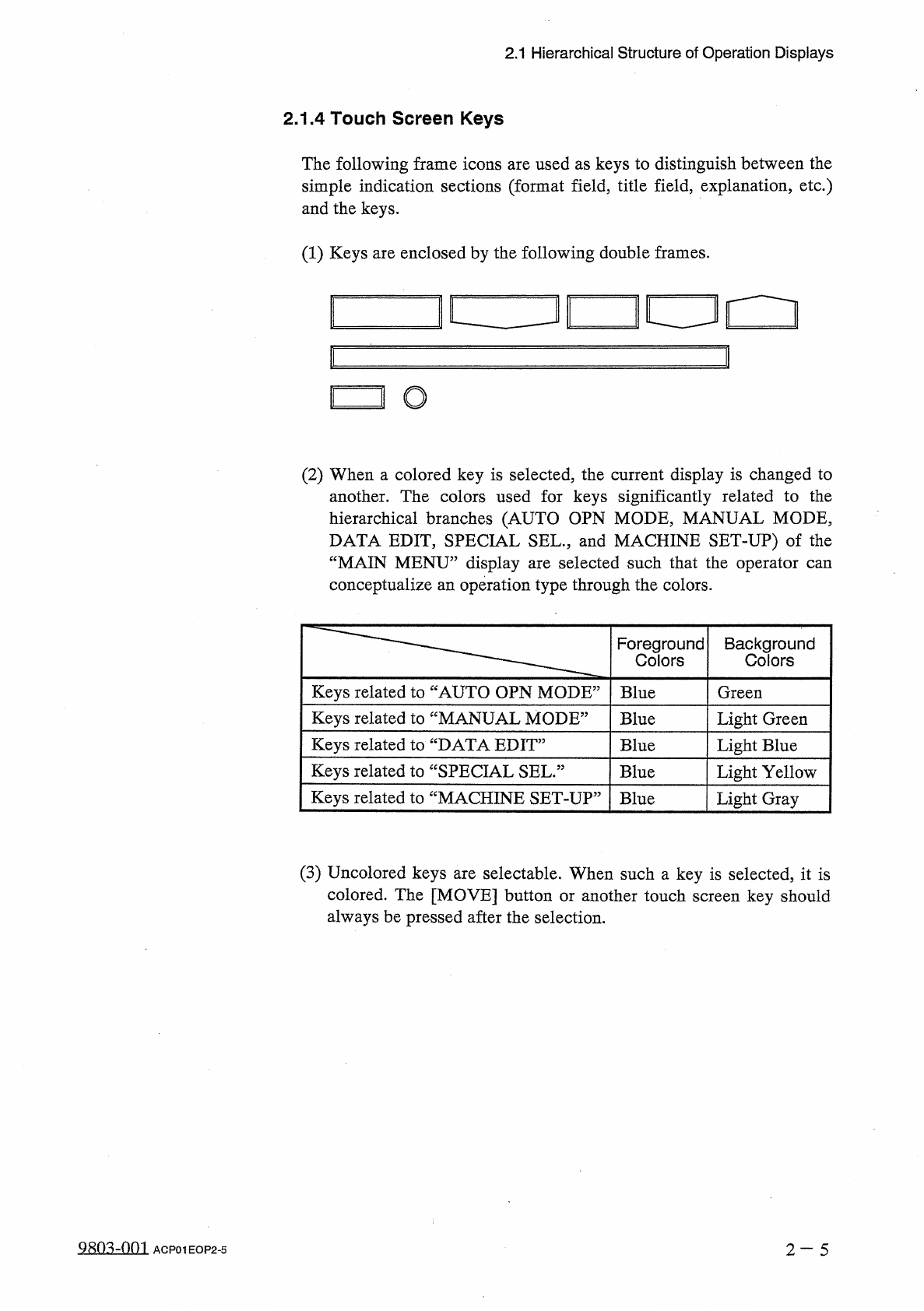
2.1 Hierarchical Structure of Operation Displays 2.1 . 3 Hierarchical Displays As shown in Fig . 2.2 , the labels have a hierarchical tree structure and the branch labels are displayed longitudinally under the trunk labe…
2.1
Hierarchical
Structure
of
Operation
Displays
2.1
.
2
Hierarchical
Structure
of
Operation
Menus
12
/
05
/
1391
(
TNI
)
)
08
:
29
:
4
B
TMiSl
^
u
OGOLI
All
operation
menus
can
be
selected
through
touch
screen
key
operations
.
The
“
MAIN
MENU
”
display
holds
the
following
5
displays
and
1
sub
display
.
Selecting
corresponding
branch
display
.
iAUTQMBgl
售
f
.
麵
•
WT
1
rNuftboE
DATAEDIT
DA
1
A
-
COIP
.
UBJA
8
Y
MW
-
鼷
mwM
評
.
腦
__
M
…
FPE
4
lh
:
menu
key
leads
you
to
the
a
Mm
?
PLEASE
UAIE
k
SELECT
101
“
AUTO
OPN
.
SUB
-
MENU
”
‘
AUTO
OPN
MODE
”
fHtwaii
IMu
mill
I
STOP
I
rfPf
'
ffllll
as
:
^
g
^
pgB
8
a
^
89
g
^
F
201
STOP
1002
|
P
6
dGg
<
ji
CHAUGE
^
5
fy
'
•
nWoH
P
80
DUCI
CHAHGEl
REUIL
MESSAGES
1
J
WKAGEMEKI
DATAj
SiSCS
:
OSIGtN
M
0
NI
1
DI
!
[
AUTO
OPN
.
SUB
-
MENU
]
<
P
.
C
.
B
.
COUMFEK
>
IE
*
[
AUTO
OPN
MODE
]
OPUAIIDK
NODE
m
:
ii
8888
1
^
。。
—
雌
1
PLACE
.
HOPE
<
P
.
C
.
B
.
KCS
,
TI
«
E
>
300
SEC
.
儡
y
lilsCBEHS
I
(
FEEOER
CHAHGE
-
OVE
?
PDEPAUTION
COlPLErO
rvr
圆一
i
F
~
1
F
~
1
IM
MANUAL
MODE
"
£
1
«
/
05
/
1991
lim
08
:
29
:
«
zooJ
|
PR
CHMGE
IPRDDilCI
CliVliGE
"
rmm
[
MANUAL
MODE
]
卜
1
■
IJ
PLEASE
MAKE
A
SELECTION
.
DATA
EDIT
”
12
/
05
/
1991
(
TUI
)
)
08
:
29
:
46
KV
1
CE
DATA
[
DATA
EDIT
]
piuTT
1
l
-
IMU
OfFSEIDAIA
[
DEVICE
TEST
1
mill
DATA
I
PLEASE
MAKE
A
SELECTION
.
“
SPECIAL
SEL
.
”
12
/
05
/
1391
(
THU
)
0
B
:
29
:
<
5
Muml
lirE
4
iu
liUMGEVEKT
UIA
I
獅
1
“
1
[
OFFSET
T E A C H I
jOEYICE
1
ESI
II
KMU
KESSAGES
U
UM
眦顯腊
[
SPECIAL
SEL
.
]
iria
jiSMT
咖
/
lIM
I
0
IYICE
CHE
«
IjuXiT
AUJUSIMEUI
|
im
PLEASE
MAKE
A
SELECTION
.
“
MACHINE
SET
-
UP
,
12
/
05
/
1991
(
THU
)
0
B
:
29
:
46
5
^
}
SETS
PASSED
.
PASS
棚
D
LIGHT
mm
[
MACHINE
SET
-
UP
]
DATE
*
H
0
CONTAINS
0
ATE
AXO
TIIC
0
*
T
*
.
SETS
coiot
OF
am
Kmi
APPEARANCE
.
SKEIS
WDE
:
[
隱
HACHIHE
CIISTOUIZE
CU
5
T
0
liiZ
£
"
Fig
.
2.1
PLEASE
MAKE
A
SELECTION
.
2
-
3
Q
810
-
OQ
9
.
ACP
01
EOP
2
-
3
2.1
Hierarchical
Structure
of
Operation
Displays
2.1
.
3
Hierarchical
Displays
As
shown
in
Fig
.
2.2
,
the
labels
have
a
hierarchical
tree
structure
and
the
branch
labels
are
displayed
longitudinally
under
the
trunk
label
such
as
“
MAIN
MENU
##
#
#
”
.
This
provides
a
clear
visual
display
of
location
in
the
hierarchical
structure
.
Note
:
Depending
on
a
key
,
the
corresponding
display
may
not
be
opened
.
In
this
case
,
an
[
RTN
]
key
appears
on
the
screen
,
enabling
you
to
go
back
to
the
previous
display
.
See
Fig
.
2.3
.
MAIN
U
!
BW
1
QQJJ
Fig
.
2.2
Fig
.
2.3
•
The
lowest
single
frame
shows
the
current
hierarchical
position
.
•
When
a
double
frame
key
is
selected
,
the
current
position
is
shifted
to
the
selected
branch
.
•
The
numbers
shown
at
the
bottom
right
of
the
key
labels
“
MAIN
MENU
”
and
“
RTN
”
represent
the
hierarchical
Nos
.
•
Pressing
the
[
RTN
]
key
opens
the
previous
display
.
Note
:
When
the
[
RTN
]
key
is
pressed
at
a
data
edit
display
such
as
the
“
PATTERN
PROGRAM
DATA
EDIT
”
and
“
COM
-
PONENT
LIBRARY
DATA
EDIT
”
displays
,
a
display
for
data
saving
appears
on
the
screen
.
2
-
4
Q
^
-
nm
ACP
01
EOP
2
-
4
2.1
Hierarchical
Structure
of
Operation
Displays
2.1
.
4
Touch
Screen
Keys
The
following
frame
icons
are
used
as
keys
to
distinguish
between
the
simple
indication
sections
(
format
field
,
title
field
,
explanation
,
etc
.
)
and
the
keys
.
(
1
)
Keys
are
enclosed
by
the
following
double
frames
.
i
[
!
□
!
O
(
2
)
When
a
colored
key
is
selected
,
the
current
display
is
changed
to
another
.
The
colors
used
for
keys
significantly
related
to
the
hierarchical
branches
(
AUTO
OPN
MODE
,
MANUAL
MODE
,
DATA
EDIT
,
SPECIAL
SEL
.
,
and
MACHINE
SET
-
UP
)
of
the
“
MAIN
MENU
”
display
are
selected
such
that
the
operator
can
conceptualize
an
operation
type
through
the
colors
.
Foreground
Colors
Background
Colors
Keys
related
to
“
AUTO
OPN
MODE
5
Blue
Green
Keys
related
to
“
MANUAL
MODE
5
Light
Green
Blue
Keys
related
to
“
DATA
EDIT
5
Blue
Light
Blue
Keys
related
to
“
SPECIAL
SEL
.
:
Blue
Light
Yellow
Keys
related
to
“
MACHINE
SET
-
UP
:
Blue
Light
Gray
(
3
)
Uncolored
keys
are
selectable
.
When
such
a
key
is
selected
,
it
is
colored
.
The
[
MOVE
]
button
or
another
touch
screen
key
should
always
be
pressed
after
the
selection
.
980
^
-
001
2
-
5
ACP
01
EOP
2
-
5