Printer 600 Preventive Maintenance.pdf - 第8页
35(9(17,9(0 $,17(1$ 1&( 0217+/< 0$,17(1$ 1&( 29.8 Technical Reference Manual Chapter Issue 4 May 03 MONTHL Y MAINTENANCE (or 45, 000 Cycles whi chever is soonest) W ARNIN G HARMFUL SUBST ANCE S. CLEANING WIP…
35(9(17,9(0$,17(1$1&(
:((./<0$,17(1$1&(
Chapter Issue 4 May 03 Technical Reference Manual 29.7
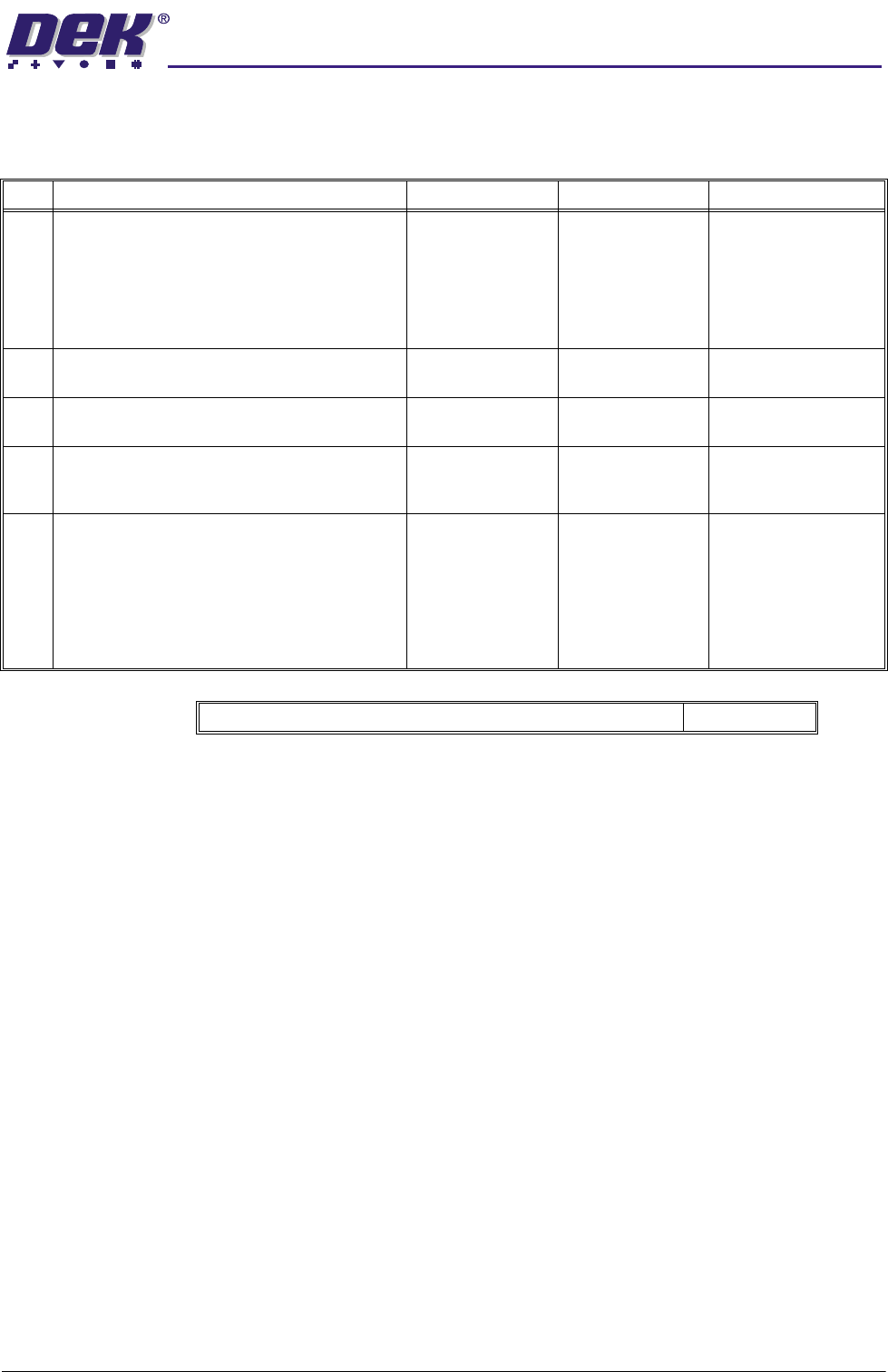
Machine Covers and External Connections
No. Task Tools Completed Comments
1 Remove any build up of dust, solder paste, or
other debris from the machine covers and pan-
els.
NOTE
Use only soap and water on the machine view-
ing panels.
Spatula,
IPA Impregnated
Wipes
2 Check correct operation of E Stops and all
cover switches.
3 Check condition of all external connections,
cables and pipes.
4 Review event log entries for the last week look-
ing for anomalies. Investigate and report anom-
alies to supervisor.
5 Copy the machine configuration and product file
data (see House Keeping Chapter, User man-
ual).
NOTE
These files will be required if a Windows NT
recovery procedure is carried out on the
machine.
Total estimated time required for weekly tasks 15.0 mins
35(9(17,9(0$,17(1$1&(
0217+/<0$,17(1$1&(
29.8 Technical Reference Manual Chapter Issue 4 May 03
MONTHLY MAINTENANCE
(or 45,000 Cycles whichever is soonest)
WARNING
HARMFUL SUBSTANCES. CLEANING WIPES AND CLEANING SOLUTIONS MAY
CONTAIN SUBSTANCES HAZARDOUS TO HEALTH. OBSERVE ALL
MANUFACTURERS’ HEALTH AND SAFETY GUIDELINES. ALWAYS WEAR
APPROVED PROTECTIVE CLOTHING WHEN CLEANING THE MACHINE.
Preparation The machine must be isolated from electrical power and air pressure until the
machine is required to function in the Run/Diagnostic mode.
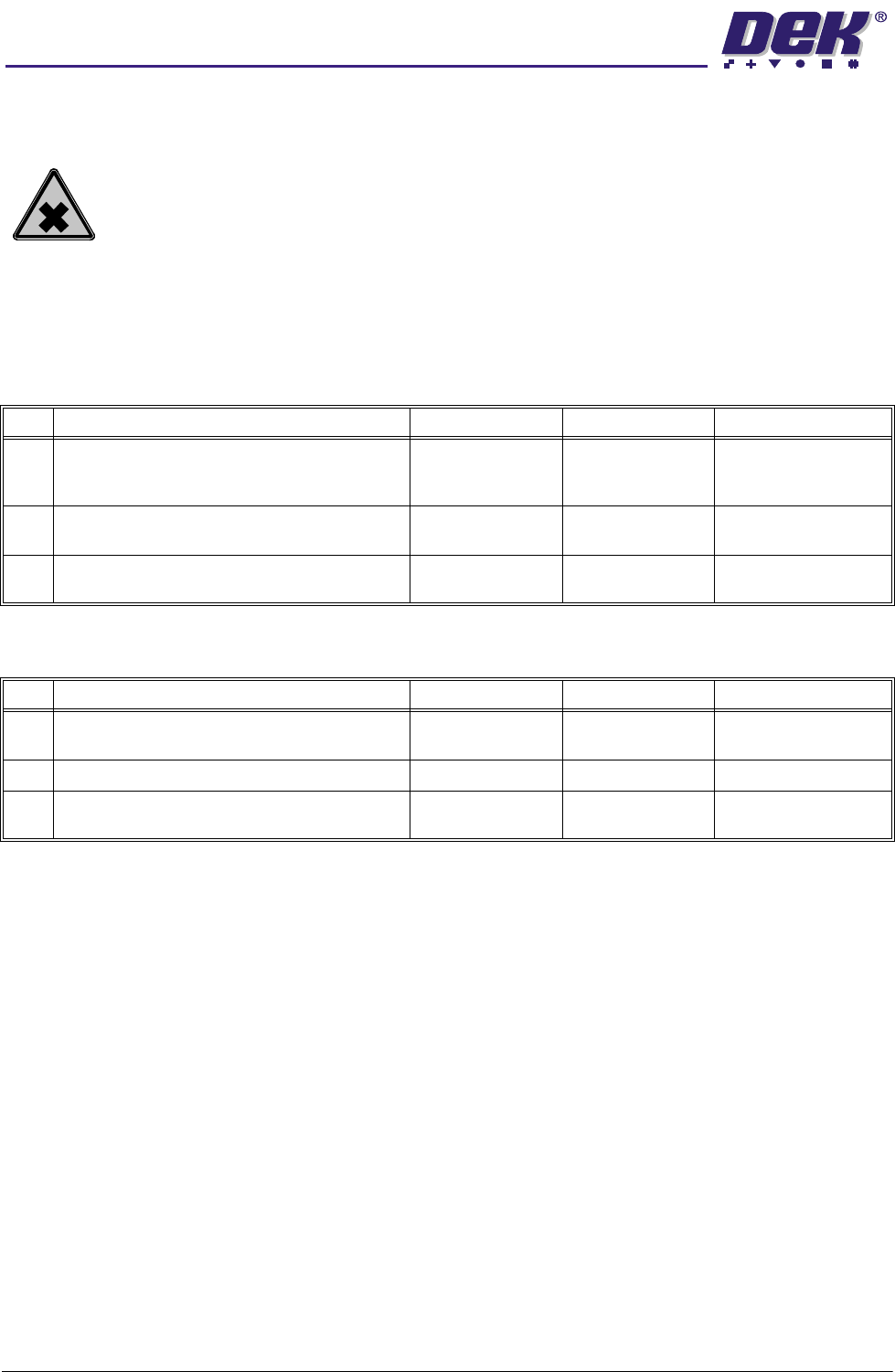
Print Carriage Figure 29-2 refers.
Squeegee System If fitted - Figure 29-3 refers.
No. Task Tools Completed Comments
1 Clean the linear bearings to remove any solder
paste or debris.
Spatula,
IPA Impregnated
Wipes
2 Check drag chain and cables for chafing or
wear.
3 Cycle the print carriage to check for smooth
operation.
No. Task Tools Completed Comments
1 Clean the leadscrews and splined shafts. IPA Impregnated
Wipes
2 Lubricate the splined shafts. THK AFB Grease
3 Cycle the squeegees to check they do not stall
and ensure smooth running.
35(9(17,9(0$,17(1$1&(
0217+/<0$,17(1$1&(
Chapter Issue 4 May 03 Technical Reference Manual 29.9
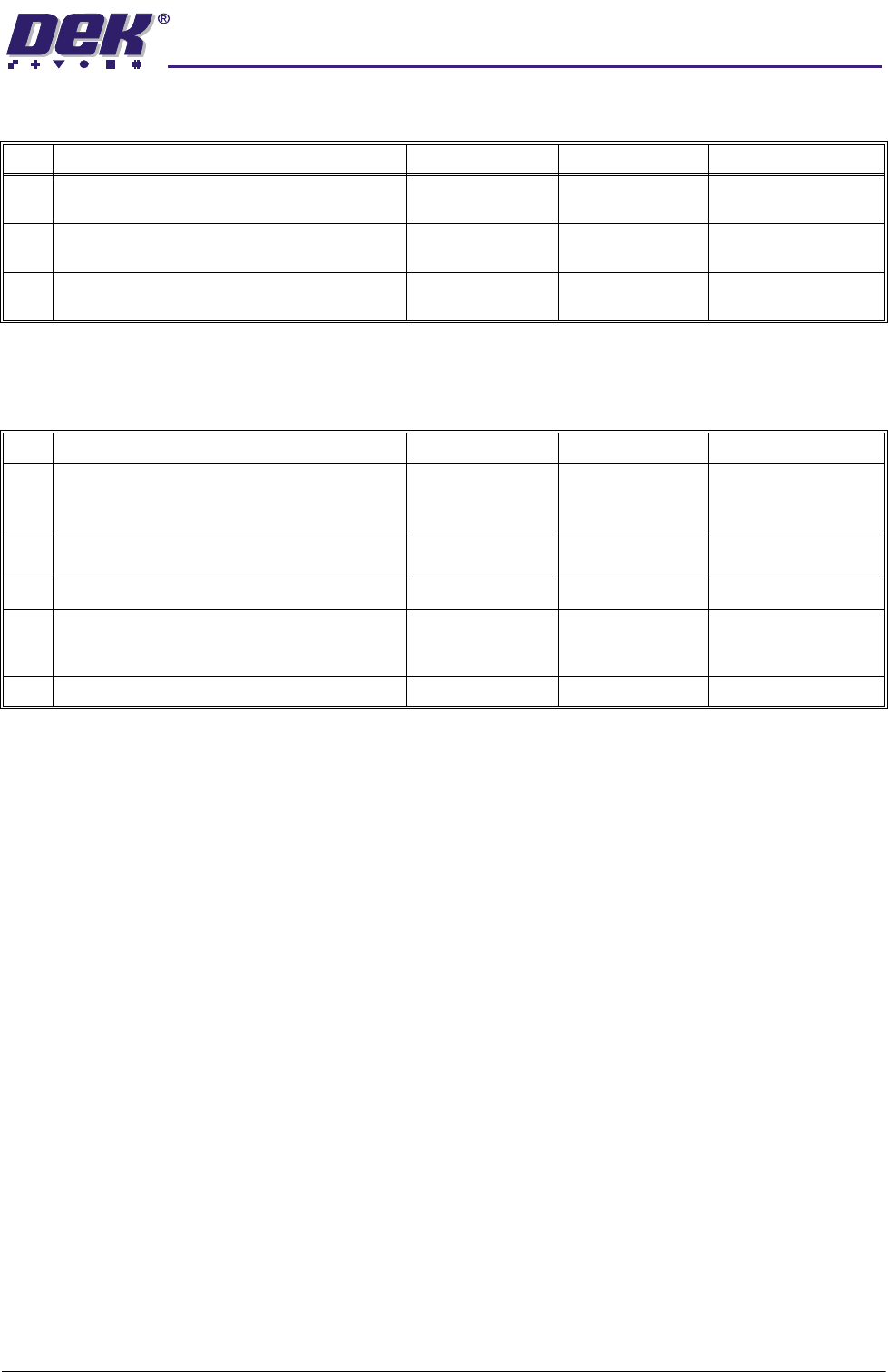
ProFlow If fitted - Figure 29-4 refers.
X and Y Camera Axes
Figures 29-9 and 29-13 refer.
No. Task Tools Completed Comments
1 Clean the leadscrew and linear bearings. IPA Impregnated
Wipes
2 Lubricate the leadscrew. Aeroshell 5
Grease
3 Cycle the ProFlow unit between Print Height
and Home, check for smooth running.
No. Task Tools Completed Comments
1 Clean the linear bearings to remove any solder
paste or debris.
Spatula,
IPA Impregnated
Wipes
2 Check drag chains and cables for chaffing and
wear.
3 Clean the camera lens. IPA Swab
4 Cycle the camera system ensuring the drag
chains do not foul machine covers or frame-
work.
5 Check correct operation of board stop.