00195779-0102_UM_D4_SR605_EN.pdf - 第225页
User manual SIPLACE D4 6 Station extensions From software version SR.605.xx 07/2008 EN Edition 6.1 Nozzle changer for the 12-nozzle Collect & Place head 225 CAUTION 6 Before you fill magaz ine, make sure that all the…
6 Station extensions User manual SIPLACE D4
6.1 Nozzle changer for the 12-nozzle Collect&Place head From software version SR.605.xx 07/2008 EN Edition
224
6.1.4 Assembly
Each nozzle changer (see Fig. 6.1 - 2) is fixed to the used tape channel.
6
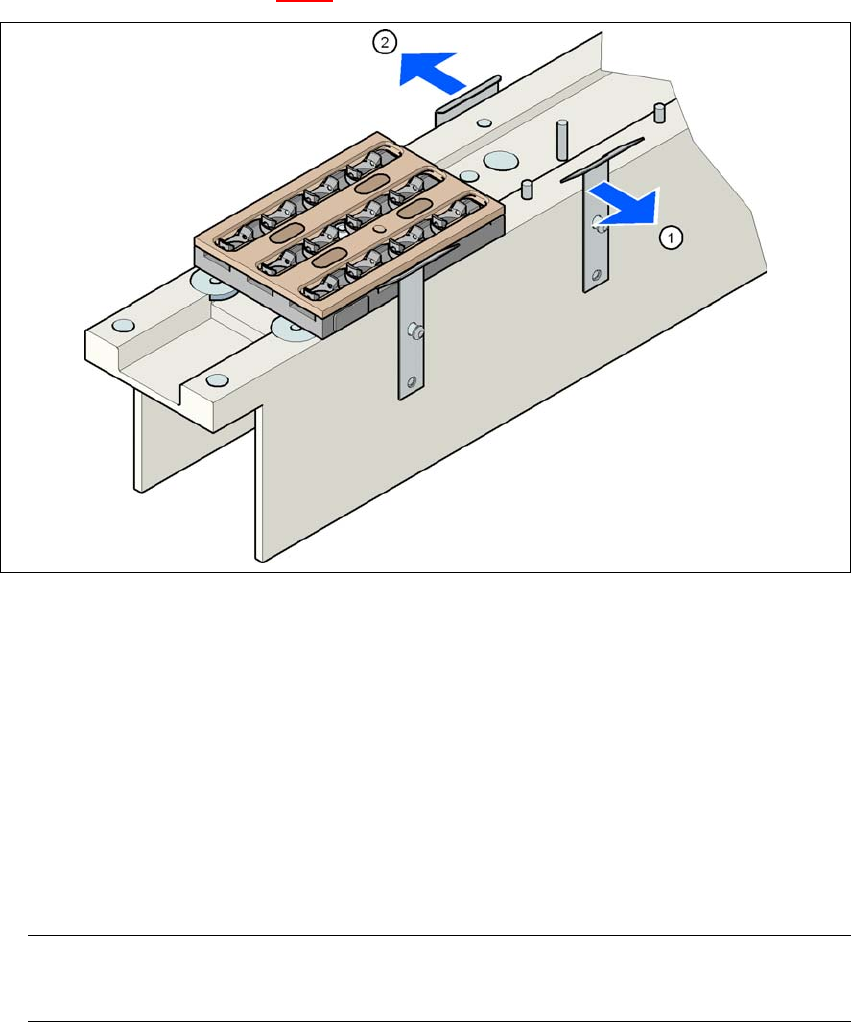
Fig. 6.1 - 3 Assembly position
(1) Spring hook pointing toward the operator
(2) Retaining clamp pointing toward the PCB conveyor
→ Align the nozzle changer so that the moving spring hooks always point toward the operator,
while the retaining clamps always point toward the PCB conveyor.
6.1.5 Notes on operation
→ When you fill a magazine with a certain nozzle type for the first time, attach an adhesive label
to identify the type.
PLEASE NOTE 6
Fill the magazines off the machine and always replace complete magazines. 6
→ Open the locking plate and place the nozzles in the nozzle holders.
→ Close the locking plate so that the nozzles cannot drop out of the magazines.

User manual SIPLACE D4 6 Station extensions
From software version SR.605.xx 07/2008 EN Edition 6.1 Nozzle changer for the 12-nozzle Collect&Place head
225
CAUTION 6
Before you fill magazine, make sure that all the nozzles on the Collect&Place head have been
returned to their magazines. 6
→ Programming the nozzle changer is described in the SIPLACE Pro user manual.
PLEASE NOTE 6
→ Do not allow components to drop onto the magazines. If they do, they could jam the locking
plate.
→ Do not allow components to drop onto free feeder module locations. They will stick to the mag-
netic bar. Production may have to be interrupted if the feeder modules are not placed on the
component table correctly. You should therefore regularly clean the magazines and free loca-
tions.
6.1.6 Changing the magazine
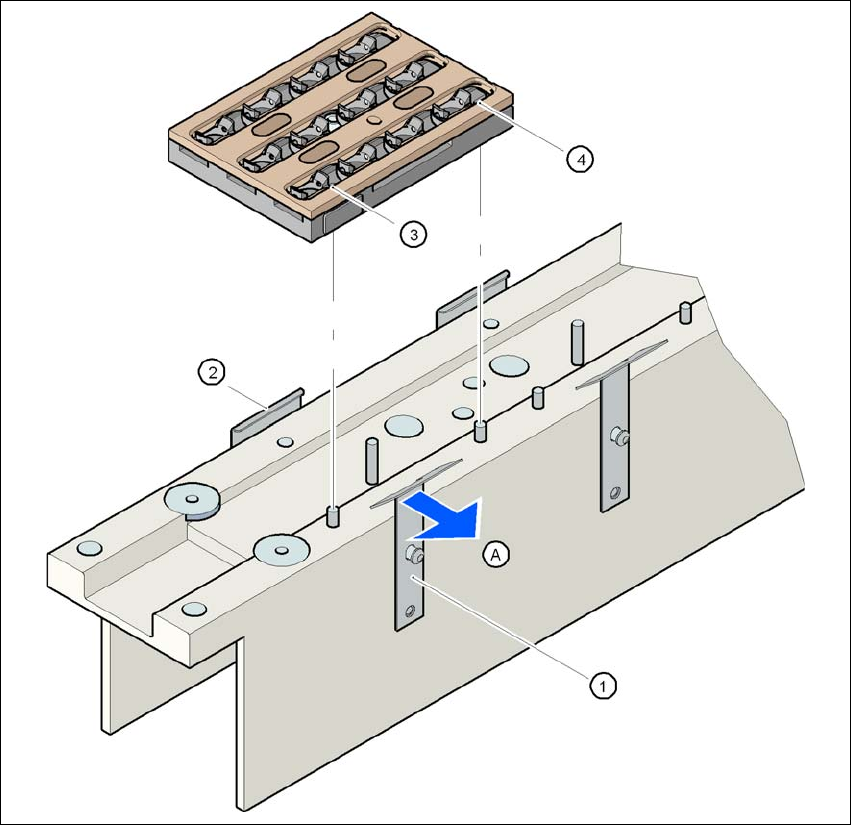
→ To remove the magazine, push the spring hook (item 1 in Fig. 6.1 - 4, page 226) away from
the magazine. Lift the magazine out of the carrier.
PLEASE NOTE
Make sure that you insert the magazine so that the centering pins slide into the centering hole
(item 3 in Fig. 6.1 - 4, page 226) and slot (item 4 in Fig. 6.1 - 4, page 226). 6
→ First place the side of the magazine with the numbered nozzles 1, 2, 3 and 4 on the base.
The retaining clamp (item 2 in Fig. 6.1 - 4
, page 226) must slide into the slot in the magazine.
→ Push the spring hook away from the magazine (item 1 in Fig. 6.1 - 4
, page 226).
→ Press the magazine so that it lies flat on the base, then release the spring hook. The spring
hook must latch into place.
6 Station extensions User manual SIPLACE D4
6.1 Nozzle changer for the 12-nozzle Collect&Place head From software version SR.605.xx 07/2008 EN Edition
226
6
Fig. 6.1 - 4 Changing the magazine
(1) Spring hook
(2) Retaining clamp
(3) Centering hole
(4) Slot
(5) Push the spring hook away from the magazine