3MAINTENANCE__O.pdf - 第100页
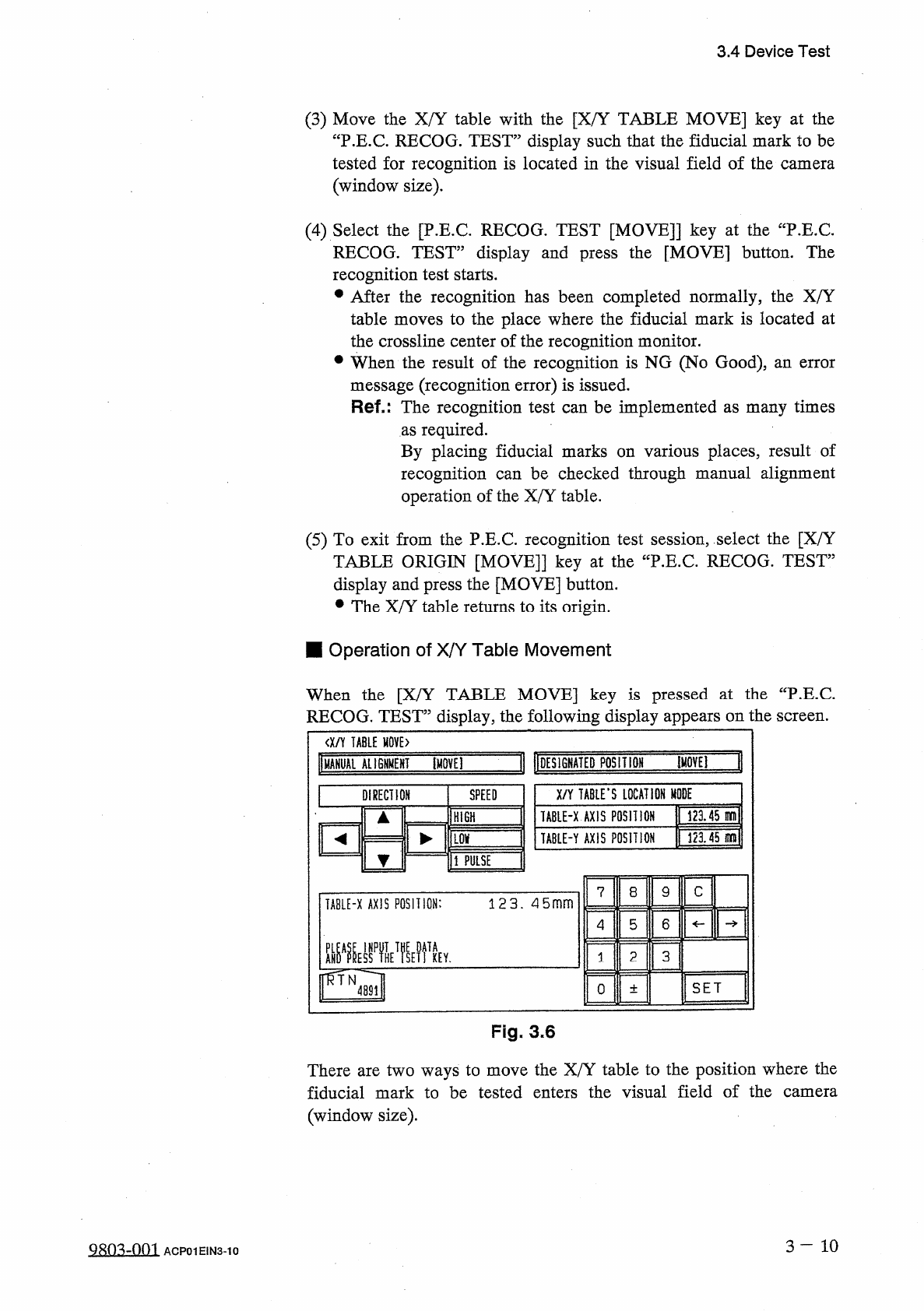
3.4 Device Test ① [ DESIGNATED POSITION [ MOVE ] ] Key • Select the [ DESIGNATED POSITION [ MOVE ] ] key . • Select the [ TABLE - X AXIS POSITION ] or [ TABLE - Y AXIS POSITION ] key and enter data using the ten - key pa…
3.4
Device
Test
(
3
)
Move
the
X
/
Y
table
with
the
[
X
/
Y
TABLE
MOVE
]
key
at
the
“
P
.
E
.
C
.
RECOG
.
TEST
”
display
such
that
the
fiducial
mark
to
be
tested
for
recognition
is
located
in
the
visual
field
of
the
camera
(
window
size
)
.
(
4
)
Select
the
[
P
.
E
.
C
.
RECOG
.
TEST
[
MOVE
]
]
key
at
the
“
P
.
E
.
C
.
RECOG
.
TEST
”
display
and
press
the
[
MOVE
]
button
.
The
recognition
test
starts
.
•
After
the
recognition
has
been
completed
normally
,
the
X
/
Y
table
moves
to
the
place
where
the
fiducial
mark
is
located
at
the
crossline
center
of
the
recognition
monitor
.
•
When
the
result
of
the
recognition
is
NG
(
No
Good
)
,
message
(
recognition
error
)
is
issued
.
Ref
.
:
The
recognition
test
can
be
implemented
as
many
times
as
required
.
By
placing
fiducial
marks
on
various
places
,
result
of
recognition
operation
of
the
X
/
Y
table
.
an
error
be
checked
through
manual
alignment
can
(
5
)
To
exit
from
the
P
.
E
.
C
.
recognition
test
session
,
select
the
[
X
/
Y
TABLE
ORIGIN
[
MOVE
]
]
key
at
the
“
P
.
E
.
C
.
RECOG
.
TEST
”
display
and
press
the
[
MOVE
]
button
.
•
The
X
/
Y
table
returns
to
its
origin
.
■
Operation
of
X
/
Y
Table
Movement
When
the
[
X
/
Y
TABLE
MOVE
]
key
is
pressed
at
the
“
P
.
E
.
C
RECOG
.
TEST
”
display
,
the
following
display
appears
on
the
screen
.
<
X
/
Y
TABLE
H
0
YE
>
]
11
DES
1
GHATED
PQSIT
1
QH
IMOVEI
"
pAHUAl
ALIGNMENT
[
MOVE
]
X
/
Y
TABLED
LOCATION
MODE
DIRECTION
SPEED
12145
lil
IHTGH
TABIE
-
X
AXIS
POSITION
32145
m
\
ILQV
TABLE
-
Y
AXIS
POSITION
ll
PULSE
9
C
7
8
TA
8
LE
-
X
AXIS
POSITION
:
12 3.4 5
mm
6
5
4
3
2
KEY
.
1
SET
0
±
Fig
,
3.6
There
are
two
ways
to
move
the
X
/
Y
table
to
the
position
where
the
fiducial
mark
to
be
tested
enters
the
visual
field
of
the
camera
(
window
size
)
.
3
一
10
QRO
^
-
nm
ACP
01
EIN
3
-
10
3.4
Device
Test
①
[
DESIGNATED
POSITION
[
MOVE
]
]
Key
•
Select
the
[
DESIGNATED
POSITION
[
MOVE
]
]
key
.
•
Select
the
[
TABLE
-
X
AXIS
POSITION
]
or
[
TABLE
-
Y
AXIS
POSITION
]
key
and
enter
data
using
the
ten
-
key
pad
.
•
When
the
[
MOVE
]
button
is
pressed
,
the
X
/
Y
table
starts
moving
to
the
designated
position
.
②
[
MANUAL
ALIGNMENT
[
MOVE
]
]
Key
•
Select
the
[
MANUAL
ALIGNMENT
[
MOVE
]
]
key
.
•
Press
one
of
the
“
DIRECTION
”
keys
to
select
a
direction
and
select
one
of
the
“
SPEED
”
keys
(
[
HIGH
]
,
[
LOW
]
,
and
[
1
PULSE
]
keys
)
to
specify
the
speed
of
the
X
/
Y
table
movement
.
•
When
the
[
MOVE
]
button
is
pressed
,
the
X
/
Y
table
starts
moving
in
the
designated
direction
at
the
specified
speed
.
Note
:
While
the
[
MOVE
]
button
is
kept
pressed
,
the
X
/
Y
table
keeps
on
moving
.
■
Recognition
Monitor
Display
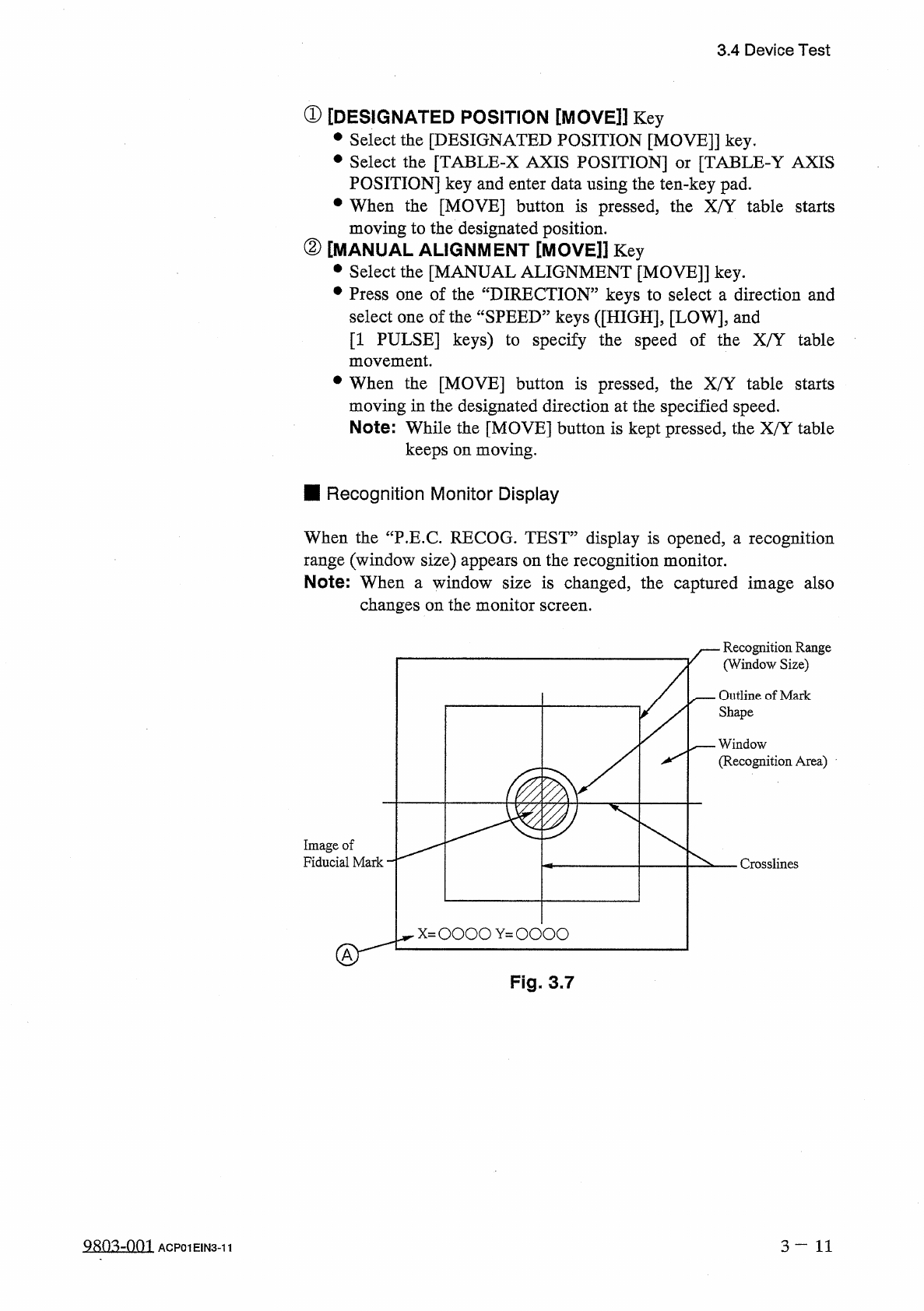
When
the
“
P
.
E
.
C
.
RECOG
.
TEST
”
display
is
opened
,
汪
recognition
range
(
window
size
)
appears
on
the
recognition
monitor
.
Note
:
When
a
window
size
is
changed
,
the
captured
image
also
changes
on
the
monitor
screen
.
Recognition
Range
(
Window
Size
)
Outline
of
Mark
Shape
一
—
Window
(
Recognition
Area
)
Image
of
Fiducial
Mark
Crosslines
Fig
.
3.7
QRQ
^
-
001
3
—
11
ACP
01
EIN
3
-
11
3.4
Device
Test
•
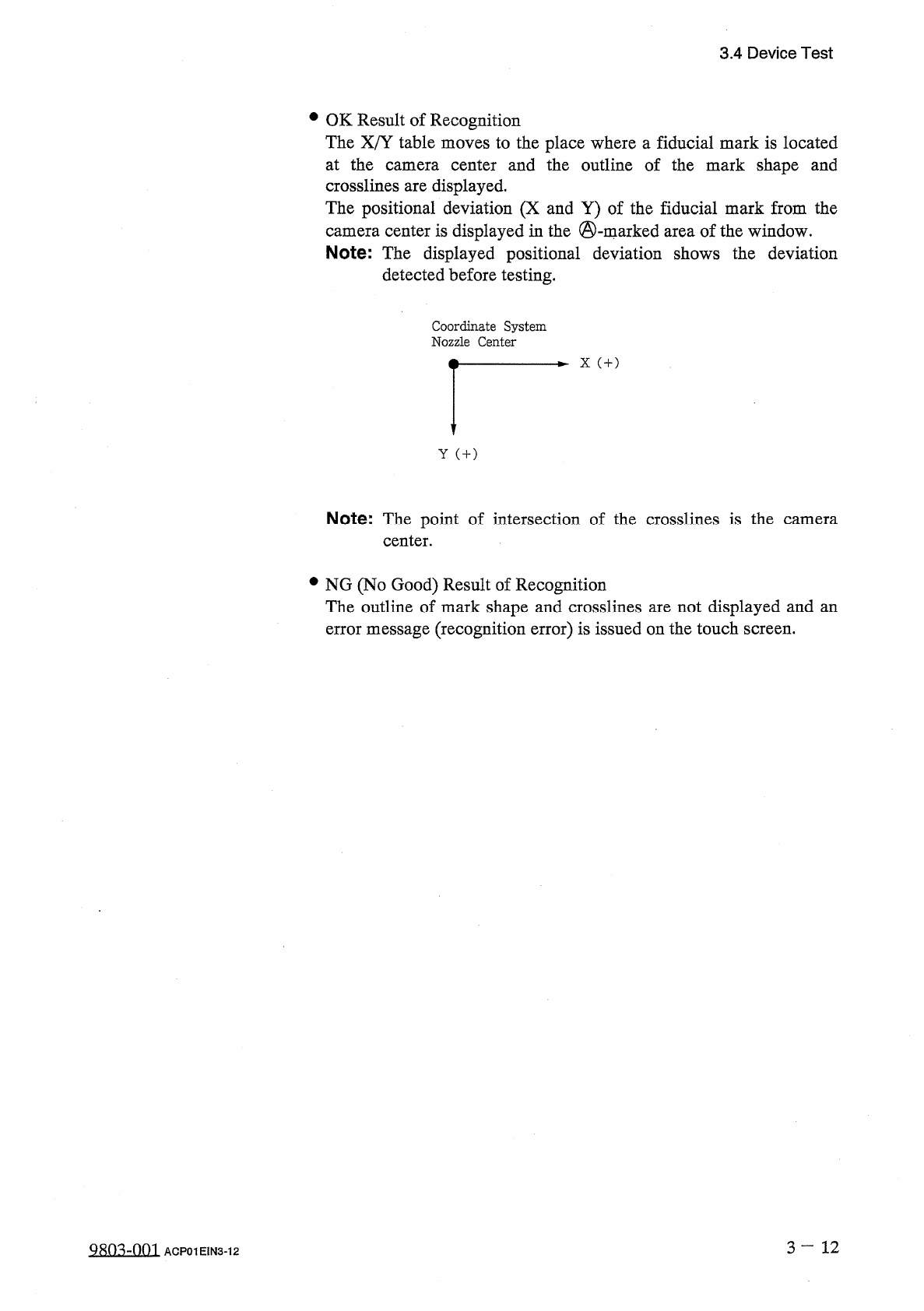
OK
Result
of
Recognition
The
X
/
Y
table
moves
to
the
place
where
a
fiducial
mark
is
located
at
the
camera
center
and
the
outline
of
the
mark
shape
and
crosslines
are
displayed
.
The
positional
deviation
(
X
and
Y
)
of
the
fiducial
mark
from
the
camera
center
is
displayed
in
the
©
-
marked
area
of
the
window
.
Note
:
The
displayed
positional
deviation
shows
the
deviation
detected
before
testing
.
Coordinate
System
Nozzle
Center
X
(
+
)
Y
(
+
)
Note
:
The
point
of
intersection
of
the
crosslines
is
the
center
.
camera
•
NG
(
No
Good
)
Result
of
Recognition
The
outline
of
mark
shape
and
crosslines
are
not
displayed
and
an
error
message
(
recognition
error
)
is
issued
on
the
touch
screen
.
3
—
12
Q
^
-
001
ACP
01
EIN
3
-
12