3MAINTENANCE__O.pdf - 第101页
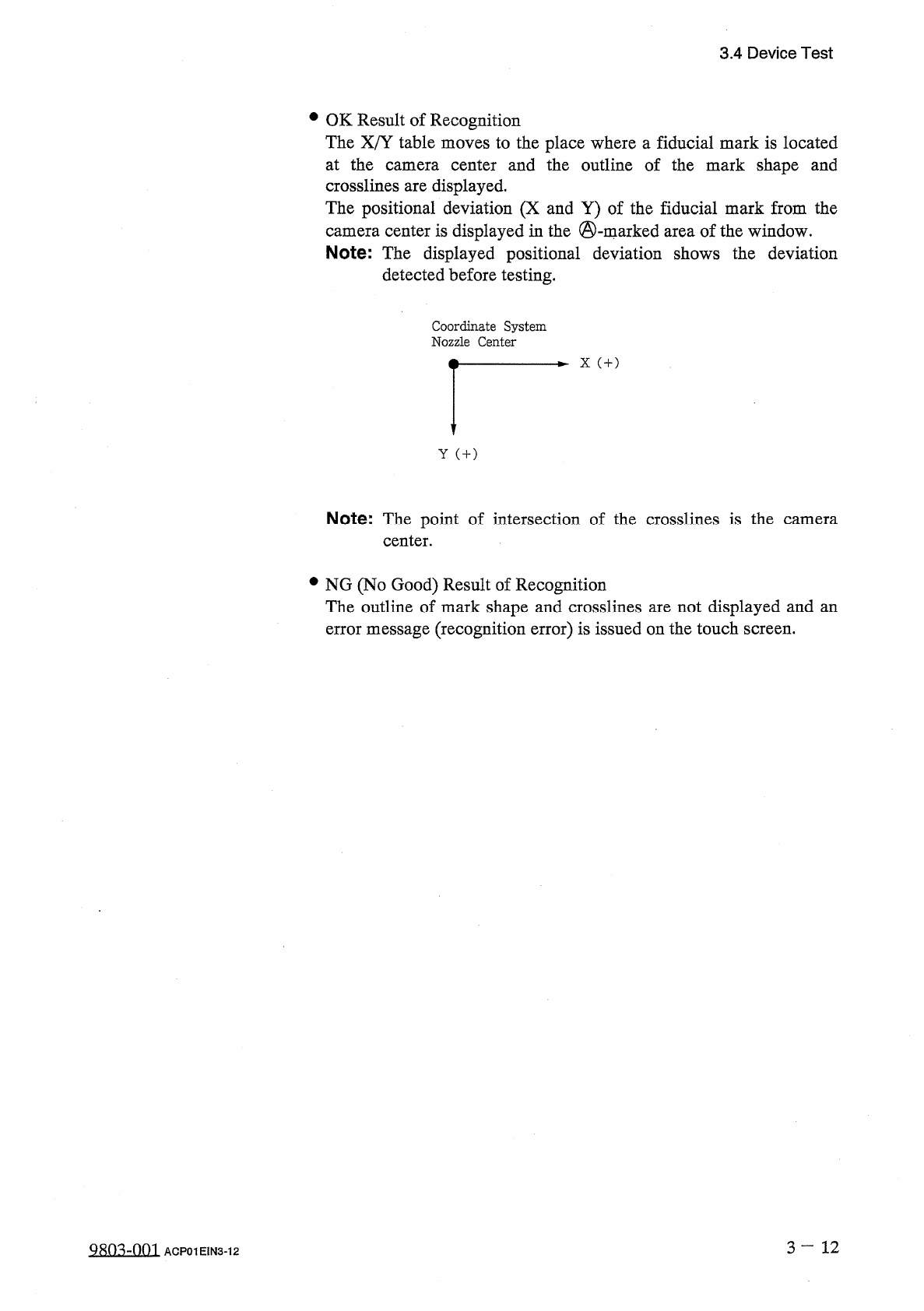
3.4 Device Test • OK Result of Recognition The X / Y table moves to the place where a fiducial mark is located at the camera center and the outline of the mark shape and crosslines are displayed . The positional deviatio…
3.4
Device
Test
①
[
DESIGNATED
POSITION
[
MOVE
]
]
Key
•
Select
the
[
DESIGNATED
POSITION
[
MOVE
]
]
key
.
•
Select
the
[
TABLE
-
X
AXIS
POSITION
]
or
[
TABLE
-
Y
AXIS
POSITION
]
key
and
enter
data
using
the
ten
-
key
pad
.
•
When
the
[
MOVE
]
button
is
pressed
,
the
X
/
Y
table
starts
moving
to
the
designated
position
.
②
[
MANUAL
ALIGNMENT
[
MOVE
]
]
Key
•
Select
the
[
MANUAL
ALIGNMENT
[
MOVE
]
]
key
.
•
Press
one
of
the
“
DIRECTION
”
keys
to
select
a
direction
and
select
one
of
the
“
SPEED
”
keys
(
[
HIGH
]
,
[
LOW
]
,
and
[
1
PULSE
]
keys
)
to
specify
the
speed
of
the
X
/
Y
table
movement
.
•
When
the
[
MOVE
]
button
is
pressed
,
the
X
/
Y
table
starts
moving
in
the
designated
direction
at
the
specified
speed
.
Note
:
While
the
[
MOVE
]
button
is
kept
pressed
,
the
X
/
Y
table
keeps
on
moving
.
■
Recognition
Monitor
Display
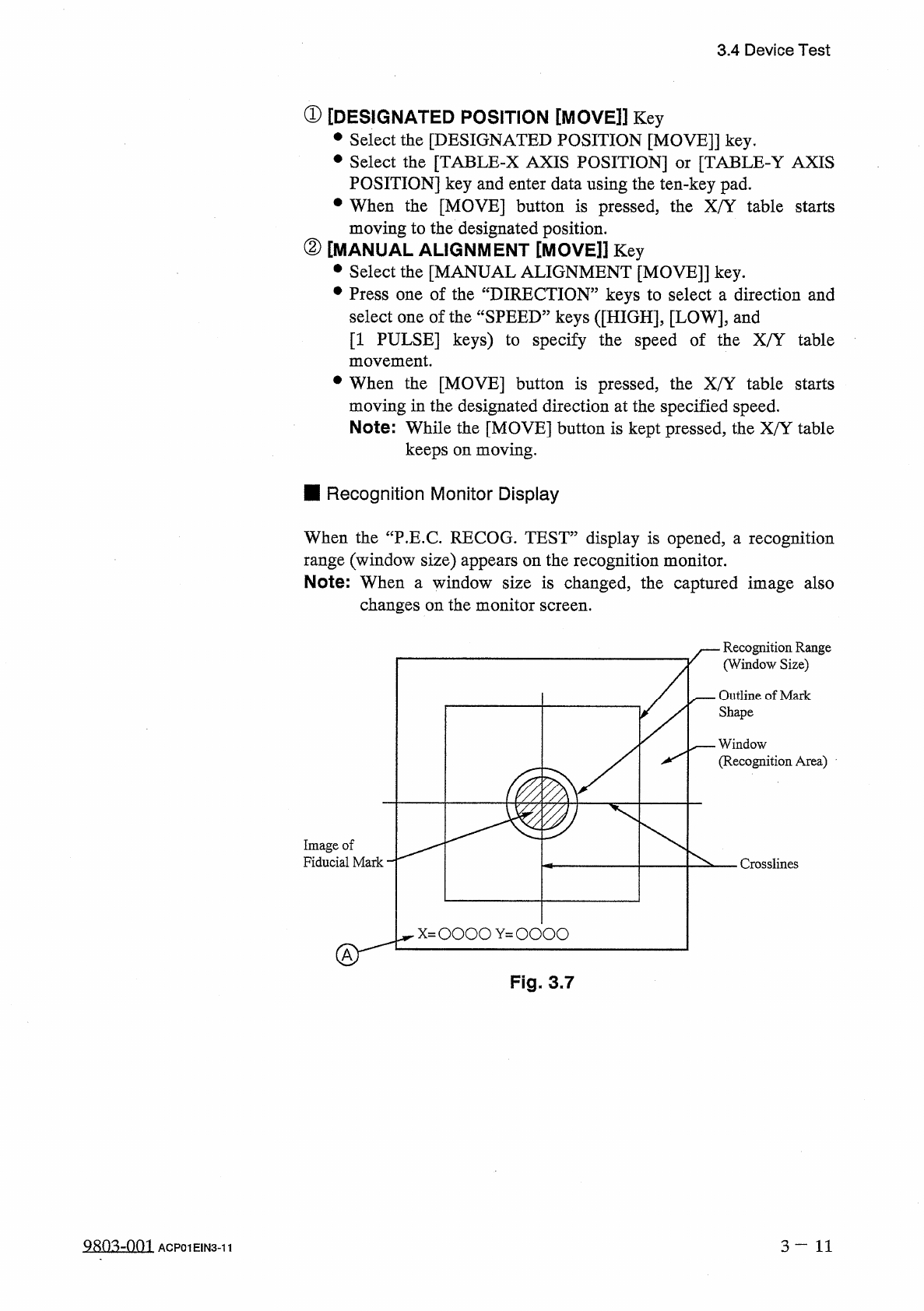
When
the
“
P
.
E
.
C
.
RECOG
.
TEST
”
display
is
opened
,
汪
recognition
range
(
window
size
)
appears
on
the
recognition
monitor
.
Note
:
When
a
window
size
is
changed
,
the
captured
image
also
changes
on
the
monitor
screen
.
Recognition
Range
(
Window
Size
)
Outline
of
Mark
Shape
一
—
Window
(
Recognition
Area
)
Image
of
Fiducial
Mark
Crosslines
Fig
.
3.7
QRQ
^
-
001
3
—
11
ACP
01
EIN
3
-
11
3.4
Device
Test
•
OK
Result
of
Recognition
The
X
/
Y
table
moves
to
the
place
where
a
fiducial
mark
is
located
at
the
camera
center
and
the
outline
of
the
mark
shape
and
crosslines
are
displayed
.
The
positional
deviation
(
X
and
Y
)
of
the
fiducial
mark
from
the
camera
center
is
displayed
in
the
©
-
marked
area
of
the
window
.
Note
:
The
displayed
positional
deviation
shows
the
deviation
detected
before
testing
.
Coordinate
System
Nozzle
Center
X
(
+
)
Y
(
+
)
Note
:
The
point
of
intersection
of
the
crosslines
is
the
center
.
camera
•
NG
(
No
Good
)
Result
of
Recognition
The
outline
of
mark
shape
and
crosslines
are
not
displayed
and
an
error
message
(
recognition
error
)
is
issued
on
the
touch
screen
.
3
—
12
Q
^
-
001
ACP
01
EIN
3
-
12
3.4
Device
Test
3.4
.
3
Component
Recognition
Test
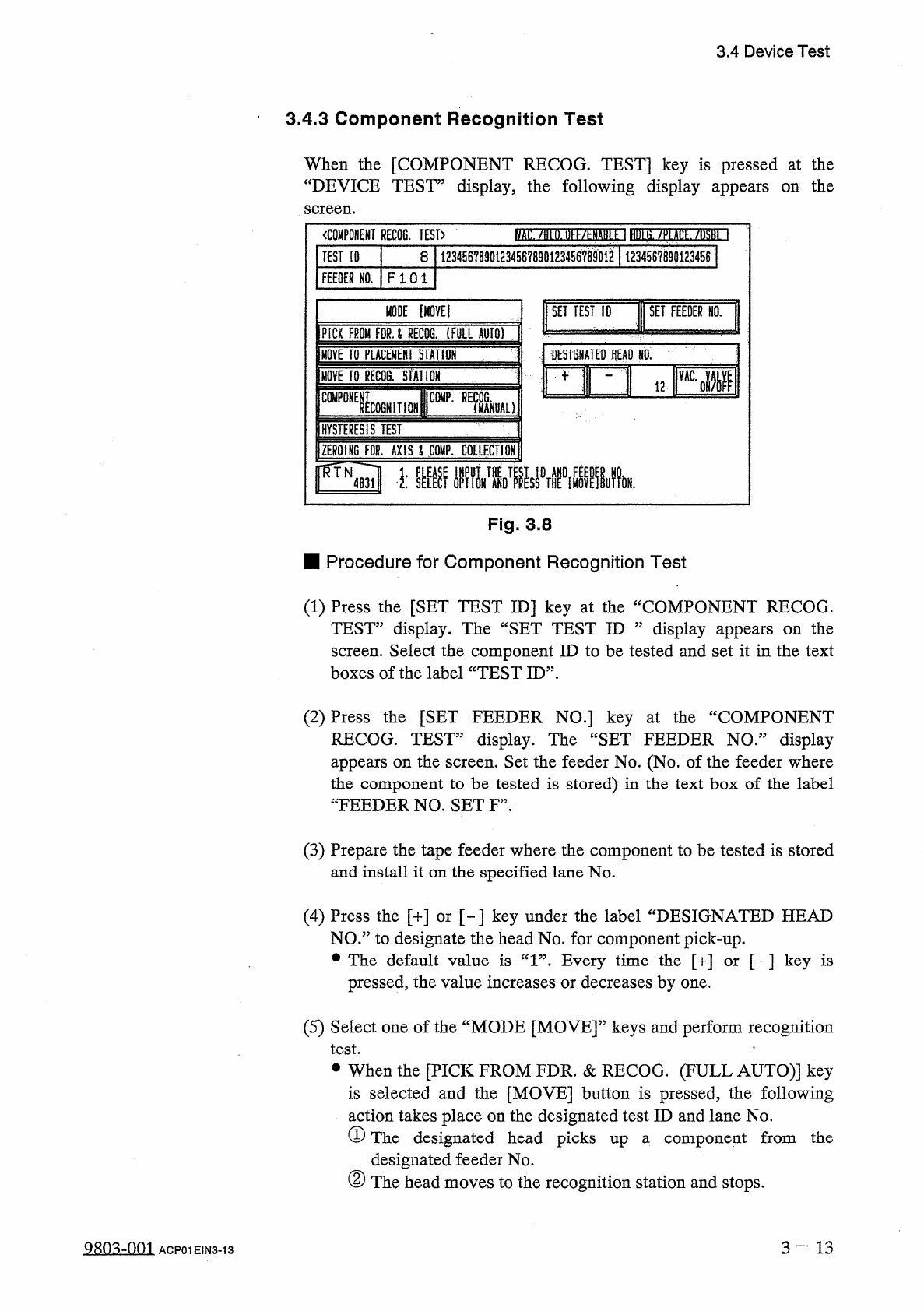
When
the
[
COMPONENT
RECOG
.
TEST
]
key
is
pressed
at
the
“
DEVICE
TEST
”
display
,
the
following
display
appears
screen
.
the
on
(
)
.
llKf
/
^
NARi
1
HUt
S
.
/
P
(
Atf
/
iM
~
l
〈
COMPONENT
RECOG
.
TEST
〉
12345678901234567890123456
^
901
^
1
123456789
Q
1234
S
61
TEST
[
0
8
FEEDER
NO
.
FI
01
1
MODE
[
MOVE
!
SET
TEST
ID
SET
FEEDER
HO
.
PICK
FROM
FPU
RECTO
.
(
FULL
AUTO
)
:
;
fESiSNATED
HEAD
NO
,
m
i
2
RI
MOVE
TO
PLACEMENT
HAtlOH
MOVE
TO
gECOG
.
STATION
"
ICOGNITION
CWP
-
REfcL
)
C
0
MP
0
HYSTERESIS
TEST
ZEROING
FDR
.
AXIS
l
CQKP
.
COLLECTION
FTN
^
■
膽
_
麵
5
_
1
.
Fig
.
3.8
■
Procedure
for
Component
Recognition
Test
(
1
)
Press
the
[
SET
TEST
ID
]
key
at
the
“
COMPONENT
RECOG
.
TEST
”
display
.
The
“
SET
TEST
ID
”
display
appears
on
the
screen
.
Select
the
component
ID
to
be
tested
and
set
it
in
the
text
boxes
of
the
label
“
TEST
ID
”
.
(
2
)
Press
the
[
SET
FEEDER
NO
.
]
key
at
the
“
COMPONENT
RECOG
.
TEST
”
display
.
The
“
SET
FEEDER
NO
.
”
display
appears
on
the
screen
.
Set
the
feeder
No
.
(
No
.
of
the
feeder
where
the
component
to
be
tested
is
stored
)
in
the
text
box
of
the
label
“
FEEDER
NO
.
SET
F
”
.
(
3
)
Prepare
the
tape
feeder
where
the
component
to
be
tested
is
stored
and
install
it
on
the
specified
lane
No
.
(
4
)
Press
the
[
+
]
or
[
~
]
key
under
the
label
“
DESIGNATED
HEAD
NO
.
”
to
designate
the
head
No
.
for
component
pick
-
up
.
•
The
default
value
is
“
1
”
.
Every
time
the
[
+
]
or
[
-
]
key
is
pressed
,
the
value
increases
or
decreases
by
one
.
(
5
)
Select
one
of
the
“
MODE
[
MOVE
]
”
keys
and
perform
recognition
test
.
•
•
When
the
[
PICK
FROM
FDR
.
&
RECOG
.
(
FULL
AUTO
)
]
key
is
selected
and
the
[
MOVE
]
button
is
pressed
,
the
following
action
takes
place
on
the
designated
test
ID
and
lane
No
.
①
The
designated
head
picks
up
a
component
from
the
designated
feeder
No
.
②
The
head
moves
to
the
recognition
station
and
stops
.
3
—
13
Q
8
Q
^
-
0
m
ACP
01
EIN
3
-
13