3MAINTENANCE__O.pdf - 第124页
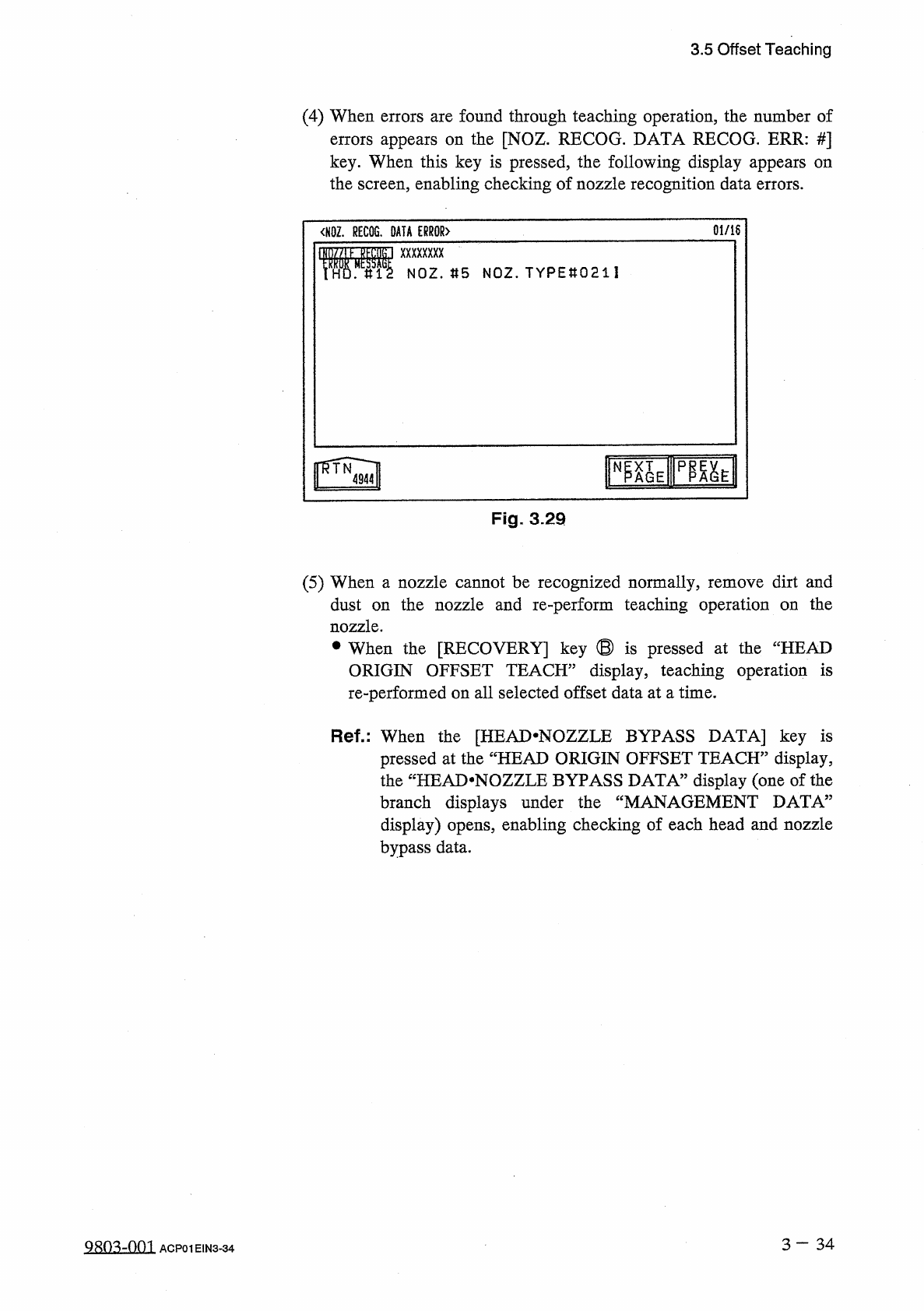
3.5 Offset Teaching ( 4 ) When errors are found through teaching operation , the number of errors appears on the [ NOZ . RECOG . DATA RECOG . ERR : # ] key . When this key is pressed , the following display appears on th…
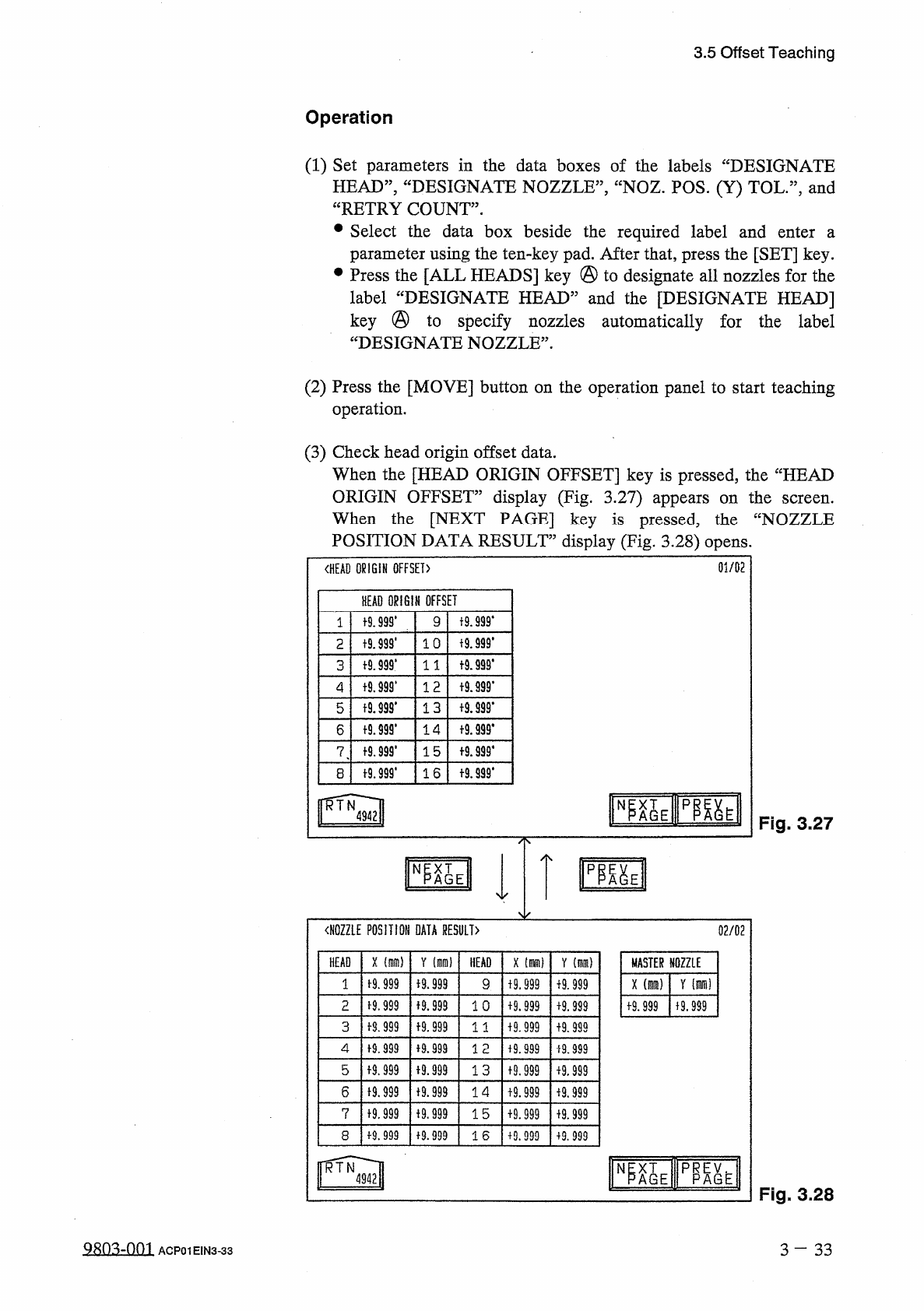
3.5
Offset
Teaching
Operation
(
1
)
Set
parameters
in
the
data
boxes
of
the
labels
“
DESIGNATE
HEAD
”
,
“
DESIGNATE
NOZZLE
”
,
“
NOZ
.
POS
.
(
Y
)
TOL
.
”
,
and
“
RETRY
COUNT
”
.
•
Select
the
data
box
beside
the
required
label
and
enter
parameter
using
the
ten
-
key
pad
.
After
that
,
press
the
[
SET
]
key
.
Press
the
[
ALL
HEADS
]
key
@
to
designate
all
nozzles
for
the
label
“
DESIGNATE
HEAD
”
and
the
[
DESIGNATE
HEAD
]
key
@
to
specify
nozzles
automatically
for
the
label
“
DESIGNATE
NOZZLE
”
.
a
(
2
)
Press
the
[
MOVE
]
button
on
the
operation
panel
to
start
teaching
operation
.
(
3
)
Check
head
origin
offset
data
.
When
the
[
HEAD
ORIGIN
OFFSET
]
key
is
pressed
,
the
“
HEAD
ORIGIN
OFFSET
”
display
(
Fig
.
3.27
)
appears
on
the
When
the
[
NEXT
PAGE
]
key
is
pressed
,
the
“
NOZZLE
POSITION
DATA
RESULT
”
display
(
Fig
.
3.28
)
opens
.
screen
.
01
/
02
〈
HEAD
ORIGIN
OFFSET
)
HEAD
ORIGIN
OFFSET
19
.
999
*
t
9.999
*
9
1
f
9
J
99
.
t
9
J
99
'
1 0
2
十
9.999
*
t
9.999
*
3
1 1
t
9.999
*
1 2
4
t
9.99
S
*
13
t
9.999
*
5
十
9
卿
.
十
9.939
.
14
6
f
9.999
'
f
9.999
*
15
7
t
9.999
.
f
9.999
*
16
8
臨
EIP
隞
EII
N
Fig
.
3.27
〈
NOZZLE
POSITION
DATA
RESULT
〉
02
/
02
X
(
隱
)
HEAD
Y
HEAD
X
[
腦
)
Y
(
mm
)
MASTER
NOZZLE
1
-
9.999
+
9.999
x
(
mra
)
Y
(
m
)
9
+
9.999
f
9.999
M
.
999
2
子
9.999
1 0
19.999
+
9.999
+
9.999
f
9.999
f
8.999
f
9.999
3
1 1
+
9.999
+
9.999
4
f
9.999
+
9.999
12
+
9.999
i
9.999
5
f
9
J
99
i
9.999
13
19.999
+
9.999
6
19.999
十
9.999
14
19.999
进
999
7
f
9
,
999
十
9
,
999
15
+
9.999
+
9.999
19.999
8
+
9.999
16
+
9.999
+
9.999
p
職
^
AGE
N
Fig
.
3.28
Qsn
^
-
nm
3
-
33
ACP
01
EIN
3
-
33
3.5
Offset
Teaching
(
4
)
When
errors
are
found
through
teaching
operation
,
the
number
of
errors
appears
on
the
[
NOZ
.
RECOG
.
DATA
RECOG
.
ERR
:
#
]
key
.
When
this
key
is
pressed
,
the
following
display
appears
on
the
screen
,
enabling
checking
of
nozzle
recognition
data
errors
.
0
l
/
i
6
<
N
0
Z
.
RECOG
.
DATA
ERROR
〉
w
mum
NOZ
.
«
5
NOZ
.
TYPEtt
0211
IS
N
Fig
.
3.29
(
5
)
When
a
nozzle
cannot
be
recognized
normally
,
remove
dirt
and
dust
on
the
nozzle
and
re
-
perform
teaching
operation
on
the
nozzle
.
•
When
the
[
RECOVERY
]
key
⑬
is
pressed
at
the
“
HEAD
ORIGIN
OFFSET
TEACH
”
display
,
teaching
operation
is
re
-
performed
on
all
selected
offset
data
at
a
time
.
Ref
.
:
When
the
[
HEAD
*
NOZZLE
BYPASS
DATA
]
key
is
pressed
at
the
“
HEAD
ORIGIN
OFFSET
TEACH
”
display
,
the
tfCHEAD
*
NOZZLE
BYPASS
DATA
”
display
(
one
of
the
branch
displays
under
the
“
MANAGEMENT
DATA
”
display
)
opens
,
enabling
checking
of
each
head
and
nozzle
bypass
data
.
3
一
34
QRO
^
-
Om
ACP
01
E
1
N
3
-
34
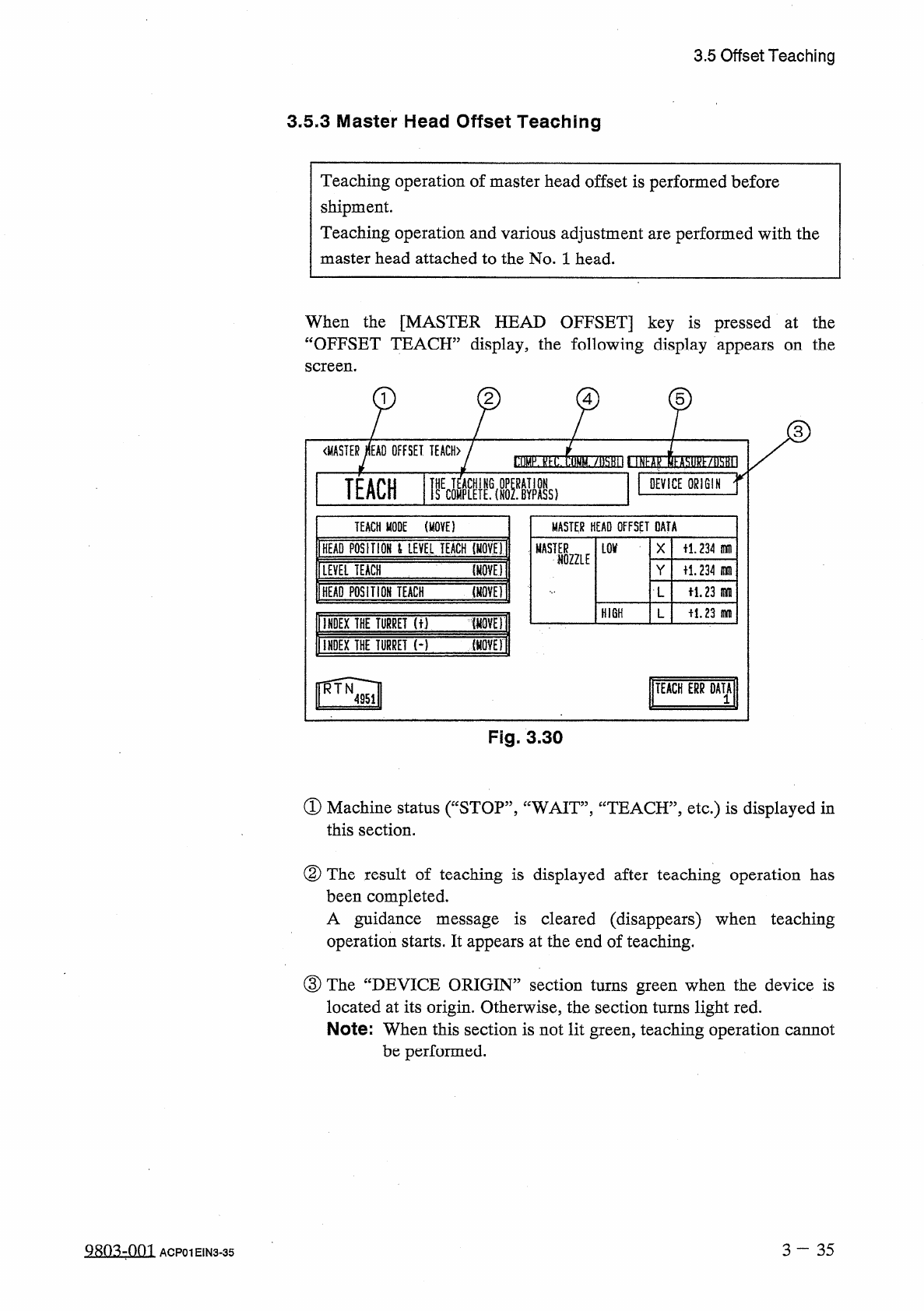
3.5
Offset
Teaching
3.5
.
3
Master
Head
Offset
Teaching
Teaching
operation
of
master
head
offset
is
performed
before
shipment
.
Teaching
operation
and
various
adjustment
are
performed
with
the
master
head
attached
to
the
No
.
1
head
.
When
the
[
MASTER
HEAD
OFFSET
]
key
is
pressed
at
the
“
OFFSET
TEACH
”
display
,
the
following
display
appears
on
the
screen
.
2
4
5
《
MASTER
MAO
OFFSET
TEACH
〉
^
(
1
r
.
nUM
.
/
lisHn
nTlMk
齚抑跡
71
MI
1
TEACH
1
瞻
(
ffifc
DEVICE
ORIGIN
TEACH
MODE
(
MOVE
)
MASTER
HEAD
OFFSET
DATA
1
HEAD
POSITION
i
LEVEL
TEACH
(
Moll
!
MASTER
m
X
il
.
234
m
NOZZLE
iQVOl
I
LEVEL
TEACH
234
nun
Y
[
HEAD
POSITION
TEW
UVEH
iL
23
m
子
1.23
infli
HIGH
I
INDEX
THE
TURCET
(
t
)
W
0
V
£
)
l
1
INDEX
THE
TUBliEnT
UVET
Si
TEACH
ERR
DATA
1
Fig
.
3.30
①
Machine
status
(
“
STOP
,
,
,
“
WAIT
,,
,
“
TEACH
,
,
,
etc
.
)
is
displayed
in
this
section
.
②
The
result
of
teaching
is
displayed
after
teaching
operation
has
been
completed
.
A
guidance
message
is
cleared
(
disappears
)
when
teaching
operation
starts
.
It
appears
at
the
end
of
teaching
.
③
The
“
DEVICE
ORIGIN
”
section
turns
green
when
the
device
is
located
at
its
origin
.
Otherwise
,
the
section
turns
light
red
.
Note
:
When
this
section
is
not
lit
green
,
teaching
operation
cannot
be
performed
.
3
-
3 5
Q
803
-
001
ACP
01
EIN
3
-
35