3MAINTENANCE__O.pdf - 第126页
3.5 Offset Teaching ④ COMP . REC . COMM . / DSBL This label appears when “ DISABLE ” is set in the text box of the label “ DRY CYCLE MODE ” at the “ TEST MODE ” display . In this case , the result of each teaching operat…
3.5
Offset
Teaching
3.5
.
3
Master
Head
Offset
Teaching
Teaching
operation
of
master
head
offset
is
performed
before
shipment
.
Teaching
operation
and
various
adjustment
are
performed
with
the
master
head
attached
to
the
No
.
1
head
.
When
the
[
MASTER
HEAD
OFFSET
]
key
is
pressed
at
the
“
OFFSET
TEACH
”
display
,
the
following
display
appears
on
the
screen
.
2
4
5
《
MASTER
MAO
OFFSET
TEACH
〉
^
(
1
r
.
nUM
.
/
lisHn
nTlMk
齚抑跡
71
MI
1
TEACH
1
瞻
(
ffifc
DEVICE
ORIGIN
TEACH
MODE
(
MOVE
)
MASTER
HEAD
OFFSET
DATA
1
HEAD
POSITION
i
LEVEL
TEACH
(
Moll
!
MASTER
m
X
il
.
234
m
NOZZLE
iQVOl
I
LEVEL
TEACH
234
nun
Y
[
HEAD
POSITION
TEW
UVEH
iL
23
m
子
1.23
infli
HIGH
I
INDEX
THE
TURCET
(
t
)
W
0
V
£
)
l
1
INDEX
THE
TUBliEnT
UVET
Si
TEACH
ERR
DATA
1
Fig
.
3.30
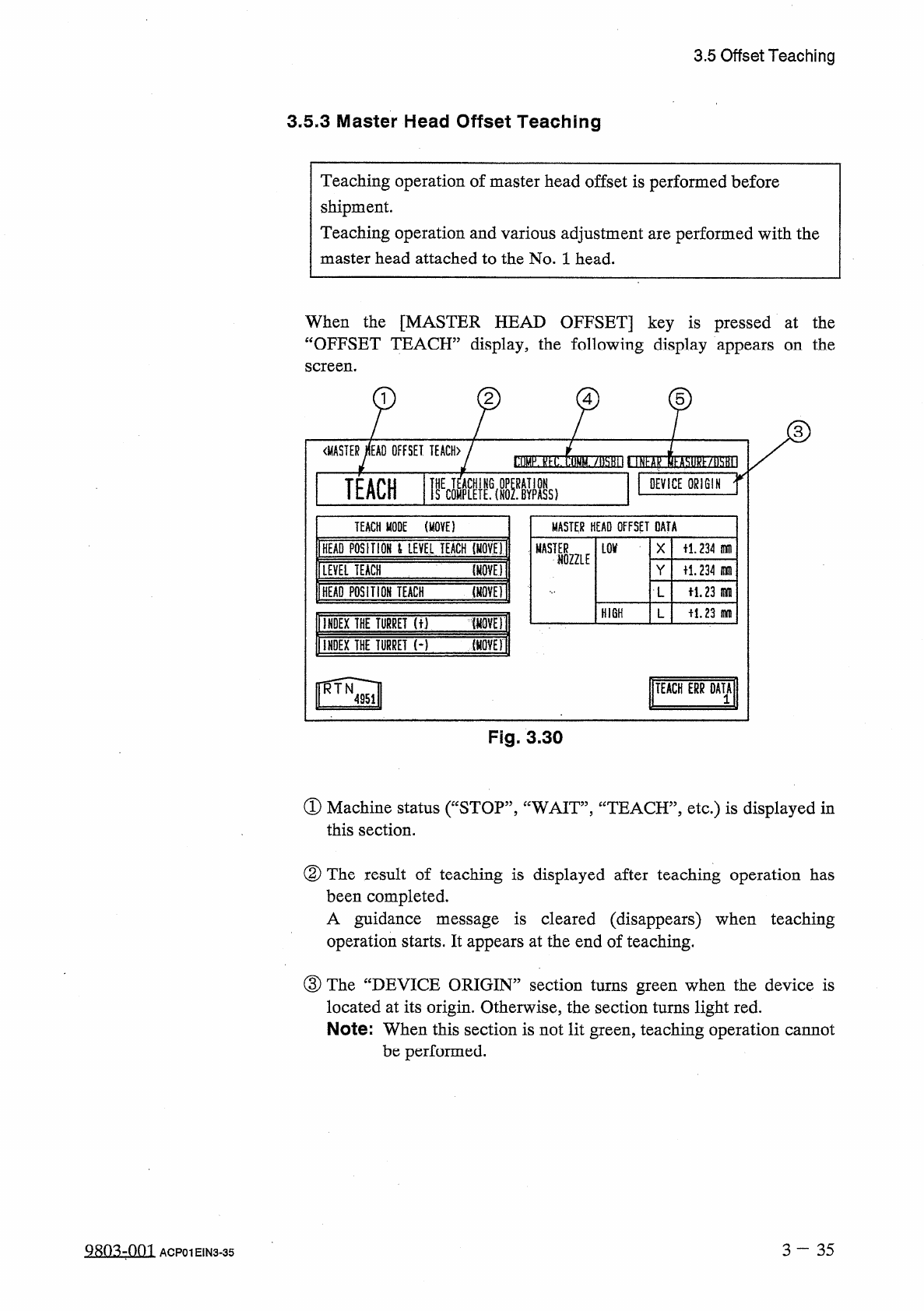
①
Machine
status
(
“
STOP
,
,
,
“
WAIT
,,
,
“
TEACH
,
,
,
etc
.
)
is
displayed
in
this
section
.
②
The
result
of
teaching
is
displayed
after
teaching
operation
has
been
completed
.
A
guidance
message
is
cleared
(
disappears
)
when
teaching
operation
starts
.
It
appears
at
the
end
of
teaching
.
③
The
“
DEVICE
ORIGIN
”
section
turns
green
when
the
device
is
located
at
its
origin
.
Otherwise
,
the
section
turns
light
red
.
Note
:
When
this
section
is
not
lit
green
,
teaching
operation
cannot
be
performed
.
3
-
3 5
Q
803
-
001
ACP
01
EIN
3
-
35
3.5
Offset
Teaching
④
COMP
.
REC
.
COMM
.
/
DSBL
This
label
appears
when
“
DISABLE
”
is
set
in
the
text
box
of
the
label
“
DRY
CYCLE
MODE
”
at
the
“
TEST
MODE
”
display
.
In
this
case
,
the
result
of
each
teaching
operation
is
not
reflected
on
offset
data
.
⑤
LINEAR
MEASURE
/
DSBL
This
label
appears
when
“
DISABLE
”
is
set
in
the
text
box
of
the
label
“
LINEAR
MEASURE
MODE
”
at
the
“
TEST
MODE
”
display
.
In
this
case
,
the
result
of
each
teaching
operation
is
not
reflected
on
offset
data
.
■
Procedure
for
Master
Head
Offset
Teaching
(
1
)
Select
the
[
INDEX
THE
TURRET
(
+
)
[
MOVE
]]
or
[
INDEX
THE
TURRET
[
-
]
[
MOVE
]]
key
and
press
the
[
MOVE
]
button
to
move
the
No
.
1
head
to
the
placement
station
.
(
2
)
Attach
the
master
head
to
the
No
.
1
head
position
.
•
Attach
the
jig
nozzle
(
master
nozzle
)
to
the
No
.
1
nozzle
position
on
the
master
head
.
Note
:
Do
not
attach
the
jig
nozzle
to
any
of
the
Nos
.
2
-
5
nozzle
positions
.
(
3
)
Orient
the
master
nozzle
to
the
3
o
’
clock
direction
through
the
manual
operation
.
(
4
)
Adjust
the
height
of
the
master
nozzle
to
UL
Level
”
.
(
5
)
Select
a
teaching
mode
and
perform
the
teaching
operation
.
When
the
[
HEAD
POSITION
&
LEVEL
TEACH
[
MOVE
]
]
key
is
selected
and
the
[
MOVE
]
button
is
pressed
,
teaching
operation
is
performed
on
“
X
/
Y
data
(
head
position
)
in
L
level
’’
,
“
L
level
”
,
and
“
L
data
(
level
in
height
direction
)
of
H
level
”
.
When
the
[
LEVEL
TEACH
[
MOVE
]]
key
is
selected
and
the
[
MOVE
]
button
is
pressed
,
teaching
operation
is
performed
on
“
L
level
”
and
“
L
data
(
level
in
height
direction
)
of
H
level
”
.
When
the
[
HEAD
POSITION
TEACH
[
MOVE
]
]
key
is
selected
and
the
[
MOVE
]
button
is
pressed
,
teaching
operation
is
performed
on
“
X
/
Y
data
(
head
position
)
in
L
level
”
.
Ref
.
:
L
data
(
level
)
offset
value
in
height
direction
is
stored
in
memory
as
“
Master
Nozzle
(
H
)
Offset
=
Master
Nozzle
(
L
)
Offset
-
400
(
Unit
:
0.01
mm
)
”
.
3
—
36
9803
-
001
ACP
01
EIN
3
-
36
3.5
Offset
Teaching
(
6
)
To
exit
from
the
master
head
offset
teaching
session
,
select
the
[
INDEX
THE
TURRET
(
+
)
[
MOVE
]
]
key
and
press
the
[
MOVE
]
button
to
move
the
master
head
to
the
placement
station
.
(
7
)
Detach
the
master
nozzle
and
head
.
(
8
)
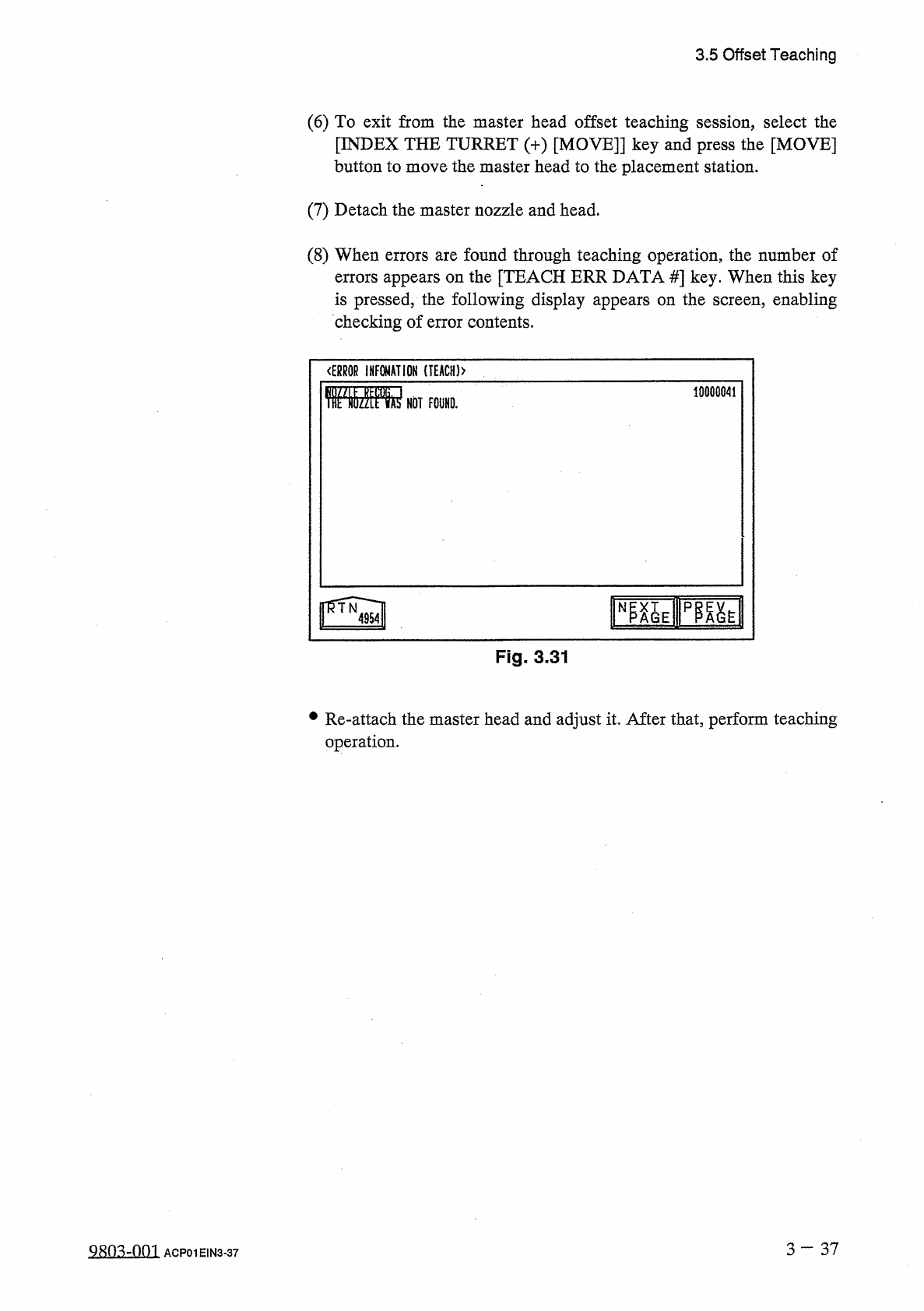
When
errors
are
found
through
teaching
operation
,
the
number
of
errors
appears
on
the
[
TEACH
ERR
DATA
#
]
key
.
When
this
key
is
pressed
,
the
following
display
appears
on
the
screen
,
enabling
checking
of
error
contents
.
<
ERR
0
R
INFOMATIOH
(
T
£
ACH
)
>
10000041
rayipfiai
Fig
.
3
-
31
•
Re
-
attach
the
master
head
and
adjust
it
.
After
that
,
perform
teaching
operation
.
3
—
37
Q
8
n
^
-
nm
ACP
01
EIN
3
-
37