3MAINTENANCE__O.pdf - 第151页
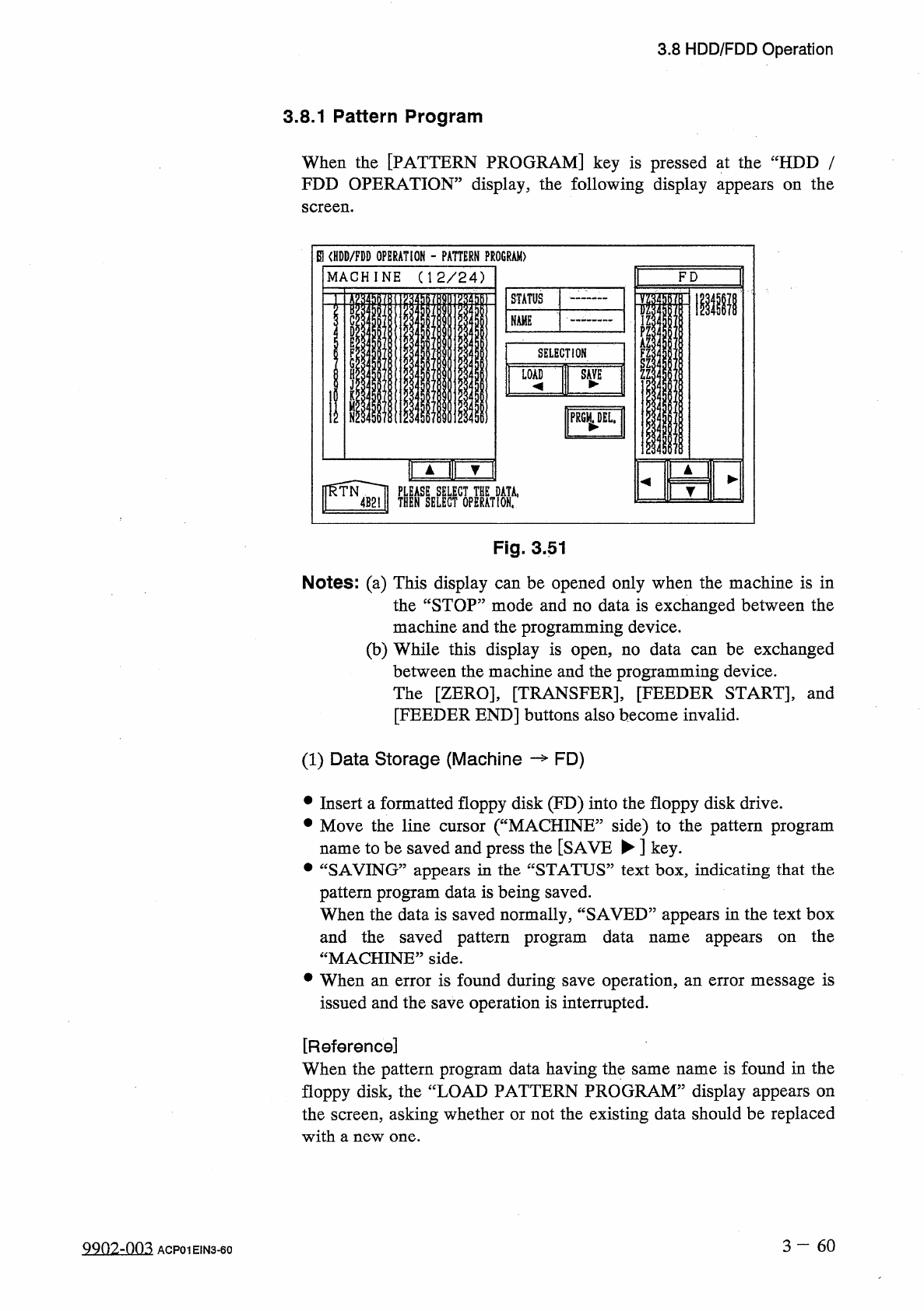
3.8 HDD / FDD Operation 3.8 . 1 Pattern Program When the [ PATTERN PROGRAM ] key is pressed at the “ HDD / FDD OPERATION ” display , the following display appears on the screen . El < HDD / FDD OPERATION - PATTERN PRO…
3.8
HDD
/
FDD
Operation
[
RECALL
MESSAGES
]
Key
When
this
key
is
pressed
,
the
corresponding
display
appears
on
the
screen
,
enabling
you
to
save
the
recalled
message
data
(
recalled
device
error
,
recalled
handling
error
,
recalled
machine
information
,
and
recalled
component
recognition
error
)
on
a
floppy
disk
.
The
contents
of
the
recalled
messages
can
also
be
checked
using
“
TEXT
EDITOR
”
on
the
personal
computer
(
programming
device
)
side
.
[
COMP
.
LIBRARY
DATA
(
ALL
)
]
Key
The
component
library
data
(
all
IDs
)
can
be
saved
on
floppy
disks
and
read
(
loaded
)
.
Note
:
The
files
saved
on
the
floppy
disks
are
not
compatible
with
the
programming
device
.
[
COMP
.
LIBRARY
DATA
(
EACH
)
]
The
component
library
data
(
each
ID
and
read
(
loaded
)
.
Note
:
The
files
saved
on
the
floppy
disks
are
not
compatible
with
the
programming
device
.
Key
)
can
be
saved
on
floppy
disks
[
PATTERN
PROGRAM
MANAGEMENT
DATA
]
Key
The
pattern
program
management
data
can
be
saved
on
floppy
disks
.
Note
:
The
files
saved
on
the
floppy
disks
cannot
be
loaded
to
the
machine
side
.
[
MANAGEMENT
DATA
]
Key
The
management
data
can
be
saved
on
floppy
disks
.
Note
:
The
files
saved
on
the
floppy
disks
cannot
be
loaded
to
the
machine
side
.
[
BYPASS
&
RATE
DATA
]
Key
The
bypass
&
rate
data
can
be
saved
on
floppy
disks
.
Note
:
The
files
saved
on
the
floppy
disks
cannot
be
loaded
to
the
machine
side
.
3
—
59
-
1
9910
-
003
ACP
01
E
1
N
3
-
59
3.8
HDD
/
FDD
Operation
3.8
.
1
Pattern
Program
When
the
[
PATTERN
PROGRAM
]
key
is
pressed
at
the
“
HDD
/
FDD
OPERATION
”
display
,
the
following
display
appears
on
the
screen
.
El
<
HDD
/
FDD
OPERATION
-
PATTERN
PROGRAM
)
M A C H I N E
(
1 2
/
2 4
)
F D
1
»
STATUS
S
3
m
M
Ti
IS
Ti
C
NAME
D
ll
E
AZ
;
SELECTION
F
G
LOAD
SAVE
M
PRGM
^
DEL
.
fCUlIiK
THENSSELEGTCOPERAT
!
ONf
,
Fig
.
3.51
Notes
:
(
a
)
This
display
can
be
opened
only
when
the
machine
is
in
the
“
STOP
”
mode
and
no
data
is
exchanged
between
the
machine
and
the
programming
device
.
(
b
)
While
this
display
is
open
,
no
data
can
be
exchanged
between
the
machine
and
the
programming
device
.
The
[
ZERO
]
,
[
TRANSFER
]
,
[
FEEDER
START
]
,
and
[
FEEDER
END
]
buttons
also
become
invalid
.
(
1
)
Data
Storage
(
Machine
—
FD
)
•
Insert
a
formatted
floppy
disk
(
FD
)
into
the
floppy
disk
drive
.
•
Move
the
line
cursor
(
“
MACHINE
”
side
)
to
the
pattern
program
to
be
saved
and
press
the
[
SAVE
►
]
key
.
•
“
SAVING
”
appears
in
the
“
STATUS
”
text
box
,
indicating
that
the
pattern
program
data
is
being
saved
.
When
the
data
is
saved
normally
,
“
SAVED
”
appears
in
the
text
box
and
the
saved
pattern
program
data
“
MACHINE
”
side
.
•
When
an
error
is
found
during
save
operation
,
an
error
message
is
issued
and
the
save
operation
is
interrupted
.
name
appears
on
the
name
[
Reference
]
When
the
pattern
program
data
having
the
same
name
is
found
in
the
floppy
disk
,
the
“
LOAD
PATTERN
PROGRAM
”
display
appears
on
the
screen
,
asking
whether
or
not
the
existing
data
should
be
replaced
with
a
new
one
.
3
-
6 0
QQ
02
-
nn
3
ACF
01
EIN
3
-
60
3.8
HDD
/
FDD
Operation
Notes
:
(
a
)
When
a
file
in
the
floppy
disk
(
a
file
of
pattern
program
data
created
on
the
programming
device
side
)
keeps
the
pattern
program
data
to
be
used
exclusively
for
another
machine
and
is
replaced
with
the
new
one
,
the
exclusive
data
for
another
machine
is
deleted
.
To
keep
the
exclusive
data
stored
in
memory
,
follow
the
data
replacement
procedure
,
using
the
data
communi
-
cation
function
with
the
programming
device
.
(
b
)
Another
display
cannot
be
opened
during
save
operation
.
(
2
)
Load
Operation
(
FD
Machine
)
•
Insert
the
floppy
disk
(
the
disk
where
the
pattern
program
data
is
stored
)
into
the
FDD
(
floppy
disk
drive
)
.
•
Press
the
[
FD
]
key
.
The
system
searches
a
file
of
pattern
program
data
stored
in
the
floppy
disk
.
The
pattern
program
result
of
search
operation
.
•
Move
the
line
cursor
on
the
“
FD
”
side
to
the
pattern
program
data
name
to
be
loaded
and
press
the
[
LOAD
^
]
key
.
•
“
LOADING
”
appears
in
the
“
STATUS
”
text
box
,
indicating
that
the
data
is
being
loaded
.
When
the
data
is
loaded
normally
,
“
LOADED
”
appears
in
the
text
box
and
the
loaded
pattern
program
name
appears
on
the
“
MACHINE
”
side
.
When
an
error
is
found
during
load
operation
,
an
error
message
is
issued
and
the
load
operation
is
interrupted
.
displayed
as
the
names
are
[
Reference
]
When
the
pattern
program
data
having
the
same
name
is
found
on
the
machine
side
,
the
“
LOAD
PATTERN
PROGRAM
”
display
appears
on
the
screen
,
asking
whether
or
not
the
existing
data
should
be
replaced
with
a
new
one
.
Notes
:
(
a
)
The
another
display
cannot
be
opened
during
load
operation
.
(
b
)
When
the
loaded
pattern
program
data
contains
component
IDs
which
do
not
exist
in
the
component
library
data
on
the
machine
side
,
it
is
required
to
load
such
IDs
from
the
programming
device
.
(
c
)
The
number
of
data
types
to
be
loaded
onto
the
machine
side
is
24
types
in
maximum
and
the
total
number
of
steps
is
7
,
600
in
(
d
)
When
the
message
some
maximum
.
CANNOT
LOAD
DATA
BY
FD
LOAD
.
PLEASE
LOAD
BY
PC
COMMUNICATION
.
”
(
prohibited
operation
)
is
issued
during
data
reading
,
data
files
are
created
as
FD
-
unloadable
files
(
file
version
)
on
the
machine
side
.
After
downloading
the
data
onto
the
programming
device
,
transfer
it
to
the
machine
through
the
serial
communication
circuit
.
3
一
61
981
0
-
002
ACP
01
E
1
N
3
-
61