3MAINTENANCE__O.pdf - 第153页
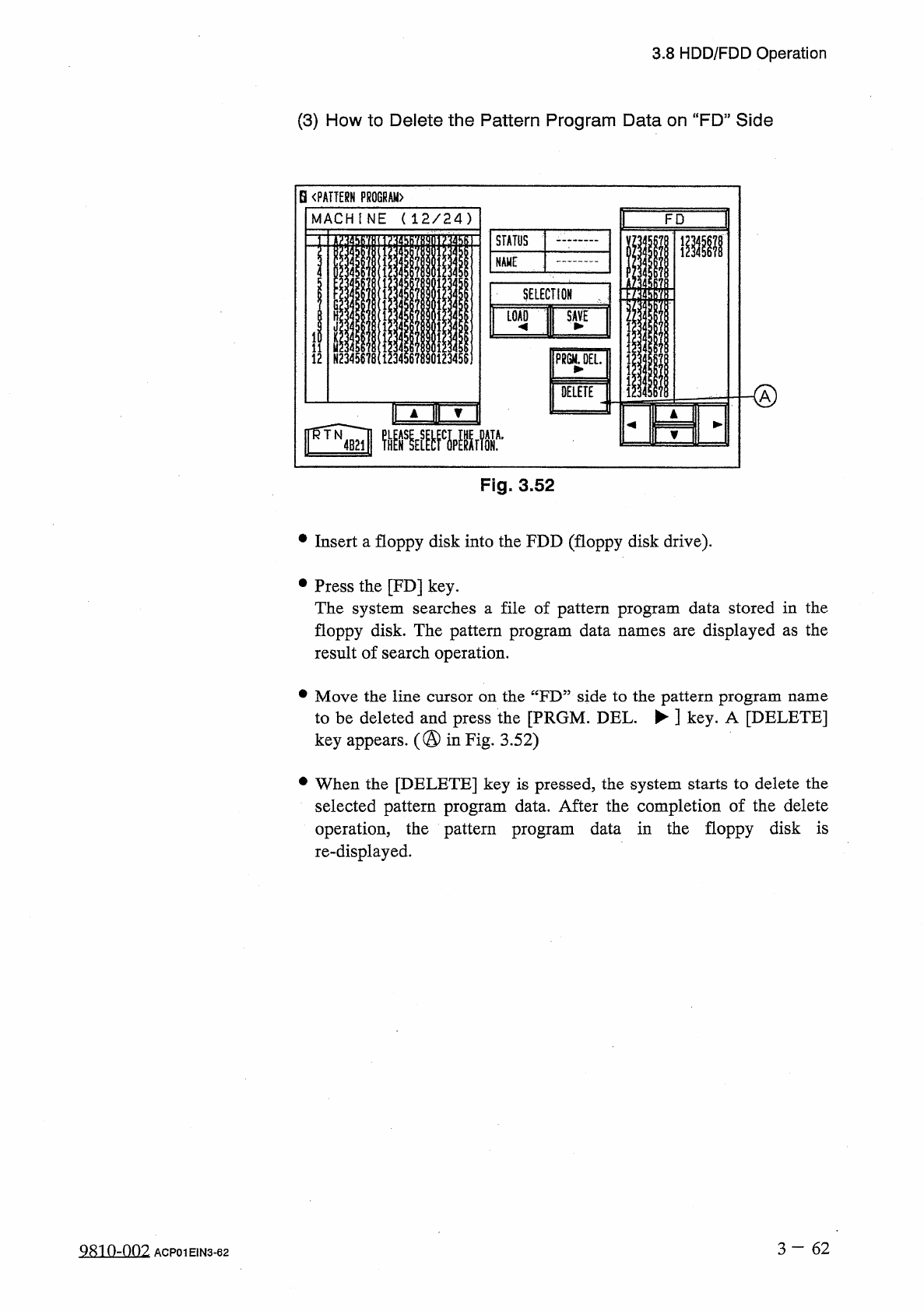
3.8 HDD / FDD Operation ( 3 ) How to Delete the Pattern Program Data on “ FD ” Side B 《 PATTERN PROGRAM 〉 M A C H I N E ( 1 2 / 2 4 ) F D STATUS I NAME III 4 ! 4 i 7 f SELECTION 4 0 LOAD | SAVE ii u N 2345678 ( 123456789…
3.8
HDD
/
FDD
Operation
Notes
:
(
a
)
When
a
file
in
the
floppy
disk
(
a
file
of
pattern
program
data
created
on
the
programming
device
side
)
keeps
the
pattern
program
data
to
be
used
exclusively
for
another
machine
and
is
replaced
with
the
new
one
,
the
exclusive
data
for
another
machine
is
deleted
.
To
keep
the
exclusive
data
stored
in
memory
,
follow
the
data
replacement
procedure
,
using
the
data
communi
-
cation
function
with
the
programming
device
.
(
b
)
Another
display
cannot
be
opened
during
save
operation
.
(
2
)
Load
Operation
(
FD
Machine
)
•
Insert
the
floppy
disk
(
the
disk
where
the
pattern
program
data
is
stored
)
into
the
FDD
(
floppy
disk
drive
)
.
•
Press
the
[
FD
]
key
.
The
system
searches
a
file
of
pattern
program
data
stored
in
the
floppy
disk
.
The
pattern
program
result
of
search
operation
.
•
Move
the
line
cursor
on
the
“
FD
”
side
to
the
pattern
program
data
name
to
be
loaded
and
press
the
[
LOAD
^
]
key
.
•
“
LOADING
”
appears
in
the
“
STATUS
”
text
box
,
indicating
that
the
data
is
being
loaded
.
When
the
data
is
loaded
normally
,
“
LOADED
”
appears
in
the
text
box
and
the
loaded
pattern
program
name
appears
on
the
“
MACHINE
”
side
.
When
an
error
is
found
during
load
operation
,
an
error
message
is
issued
and
the
load
operation
is
interrupted
.
displayed
as
the
names
are
[
Reference
]
When
the
pattern
program
data
having
the
same
name
is
found
on
the
machine
side
,
the
“
LOAD
PATTERN
PROGRAM
”
display
appears
on
the
screen
,
asking
whether
or
not
the
existing
data
should
be
replaced
with
a
new
one
.
Notes
:
(
a
)
The
another
display
cannot
be
opened
during
load
operation
.
(
b
)
When
the
loaded
pattern
program
data
contains
component
IDs
which
do
not
exist
in
the
component
library
data
on
the
machine
side
,
it
is
required
to
load
such
IDs
from
the
programming
device
.
(
c
)
The
number
of
data
types
to
be
loaded
onto
the
machine
side
is
24
types
in
maximum
and
the
total
number
of
steps
is
7
,
600
in
(
d
)
When
the
message
some
maximum
.
CANNOT
LOAD
DATA
BY
FD
LOAD
.
PLEASE
LOAD
BY
PC
COMMUNICATION
.
”
(
prohibited
operation
)
is
issued
during
data
reading
,
data
files
are
created
as
FD
-
unloadable
files
(
file
version
)
on
the
machine
side
.
After
downloading
the
data
onto
the
programming
device
,
transfer
it
to
the
machine
through
the
serial
communication
circuit
.
3
一
61
981
0
-
002
ACP
01
E
1
N
3
-
61
3.8
HDD
/
FDD
Operation
(
3
)
How
to
Delete
the
Pattern
Program
Data
on
“
FD
”
Side
B
《
PATTERN
PROGRAM
〉
MACHINE
(
12
/
24
)
FD
STATUS
I
NAME
III
4
!
4
i
7
f
SELECTION
4
0
LOAD
|
SAVE
ii
u
N
2345678
(
1234567890123456
]
12
PR
6
M
.
0
EL
.
O
DELETE
(
)
▲
r
▼
[
w
圆
WA
,
Fig
.
3.52
•
Insert
a
floppy
disk
into
the
FDD
(
floppy
disk
drive
)
.
•
Press
the
[
FD
]
key
.
The
system
searches
a
file
of
pattern
program
data
stored
in
the
floppy
disk
.
The
pattern
program
data
names
are
displayed
as
the
result
of
search
operation
.
•
Move
the
line
cursor
on
the
“
FD
”
side
to
the
pattern
program
name
to
be
deleted
and
press
the
[
PRGM
.
DEL
.
►
]
key
.
A
[
DELETE
]
key
appears
.
(
@
in
Fig
,
3.52
)
•
When
the
[
DELETE
]
key
is
pressed
,
the
system
starts
to
delete
the
selected
pattern
program
data
.
After
the
completion
of
the
delete
operation
,
the
pattern
program
data
in
the
floppy
disk
is
re
-
displayed
.
3
—
62
0
-
002
ACP
01
E
1
N
3
-
62
3.8
HDD
/
FDD
Operation
3.8
.
2
Saving
the
AH
Backup
Data
•
Temporary
Data
Saving
before
Version
Improvement
Operation
of
Machine
Software
•
Data
Analysis
after
Error
Occurrence
•
This
function
can
be
used
to
save
such
data
that
cannot
be
exchanged
between
the
machine
and
the
programming
device
.
Note
:
The
machine
is
not
provided
with
a
loading
function
of
all
backup
data
.
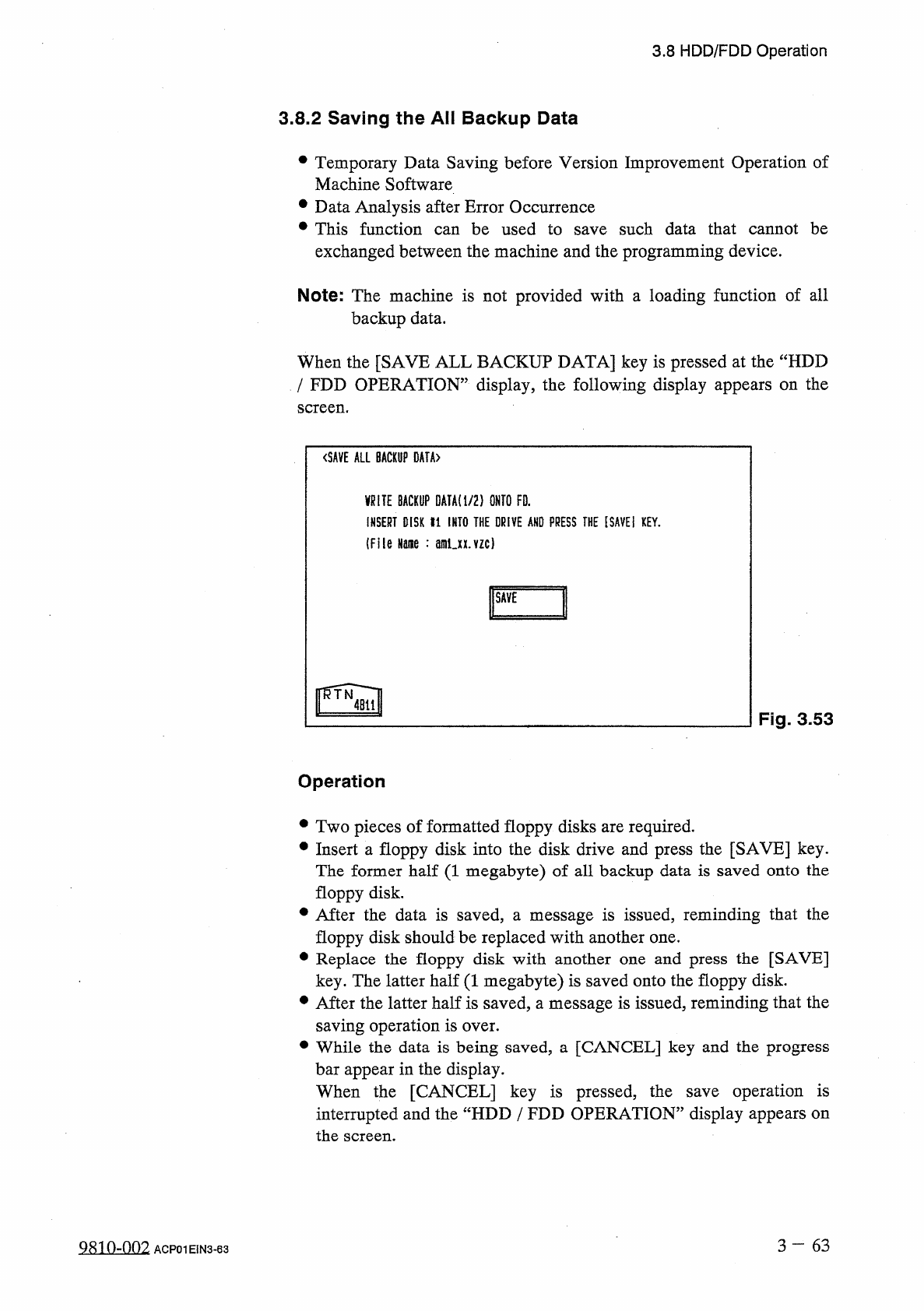
When
the
[
SAVE
ALL
BACKUP
DATA
]
key
is
pressed
at
the
“
HDD
/
FDD
OPERATION
”
display
,
the
following
display
appears
on
the
screen
.
<
SAVE
ALL
BACKUP
DATA
〉
_
BACKUP
DATA
!
i
/
2
)
ONTO
FD
.
INSERT
DISK
«
1
INTO
THE
DRIVE
ANO
PRESS
THE
[
SAVEI
KEY
.
(
File
Name
:
amux
.
vzc
)
F
~
1
Fig
.
3.53
Operation
•
Two
pieces
of
formatted
floppy
disks
are
required
.
•
Insert
a
floppy
disk
into
the
disk
drive
and
press
the
[
SAVE
]
key
.
The
former
half
(
1
megabyte
)
of
all
backup
data
is
saved
onto
the
floppy
disk
.
•
After
the
data
is
saved
,
a
message
is
issued
,
reminding
that
the
floppy
disk
should
be
replaced
with
another
one
.
•
Replace
the
floppy
disk
with
another
one
and
press
the
[
SAVE
]
key
.
The
latter
half
(
1
megabyte
)
is
saved
onto
the
floppy
disk
.
•
After
the
latter
half
is
saved
,
a
message
is
issued
,
reminding
that
the
saving
operation
is
over
.
•
While
the
data
is
being
saved
,
a
[
CANCEL
]
key
and
the
progress
bar
appear
in
the
display
.
When
the
[
CANCEL
]
key
is
pressed
,
the
interrupted
and
the
“
HDD
/
FDD
OPERATION
”
display
appears
on
screen
.
operation
is
save
the
3
一
63
9810
-
002
ACP
01
EIN
3
-
63