3MAINTENANCE__O.pdf - 第156页
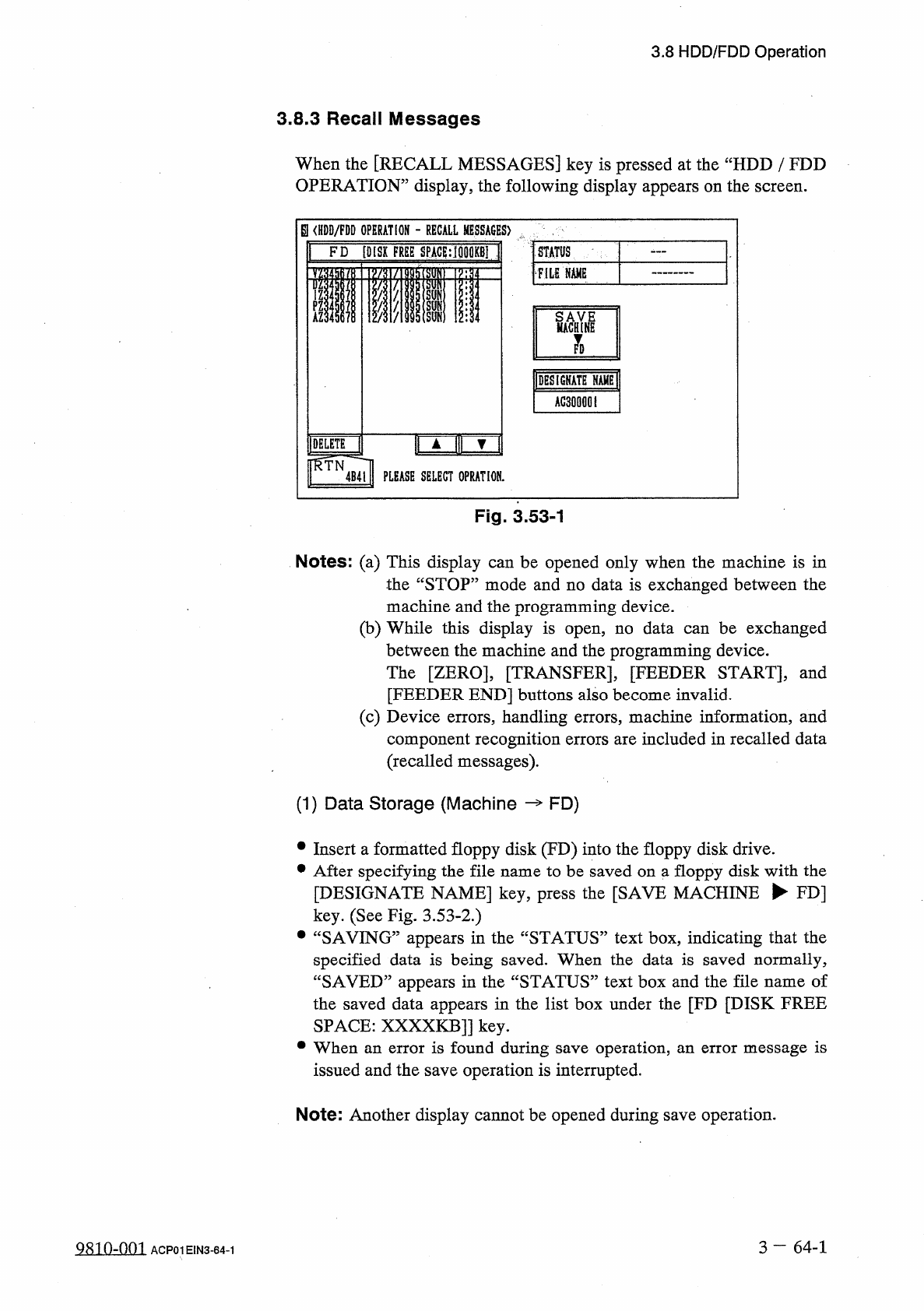
3.8 HDD / FDD Operation 3.8 . 3 Recall Messages When the [ RECALL MESSAGES ] key is pressed at the “ HDD / FDD OPERATION 55 display , the following display appears on the screen . B am / m OPERATION - RECALL MESSAGES ) F…
3.8
HDD
/
FDD
Operation
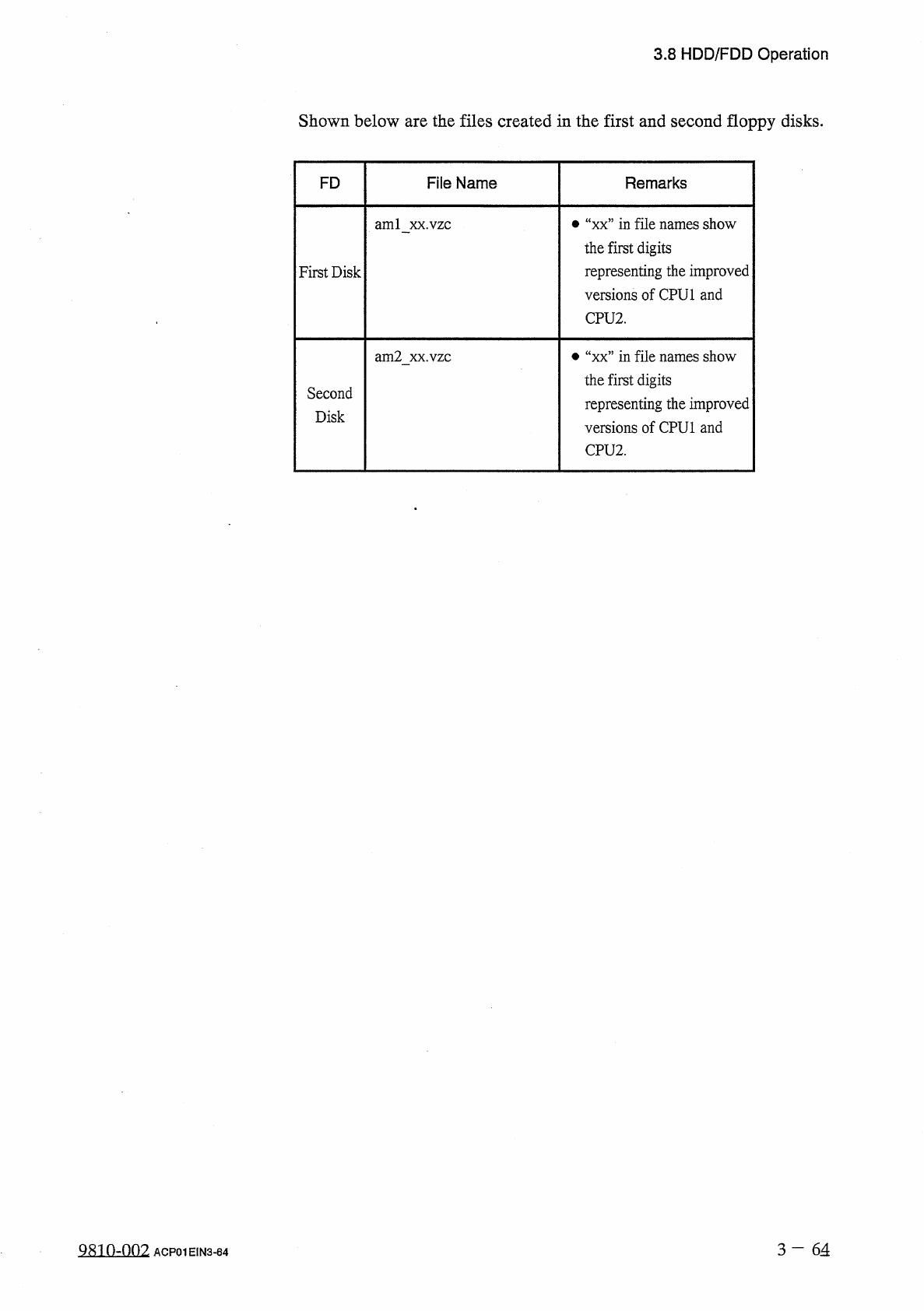
Shown
below
are
the
files
created
in
the
first
and
second
floppy
disks
.
FD
File
Name
Remarks
•
“
xx
”
in
file
names
show
the
first
digits
representing
the
improved
versions
of
CPU
1
and
CPU
2
.
ami
xx
.
vzc
First
Disk
•
“
xx
”
in
file
names
show
the
first
digits
representing
the
improved
versions
of
CPU
1
and
CPU
2
.
am
2
xx
.
vzc
Second
Disk
3
-
64
Q
810
-
n
02
ACP
01
EIN
3
-
64
3.8
HDD
/
FDD
Operation
3.8
.
3
Recall
Messages
When
the
[
RECALL
MESSAGES
]
key
is
pressed
at
the
“
HDD
/
FDD
OPERATION
55
display
,
the
following
display
appears
on
the
screen
.
B
am
/
m
OPERATION
-
RECALL
MESSAGES
)
FD
[
DISK
FREE
SPACE
:
細
0
K
81
S
PILE
NAME
Wi
1
DES
1
GKATE
NAMH
[
AG
3
Q
000
I
H
A
f H
?
[
DELETE
■
RTN
4
B
4
l
|
PLEASE
SELECT
OPRATION
.
Fig
.
3.53
-
1
Notes
:
(
a
)
This
display
can
be
opened
only
when
the
machine
is
in
the
“
STOP
”
mode
and
no
data
is
exchanged
between
the
machine
and
the
programming
device
.
(
b
)
While
this
display
is
open
,
no
data
can
be
exchanged
between
the
machine
and
the
programming
device
.
The
[
ZERO
]
,
[
TRANSFER
]
,
[
FEEDER
START
]
,
and
[
FEEDER
END
]
buttons
also
become
invalid
.
(
c
)
Device
errors
,
handling
errors
,
machine
information
,
and
component
recognition
errors
are
included
in
recalled
data
(
recalled
messages
)
.
(
1
)
Data
Storage
(
Machine
FD
)
•
Insert
a
formatted
floppy
disk
(
FD
)
into
the
floppy
disk
drive
.
•
After
specifying
the
file
name
to
be
saved
on
a
floppy
disk
with
the
[
DESIGNATE
NAME
]
key
,
press
the
[
SAVE
MACHINE
►
FD
]
key
.
(
See
Fig
.
3.53
-
2
.
)
•
“
SAVING
”
appears
in
the
“
STATUS
”
text
box
,
indicating
that
the
specified
data
is
being
saved
.
When
the
data
is
saved
normally
,
“
SAVED
”
appears
in
the
“
STATUS
”
text
box
and
the
file
name
of
the
saved
data
appears
in
the
list
box
under
the
[
FD
[
DISK
FREE
SPACE
:
XXXXKB
]]
key
.
•
When
an
error
is
found
during
save
operation
,
an
error
message
is
issued
and
the
save
operation
is
interrupted
.
Note
:
Another
display
cannot
be
opened
during
save
operation
.
3
一
64
-
1
9810
-
001
ACP
01
EIN
3
-
64
-
1
3.8
HDD
/
FDD
Operation
(
2
)
Designation
of
File
Name
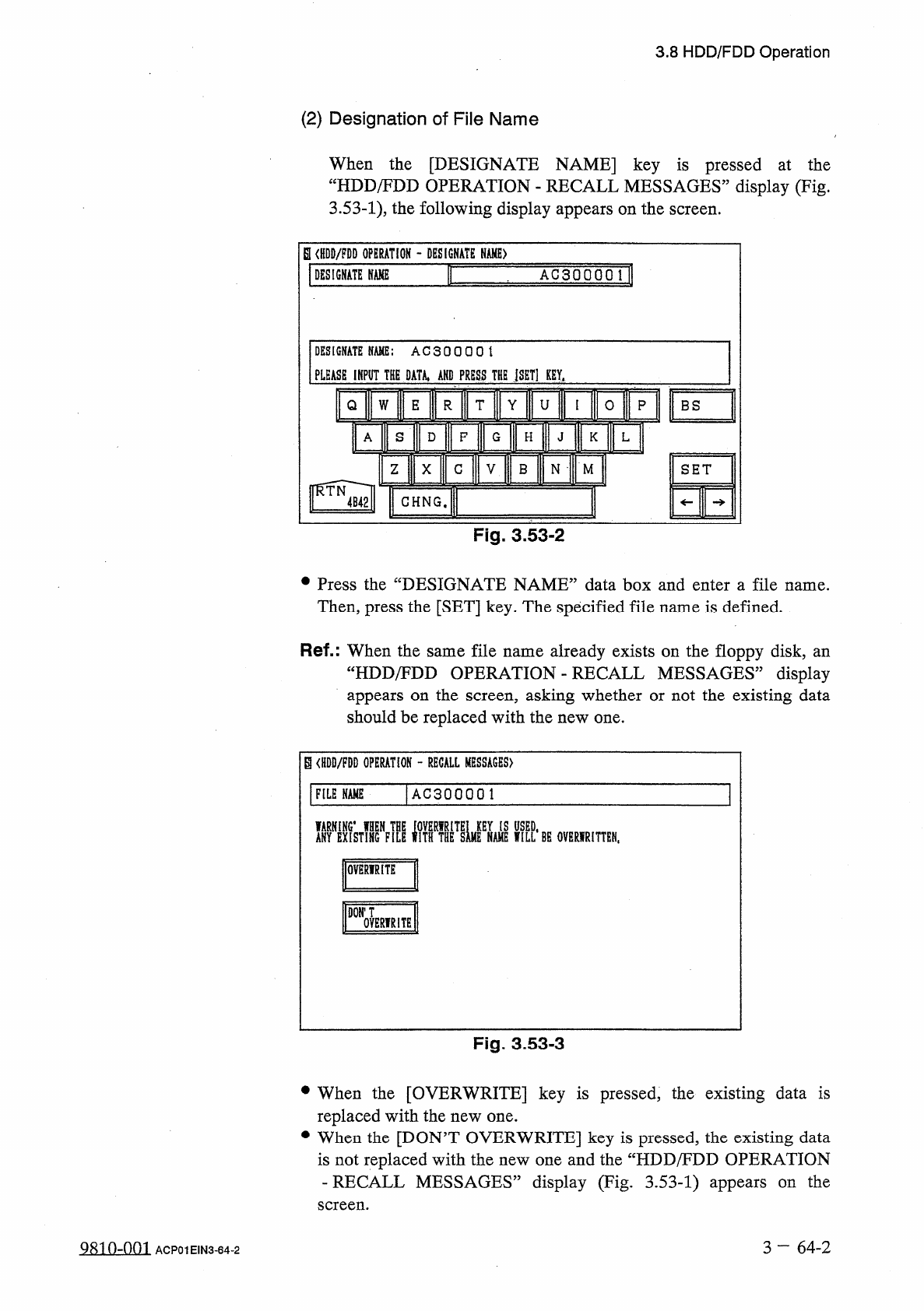
When
the
[
DESIGNATE
NAME
]
key
is
pressed
at
the
“
HDD
/
FDD
OPERATION
-
RECALL
MESSAGES
”
display
(
Fig
.
3.53
-
1
)
,
the
following
display
appears
on
the
screen
.
S
(
HDB
/
FDD
OPERATION
-
DESIGNATE
NAME
)
a
DESIGNATE
NAME
A G
3
Q
0
Q Q
DESIGNATE
NAME
:
AC
30000
\
PLEASE
1
KPUT
THE
DATA
,
AKD
PRESS
THE
jSET
]
KEY
,
I
W
E
T
Y
U
Q
R
0
P
BS
3
HIKIRFIF
H
K
L
z
X
G
V
B
N
•
M
GHNG
,
Fig
.
3.53
-
2
•
Press
the
“
DESIGNATE
NAME
”
data
box
and
enter
a
file
name
.
Then
,
press
the
[
SET
]
key
.
The
specified
file
name
is
defined
.
Ref
.
:
When
the
same
file
name
already
exists
on
the
floppy
disk
,
an
“
HDD
/
FDD
OPERATION
-
RECALL
MESSAGES
”
display
appears
on
the
screen
,
asking
whether
or
not
the
existing
data
should
be
replaced
with
the
new
one
.
B
〈
HDD
/
PDD
OPERATION
-
RECALL
MESSAGES
)
AC
300001
FILE
NAME
MM
NAME
WILL
1
BE
OVERIRITTEN
,
OVERWRITE
DON
'
T
OVERIRITE
Fig
.
3.53
-
3
•
When
the
[
OVERWRITE
]
key
is
pressed
,
the
existing
data
is
replaced
with
the
new
one
.
•
When
the
[
DON
’
T
OVERWRITE
]
key
is
pressed
,
the
existing
data
is
not
replaced
with
the
new
one
and
the
“
HDD
/
FDD
OPERATION
-
RECALL
MESSAGES
”
display
(
Fig
.
3.53
-
1
)
appears
on
the
screen
.
3
一
64
-
2
QRin
-
nm
ACP
01
EIN
3
-
64
-
2