3MAINTENANCE__O.pdf - 第159页
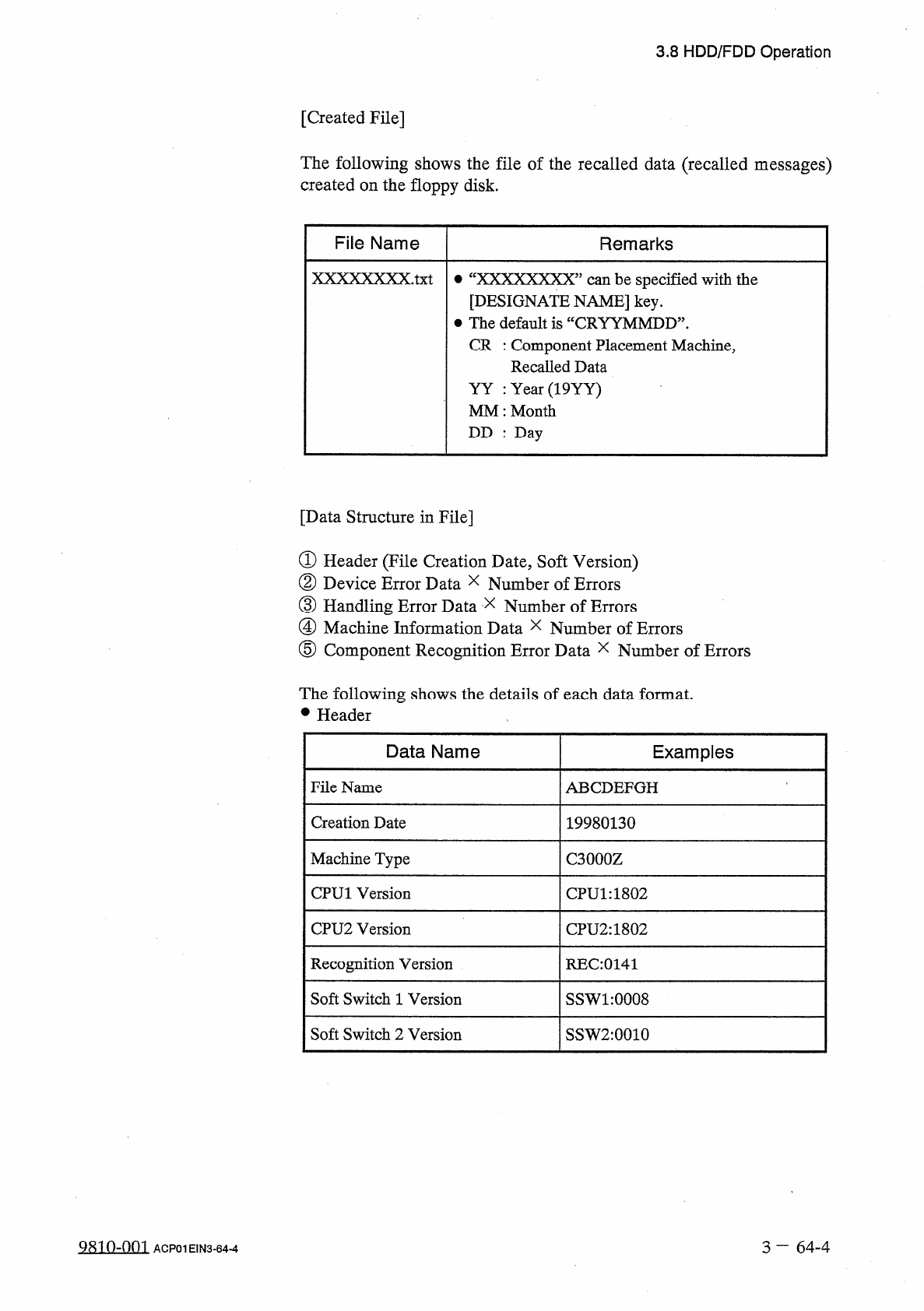
3.8 HDD / FDD Operation [ Created File ] The following shows the file of the recalled data ( recalled messages ) created on the floppy disk . File Name Remarks XXXXXXXX . txt 參 “ XXXXXXXX ” can be specified with the [ DE…
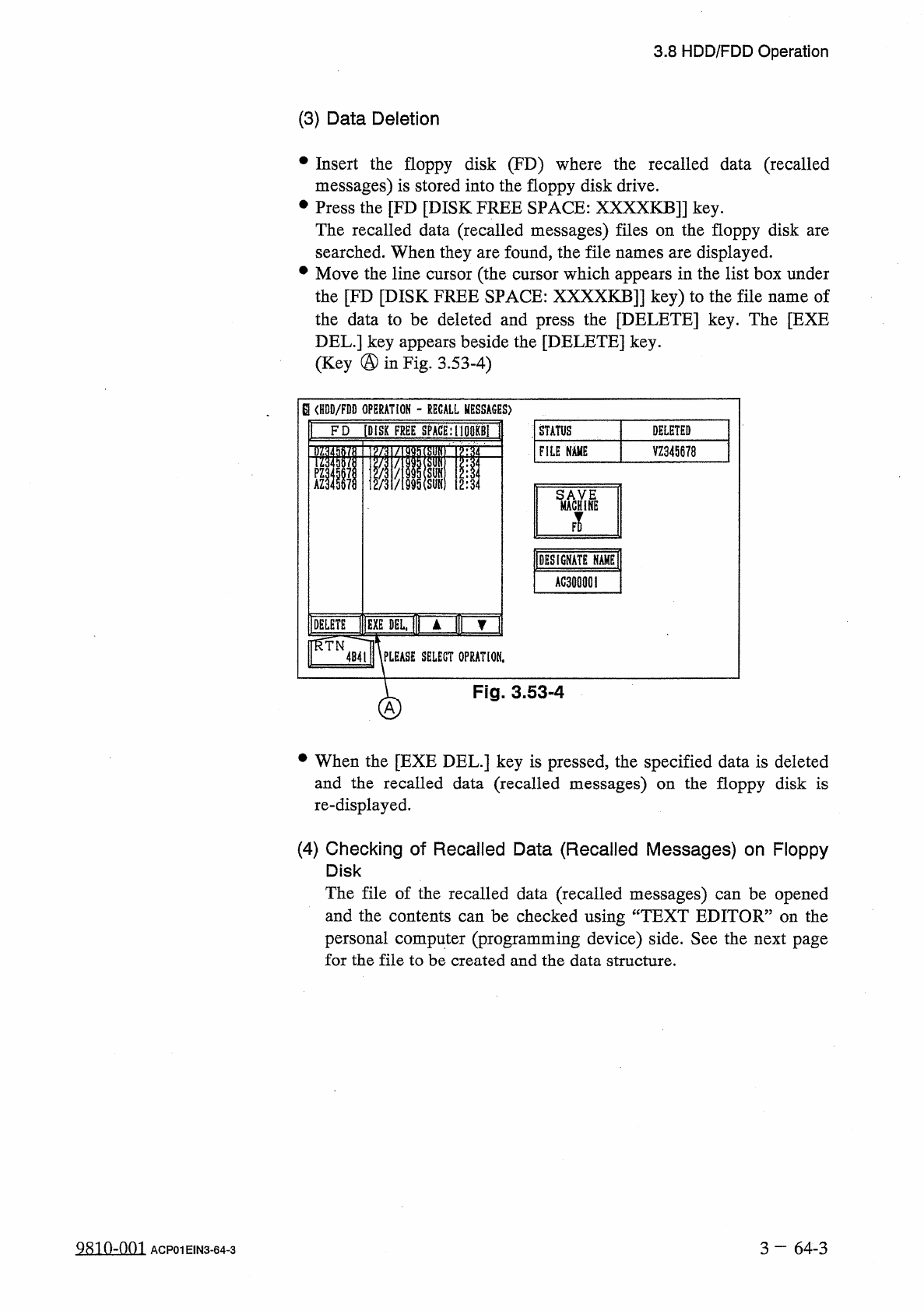
3.8
HDD
/
FDD
Operation
(
3
)
Data
Deletion
•
Insert
the
floppy
disk
(
FD
)
where
the
recalled
data
(
recalled
messages
)
is
stored
into
the
floppy
disk
drive
.
•
Press
the
[
FD
[
DISK
FREE
SPACE
:
XXXXKB
]]
key
.
The
recalled
data
(
recalled
messages
)
files
on
the
floppy
disk
are
searched
.
When
they
are
found
,
the
file
names
are
displayed
.
•
Move
the
line
cursor
(
the
cursor
which
appears
in
the
list
box
under
the
[
FD
[
DISK
FREE
SPACE
:
XXXXKB
]
]
key
)
to
the
file
name
of
the
data
to
be
deleted
and
press
the
[
DELETE
]
key
.
The
[
EXE
DEL
.
]
key
appears
beside
the
[
DELETE
]
key
.
(
Key
@
in
Fig
.
3.53
-
4
)
Q
<
HDD
/
FDD
OPERATION
-
RECALL
MESSAGES
)
r
STATUS
FD
[
DISK
FREE
SPACE
:
100
KB
1
DELETED
VZ
345678
FILE
NAME
SMACfni
|
DESIGNATE
NAME
;
AG
300001
DELETE
nMlC
I
▲
l
|
|
▼
"
RTN
4
B
41
\
PLEASE
SELECT
0
PRAT
10
M
.
Fig
.
3.53
-
4
A
•
When
the
[
EXE
DEL
.
]
key
is
pressed
,
the
specified
data
is
deleted
and
the
recalled
data
(
recalled
messages
)
on
the
floppy
disk
is
re
-
displayed
.
(
4
)
Checking
of
Recalled
Data
(
Recalled
Messages
)
on
Floppy
Disk
The
file
of
the
recalled
data
(
recalled
messages
)
can
be
opened
and
the
contents
can
be
checked
using
“
TEXT
EDITOR
”
on
the
personal
computer
(
programming
device
)
side
.
See
the
next
page
for
the
file
to
be
created
and
the
data
structure
.
QRin
^
nm
3
一
64
-
3
ACP
01
EIN
3
-
64
-
3
3.8
HDD
/
FDD
Operation
[
Created
File
]
The
following
shows
the
file
of
the
recalled
data
(
recalled
messages
)
created
on
the
floppy
disk
.
File
Name
Remarks
XXXXXXXX
.
txt
參
“
XXXXXXXX
”
can
be
specified
with
the
[
DESIGNATE
NAME
]
key
.
•
The
default
is
“
CRYYMMDD
”
.
CR
:
Component
Placement
Machine
,
Recalled
Data
YY
:
Year
(
19
YY
)
MM
:
Month
DD
:
Day
[
Data
Structure
in
File
]
①
Header
(
File
Creation
Date
,
Soft
Version
)
②
Device
Error
Data
x
Number
of
Errors
③
Handling
Error
Data
x
④
Machine
Information
Data
x
Number
of
Errors
⑤
Component
Recognition
Error
Data
x
Number
of
Errors
Number
of
Errors
The
following
shows
the
details
of
each
data
format
.
•
Header
Data
Name
Examples
File
Name
ABCDEFGH
Creation
Date
19980130
Machine
Type
C
3000
Z
CPU
1
Version
CPU
1
:
1802
CPU
2
Version
CPU
2
:
1802
Recognition
Version
REC
:
0141
Soft
Switch
1
Version
SSW
1
:
0008
Soft
Switch
2
Version
SSW
2
:
0010
9810
-
001
3
—
64
-
4
ACP
01
EIN
3
-
64
-
4
3.8
HDD
/
FDD
Operation
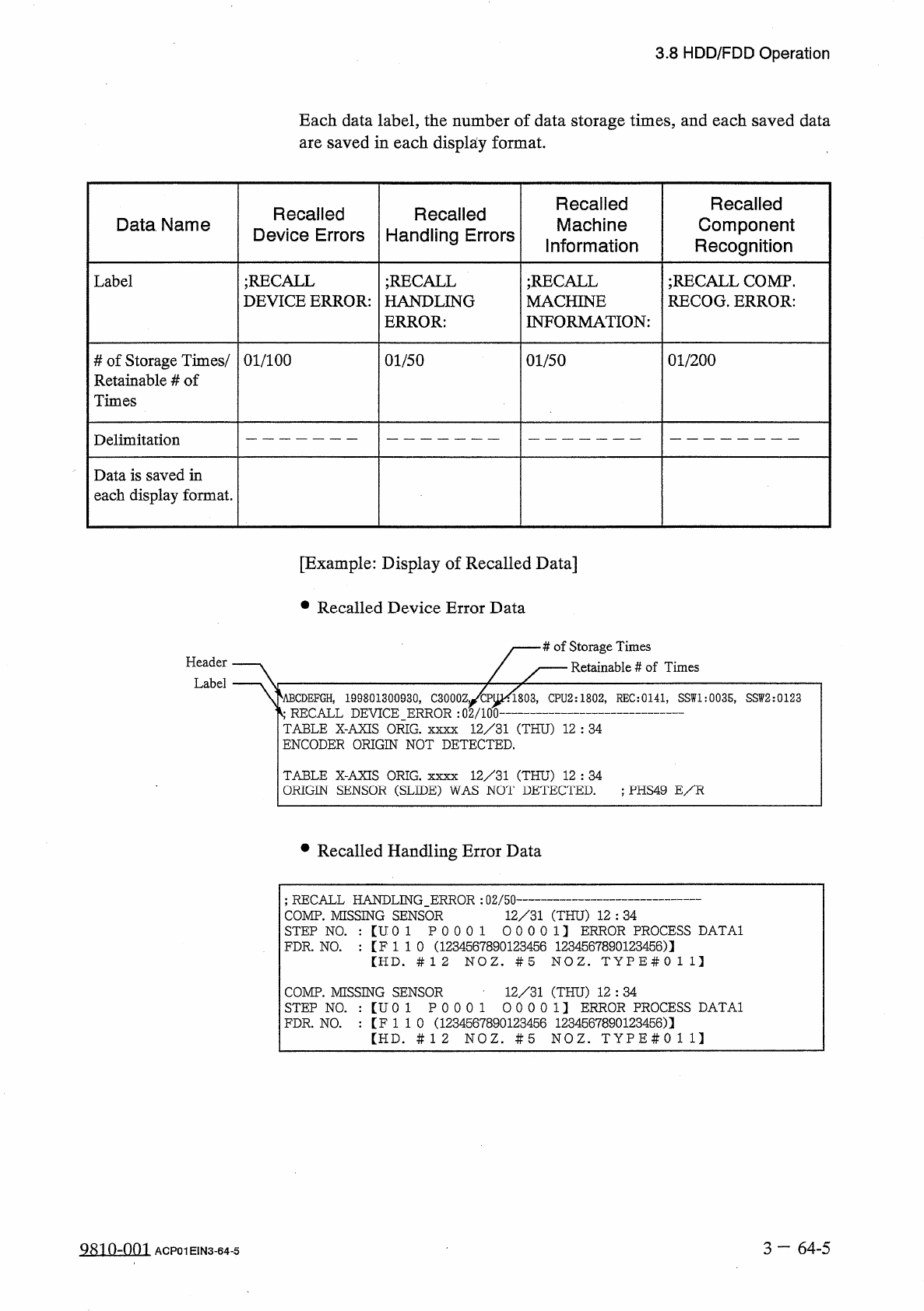
Each
data
label
,
the
number
of
data
storage
times
,
and
each
saved
data
are
saved
in
each
display
format
.
Recalled
Component
Recognition
Recalled
Machine
Information
Recalled
Device
Errors
Recalled
Handling
Errors
Data
Name
Label
;
RECALL
DEVICE
ERROR
:
;
RECALL
HANDLING
ERROR
:
;
RECALL
MACHINE
INFORMATION
:
;
RECALL
COMP
.
RECOG
.
ERROR
:
#
of
Storage
Times
/
Retainable
#
of
Times
01
/
100
01
/
50
01
/
50
01
/
200
Delimitation
Data
is
saved
in
each
display
format
.
[
Example
:
Display
of
Recalled
Data
]
•
Recalled
Device
Error
Data
#
of
Storage
Times
Retainable
#
of
Times
Header
Label
^
ABCDEFGH
,
199801300930
,
C
3000
Zj
/
CPUK
1803
,
CPU
2
:
1802
,
REC
:
0141
,
SSW
1
:
0035
,
SSW
2
:
0123
4
RECALL
DEVICE
ERROR
:
02
/
100
TABLE
X
-
AXIS
ORIG
.
xxxx
12
/
31
(
THU
)
12
:
34
ENCODER
ORIGIN
NOT
DETECTED
.
TABLE
X
-
AXIS
ORIG
.
xxxx
12
/
31
(
THU
)
12
:
34
ORIGIN
SENSOR
(
SLIDE
)
WAS
NOT
DETECTED
.
;
PHS
49
E
/
R
•
Recalled
Handling
Error
Data
;
RECALL
HANDLING
_
ERROR
:
02
/
50
-
COMP
.
MISSING
SENSOR
12
/
31
(
THU
)
12
:
34
STEP
N O
.
:
【
U
0
1
P
0
0
0
1
0
0
0
0
1
】
ERROR
PROCESS
DATA
1
FDR
.
N O
.
:
【
F
1
1
0
(
1234567890123456
1234567890123456
)
】
【
HD
.
#
12
N O Z
.
#
5
N O Z
.
T Y P E
#
0 1 1
】
12
/
31
(
THU
)
12
:
34
COMP
.
MISSING
SENSOR
STEP
Na
:
【
U
01
P
0 0 0 1
0 0 0 0 1
】
ERROR
PROCESS
DATA
1
FDR
.
N O
.
:
【
F
1
1
0
(
1234567890123456
1234567890123456
)
]
【
HD
.
#
12
N O Z
.
#
5
N O Z
.
T Y P E
#
0 1 1
】
3
一
64
-
5
9810
-
001
ACP
01
EIN
3
-
64
-
5