3MAINTENANCE__O.pdf - 第165页
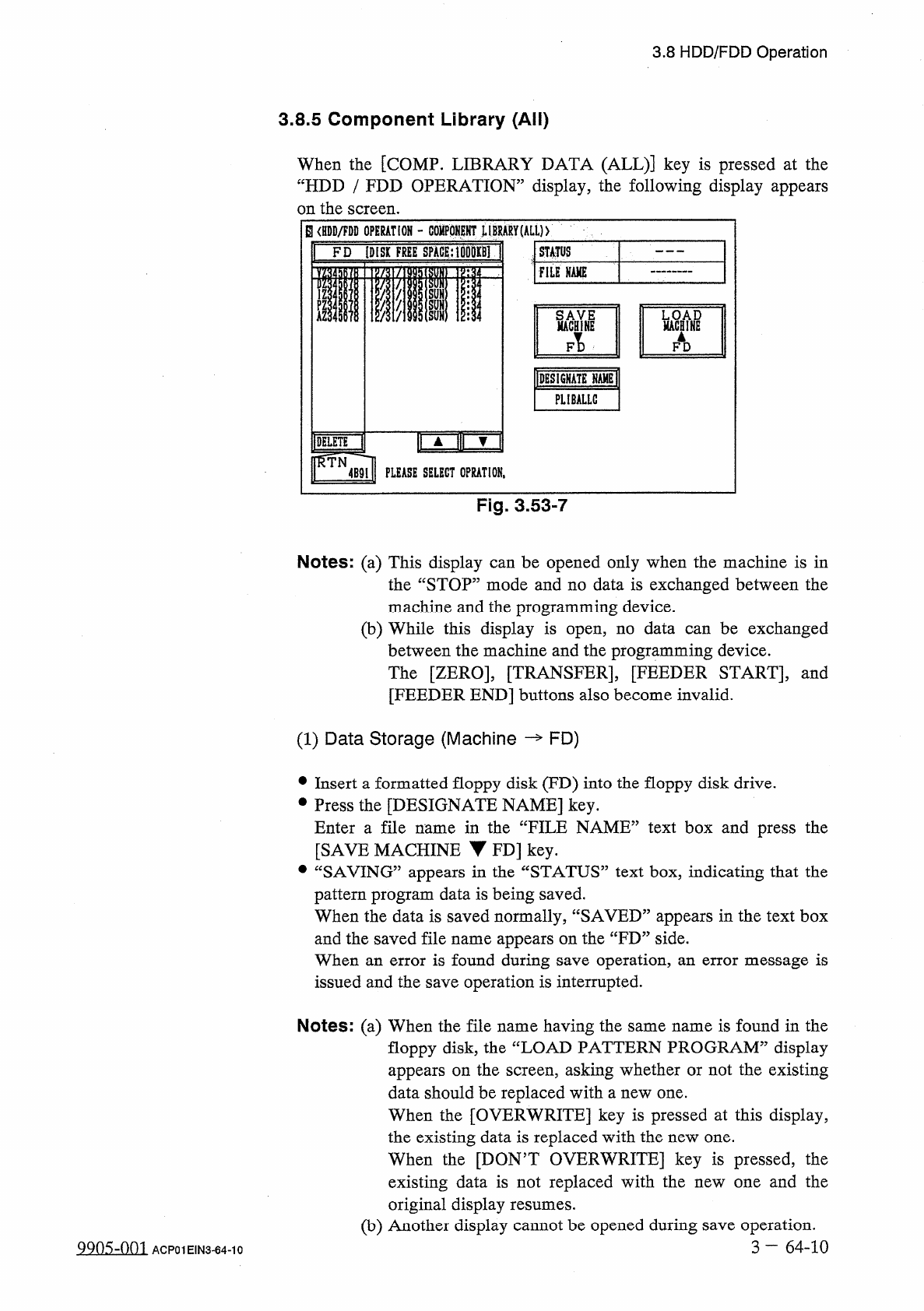
3.8 HDD / FDD Operation 3.8 . 5 Component Library ( All ) When the [ COMP . LIBRARY DATA ( ALL ) ] key is pressed at the “ HDD / FDD OPERATION ” display , the following display appears on the screen . B < HDD / FDD OP…
3.8
HDD
/
FDD
Operation
⑶
How
to
Delete
the
Offset
Data
on
“
FD
”
Side
•
Insert
a
floppy
disk
(
FD
)
into
the
floppy
disk
drive
(
FDD
)
.
•
Press
the
[
FD
[
DISK
FREE
SPACE
:
XXXXKB
]
]
key
.
The
pattern
program
data
files
When
they
are
found
,
the
file
names
are
displayed
.
•
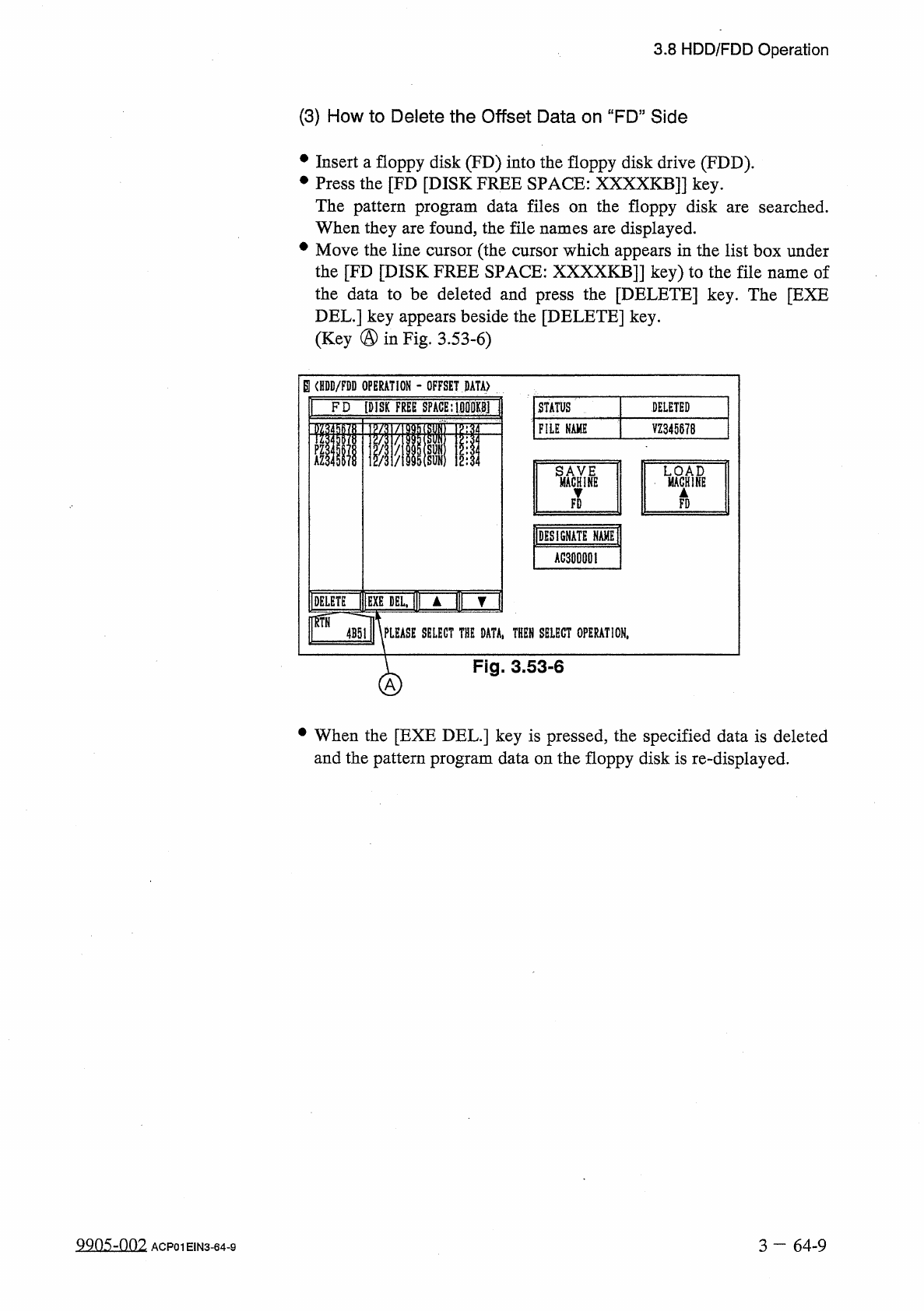
Move
the
line
cursor
(
the
cursor
which
appears
in
the
list
box
under
the
[
FD
[
DISK
FREE
SPACE
:
XXXXKB
]]
key
)
to
the
file
name
of
the
data
to
be
deleted
and
press
the
[
DELETE
]
key
.
The
[
EXE
DEL
.
]
key
appears
beside
the
[
DELETE
]
key
.
(
Key
®
in
Fig
.
3.53
-
6
)
the
floppy
disk
are
searched
.
on
B
〈
HDD
/
FDD
OPERATION
-
OFFSET
DATA
)
DELETED
FD
[
DISK
FREE
SPACE
:
U
1
娜
M
STATUS
FILE
KAME
VZ
34567
B
LM
?
CHIFE
▲
IDESIGNATE
NAME
]
AG
30000
I
IIIEXEDEUII
A
|
|
|
▼
1
\
PLEASE
SELECT
THE
DATA
,
THEN
SELECT
OPERATION
,
DELETE
4
B
5
ll
Fig
.
3.53
-
6
A
•
When
the
[
EXE
DEL
.
]
key
is
pressed
,
the
specified
data
is
deleted
and
the
pattern
program
data
on
the
floppy
disk
is
re
-
displayed
.
3
一
64
-
9
ACP
01
EIN
3
-
64
-
9
3.8
HDD
/
FDD
Operation
3.8
.
5
Component
Library
(
All
)
When
the
[
COMP
.
LIBRARY
DATA
(
ALL
)
]
key
is
pressed
at
the
“
HDD
/
FDD
OPERATION
”
display
,
the
following
display
appears
on
the
screen
.
B
<
HDD
/
FDD
OPERATION
-
COHPQKEHT
MBRARY
(
ALL
)
>
1
FD
[
DISK
FREE
SPACE
:
1
刪现
|
STATUS
FllE
NAME
ii
§
WBYNE
WcH
^
AZ
FAD
FT
)
IDESIGNATEIAMEI
PLIBALLG
□
mm
4
B
9
l
|
PLEASE
SELECT
0
PRAT
10
N
.
DELETE
nmi
Fig
.
3.53
-
7
Notes
:
(
a
)
This
display
can
be
opened
only
when
the
machine
is
in
the
“
STOP
”
mode
and
no
data
is
exchanged
between
the
machine
and
the
programming
device
.
(
b
)
While
this
display
is
open
,
no
data
can
be
exchanged
between
the
machine
and
the
programming
device
.
The
[
ZERO
]
,
[
TRANSFER
]
,
[
FEEDER
START
]
,
and
[
FEEDER
END
]
buttons
also
become
invalid
.
(
1
)
Data
Storage
(
Machine
—
FD
)
•
Insert
a
formatted
floppy
disk
(
FD
)
into
the
floppy
disk
drive
.
•
Press
the
[
DESIGNATE
NAME
]
key
.
Enter
a
file
name
in
the
“
FILE
NAME
”
text
box
and
press
the
[
SAVE
MACHINE
▼
FD
]
key
.
•
“
SAVING
”
appears
in
the
“
STATUS
”
text
box
,
indicating
that
the
pattern
program
data
is
being
saved
.
When
the
data
is
saved
normally
,
“
SAVED
”
appears
in
the
text
box
and
the
saved
file
name
appears
on
the
“
FD
”
side
.
When
an
error
is
found
during
save
operation
,
an
error
message
is
issued
and
the
save
operation
is
interrupted
.
Notes
:
(
a
)
When
the
file
name
having
the
same
name
is
found
in
the
floppy
disk
,
the
“
LOAD
PATTERN
PROGRAM
”
display
appears
on
the
screen
,
asking
whether
or
not
the
existing
data
should
be
replaced
with
a
new
one
.
When
the
[
OVERWRITE
]
key
is
pressed
at
this
display
,
the
existing
data
is
replaced
with
the
new
one
.
When
the
[
DON
,
T
OVERWRITE
]
key
is
pressed
,
the
existing
data
is
not
replaced
with
the
new
one
and
the
original
display
(
b
)
Another
display
cannot
be
opened
during
save
operation
.
3
—
64
-
10
resumes
.
9905
-
001
ACP
01
EIN
3
-
64
-
10
3.8
HDD
/
FDD
Operation
(
2
)
Load
Operation
(
FD
—
Machine
)
•
Insert
the
floppy
disk
(
the
disk
where
the
component
library
data
files
is
stored
)
into
the
FDD
(
floppy
disk
drive
)
.
•
Press
the
[
FD
]
key
.
The
component
library
data
files
stored
in
the
floppy
disk
are
searched
.
The
pattern
program
names
are
displayed
as
the
result
of
search
operation
.
•
Move
the
line
cursor
on
the
“
FD
”
side
to
the
pattern
program
data
name
to
be
loaded
and
press
the
[
LOAD
MACHINE
M
FD
]
key
.
•
“
LOADING
”
appears
in
the
“
STATUS
”
text
box
,
indicating
that
the
data
is
being
loaded
.
When
the
data
is
loaded
normally
,
“
LOADED
”
appears
in
the
text
box
and
the
loaded
pattern
program
name
appears
on
the
“
MACHINE
”
side
.
When
an
error
is
found
during
load
operation
,
an
error
message
is
issued
and
the
load
operation
is
interrupted
.
Note
:
The
another
display
cannot
be
opened
during
load
operation
.
(
3
)
How
to
delete
the
component
library
data
files
on
the
floppy
disks
•
Insert
a
floppy
disk
into
the
FDD
(
floppy
disk
drive
)
.
•
Press
the
[
FD
]
key
.
The
component
library
data
files
stored
in
the
floppy
disk
searched
.
The
file
names
are
displayed
as
the
result
of
search
operation
.
•
Move
the
line
cursor
on
the
pattern
program
name
to
be
deleted
and
press
the
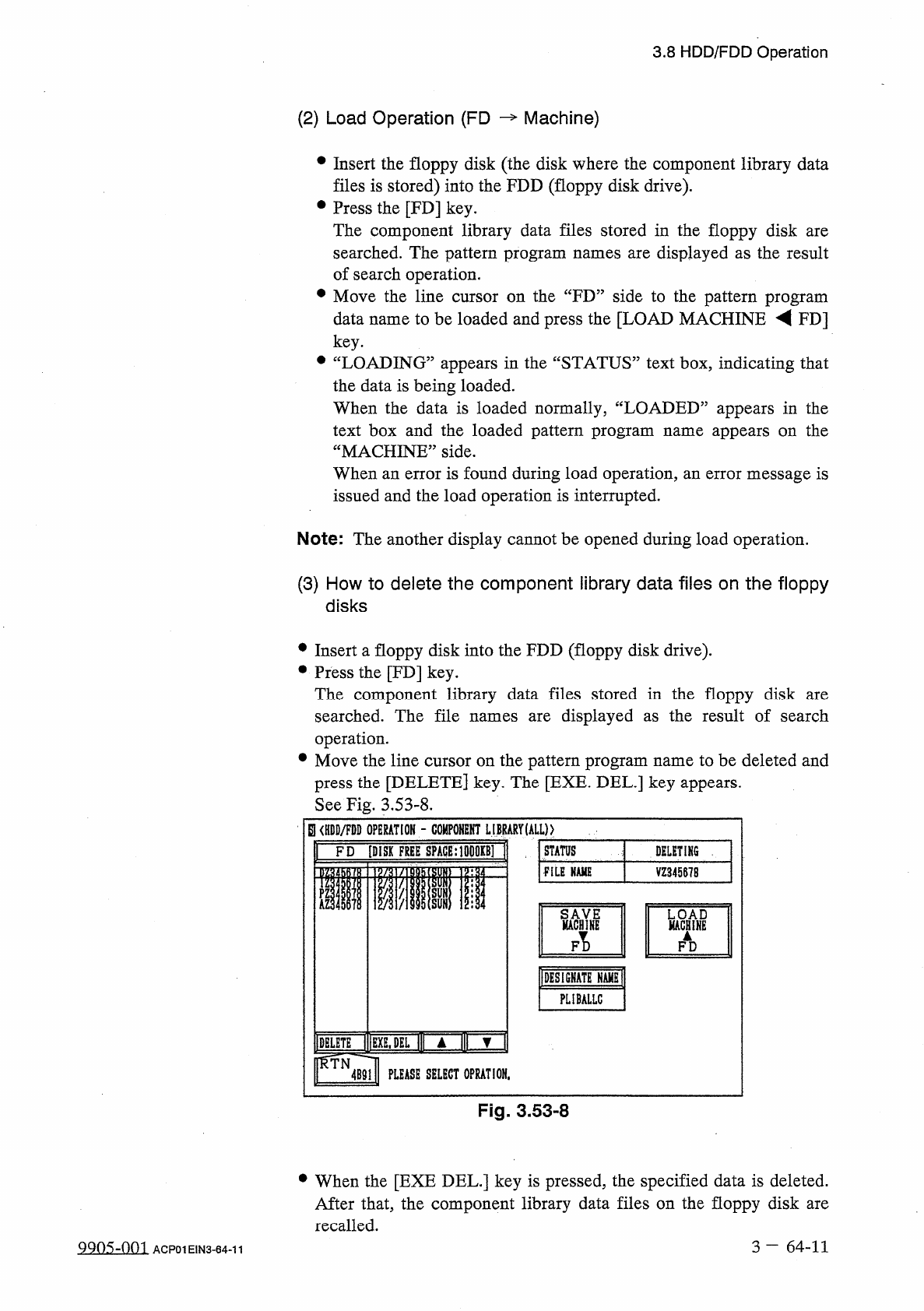
[
DELETE
]
key
.
The
[
EXE
.
DEL
.
]
key
appears
.
See
Fig
.
3.53
-
8
.
S
<
HDD
/
FDD
OPERATION
-
COMPONENT
L
调
ARYULLp
.
FD
[
DISK
FREE
SPACE
:
1
DD
0
KB
]
are
STATUS
DELETING
,
FILE
NAME
l
VZ
345678
PZ
kl
MACHYNH
KWHINB
FI
)
FD
IDESIGHATE
HAHHl
PLIBALLC
IDHLETE
|
|
|
EXE
,
DEL
l
|
l
A
1
»
▼
rSTN
^
l
4
B
91
PLEASE
SELECT
OPRATION
,
Fig
.
3.53
-
8
•
When
the
[
EXE
DEL
.
]
key
is
pressed
,
the
specified
data
is
deleted
.
After
that
,
the
component
library
data
files
on
the
floppy
disk
are
recalled
.
3
-
64
-
11
QQ
05
-
001
ACP
01
EIN
3
-
64
-
11