3MAINTENANCE__O.pdf - 第178页
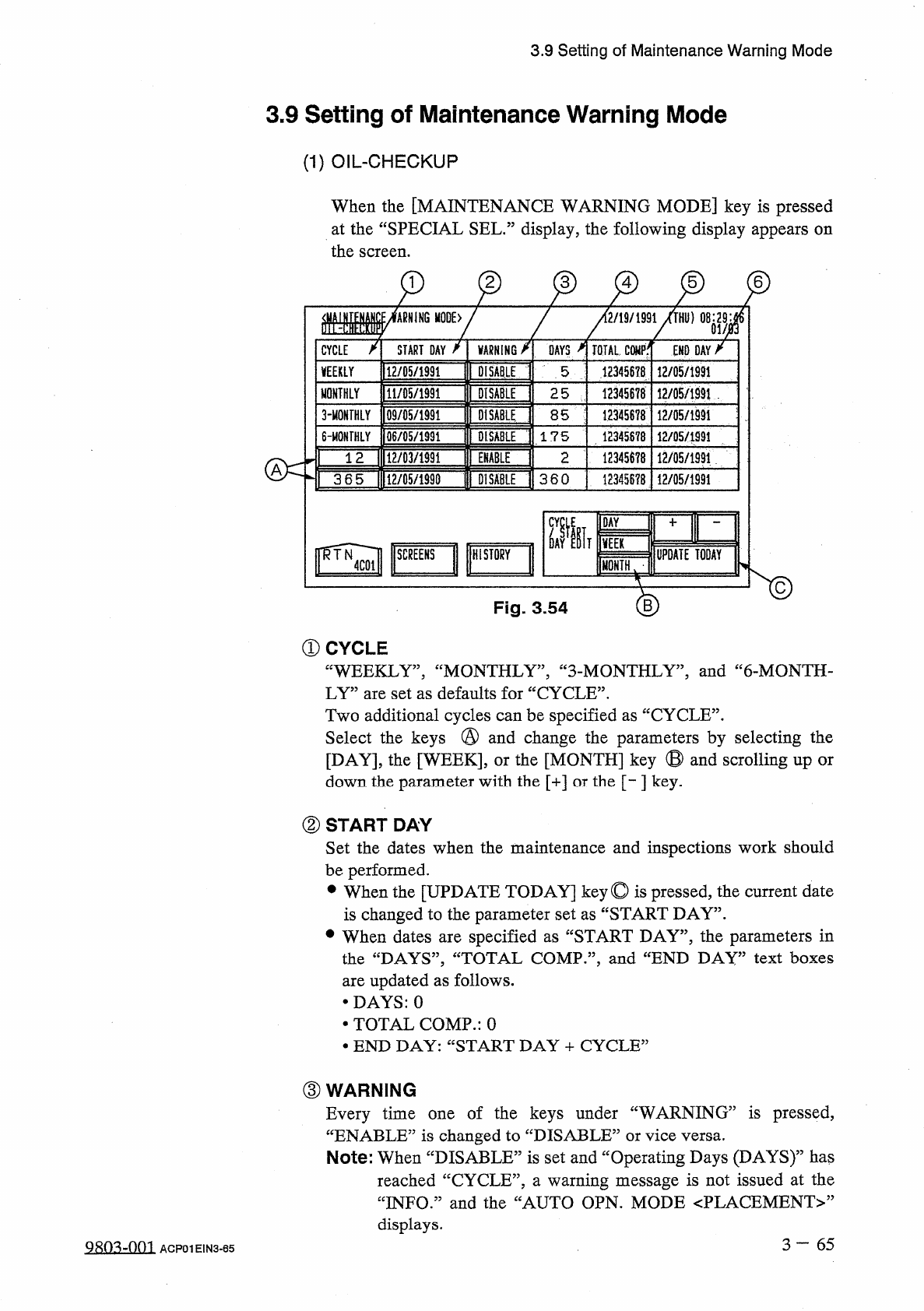
3.9 Setting of Maintenance Warning Mode 3.9 Setting of Maintenance Warning Mode ( 1 ) OIL - CHECKUP When the [ MAINTENANCE WARNING MODE ] key is pressed at the “ SPECIAL SEL • ” display , the following display appears on…
3.8
HDD
/
FDD
Operation
(
2
)
How
to
Delete
the
Bypass
&
Rate
Data
on
“
FD
”
Side
Insert
a
floppy
disk
(
FD
)
into
the
floppy
disk
drive
(
FDD
)
.
Press
the
[
FD
[
DISK
FREE
SPACE
:
XXXXKB
]]
key
.
The
bypass
&
rate
data
on
the
floppy
disk
is
searched
.
When
the
component
IDs
are
found
,
they
are
displayed
.
Move
the
line
cursor
(
the
line
cursor
which
appears
in
the
list
box
under
the
[
FD
[
DISK
FREE
SPACE
:
XXXXKB
]]
key
)
to
the
file
name
of
the
data
to
be
deleted
and
press
the
[
DELETE
]
key
.
The
[
EXE
DEL
.
]
key
appears
beside
the
[
DELETE
]
key
.
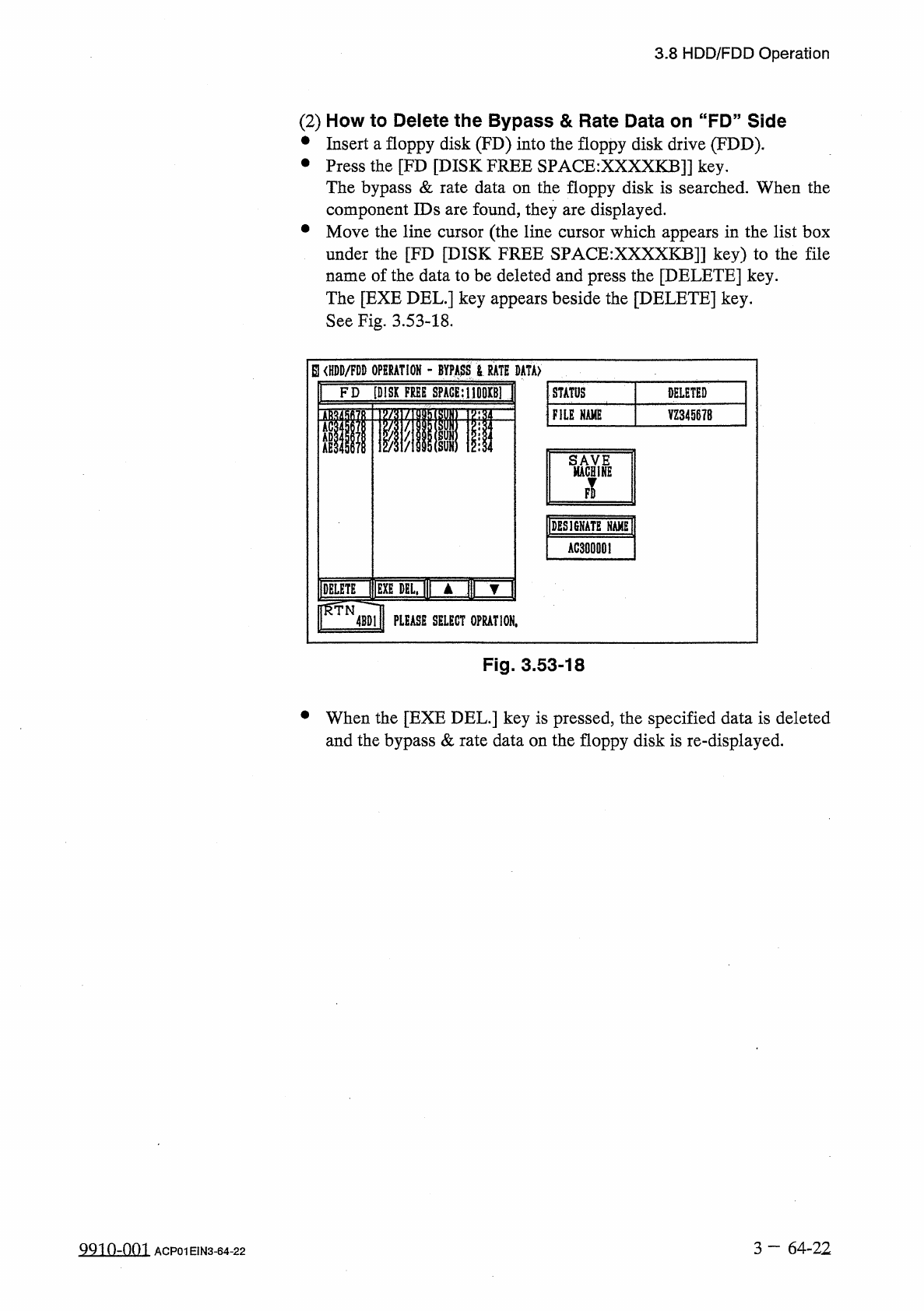
See
Fig
.
3.53
-
18
.
參
參
EUHDD
/
FDD
OPERATION
_
BYPASS
>
RATE
DATA
)
FD
[
DISK
FREE
SPACE
;
I
|
001
tBl
STATUS
DELETED
FILE
NAME
YZ
34567
B
im
llAGHli
IDESISNATE
AC
300001
IDELETE
lUmTELj
▲
fl
]
rNJ
PLEASE
SELECT
0
PRAT
10
N
,
Fig
.
3.53
-
18
•
When
the
[
EXE
DEL
.
]
key
is
pressed
,
the
specified
data
is
deleted
and
the
bypass
&
rate
data
on
the
floppy
disk
is
re
-
displayed
.
3
—
64
-
22
QQio
-
nm
ACP
01
EIN
3
-
64
-
22
3.9
Setting
of
Maintenance
Warning
Mode
3.9
Setting
of
Maintenance
Warning
Mode
(
1
)
OIL
-
CHECKUP
When
the
[
MAINTENANCE
WARNING
MODE
]
key
is
pressed
at
the
“
SPECIAL
SEL
•
”
display
,
the
following
display
appears
on
the
screen
.
p
p
2
6
[
2
/
19
/
1991
/
THU
)
fARNING
_
E
>
VARMING
/
ENO
DAY
/
START
DAY
CYCLE
DAYS
TOTAL
,
COMP
^
DISABLE
:
.
12345678
12
/
05
/
1991
5
12
/
05
/
1991
WEEKLY
"
PISABii
MONTHLY
11
/
05
/
1991
12345678
25
12
/
05
/
1991
123456
?
8
3
-
MONTHLY
09
/
05
/
1991
DISABLE
,
85
12
/
05
/
1991
DISABLE
6
-
MONTHLY
12345878
06
/
Q
5
/
1991
175
12
/
05
/
1
S
91
12
/
05
/
1991
12
/
03
/
1991
ENABLE
2
12345678
1 2
360
365
12
/
05
/
199
Q
DISABLE
12345578
12
/
05
/
1991
CY
(
DAY
'
Ml
画
1
^
1
SCREENS
UPDATE
TODAY
HISTORY
MONTH
v
Fig
.
3.54
①
CYCLE
“
WEEKLY
”
,
“
MONTHLY
”
,
“
3
-
MONTHLY
,,
,
and
“
6
-
MONTH
-
LY
”
are
set
as
defaults
for
“
CYCLE
”
.
Two
additional
cycles
can
be
specified
as
“
CYCLE
”
.
Select
the
keys
@
and
change
the
parameters
by
selecting
the
[
DAY
]
,
the
[
WEEK
]
,
or
the
[
MONTH
]
key
⑬
and
scrolling
up
down
the
parameter
with
the
[
+
]
or
the
[
-
]
key
.
or
②
START
DAY
Set
the
dates
when
the
maintenance
and
inspections
work
should
be
performed
.
•
When
the
[
UPDATE
TODAY
]
key
©
is
pressed
,
the
current
date
is
changed
to
the
parameter
set
as
“
START
DAY
”
.
•
When
dates
are
specified
as
“
START
DAY
”
,
the
parameters
in
the
“
DAYS
”
,
“
TOTAL
COMP
”
,
and
“
END
DAY
”
text
boxes
are
updated
as
follows
.
•
DAYS
:
0
•
TOTAL
COMP
.
:
0
•
END
DAY
:
“
START
DAY
+
CYCLE
”
③
WARNING
Every
time
one
of
the
keys
under
“
WARNING
”
is
pressed
,
“
ENABLE
”
is
changed
to
“
DISABLE
:
Note
:
When
“
DISABLE
”
is
set
and
“
Operating
Days
(
DAYS
)
55
has
reached
“
CYCLE
”
,
a
warning
message
is
not
issued
at
the
“
INFO
.
”
and
the
“
AUTO
OPN
.
MODE
<
PLACEMENT
>
,
,
displays
.
or
vice
versa
.
3
—
65
Q
8
Q
3
-
001
ACP
01
EIN
3
-
65
3.9
Setting
of
Maintenance
Warning
Mode
④
DAYS
Number
of
Days
counted
from
“
START
DAY
”
Days
are
added
regardless
of
the
operating
time
and
condition
of
the
machine
.
Note
:
When
“
DAYS
”
reaches
“
END
DAY
”
,
the
background
color
turns
red
.
⑤
TOTAL
COMP
.
Number
of
Components
picked
up
during
automatic
operation
,
starting
from
“
START
DAY
”
The
parameters
can
be
used
to
check
the
operating
condition
of
the
machine
,
starting
from
“
START
DAY
”
.
⑥
END
DAY
Date
counted
from
“
START
DAY
”
The
displayed
date
shows
“
START
DAY
+
CYCLE
”
and
a
warning
message
is
issued
on
the
date
when
“
ENABLE
”
is
set
in
the
data
box
of
the
label
“
WARNING
”
.
3
一
66
gRo
^
-
om
ACP
01
EIN
3
-
66