3MAINTENANCE__O.pdf - 第181页
3.9 Setting of Maintenance Warning Mode ④ TERM : DAYS and TOTAL COMP . Different from the lubrication and inspections work for which the maintenance term is designated , the maintenance and inspections work can be perfor…
3.9
Setting
of
Maintenance
Warning
Mode
(
2
)
UPKEEP
-
CHECKUP
When
the
[
SCREENS
]
key
is
pressed
at
the
“
MAINTENANCE
WARNING
MODE
(
OIL
-
CHECKUP
)
”
display
,
the
following
display
appears
on
the
screen
.
2
,
LN
12
/
19
/
1991
(
THU
)
08
:
^
9
M
^
GROUP
START
DAY
VARN
16
DAYS
TOTAL
COMP
.
END
DAY
112
/
00
/
1991
DISABLE
NOZZLE
.
5
12345678
12
/
05
/
1991
112
/
00
/
1991
12
/
05
/
1491
FILTER
#
1
DISABLE
5
12345678
FILTER
t
2
DISABLE
5
12345678
12
/
05
/
1991
TERM
DAYS
m
»
1000
NOZZLE
5
B
1
QQ
00
疆
COMP
.
2
FILTER
51
1
QB
tooooo
12345678
FILTER
#
2
15
B
SIT
w
眶
HISTORY
UPDATE
TODAY
[
MONTH
Fig
.
3.55
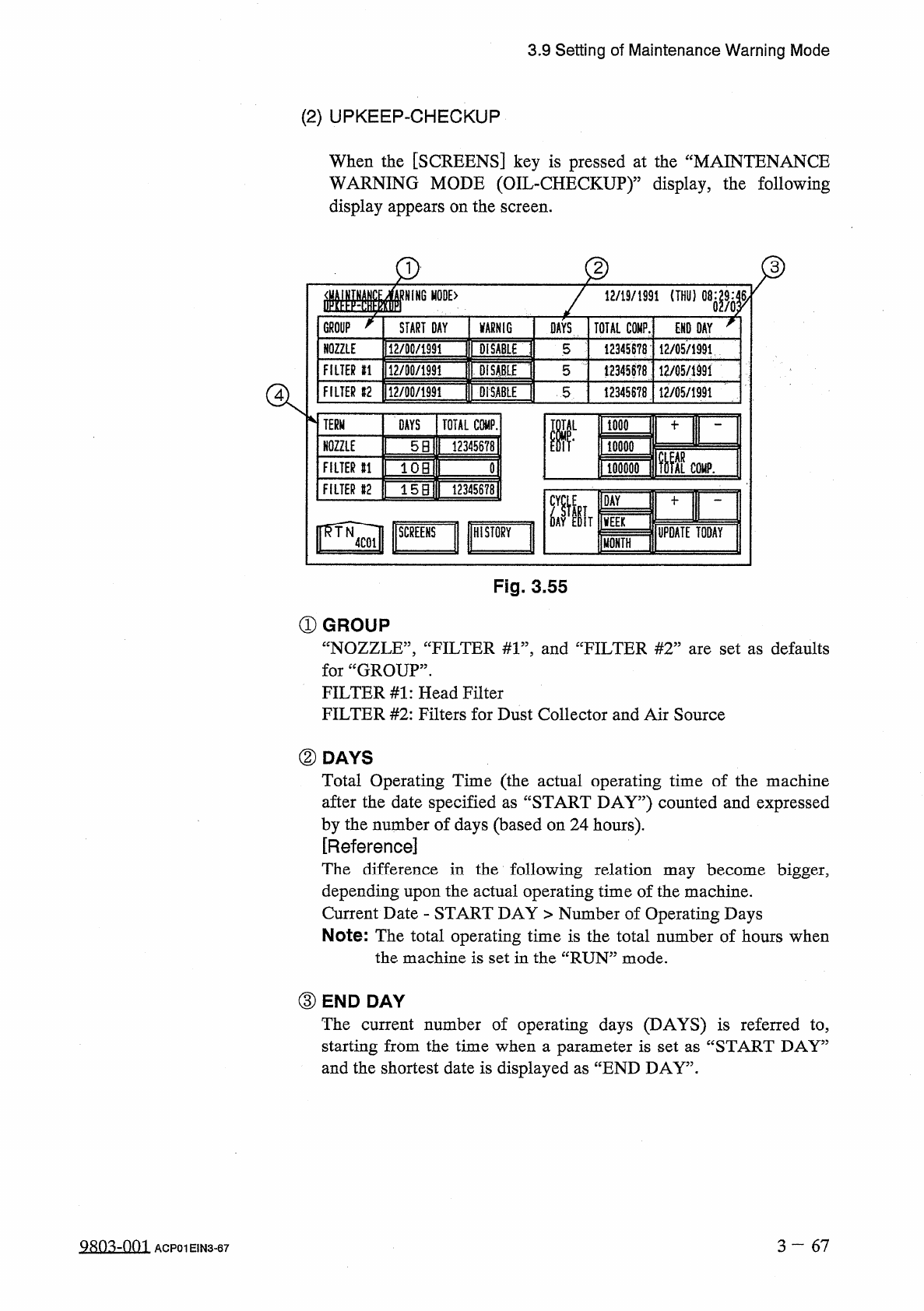
①
GROUP
“
NOZZLE
”
,
“
FILTER
#
1
”
,
and
“
FILTER
#
2
”
are
set
as
defaults
for
“
GROUP
”
.
FILTER
#
1
:
Head
Filter
FILTER
#
2
:
Filters
for
Dust
Collector
and
Air
Source
②
DAYS
Total
Operating
Time
(
the
actual
operating
time
of
the
machine
after
the
date
specified
as
“
START
DAY
”
)
counted
and
expressed
by
the
number
of
days
(
based
on
24
hours
)
.
[
Reference
]
The
difference
in
the
following
relation
may
become
bigger
,
depending
upon
the
actual
operating
time
of
the
machine
.
Current
Date
-
START
DAY
>
Number
of
Operating
Days
Note
:
The
total
operating
time
is
the
total
number
of
hours
when
the
machine
is
set
in
the
“
RUN
”
mode
.
③
END
DAY
The
current
number
of
operating
days
(
DAYS
)
is
referred
to
,
starting
from
the
time
when
a
parameter
is
set
as
“
START
DAY
”
and
the
shortest
date
is
displayed
as
“
END
DAY
”
.
3
一
67
QRO
^
Om
ACP
01
EIN
3
-
67
3.9
Setting
of
Maintenance
Warning
Mode
④
TERM
:
DAYS
and
TOTAL
COMP
.
Different
from
the
lubrication
and
inspections
work
for
which
the
maintenance
term
is
designated
,
the
maintenance
and
inspections
work
can
be
performed
for
the
maintenance
term
based
on
the
condition
of
the
machine
(
how
the
machine
has
been
used
)
.
Parameters
for
“
DAYS
”
and
“
TOTAL
COMP
”
can
be
set
as
the
requirements
to
give
a
warning
for
maintenance
.
Whenever
one
of
the
two
requirements
is
fulfilled
,
a
warning
message
is
issued
.
Notes
:
(
a
)
The
parameters
as
“
DAYS
”
are
based
on
24
hours
as
a
day
,
7
x
24
hours
as
a
week
,
and
30
x
24
hours
as
month
.
(
b
)
When
“
0
”
(
zero
)
is
set
in
a
“
DAYS
”
data
box
,
no
condition
is
specified
for
“
DAYS
”
.
(
c
)
When
“
0
”
(
zero
)
is
set
in
a
“
TOTAL
COMP
.
”
data
box
,
no
condition
is
specified
for
“
TOTAL
COMP
.
”
.
(
d
)
When
“
0
”
(
zero
)
is
set
in
both
“
DAYS
”
and
“
TOTAL
COMP
.
”
data
boxes
,
the
condition
becomes
the
same
as
that
of
the
case
where
“
DISABLE
”
is
set
in
the
“
WARNING
”
data
boxes
.
a
(
3
)
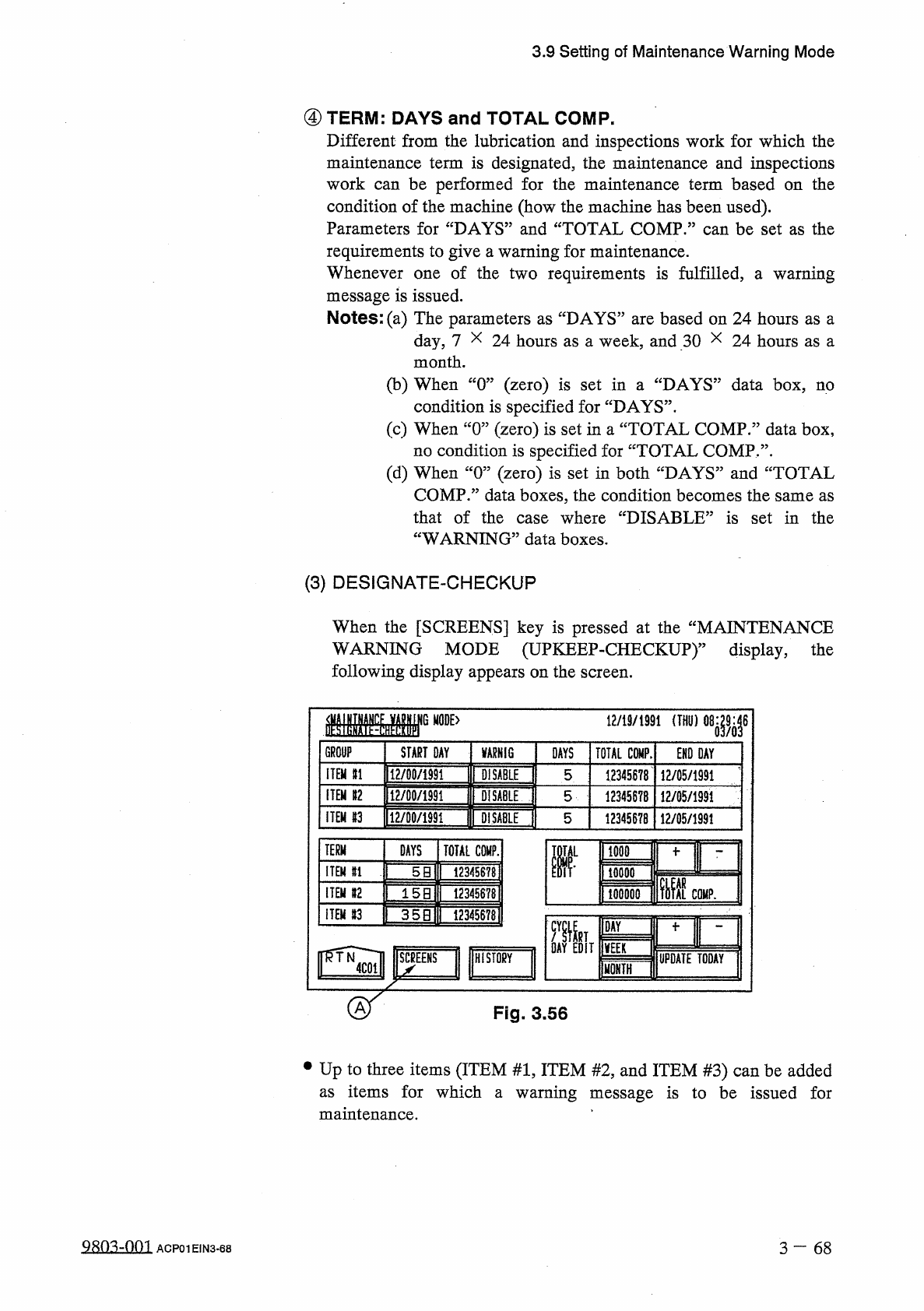
DESIGNATE
-
CHECKUP
When
the
[
SCREENS
]
key
is
pressed
at
the
“
MAINTENANCE
WARNING
MODE
(
UPKEEP
-
CHECKUP
)
"
display
,
the
following
display
appears
on
the
screen
.
12
/
19
/
1991
(
THU
)
08
:
■
6
GROUP
START
DAY
VARNIG
DAYS
TOTAL
COMP
.
END
DAY
ITEM
n
112
/
00
/
1991
DISABLE
5
12345678
12
/
05
/
1991
ITEM
»
2
mWm
DISABLE
5
12345678
12
/
05
/
1991
imimmw
ITEM
#
3
DljABlE
5
12345678
12
/
05
/
1991
TERM
DAYS
TOTAL
COMP
.
D
IL
1000
ITEM
n
5
B
12345678
10
QQ
0
辦灶
COMP
.
ITEM
n
15
B
12345678
100000
ITEM
#
3
12345678
(
35
B
DAY
VEER
HISTORY
UPDATE
TODAY
MONTH
ST
Fig
.
3.56
•
Up
to
three
items
(
ITEM
#
1
,
ITEM
#
2
,
and
ITEM
#
3
)
can
be
added
as
items
for
which
maintenance
.
warning
message
is
to
be
issued
for
a
Q
80
^
-
0
m
3
—
6 8
ACP
01
EIN
3
-
68
3.9
Setting
of
Maintenance
Warning
Mode
(
4
)
HISTORY
•
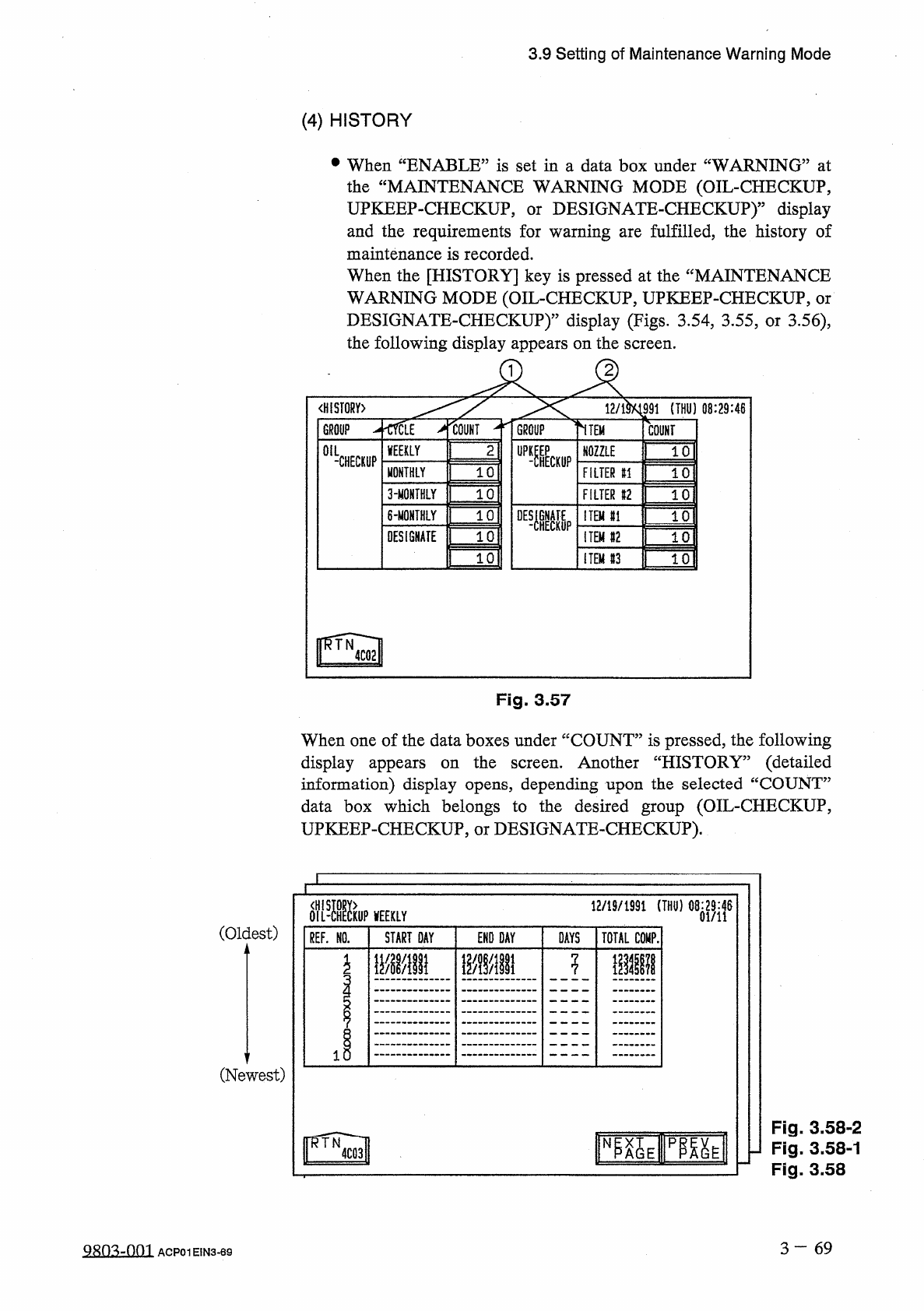
When
“
ENABLE
”
is
set
in
a
data
box
under
“
WARNING
”
at
the
“
MAINTENANCE
WARNING
MODE
(
OIL
-
CHECKUP
,
UPKEEP
-
CHECKUP
,
and
the
requirements
for
warning
are
fulfilled
,
the
history
of
maintenance
is
recorded
.
When
the
[
HISTORY
]
key
is
pressed
at
the
“
MAINTENANCE
WARNING
MODE
(
OIL
-
CHECKUP
,
UPKEEP
-
CHECKUP
,
or
DESIGNATE
-
CHECKUP
)
”
display
(
Figs
.
3.54
,
3.55
,
or
3.56
)
,
the
following
display
appears
on
the
screen
.
DESIGNATE
-
CHECKUP
)
"
display
or
<
H
!
ST
0
RY
>
12
/
m
991
(
THU
)
08
:
29
:
46
^
crctf
>
iouNT
^
TGROUP
~
THEM
GROUP
COUNT
OIL
WEEKLY
2
UP
-
?
HECK
11
P
NOZZLE
10
-
CHECKUP
10
MONTHLY
FILTER
f
!
10
3
-
MOMTHLY
10
FILTER
12
10
10
°
E
«
6
-
MONTHLY
ITEM
#
1
10
DESiGNATE
10
ITEM
#
2
10
10
ITEM
#
3
10
Fig
.
3.57
When
one
of
the
data
boxes
under
“
COUNT
”
is
pressed
,
the
following
Another
“
HISTORY
”
(
detailed
display
appears
on
the
information
)
display
opens
,
depending
upon
the
selected
“
COUNT
”
data
box
which
belongs
to
the
desired
group
(
OIL
-
CHECKUP
,
UPKEEP
-
CHECKUP
,
or
DESIGNATE
-
CHECKUP
)
.
screen
.
flfl
-
ffiuP
WEEKLY
12
/
19
/
1991
(
THU
)
08
:
29
:
46
01
/
11
(
Oldest
)
REF
.
NO
.
START
DAY
END
DAY
DAYS
TOTAL
COMP
.
WI
1
\
m
\
n
\
mm
i
(
Newest
)
Fig
.
3.58
-
2
Fig
.
3.58
-
1
Fig
.
3.58
臨
E
TOE
N
3
一
69
Q
8
D
3
-
001
ACP
01
EIN
3
-
69