3MAINTENANCE__O.pdf - 第185页
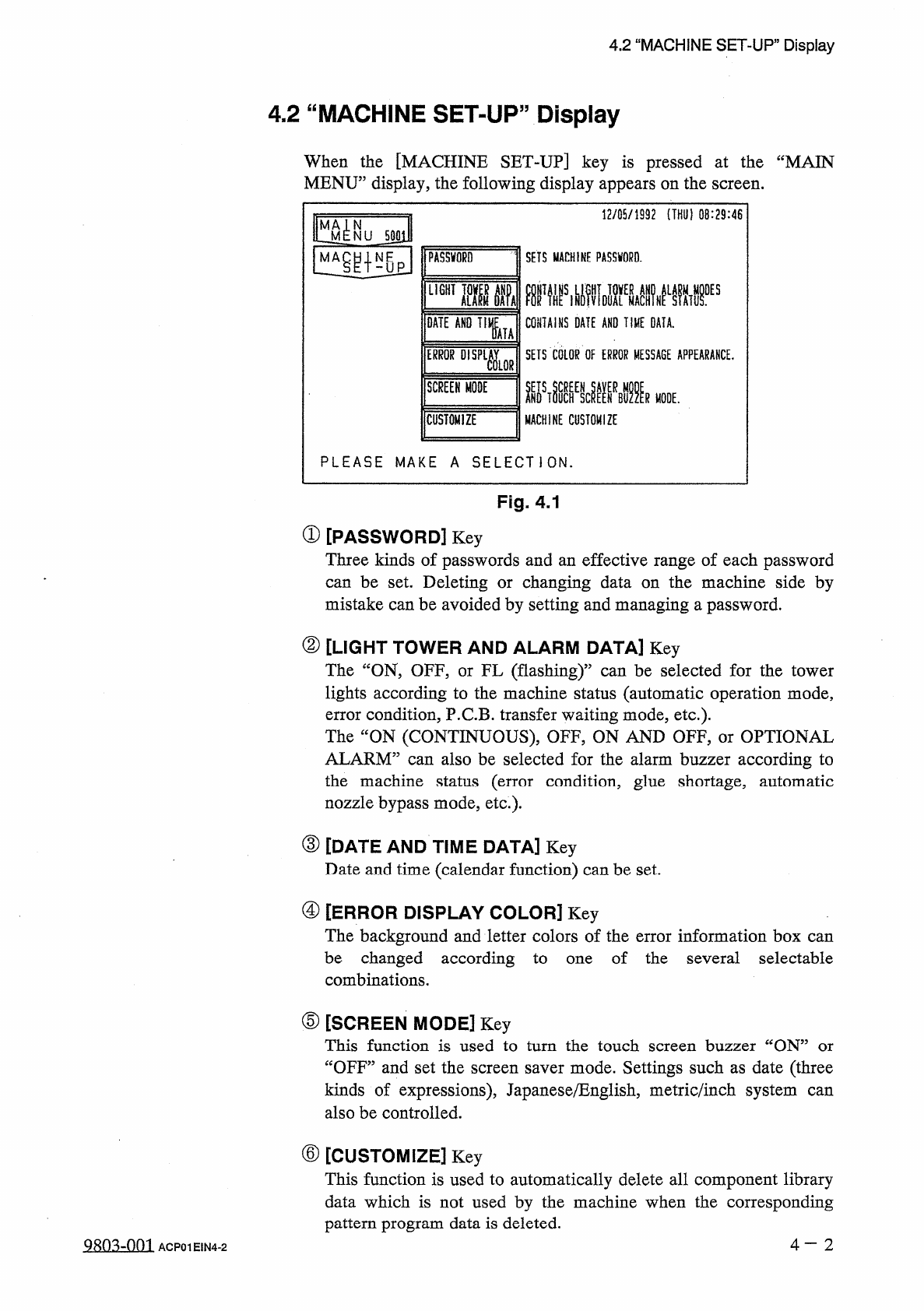
4.2 “ MACHINE SET - UP , , Display 4.2 “ MACHINE SET - UP ” Display When the [ MACHINE SET _ UP ] key is pressed at the “ MAIN MENU ” display , the following display appears on the screen . 12 / 05 / 1992 ( THU ) 08 : 29…
4.1
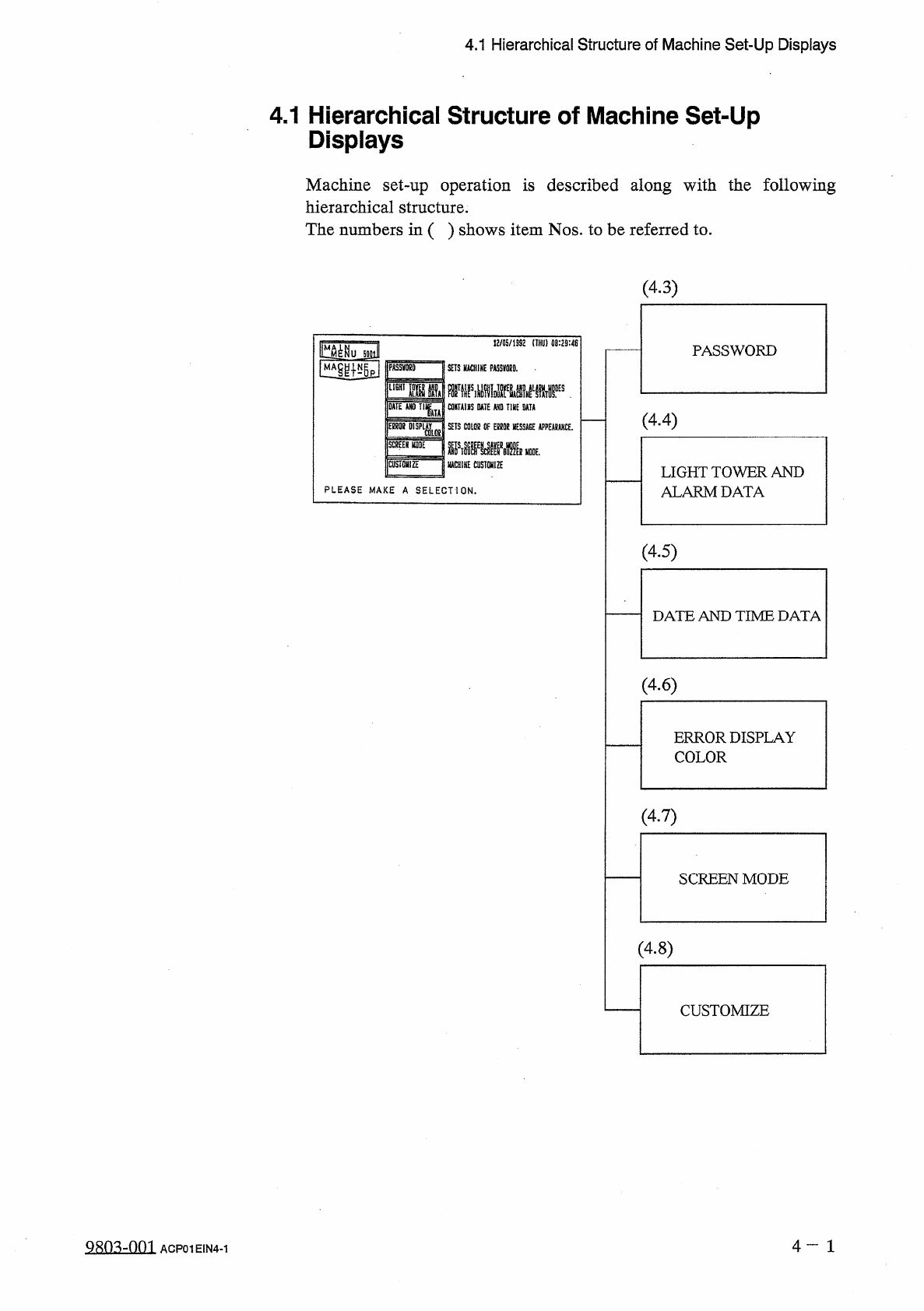
Hierarchical
Structure
of
Machine
Set
-
Up
Displays
4.1
Hierarchical
Structure
of
Machine
Set
-
Up
Displays
Machine
set
-
up
operation
is
described
along
with
the
following
hierarchical
structure
.
The
numbers
in
(
)
shows
item
Nos
.
to
be
referred
to
.
(
4.3
)
«
/
05
/
1992
(
THU
)
08
:
29
:
48
tt
^
lMu
5
O
3
PASSWORD
PASSVffiO
SETS
HACHIKE
PASSKORD
.
DATE
AND
Tl
lu
CONTAiHS
DATE
AND
TUE
OATA
(
4.4
)
\
mumU
[
SCREEN
MODE
I
SETS
C
0
L
0
B
OF
EBfiOS
MESSAGE
APPEARANCE
.
MMm
緣
CUSTOMIZE
IUCHIHE
CUSTOMIZE
LIGHT
TOWER
AND
ALARM
DATA
PLEASE
MAKE
A
SELECTION
.
(
4.5
)
DATE
AND
TIME
DATA
(
4
-
6
)
ERROR
DISPLAY
COLOR
(
4.7
)
SCREEN
MODE
(
4.8
)
CUSTOMIZE
4
一
1
QRO
^
-
Om
ACP
01
EIN
4
-
1
4.2
“
MACHINE
SET
-
UP
,
,
Display
4.2
“
MACHINE
SET
-
UP
”
Display
When
the
[
MACHINE
SET
_
UP
]
key
is
pressed
at
the
“
MAIN
MENU
”
display
,
the
following
display
appears
on
the
screen
.
12
/
05
/
1992
(
THU
)
08
:
29
:
46
MA
^
N
NU
500
U
M
PASSWORD
SETS
MACHINE
PASSWORD
.
CONTAINS
DATE
AND
TIME
DATA
.
DATE
AND
T
,
fc
SETS
COLOR
OF
ERROR
MESSAGE
APPEARANCE
.
MACHINE
CUSTOMIZE
SCREEN
MODE
R
MODE
.
CUSTOMIZE
PLEASE
MAKE
A
SELECTION
.
Fig
.
4.1
①
[
PASSWORD
]
Key
Three
kinds
of
passwords
and
an
effective
range
of
each
password
can
be
set
.
Deleting
or
changing
data
on
the
machine
side
by
mistake
can
be
avoided
by
setting
and
managing
a
password
.
②
[
LIGHT
TOWER
AND
ALARM
DATA
]
Key
The
“
ON
,
OFF
,
or
FL
(
flashing
)
,,
lights
according
to
the
machine
status
(
automatic
operation
mode
,
error
condition
,
P
.
C
.
B
.
transfer
waiting
mode
,
etc
.
)
.
The
“
ON
(
CONTINUOUS
)
,
OFF
,
ON
AND
OFF
,
or
OPTIONAL
ALARM
”
can
also
be
selected
for
the
alarm
buzzer
according
to
the
machine
status
(
error
condition
,
glue
shortage
,
automatic
nozzle
bypass
mode
,
etc
.
)
.
can
be
selected
for
the
tower
③
[
DATE
AND
TIME
DATA
]
Key
Date
and
time
(
calendar
function
)
can
be
set
.
④
[
ERROR
DISPLAY
COLOR
]
Key
The
background
and
letter
colors
of
the
error
information
box
can
be
changed
according
to
combinations
.
of
the
several
selectable
one
⑤
[
SCREEN
MODE
]
Key
This
function
is
used
to
turn
the
touch
screen
buzzer
“
ON
5
“
OFF
”
and
set
the
screen
saver
mode
.
Settings
such
as
date
(
three
kinds
of
expressions
)
,
Japanese
/
English
,
metric
/
inch
system
also
be
controlled
.
or
can
⑥
[
CUSTOMIZE
]
Key
This
function
is
used
to
automatically
delete
all
component
library
data
which
is
not
used
by
the
machine
when
the
corresponding
pattern
program
data
is
deleted
.
4
—
2
QRO
^
-
Om
ACP
01
EIN
4
-
2
4.3
Management
of
Password
4.3
Management
of
Password
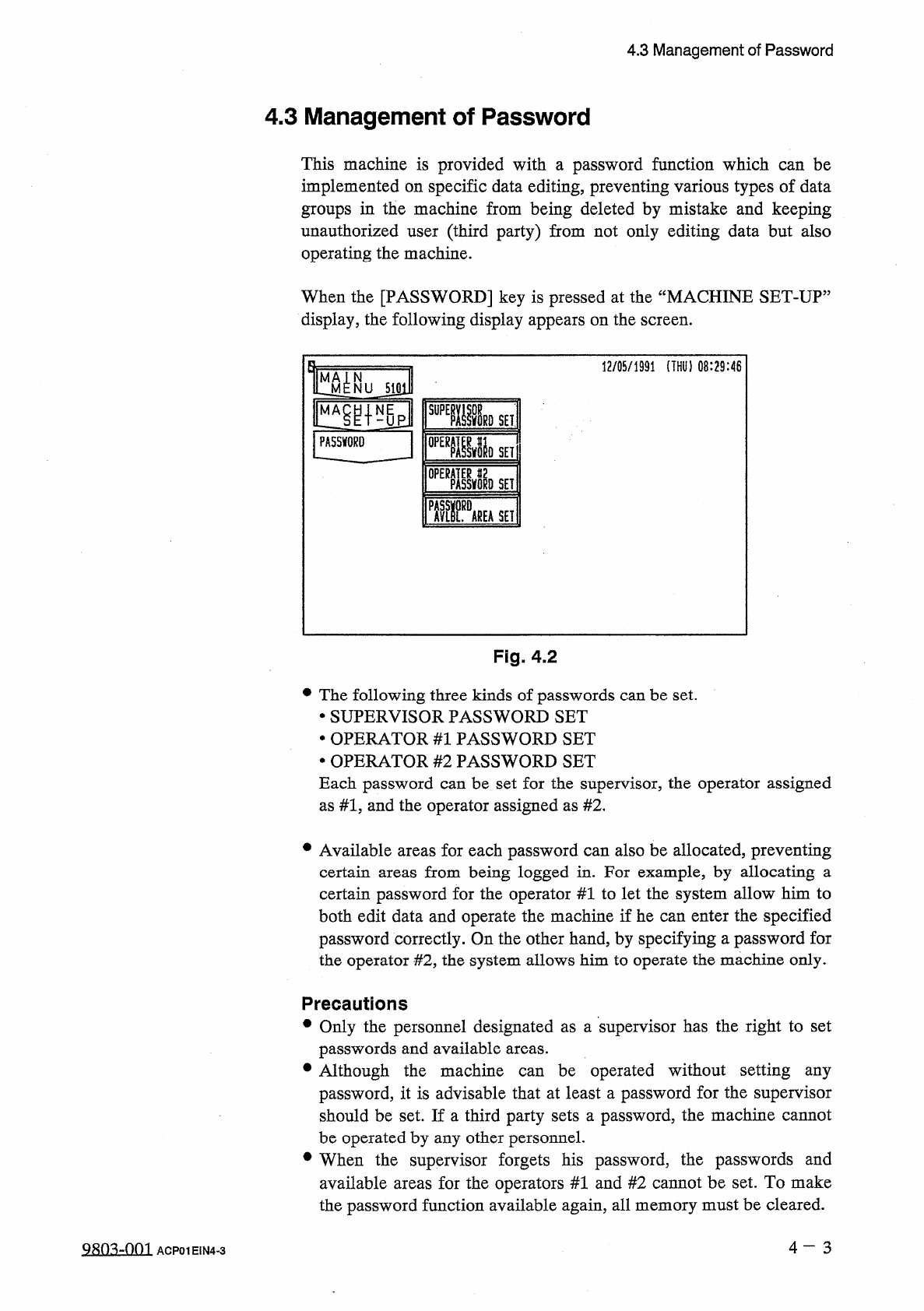
This
machine
is
provided
with
a
password
function
which
can
be
implemented
on
specific
data
editing
,
preventing
various
types
of
data
groups
in
the
machine
from
being
deleted
by
mistake
and
keeping
unauthorized
user
(
third
party
)
from
not
only
editing
data
but
also
operating
the
machine
.
When
the
[
PASSWORD
]
key
is
pressed
at
the
“
MACHINE
SET
-
UP
:
display
,
the
following
display
appears
on
the
screen
.
12
/
05
/
1991
(
THU
)
08
:
29
:
46
U
S
101
慨匯隱
PASSWORD
0
PEBMDSET
SET
■
RVEASEI
Fig
.
4.2
•
The
following
three
kinds
of
passwords
can
be
set
.
•
SUPERVISOR
PASSWORD
SET
•
OPERATOR
#
1
PASSWORD
SET
•
OPERATOR
#
2
PASSWORD
SET
Each
password
can
be
set
for
the
supervisor
,
the
operator
assigned
as
#
1
,
and
the
operator
assigned
as
#
2
,
•
Available
areas
for
each
password
can
also
be
allocated
,
preventing
certain
certain
password
for
the
operator
#
1
to
let
the
system
allow
him
to
both
edit
data
and
operate
the
machine
if
he
can
enter
the
specified
password
correctly
.
On
the
other
hand
,
by
specifying
a
password
for
the
operator
#
2
,
the
system
allows
him
to
operate
the
machine
only
.
from
being
logged
in
.
For
example
,
by
allocating
a
areas
Precautions
•
Only
the
personnel
designated
as
a
supervisor
has
the
right
to
set
passwords
and
available
areas
.
•
Although
the
machine
password
,
it
is
advisable
that
at
least
a
password
for
the
supervisor
should
be
set
.
If
a
third
party
sets
a
password
,
the
machine
cannot
be
operated
by
any
other
personnel
.
•
When
the
supervisor
forgets
his
password
,
the
passwords
and
available
areas
for
the
operators
#
1
and
#
2
cannot
be
set
.
To
make
the
password
function
available
again
,
all
memory
must
be
cleared
.
be
operated
without
setting
any
can
4
一
3
9803
-
001
ACP
01
EIN
4
-
3