3MAINTENANCE__O.pdf - 第190页
4.3 Management of Password 4.3 . 3 Flow of Operation • When the machine is powered , the display for system initialization appears on the screen and the display for “ Log In ” type selection follows . As long as the oper…
4.3
Management
of
Password
4
-
3.2
Setting
of
Password
Available
Areas
•
Enter
the
password
specified
as
one
for
the
supervisor
to
issue
the
“
Log
In
”
command
.
•
Open
the
“
PASSWORD
AVLBL
.
AREA
SET
”
display
(
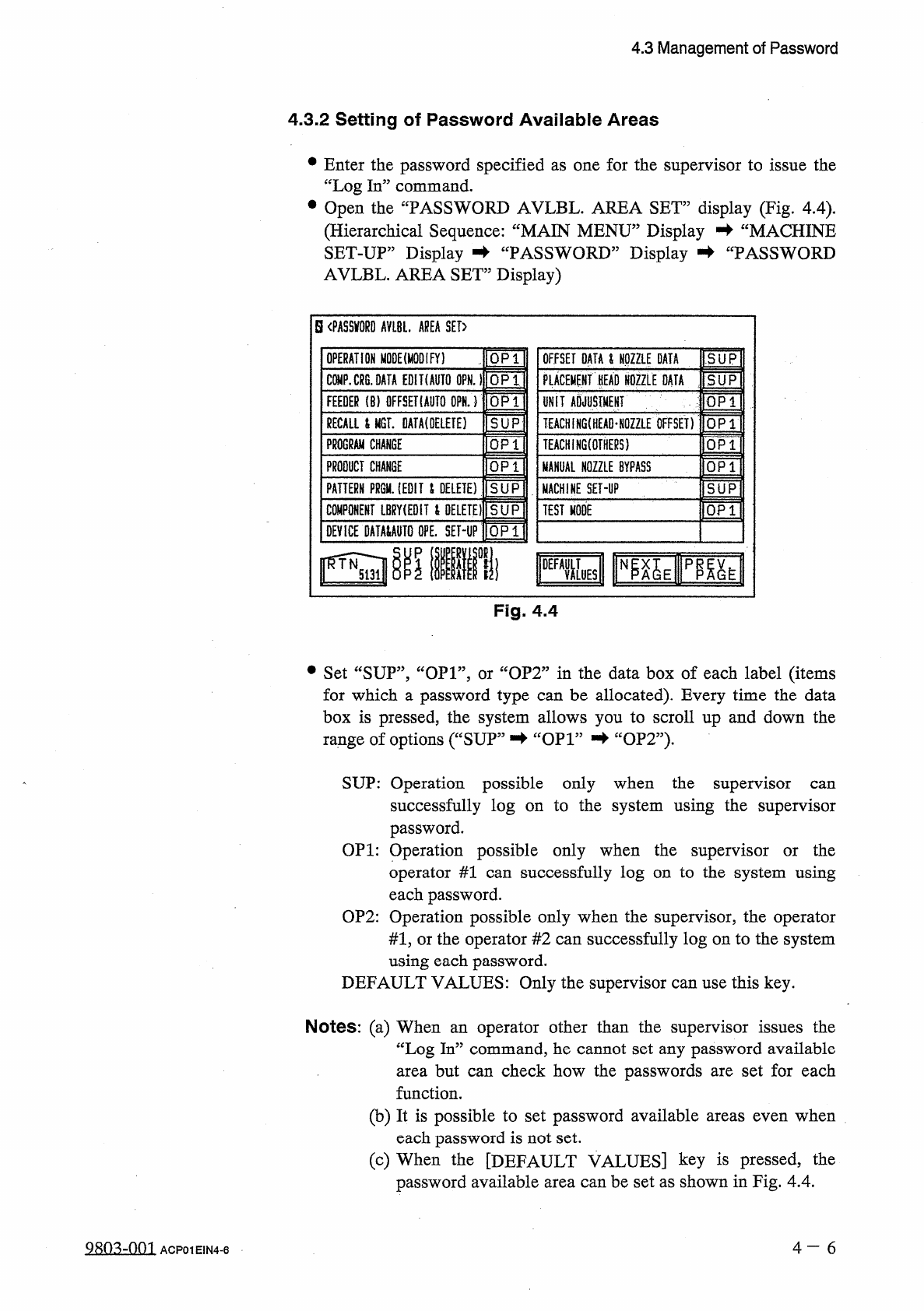
Fig
.
4.4
)
.
(
Hierarchical
Sequence
:
“
MAIN
MENU
”
Display
蛑
“
MACHINE
SET
-
UP
”
Display
蛑
“
PASSWORD
”
Display
蚌
“
PASSWORD
AVLBL
.
AREA
SET
”
Display
)
S
〈
PASSWORD
AVLBL
.
AREA
SET
>
OPERATION
MODE
(
MODIFY
)
QP
1
OFFSET
DATA
&
NOZZLE
DATA
SUP
PLACEMENT
PD
NOZZLE
DATA
5
UP
CW
.
CRG
.
OAfA
EDIKAUTO
OPN
.
1
OP
1
OPT
UNIT
ADJUSTMENT
FEEDER
(
8
)
DFFSETIAUTO
OPN
.
)
RECALL
i
MGT
.
DATA
(
OELETE
)
SUP
TEACH
[
NG
(
HEAD
*
N
0
Z
2
L
£
OFFSET
)
TEACHiNGtOTHERS
)
PROGRAM
CHANGE
OP
1
PRODUCT
CHANGE
QP
1
MANUAL
NOZZLE
BYPASS
PATTERN
FRQU
.
(
EDIT
i
DELETE
)
SUP
MACHINE
SET
-
UP
IQPTI
COMPONENT
LBRY
(
EDiT
t
DELETE
)
SUP
TEST
MODE
DEVICE
DATMAUTO
OPE
.
SEHP
QP
1
1
DEFXES
Fig
.
4.4
•
Set
“
SUP
”
,
“
OP
1
”
,
or
“
OP
2
”
in
the
data
box
of
each
label
(
items
for
which
a
password
type
can
be
allocated
)
.
Every
time
the
data
box
is
pressed
,
the
system
allows
you
to
scroll
up
and
down
the
range
of
options
(
“
SUP
”
蛑
“
OP
1
”
-
►
“
OP
2
”
)
,
SUP
:
Operation
possible
only
when
the
supervisor
successfully
log
on
to
the
system
using
the
supervisor
password
.
OP
1
:
Operation
possible
only
when
the
supervisor
or
the
operator
#
1
can
successfully
log
on
to
the
system
using
each
password
.
OP
2
:
Operation
possible
only
when
the
supervisor
,
the
operator
#
1
,
or
the
operator
#
2
can
successfully
log
on
to
the
system
using
each
password
.
DEFAULT
VALUES
:
Only
the
supervisor
can
use
this
key
.
can
Notes
:
(
a
)
When
an
operator
other
than
the
supervisor
issues
the
“
Log
In
”
command
,
he
cannot
set
any
password
available
area
but
can
check
how
the
passwords
are
set
for
each
function
.
(
b
)
It
is
possible
to
set
password
available
areas
even
when
each
password
is
not
set
.
(
c
)
When
the
[
DEFAULT
VALUES
]
key
is
pressed
,
the
password
available
area
can
be
set
as
shown
in
Fig
.
4.4
.
4
-
6
980
^
-
001
ACP
01
EIN
4
-
6
4.3
Management
of
Password
4.3
.
3
Flow
of
Operation
•
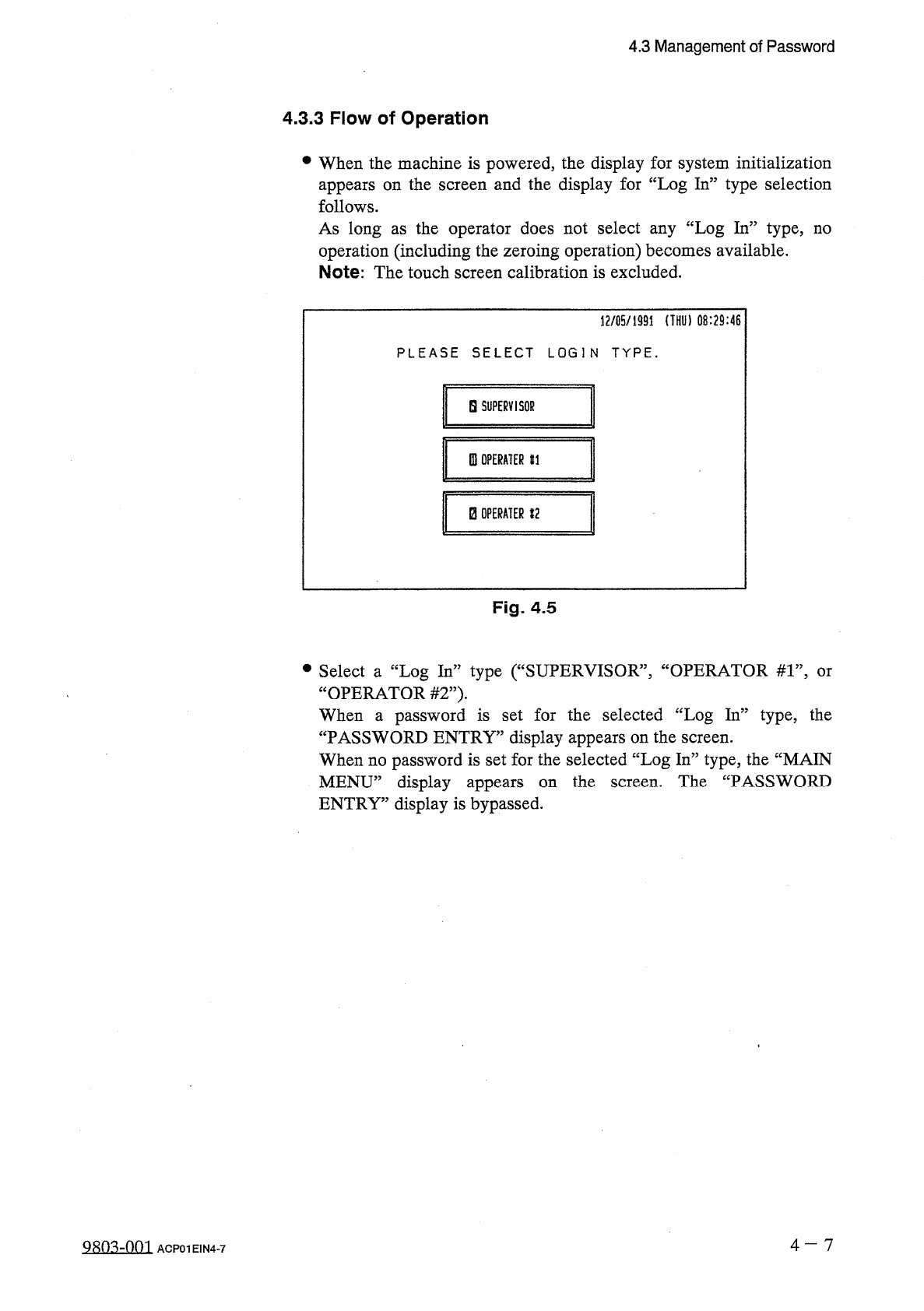
When
the
machine
is
powered
,
the
display
for
system
initialization
appears
on
the
screen
and
the
display
for
“
Log
In
”
type
selection
follows
.
As
long
as
the
operator
does
not
select
any
“
Log
In
”
type
,
no
operation
(
including
the
zeroing
operation
)
becomes
available
.
Note
:
The
touch
screen
calibration
is
excluded
.
12
/
05
/
1991
(
THU
)
08
:
29
:
46
PLEASE
SELECT
LOGIN
TYPE
.
H
SUPERVISOR
0
!
OPERATER
HI
B
OPERATER
12
Fig
.
4.5
•
Select
a
“
Log
In
”
type
(
“
SUPERVISOR
”
,
“
OPERATOR
#
1
”
,
“
OPERATOR
#
2
”
)
.
When
a
password
is
set
for
the
selected
“
Log
In
”
type
,
the
“
PASSWORD
ENTRY
”
display
appears
on
the
screen
.
When
no
password
is
set
for
the
selected
“
Log
In
”
type
,
the
“
MAIN
MENU
”
display
appears
ENTRY
”
display
is
bypassed
.
or
the
screen
.
The
“
PASSWORD
on
4
-
7
QRO
^
-
nm
ACP
01
EIN
4
-
7
4.3
Management
of
Password
〈
PASSWORD
ENTRY
)
PLEASE
ENTER
THE
OPERATER
#
1
PASSWORD
.
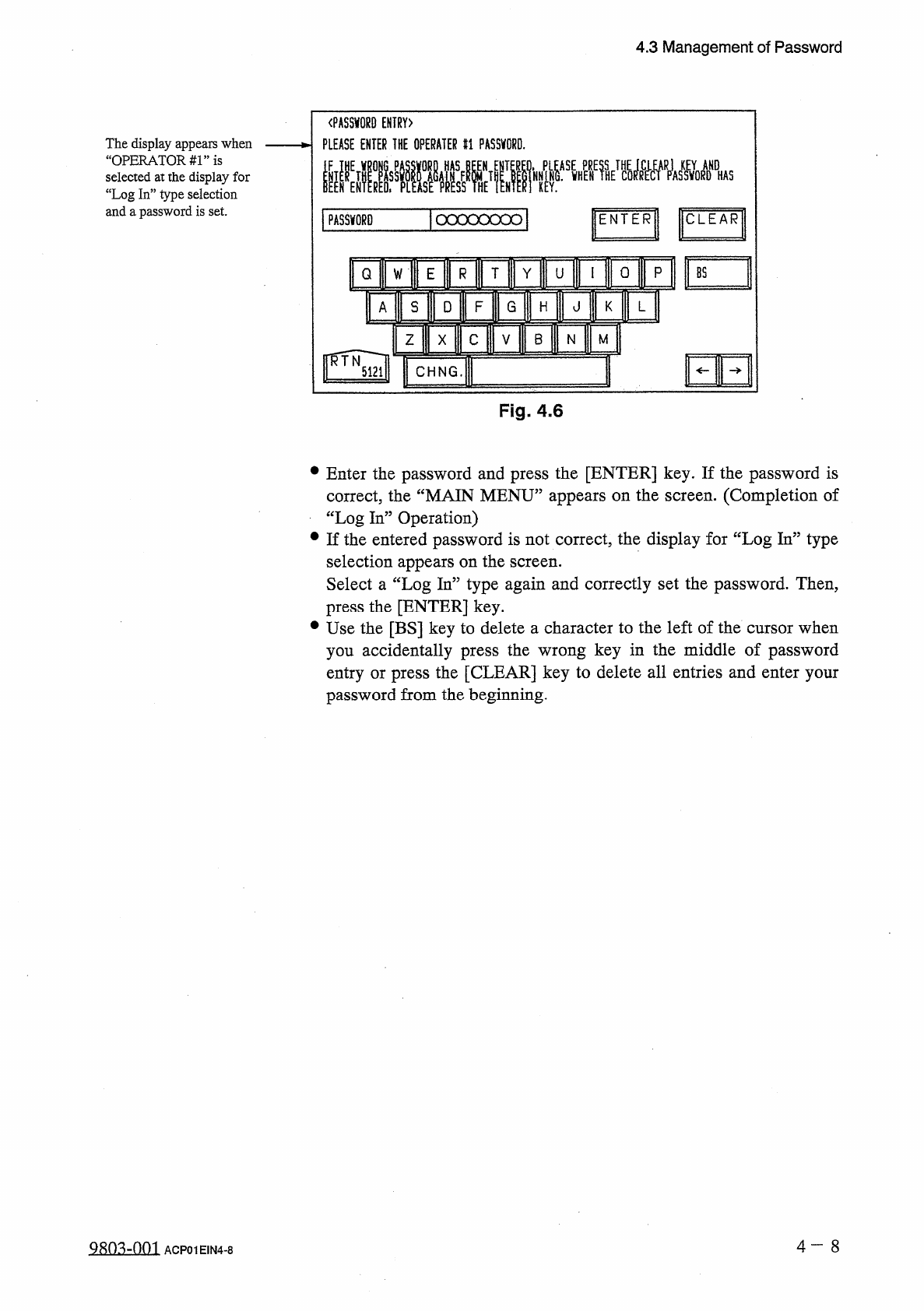
The
display
appears
when
“
OPERATORS
”
is
selected
at
the
display
for
“
Log
In
”
type
selection
and
a
password
is
set
.
ICLEAR
1
PASSWORD
|
ocxxoood
|
ENTER
0
p
T
Y
Q
U
W
mi
s
D
F
G
A
H
HE
B
Z
M
N
X
I
CHNG
.
Fig
.
4.6
•
Enter
the
password
and
press
the
[
ENTER
]
key
.
If
the
password
is
correct
,
the
“
MAIN
MENU
”
appears
on
the
screen
.
(
Completion
of
“
Log
In
”
Operation
)
•
If
the
entered
password
is
not
correct
,
the
display
for
“
Log
In
”
type
selection
appears
on
the
screen
.
Select
a
“
Log
In
”
type
again
and
correctly
set
the
password
.
Then
,
press
the
[
ENTER
]
key
.
•
Use
the
[
BS
]
key
to
delete
a
character
to
the
left
of
the
cursor
when
you
accidentally
press
the
wrong
key
in
the
middle
of
password
entry
or
press
the
[
CLEAR
]
key
to
delete
all
entries
and
enter
your
password
from
the
beginning
.
4
一
8
ACP
01
EIN
4
-
8