3MAINTENANCE__O.pdf - 第191页
4.3 Management of Password 〈 PASSWORD ENTRY ) PLEASE ENTER THE OPERATER # 1 PASSWORD . The display appears when “ OPERATORS ” is selected at the display for “ Log In ” type selection and a password is set . I C L E A R 1…
4.3
Management
of
Password
4.3
.
3
Flow
of
Operation
•
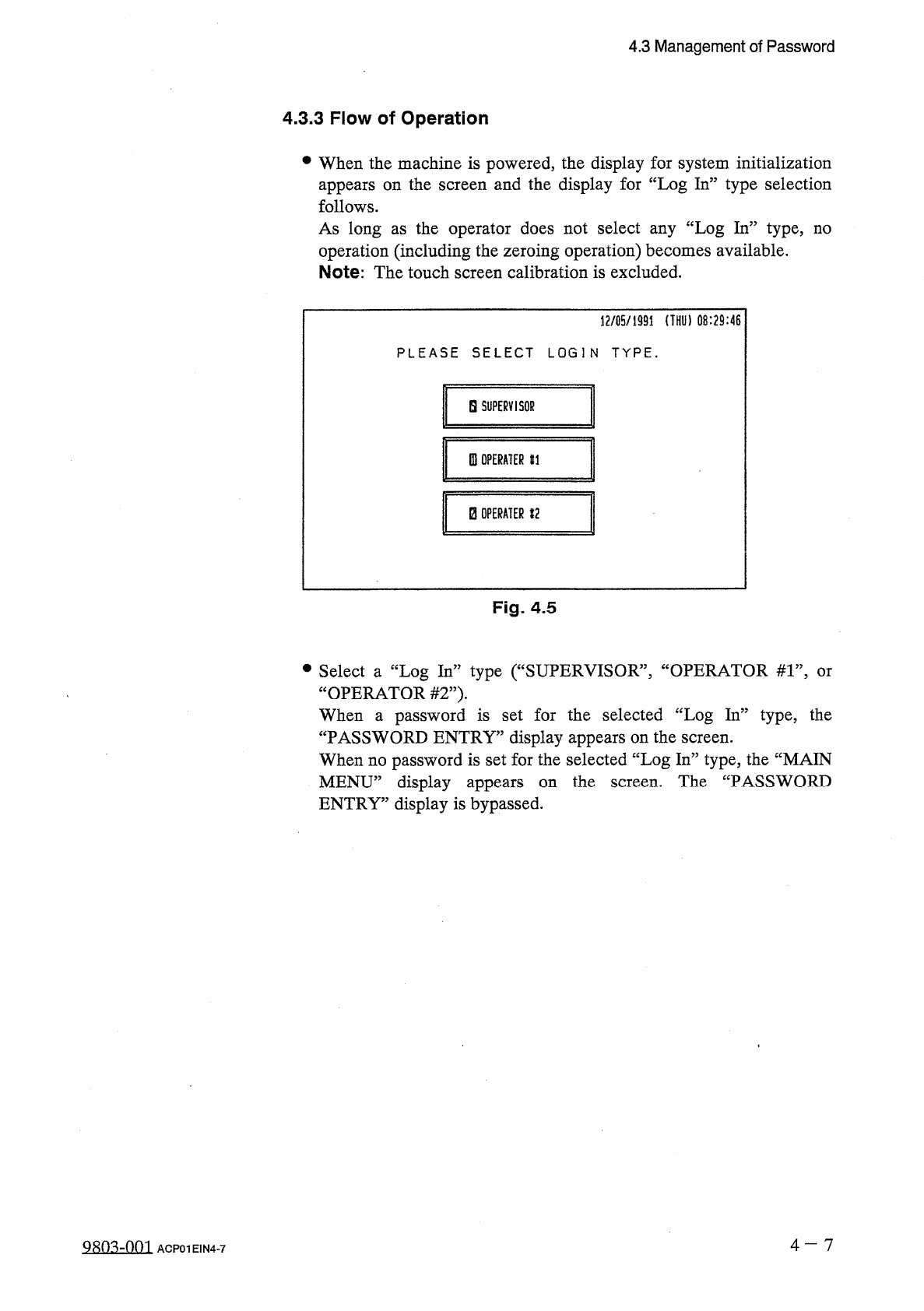
When
the
machine
is
powered
,
the
display
for
system
initialization
appears
on
the
screen
and
the
display
for
“
Log
In
”
type
selection
follows
.
As
long
as
the
operator
does
not
select
any
“
Log
In
”
type
,
no
operation
(
including
the
zeroing
operation
)
becomes
available
.
Note
:
The
touch
screen
calibration
is
excluded
.
12
/
05
/
1991
(
THU
)
08
:
29
:
46
PLEASE
SELECT
LOGIN
TYPE
.
H
SUPERVISOR
0
!
OPERATER
HI
B
OPERATER
12
Fig
.
4.5
•
Select
a
“
Log
In
”
type
(
“
SUPERVISOR
”
,
“
OPERATOR
#
1
”
,
“
OPERATOR
#
2
”
)
.
When
a
password
is
set
for
the
selected
“
Log
In
”
type
,
the
“
PASSWORD
ENTRY
”
display
appears
on
the
screen
.
When
no
password
is
set
for
the
selected
“
Log
In
”
type
,
the
“
MAIN
MENU
”
display
appears
ENTRY
”
display
is
bypassed
.
or
the
screen
.
The
“
PASSWORD
on
4
-
7
QRO
^
-
nm
ACP
01
EIN
4
-
7
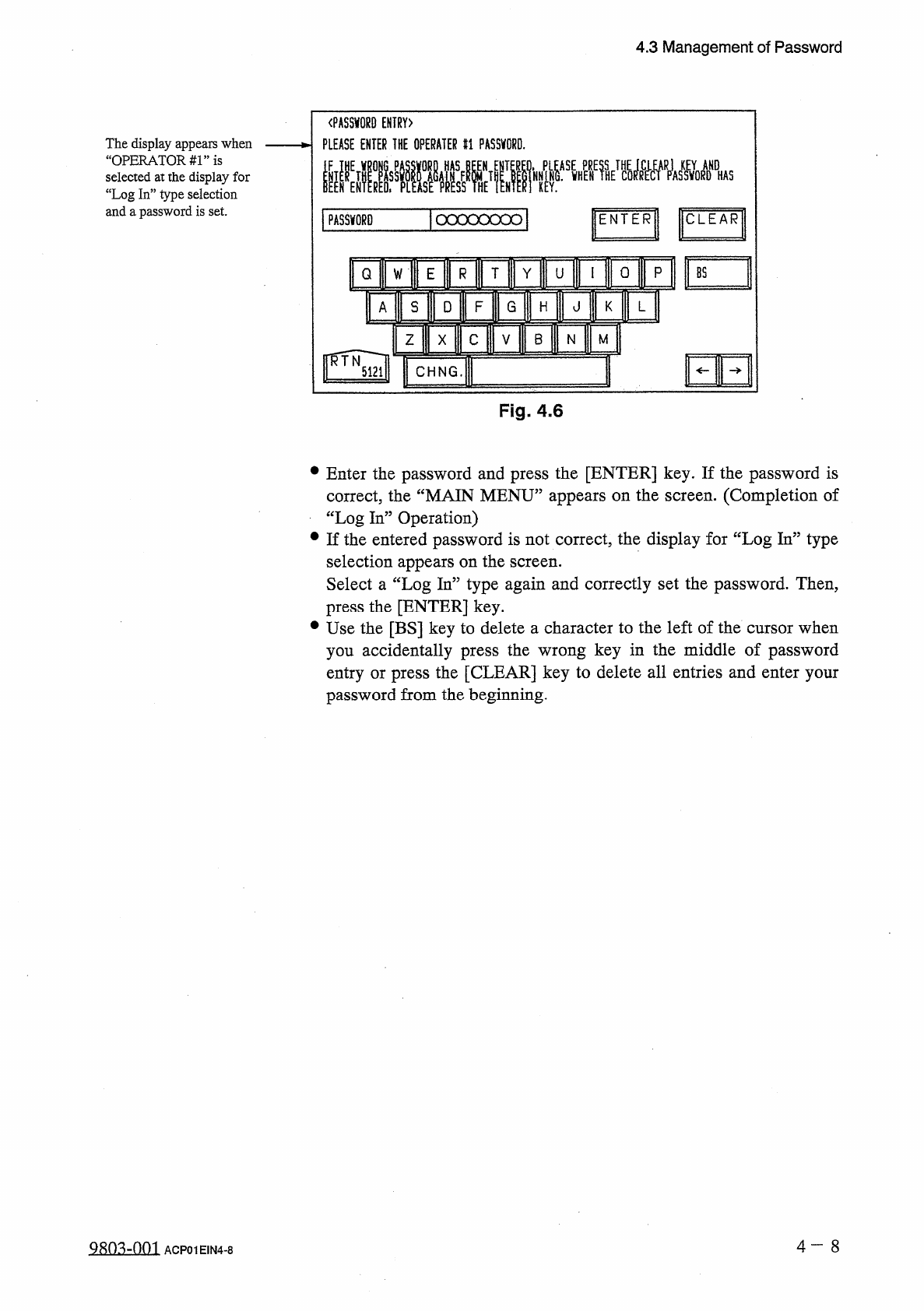
4.3
Management
of
Password
〈
PASSWORD
ENTRY
)
PLEASE
ENTER
THE
OPERATER
#
1
PASSWORD
.
The
display
appears
when
“
OPERATORS
”
is
selected
at
the
display
for
“
Log
In
”
type
selection
and
a
password
is
set
.
ICLEAR
1
PASSWORD
|
ocxxoood
|
ENTER
0
p
T
Y
Q
U
W
mi
s
D
F
G
A
H
HE
B
Z
M
N
X
I
CHNG
.
Fig
.
4.6
•
Enter
the
password
and
press
the
[
ENTER
]
key
.
If
the
password
is
correct
,
the
“
MAIN
MENU
”
appears
on
the
screen
.
(
Completion
of
“
Log
In
”
Operation
)
•
If
the
entered
password
is
not
correct
,
the
display
for
“
Log
In
”
type
selection
appears
on
the
screen
.
Select
a
“
Log
In
”
type
again
and
correctly
set
the
password
.
Then
,
press
the
[
ENTER
]
key
.
•
Use
the
[
BS
]
key
to
delete
a
character
to
the
left
of
the
cursor
when
you
accidentally
press
the
wrong
key
in
the
middle
of
password
entry
or
press
the
[
CLEAR
]
key
to
delete
all
entries
and
enter
your
password
from
the
beginning
.
4
一
8
ACP
01
EIN
4
-
8
4.3
Management
of
Password
12
/
05
/
1991
(
THU
)
08
:
29
:
45
af
■
腦
f c w
_
.
DAV
1
^
ENDA
!
AGRAM
0
A
]
A
*
C
0
MP
*
l
,
BRARV
0
ATA
*
AUTQM
8
^
M A N U
^
D E
DATA
E D I T
SPEC
^
L
.
LAYACOLOC
-
-
MA
§
㈣
p
F
A
jjlOGOijfI
ER
-
0
R
^
MULTI
PLEASE
MAKE
A
StlECTION
.
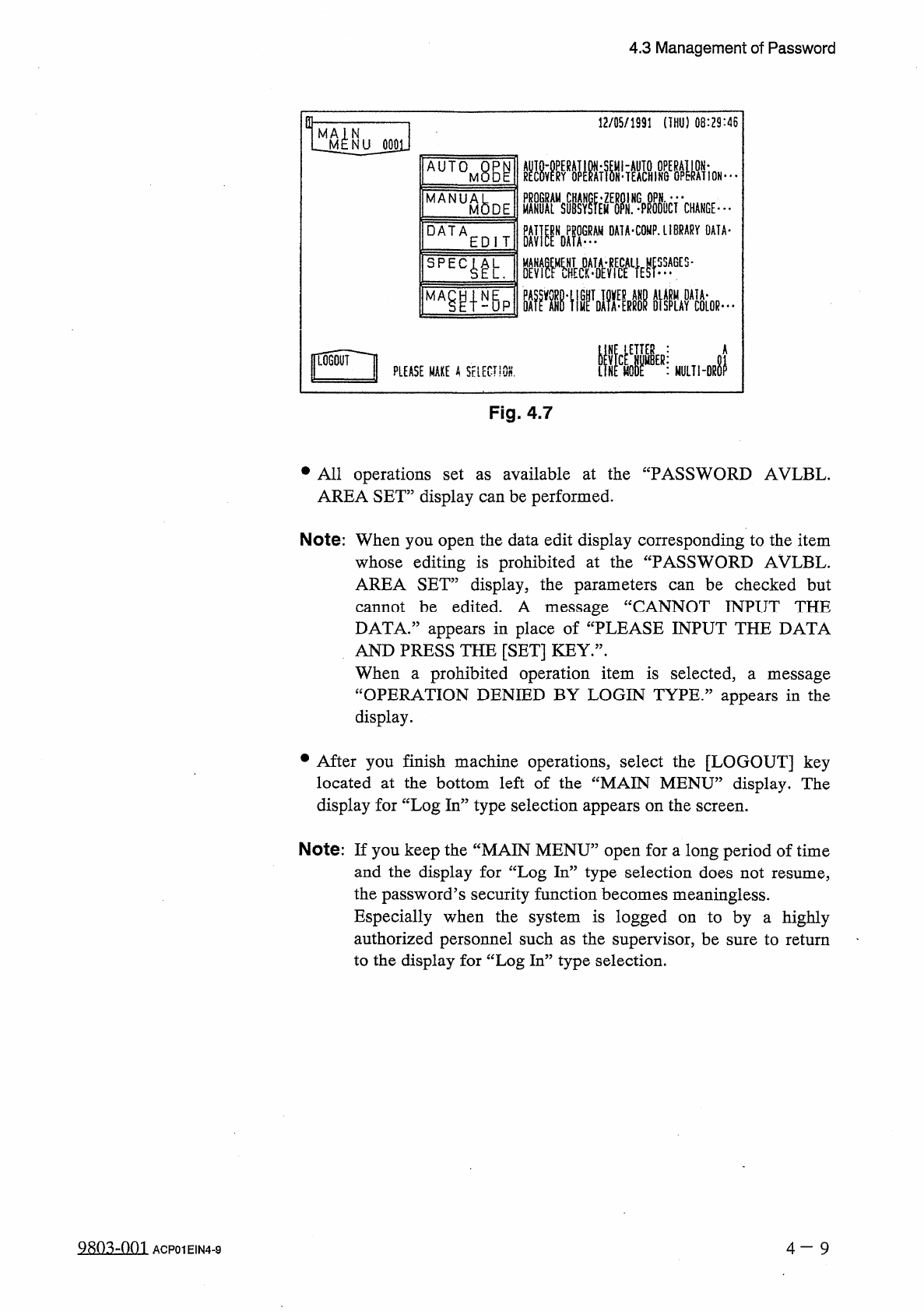
Fig
.
4.7
•
All
operations
set
AREA
SET
”
display
can
be
performed
.
available
at
the
“
PASSWORD
AVLBL
.
as
Note
:
When
you
open
the
data
edit
display
corresponding
to
the
item
whose
editing
is
prohibited
at
the
“
PASSWORD
AVLBL
.
AREA
SET
”
display
,
the
parameters
can
be
checked
but
cannot
be
edited
.
A
message
DATA
.
”
appears
in
place
of
“
PLEASE
INPUT
THE
DATA
AND
PRESS
THE
[
SET
]
KEY
.
”
.
When
a
prohibited
operation
item
is
selected
,
“
OPERATION
DENIED
BY
LOGIN
TYPE
.
1
CANNOT
INPUT
THE
a
message
appears
in
the
display
.
•
After
you
finish
machine
operations
,
select
the
[
LOGOUT
]
key
located
at
the
bottom
left
of
the
“
MAIN
MENU
”
display
.
The
display
for
“
Log
In
”
type
selection
appears
on
the
screen
.
Note
:
If
you
keep
the
“
MAIN
MENU
”
open
for
a
long
period
of
time
and
the
display
for
“
Log
In
”
type
selection
does
not
resume
,
the
password
’
s
security
function
becomes
meaningless
.
Especially
when
the
system
is
logged
on
to
by
a
highly
authorized
personnel
such
as
the
supervisor
,
be
sure
to
return
to
the
display
for
“
Log
In
”
type
selection
.
9
sn
^
-
nm
4
-
9
ACP
01
EIN
4
-
9