3MAINTENANCE__O.pdf - 第196页
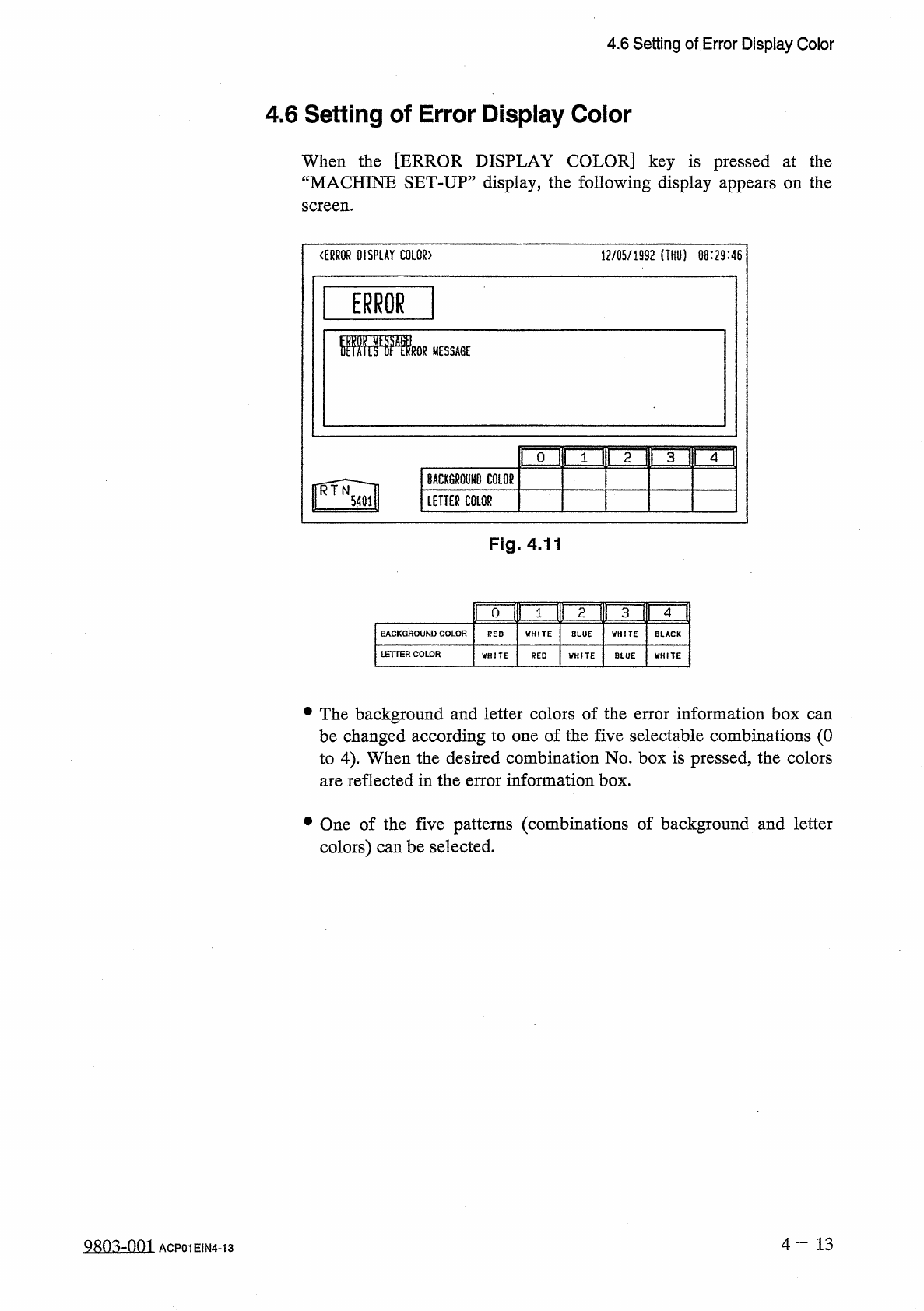
4.6 Setting of Error Display Color 4.6 Setting of Error Display Color When the [ ERROR DISPLAY COLOR ] key is pressed at the “ MACHINE SET - UP ” display , the following display appears on the screen . 〈 ERROR DISPLAY CO…
4.5
Setting
of
Date
and
Time
Data
4.5
Setting
of
Date
and
Time
Data
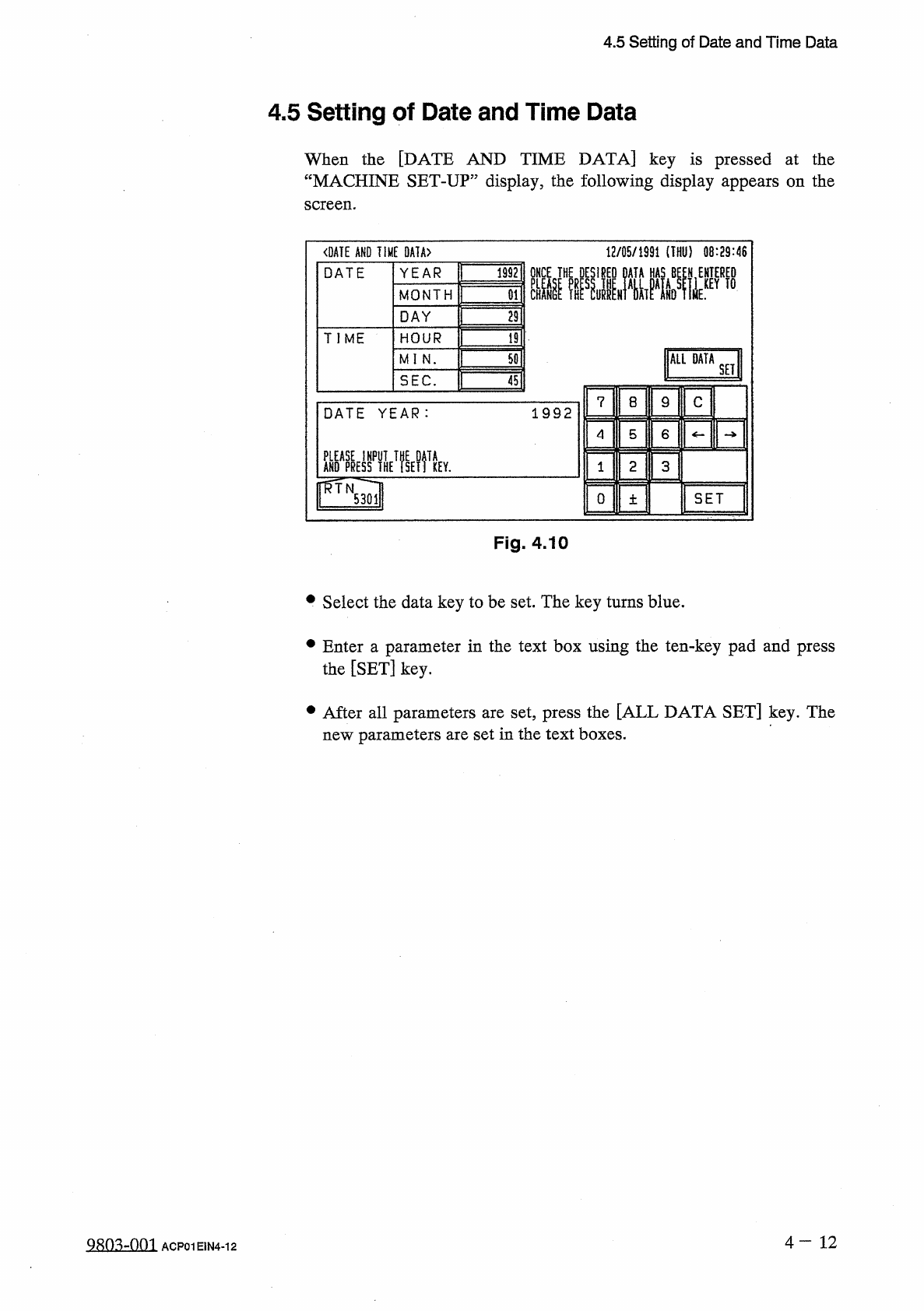
When
the
[
DATE
AND
TIME
DATA
]
key
is
pressed
at
the
“
MACHINE
SET
-
UP
”
display
,
the
following
display
appears
on
the
screen
.
<
DATE
AND
TIME
0
A
1
A
>
12
/
05
/
1991
(
THU
)
08
:
29
:
46
ONCE
THE
DESIRED
DATA
HAS
BE
£
N
,
ENTERED
YEAR
1992
DATE
MONTH
29
DAY
TIME
HOUR
19
ALL
DATA
50
MI
N
.
SET
SEC
.
45
C
7
8
9
1992
DATE
YEAR
:
4
5
6
AHO
^
yffHE
^
SElftEY
.
ffTN
2
3
SET
0
5301
土
Fig
.
4.10
•
Select
the
data
key
to
be
set
.
The
key
turns
blue
.
•
Enter
a
parameter
in
the
text
box
using
the
ten
-
key
pad
and
press
the
[
SET
]
key
.
•
After
all
parameters
are
set
,
press
the
[
ALL
DATA
SET
]
key
.
The
new
parameters
are
set
in
the
text
boxes
.
4
一
12
98
Q
3
..
-
.
.
Q
.
Q
1
ACP
01
E
1
N
4
-
12
4.6
Setting
of
Error
Display
Color
4.6
Setting
of
Error
Display
Color
When
the
[
ERROR
DISPLAY
COLOR
]
key
is
pressed
at
the
“
MACHINE
SET
-
UP
”
display
,
the
following
display
appears
on
the
screen
.
〈
ERROR
DISPLAY
COLOR
)
12
/
05
/
1992
(
THU
)
08
:
29
:
46
1
ERROR
1
fflffSFlU
MESSAGE
riTr
Tim
0
BACKGROUND
COLOR
LETTEfi
COLOR
Fig
.
4.11
^
umimi
3
ip
41
BACKGROUND
COLOR
RED
LETTER
COLOR
•
The
background
and
letter
colors
of
the
error
information
box
be
changed
according
to
one
of
the
five
selectable
combinations
(
0
to
4
)
.
When
the
desired
combination
No
.
box
is
pressed
,
the
colors
are
reflected
in
the
error
information
box
.
can
•
One
of
the
five
patterns
(
combinations
of
background
and
letter
colors
)
can
be
selected
.
4
-
13
Qso
^
-
nm
ACP
01
EIN
4
-
13
4.7
Setting
of
Screen
Mode
4.7
Setting
of
Screen
Mode
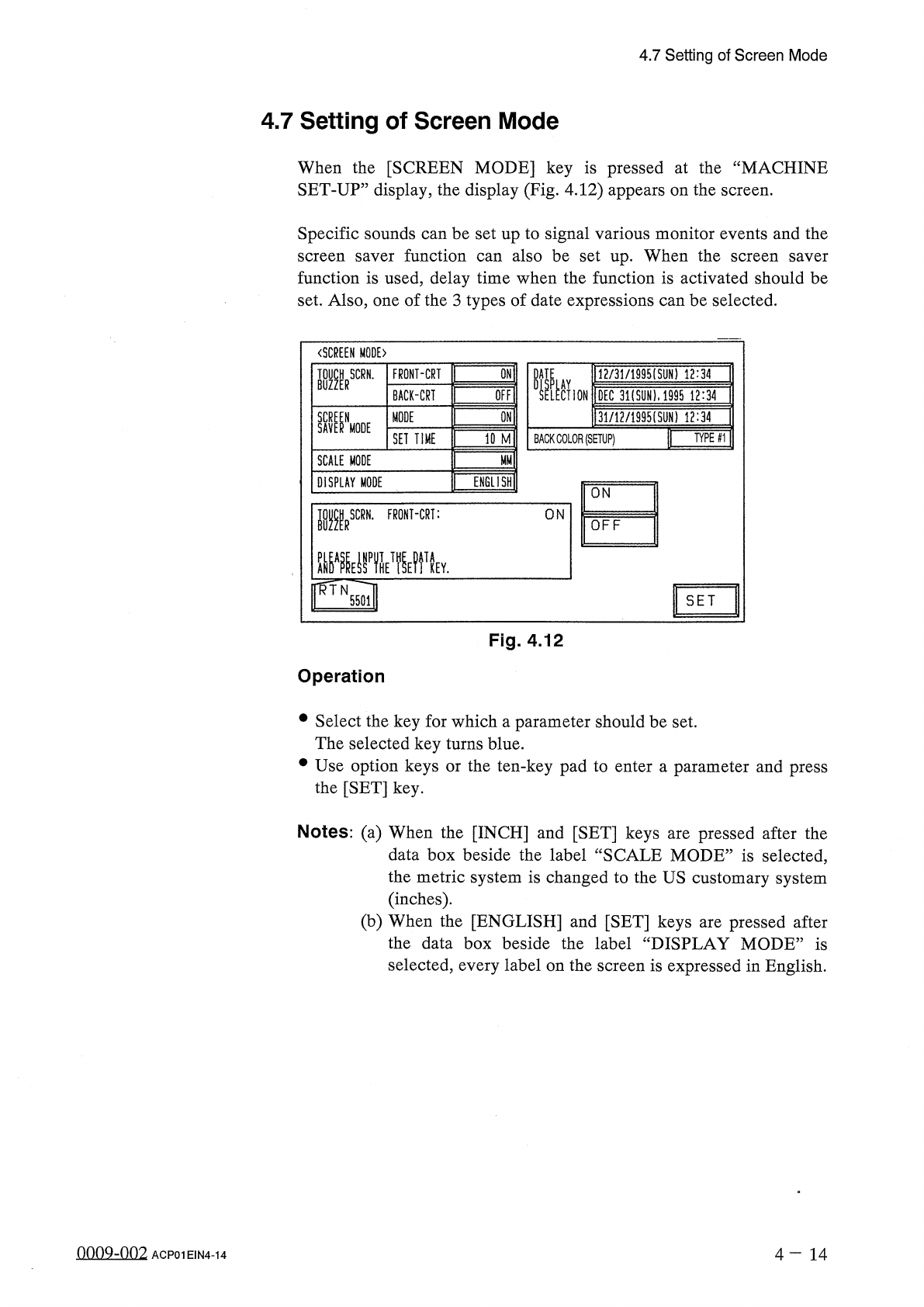
When
the
[
SCREEN
MODE
]
key
is
pressed
at
the
“
MACHINE
SET
-
UP
”
display
,
the
display
(
Fig
.
4.12
)
appears
on
the
screen
.
Specific
sounds
can
be
set
up
to
signal
various
monitor
events
and
the
screen
saver
function
can
also
be
set
up
.
When
the
function
is
used
,
delay
time
when
the
function
is
activated
should
be
set
.
Also
,
one
of
the
3
types
of
date
expressions
can
be
selected
.
screen
saver
〈
SCREEN
MODE
)
W
_
IAV
.
M
2
/
31
/
1995
ISUN
)
12
:
34
SELECTION
IDEC
3
i
(
syN
)
.
i
99
rT
?
il
4
|
3
lJl
2
/
1995
(
SUN
)
12
^
7
DATE
BUZZERSCRN
'
FRONT
-
CRT
QFFI
BACK
-
CRI
W
MODE
SAV
^
NMODE
WMI
TYPE
#
1
SET
TIME
BACK
COLOR
(
SETUP
)
SCALE
MODE
ENGLISH
!
DISPLAY
MODE
ON
■
RSCRN
.
FRONT
-
CRT
:
ON
OFF
^
A
^
ynTHETfyi
IWN
TA
KEY
.
SET
5501
Fig
.
4.12
Operation
•
Select
the
key
for
which
a
parameter
should
be
set
.
The
selected
key
turns
blue
.
•
Use
option
keys
or
the
ten
-
key
pad
to
enter
a
parameter
and
press
the
[
SET
]
key
.
Notes
:
(
a
)
When
the
[
INCH
]
and
[
SET
]
keys
are
pressed
after
the
data
box
beside
the
label
“
SCALE
MODE
”
is
selected
,
the
metric
system
is
changed
to
the
US
customary
system
(
inches
)
.
(
b
)
When
the
[
ENGLISH
]
and
[
SET
]
keys
are
pressed
after
the
data
box
beside
the
label
“
DISPLAY
MODE
”
is
selected
,
every
label
on
the
screen
is
expressed
in
English
.
onnQ
-
nn
2
4
-
14
ACP
01
EIN
4
-
14