3MAINTENANCE__O.pdf - 第59页
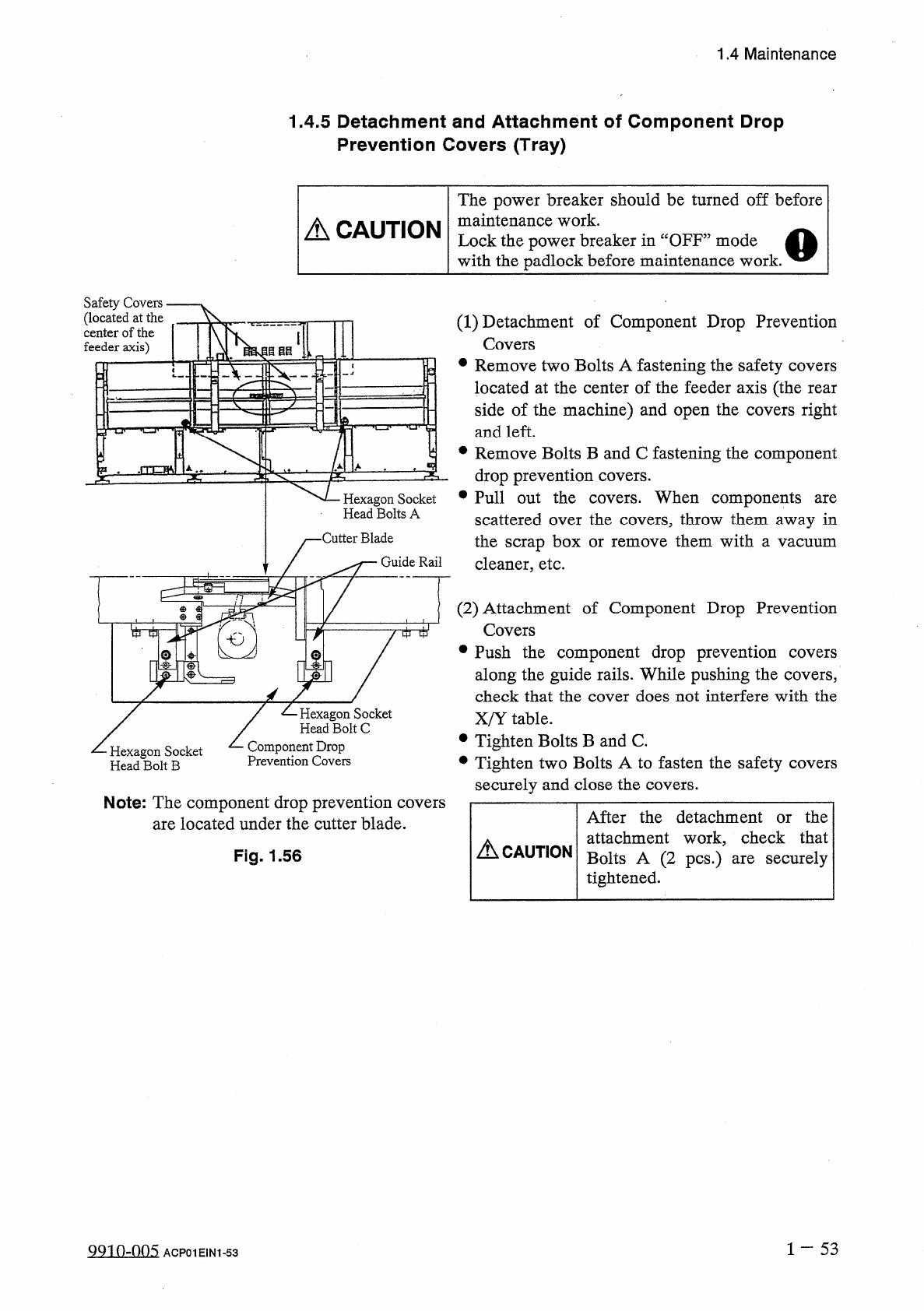
1.4 Maintenance 1.4 . 5 Detachment and Attachment of Component Drop Prevention Covers ( Tray ) The power breaker should be turned off before maintenance work . Lock the power breaker in “ OFF ” mode with the padlock befo…
1.4
Maintenance
(
5
)
Confirmation
Points
(
Before
Attachment
of
Round
or
Reflective
Nozzle
)
參
Confirmation
of
Nozzle
Attachment
Angle
Perform
the
teaching
operation
for
head
origin
and
head
/
nozzle
offset
data
in
this
order
.
When
a
cylindrical
or
a
0603
component
is
used
,
perform
the
component
recognition
test
to
confirm
that
the
nozzle
is
attached
at
an
angle
of
5
degrees
or
less
(
X
and
Y
direction
on
the
recognition
monitor
)
.
If
the
angle
exceeds
5
degrees
,
follow
the
instructions
given
in
u
®
Cap
Attachment
”
and
go
through
the
subsequent
procedures
again
.
1
一
52
QQ
10
-
nn
5
1.4
Maintenance
1.4
.
5
Detachment
and
Attachment
of
Component
Drop
Prevention
Covers
(
Tray
)
The
power
breaker
should
be
turned
off
before
maintenance
work
.
Lock
the
power
breaker
in
“
OFF
”
mode
with
the
padlock
before
maintenance
work
.
A
CAUTION
Safety
Covers
(
located
at
the
center
of
the
feeder
axis
)
V
.
(
1
)
Detachment
of
Component
Drop
Prevention
Covers
•
Remove
two
Bolts
A
fastening
the
safety
covers
located
at
the
center
of
the
feeder
axis
(
the
rear
side
of
the
machine
)
and
open
the
covers
right
and
left
.
目目目
•
Remove
Bolts
B
and
C
fastening
the
component
drop
prevention
covers
.
Hexagon
Socket
•
Pull
out
the
covers
.
When
components
Head
Bolts
A
are
scattered
over
the
covers
,
throw
them
away
in
the
scrap
box
or
cleaner
,
etc
.
•
Cutter
Blade
them
with
remove
a
vacuum
Guide
Rail
(
2
)
Attachment
of
Component
Drop
Prevention
Covers
•
Push
the
component
drop
prevention
along
the
guide
rails
.
While
pushing
the
covers
,
check
that
the
cover
does
not
interfere
with
the
X
/
Y
table
.
•
Tighten
Bolts
B
and
C
.
•
Tighten
two
Bolts
A
to
fasten
the
safety
covers
securely
and
close
the
covers
.
i
tti
1
covers
/
乙
Hexagon
Socket
,
Head
Bolt
C
Component
Drop
Prevention
Covers
Hexagon
Socket
Head
Bolt
B
Note
:
The
component
drop
prevention
covers
are
located
under
the
cutter
blade
.
After
the
detachment
or
the
attachment
work
,
check
that
Bolts
A
(
2
pcs
.
)
are
securely
tightened
.
A
CAUTION
Fig
.
1.56
1
-
53
QQ
10
-
005
ACP
01
EIN
1
-
53
1.4
Maintenance
1.4
.
6
Replacement
of
Cutter
Blade
Shut
off
the
power
breaker
and
then
replace
cutter
blades
.
Lock
the
power
breaker
using
the
padlock
before
maintenance
and
inspections
work
.
A
CAUTION
(
1
)
Time
of
Replacement
Replace
a
cutter
blade
with
a
new
one
when
the
cutting
quality
has
deteriorated
due
to
wear
,
cracks
,
etc
.
(
2
)
Replacement
Procedure
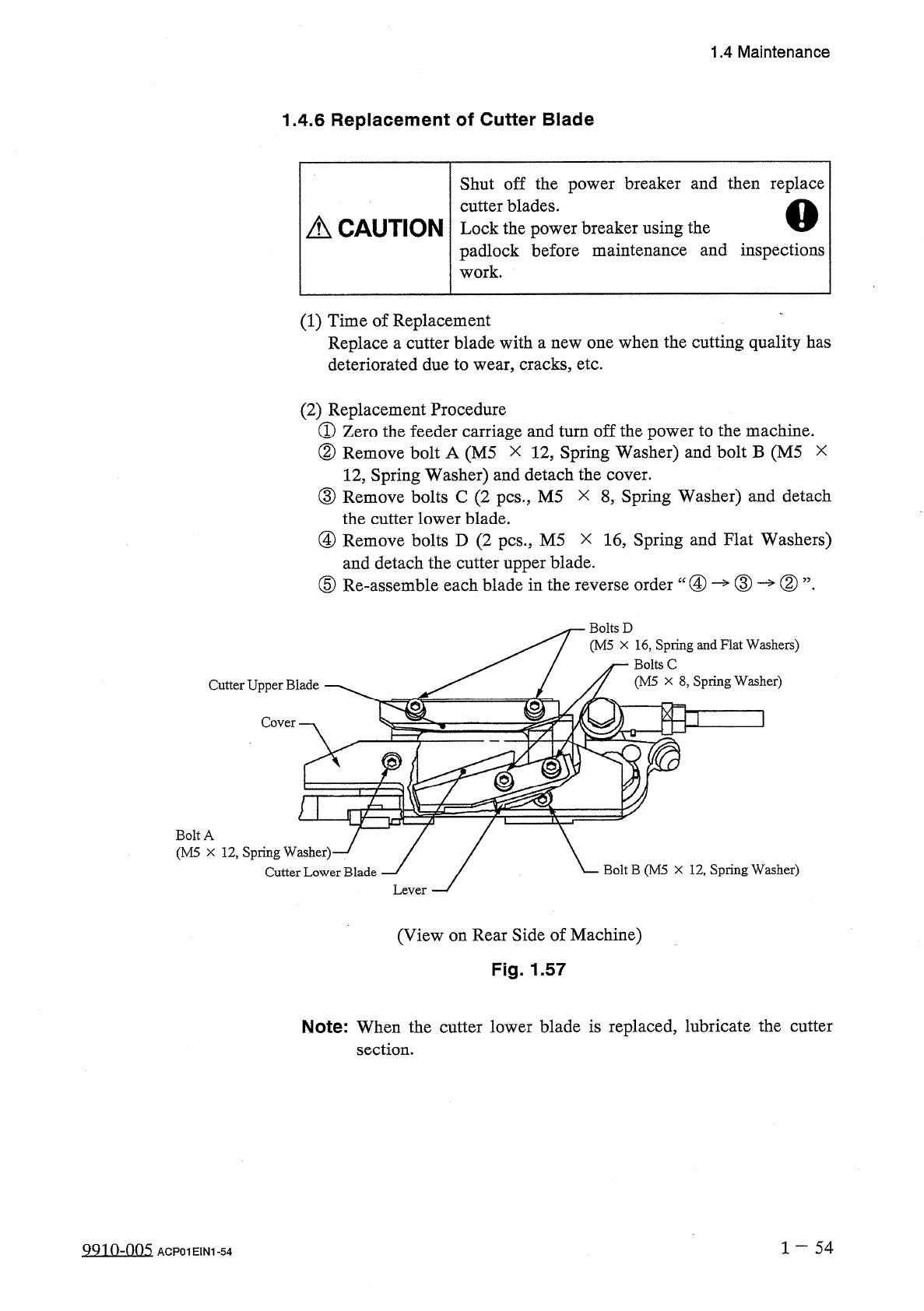
①
Zero
the
feeder
carriage
and
turn
off
the
power
to
the
machine
.
②
Remove
bolt
A
(
M
5
X
12
,
Spring
Washer
)
and
bolt
B
(
M
5
12
,
Spring
Washer
)
and
detach
the
cover
.
③
Remove
bolts
C
(
2
pcs
.
,
M
5
the
cutter
lower
blade
.
④
Remove
bolts
D
(
2
pcs
”
M
5
and
detach
the
cutter
upper
blade
.
⑤
Re
-
assemble
each
blade
in
the
x
8
,
Spring
Washer
)
and
detach
X
16
,
Spring
and
Flat
Washers
)
X
order
“
④
—
③
—
②
”
.
reverse
Bolts
D
(
M
5
x
16
,
Spring
and
Flat
Washers
)
j
—
Bolts
C
/
7
(
M
5
x
8
,
Spring
Washer
)
Cutter
Upper
Blade
Bolt
A
(
M
5
X
12
,
Spring
Washer
)
Bolt
B
(
M
5
X
12
,
Spring
Washer
)
Cutter
Lower
Blade
(
View
on
Rear
Side
of
Machine
)
Fig
.
1.57
Note
:
When
the
cutter
lower
blade
is
replaced
,
lubricate
the
cutter
section
.
1
一
54
QQ
10
-
005
ACP
01
EIN
1
-
54