3MAINTENANCE__O.pdf - 第66页
1.4 Maintenance 1.4 . 9 Replacement of Unrequired Nozzle Storage and Nozzle Level Selection Plates ( 1 ) Time of Replacement Replace the plate whenever a dent ( approx . 0.2 mm ) is made on the surface . Eccentric Pin £ …
1.4
Maintenance
•
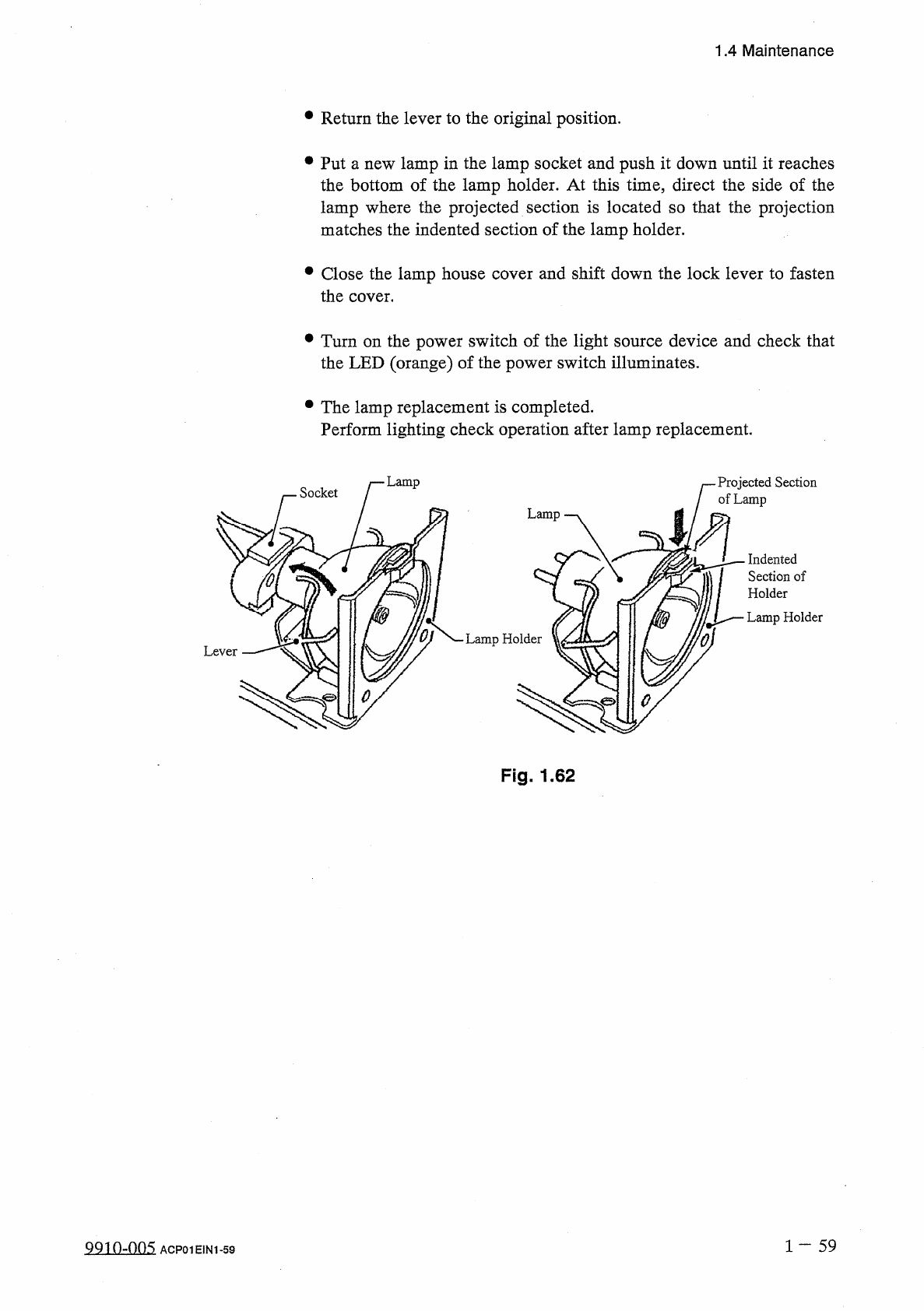
Return
the
lever
to
the
original
position
.
•
Put
a
new
lamp
in
the
lamp
socket
and
push
it
down
until
it
reaches
the
bottom
of
the
lamp
holder
.
At
this
time
,
direct
the
side
of
the
lamp
where
the
projected
section
is
located
so
that
the
projection
matches
the
indented
section
of
the
lamp
holder
.
•
Close
the
lamp
house
cover
and
shift
down
the
lock
lever
to
fasten
the
cover
.
•
Turn
on
the
power
switch
of
the
light
source
device
and
check
that
the
LED
(
orange
)
of
the
power
switch
illuminates
.
•
The
lamp
replacement
is
completed
.
Perform
lighting
check
operation
after
lamp
replacement
.
Lamp
Projected
Section
of
Lamp
Socket
Indented
Section
of
Holder
Lamp
Holder
Fig
.
1.62
1
—
5 9
QQio
-
nns
ACP
01
E
1
N
1
-
59
1.4
Maintenance
1.4
.
9
Replacement
of
Unrequired
Nozzle
Storage
and
Nozzle
Level
Selection
Plates
(
1
)
Time
of
Replacement
Replace
the
plate
whenever
a
dent
(
approx
.
0.2
mm
)
is
made
on
the
surface
.
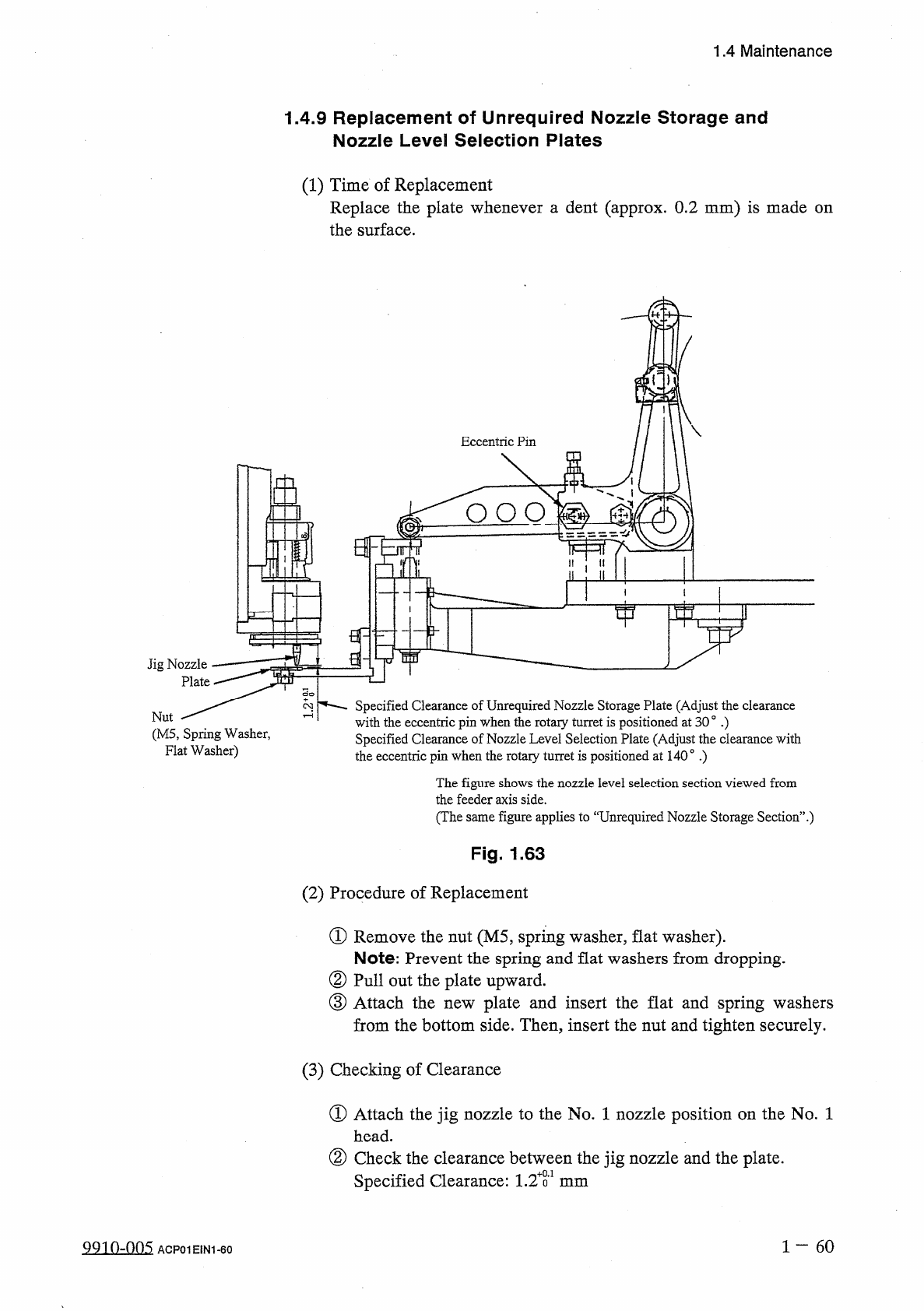
Eccentric
Pin
£
2
O O O
Jig
Nozzle
Plate
Specified
Clearance
of
Unrequired
Nozzle
Storage
Plate
(
Adjust
the
clearance
with
the
eccentric
pin
when
the
rotary
turret
is
positioned
at
30
。
•
)
Specified
Clearance
of
Nozzle
Level
Selection
Plate
(
Adjust
the
clearance
with
2
Nut
(
M
5
,
Spring
Washer
,
Flat
Washer
)
the
eccentric
pin
when
the
rotary
turret
is
positioned
at
140
°
.
)
The
figure
shows
the
nozzle
level
selection
section
viewed
from
the
feeder
axis
side
.
(
The
same
figure
applies
to
“
Unrequired
Nozzle
Storage
Section
’
’
.
)
Fig
.
1.63
(
2
)
Procedure
of
Replacement
①
Remove
the
nut
(
M
5
,
spring
washer
,
flat
washer
)
.
Note
:
Prevent
the
spring
and
flat
washers
from
dropping
.
②
Pull
out
the
plate
upward
.
③
Attach
the
from
the
bottom
side
.
Then
,
insert
the
nut
and
tighten
securely
.
plate
and
insert
the
flat
and
spring
washers
new
(
3
)
Checking
of
Clearance
①
Attach
the
jig
nozzle
to
the
No
.
1
nozzle
position
on
the
No
.
1
head
.
②
Check
the
clearance
between
the
jig
nozzle
and
the
plate
.
Specified
Clearance
:
1.2
T
mm
1
60
9910
-
005
ACP
01
EIN
1
-
60
1.5
Checklist
for
Maintenance
1.5
Checklist
for
Maintenance
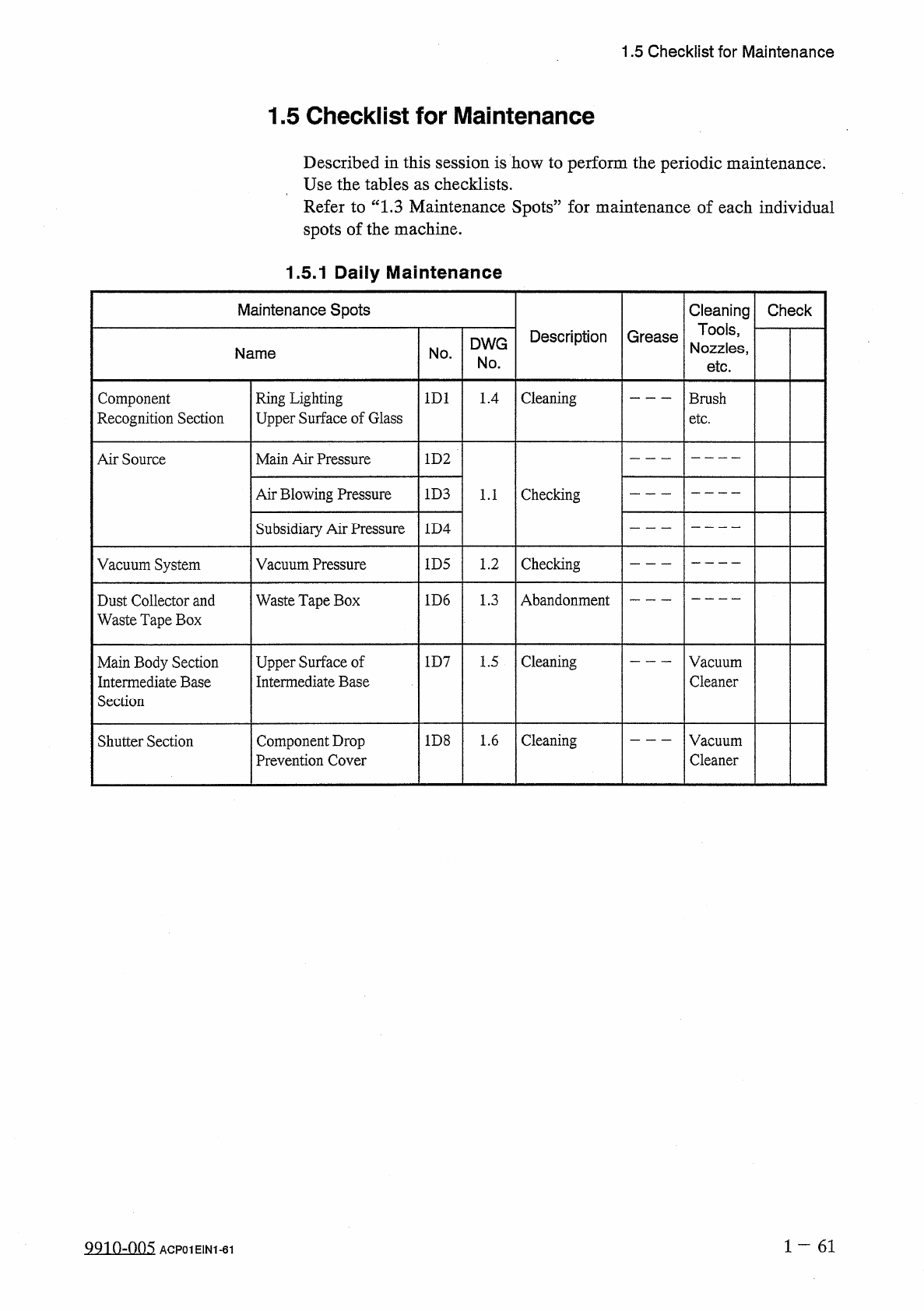
Described
in
this
session
is
how
to
perform
the
periodic
maintenance
.
Use
the
tables
as
checklists
.
Refer
to
“
1.3
Maintenance
Spots
”
for
maintenance
of
each
individual
spots
of
the
machine
.
1.5
.
1
Daily
Maintenance
Maintenance
Spots
Cleaning
Tools
,
Nozzles
,
Check
Description
Grease
DWG
Name
No
.
No
.
etc
.
Cleaning
Component
Recognition
Section
Ring
Lighting
Upper
Surface
of
Glass
1
D
1
1.4
Brush
etc
.
Main
Air
Pressure
Air
Source
1
D
2
Air
Blowing
Pressure
1
D
3
Checking
1.1
Subsidiary
Air
Pressure
1
D
4
Checking
Vacuum
System
Vacuum
Pressure
1
D
5
1.2
Abandonment
1
D
6
1.3
Dust
Collector
and
Waste
Tape
Box
Waste
Tape
Box
Upper
Surface
of
Intermediate
Base
Cleaning
Main
Body
Section
Intermediate
Base
Section
1
D
7
1.5
Vacuum
Cleaner
Cleaning
1
D
8
1.6
Vacuum
Cleaner
Shutter
Section
Component
Drop
Prevention
Cover
1
一
61
QQ
10
-
005
ACP
01
E
1
N
1
-
61