3MAINTENANCE__O.pdf - 第90页
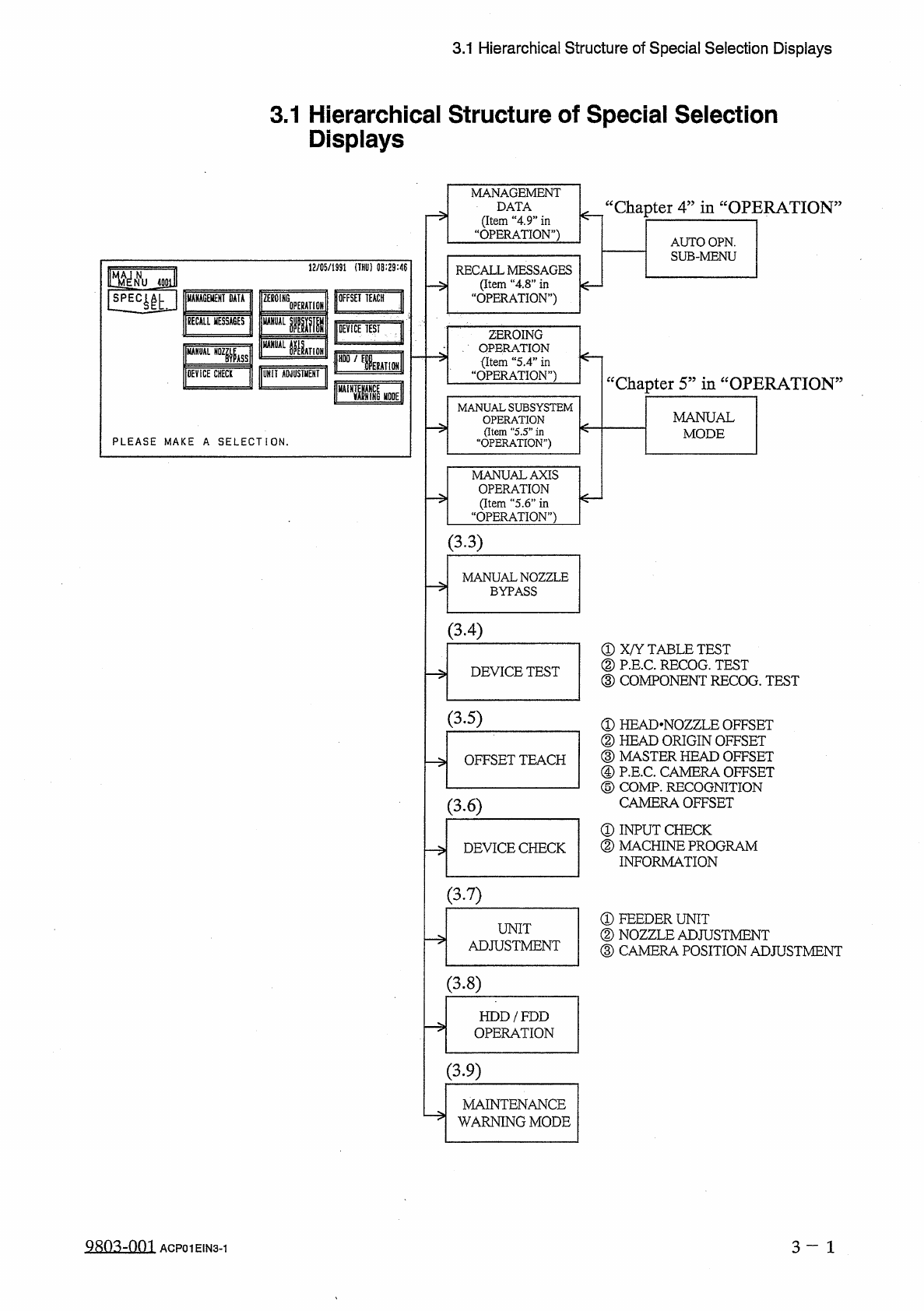
3.1 Hierarchical Structure of Special Selection Displays 3.1 Hierarchical Structure of Special Selection Displays MANAGEMENT DATA ( Item “ 4.9 ” in “ OPERATION ” ) “ Chapter 4 ” in “ OPERATION AUTO OPN . SUB - MENU 12 / …
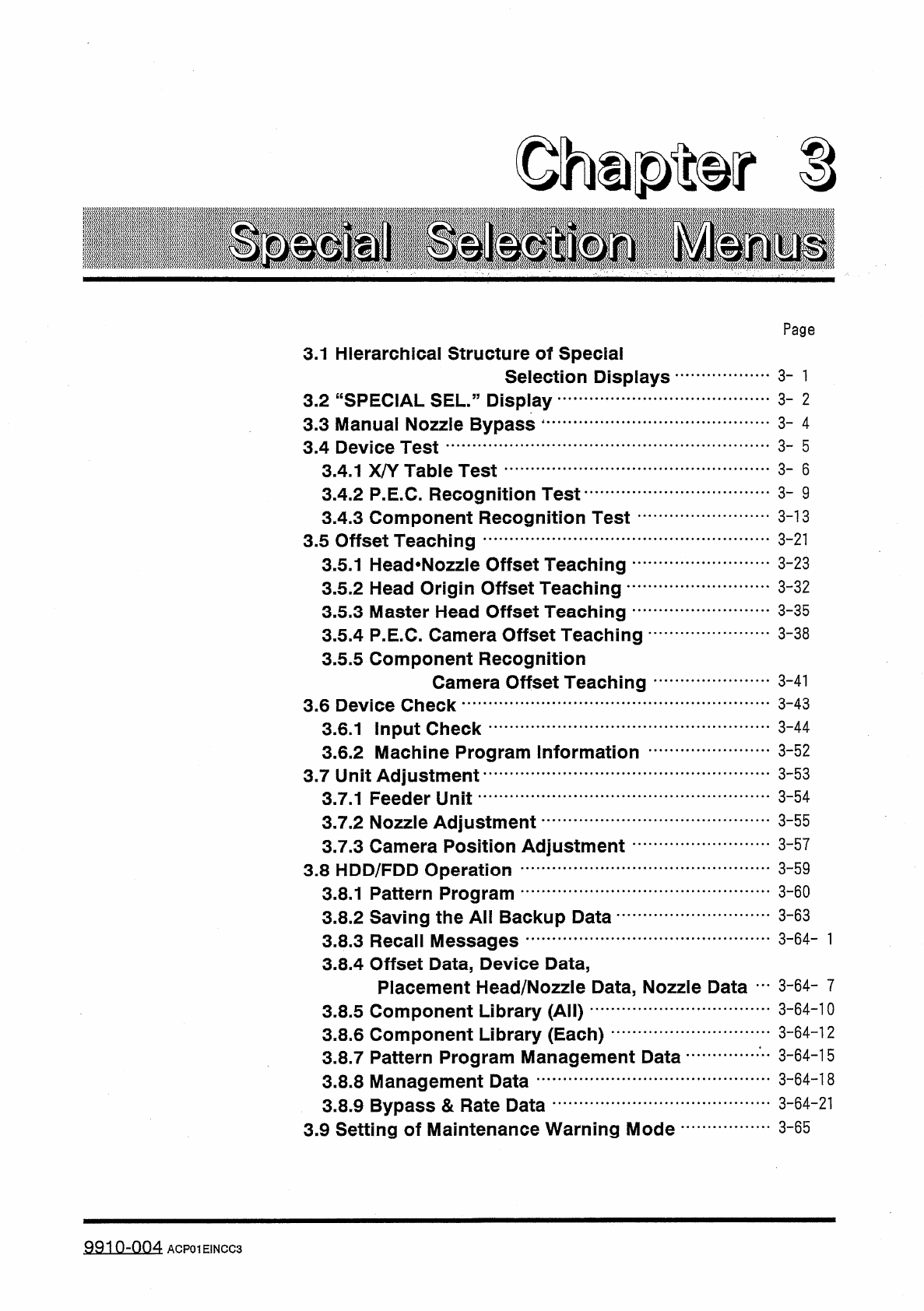
Ohupter
S
Page
3.1
Hierarchical
Structure
of
Special
Selection
Displays
3
-
1
3
-
2
3.2
“
SPECIAL
SEL
.
”
Display
3.3
Manual
Nozzle
Bypass
1
3.4
Device
Test
3
-
4
3
-
5
3
-
6
3.4
.
1
X
/
Y
Table
Test
3.4
.
2
P
.
E
.
C
.
Recognition
Test
3.4
.
3
Component
Recognition
Test
-
3.5
Offset
Teaching
3.5
.
1
Head
*
Nozzle
Offset
Teaching
…
'
3.5
.
2
Head
Origin
Offset
Teaching
•
…
.
3.5
.
3
Master
Head
Offset
Teaching
…
1
3.5
.
4
P
.
E
.
C
.
Camera
Offset
Teaching
3.5
.
5
Component
Recognition
Camera
Offset
Teaching
3
-
9
3
-
13
3
-
21
3
-
23
3
-
32
3
-
35
3
-
38
3
-
41
3
-
43
3.6
Device
Check
3
-
44
3.6
.
1
Input
Check
3.6
.
2
Machine
Program
Information
3.7
Unit
Adjustment
3.7
.
1
Feeder
Unit
3
-
52
3
-
53
3
-
54
3
-
55
3.7
.
2
Nozzle
Adjustment
3.7
.
3
Camera
Position
Adjustment
3.8
HDD
/
FDD
Operation
3.8
.
1
Pattern
Program
3.8
.
2
Saving
the
All
Backup
Data
-
3.8
.
3
Recall
Messages
3.8
.
4
Offset
Data
,
Device
Data
,
Placement
Head
/
Nozzle
Data
,
Nozzle
Data
…
3
-
6 4
-
7
3
-
64
-
10
3
-
57
3
-
59
3
-
60
3
-
63
3.8
.
5
Component
Library
(
All
)
3.8
.
6
Component
Library
(
Each
)
3.8
.
7
Pattern
Program
Management
Data
3.8
.
8
Management
Data
3.8
.
9
Bypass
&
Rate
Data
3.9
Setting
of
Maintenance
Warning
Mode
•
3
-
64
-
12
3
-
64
-
15
3
-
64
-
18
3
-
64
-
21
3
-
65
9910
-
004
ACP
01
EINCC
3
3.1
Hierarchical
Structure
of
Special
Selection
Displays
3.1
Hierarchical
Structure
of
Special
Selection
Displays
MANAGEMENT
DATA
(
Item
“
4.9
”
in
“
OPERATION
”
)
“
Chapter
4
”
in
“
OPERATION
AUTO
OPN
.
SUB
-
MENU
12
/
05
/
1991
(
THU
)
08
:
29
:
46
RECALL
MESSAGES
(
Item
“
4
,
8
”
in
OPERATION
”
)
jgoi
OFFSET
TEACH
J
MANAGEMENT
DATA
ZEB
01
HG
0
PERAT
10
BECALL
MESSAGES
UANUAL
腿
M
|
DEViCE
TEST
ZEROING
、
.
OPERATION
今
〈
Item
“
5.4
”
in
“
OPERATION
”
)
MANUAL
KTION
A
"
,
槛
DEVICE
CHECK
UNIT
ADJUSTMENT
cc
Chanter
5
,
5
in
“
OPERATION
>
5
flm
MANUAL
SUBSYSTEM
OPERATION
(
Item
"
5.5
”
in
“
OPERATION
”
)
MANUAL
MODE
PLEASE
MAKE
A
SELECTION
.
MANUAL
AXIS
OPERATION
(
Item
“
5.6
”
in
“
OPERATION
”
)
(
33
)
MANUAL
NOZZLE
BYPASS
(
3.4
)
①
X
/
Y
TABLE
TEST
②
P
.
E
.
C
.
RECOG
.
TEST
③
COMPONENT
RECOG
.
TEST
DEVICE
TEST
(
3.5
)
①
HEAD
-
NOZZLE
OFFSET
②
HEAD
ORIGIN
OFFSET
③
MASTER
HEAD
OFFSET
④
P
.
E
.
C
.
CAMERA
OFFSET
⑤
COMP
.
RECOGNITION
CAMERA
OFFSET
①
INPUT
CHECK
②
MACHINE
PROGRAM
INFORMATION
OFFSET
TEACH
(
3.6
)
DEVICE
CHECK
(
3.7
)
①
FEEDER
UNIT
②
NOZZLE
ADJUSTMENT
③
CAMERA
POSITION
ADJUSTMENT
UNIT
ADJUSTMENT
-
>
(
3.8
)
HDD
/
FDD
OPERATION
(
3.9
)
MAINTENANCE
WARNING
MODE
Q
803
-
001
3
-
1
ACP
01
EIN
3
-
1
3.2
"
SPECIAL
SEL
.
"
Display
3.2
“
SPECIAL
SEL
.
55
Display
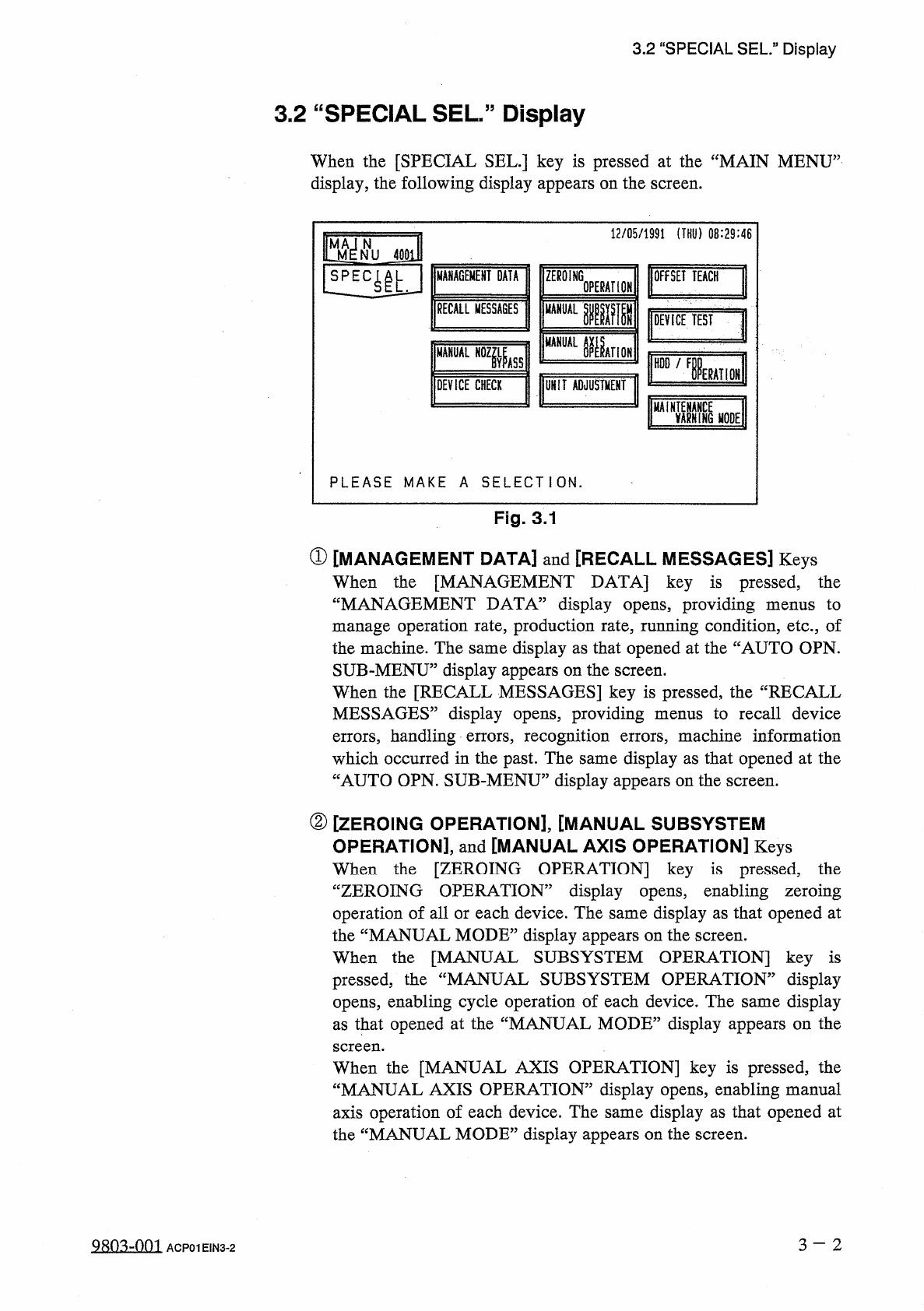
When
the
[
SPECIAL
SEL
.
]
key
is
pressed
at
the
“
MAIN
MENU
”
display
,
the
following
display
appears
on
the
screen
.
12
/
05
/
1991
(
THU
)
08
:
29
:
46
m
N
NU
40
EU
丽
GE
丽
DATA
ZEROING
OFFSET
TEACH
!
1
E
4
|
L
OPERATION
RECALL
MESSAGES
MANUAL
IW
DEVICE
TEST
綱
AHOK
MANUAL
N
0
Zfe
HDD
/
F
IERAHON
j
DEVICE
CHECK
UNIT
ADJUSTMENT
MAi
EARNING
麵
E
PLEASE
MAKE
A
SELECTION
.
Fig
.
3.1
①
[
MANAGEMENT
DATA
]
and
[
RECALL
MESSAGES
]
Keys
When
the
[
MANAGEMENT
DATA
]
key
is
pressed
,
the
“
MANAGEMENT
DATA
5
display
opens
,
providing
menus
to
manage
operation
rate
,
production
rate
,
running
condition
,
etc
.
,
of
the
machine
.
The
same
display
as
that
opened
at
the
“
AUTO
OPN
.
SUB
-
MENU
”
display
appears
on
the
screen
.
When
the
[
RECALL
MESSAGES
]
key
is
pressed
,
the
“
RECALL
MESSAGES
”
display
opens
,
providing
menus
to
recall
device
errors
,
handling
errors
,
recognition
errors
,
machine
information
which
occurred
in
the
past
.
The
same
display
as
that
opened
at
the
“
AUTO
OPN
.
SUB
-
MENU
”
display
appears
on
the
screen
.
②
[
ZEROING
OPERATION
]
,
[
MANUAL
SUBSYSTEM
OPERATION
]
,
and
[
MANUAL
AXIS
OPERATION
]
Keys
When
the
[
ZEROING
OPERATION
]
key
is
pressed
,
the
“
ZEROING
OPERATION
”
display
opens
,
enabling
zeroing
operation
of
all
or
each
device
.
The
same
display
as
that
opened
at
the
“
MANUAL
MODE
”
display
appears
on
the
screen
.
When
the
[
MANUAL
SUBSYSTEM
OPERATION
]
key
is
pressed
;
the
“
MANUAL
SUBSYSTEM
OPERATION
”
display
opens
,
enabling
cycle
operation
of
each
device
.
The
same
display
as
that
opened
at
the
“
MANUAL
MODE
”
display
appears
on
the
screen
.
OPERATION
]
key
is
pressed
,
the
When
the
[
MANUAL
AXIS
“
MANUAL
AXIS
OPERATION
53
display
opens
,
enabling
manual
axis
operation
of
each
device
.
The
same
display
as
that
opened
at
the
“
MANUAL
MODE
”
display
appears
on
the
screen
.
3
-
2
QRO
^
-
nm
ACP
01
EIN
3
-
2