3MAINTENANCE__O.pdf - 第92页
3.2 “ SPECIAL SEL . " Display ③ [ MANUAL NOZZLE BYPASS ] Key When this key is pressed , the “ MANUAL NOZZLE BYPASS ” display opens , enabling manual bypass setting of a nozzle which is not in good shape or which sho…
3.2
"
SPECIAL
SEL
.
"
Display
3.2
“
SPECIAL
SEL
.
55
Display
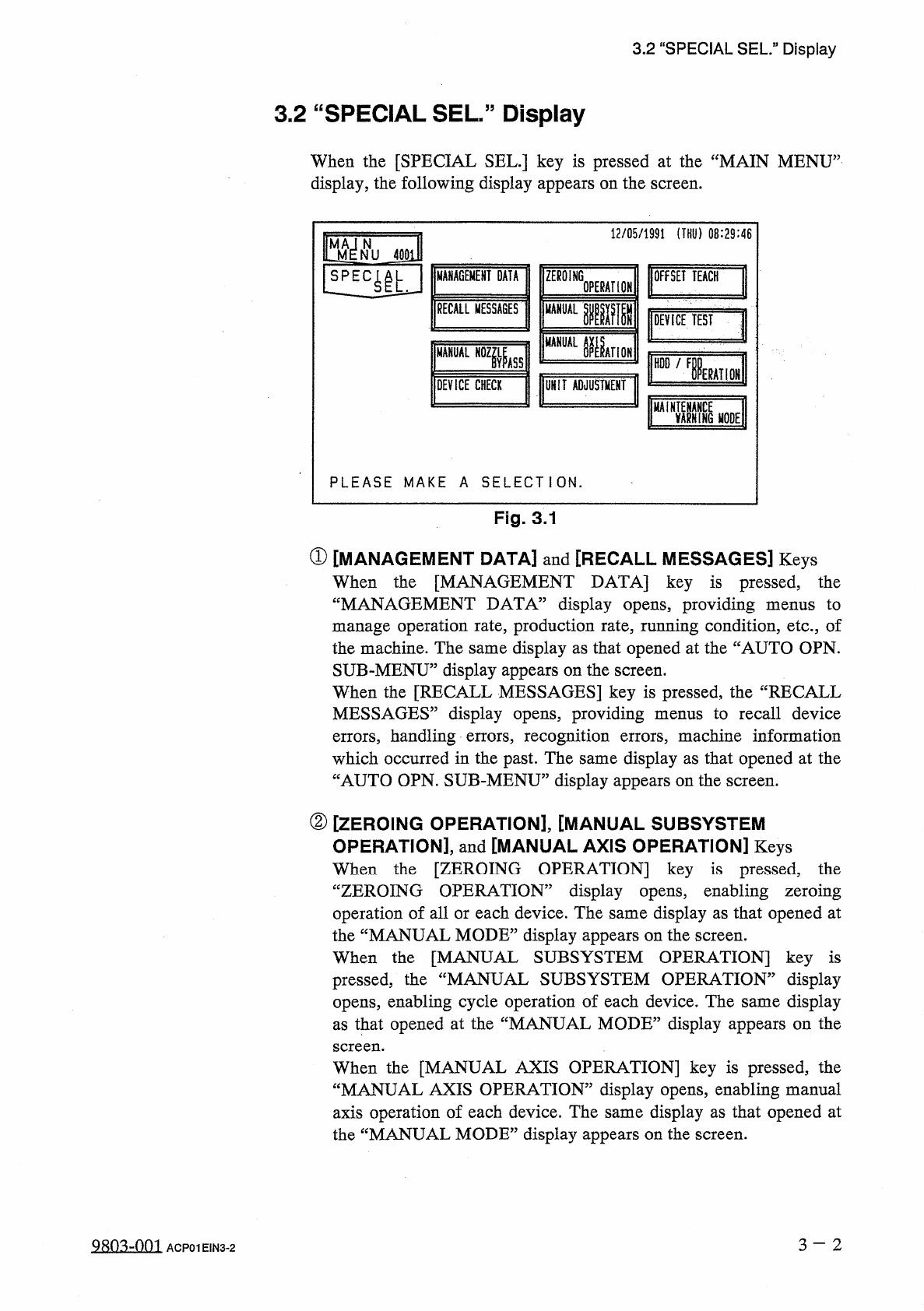
When
the
[
SPECIAL
SEL
.
]
key
is
pressed
at
the
“
MAIN
MENU
”
display
,
the
following
display
appears
on
the
screen
.
12
/
05
/
1991
(
THU
)
08
:
29
:
46
m
N
NU
40
EU
丽
GE
丽
DATA
ZEROING
OFFSET
TEACH
!
1
E
4
|
L
OPERATION
RECALL
MESSAGES
MANUAL
IW
DEVICE
TEST
綱
AHOK
MANUAL
N
0
Zfe
HDD
/
F
IERAHON
j
DEVICE
CHECK
UNIT
ADJUSTMENT
MAi
EARNING
麵
E
PLEASE
MAKE
A
SELECTION
.
Fig
.
3.1
①
[
MANAGEMENT
DATA
]
and
[
RECALL
MESSAGES
]
Keys
When
the
[
MANAGEMENT
DATA
]
key
is
pressed
,
the
“
MANAGEMENT
DATA
5
display
opens
,
providing
menus
to
manage
operation
rate
,
production
rate
,
running
condition
,
etc
.
,
of
the
machine
.
The
same
display
as
that
opened
at
the
“
AUTO
OPN
.
SUB
-
MENU
”
display
appears
on
the
screen
.
When
the
[
RECALL
MESSAGES
]
key
is
pressed
,
the
“
RECALL
MESSAGES
”
display
opens
,
providing
menus
to
recall
device
errors
,
handling
errors
,
recognition
errors
,
machine
information
which
occurred
in
the
past
.
The
same
display
as
that
opened
at
the
“
AUTO
OPN
.
SUB
-
MENU
”
display
appears
on
the
screen
.
②
[
ZEROING
OPERATION
]
,
[
MANUAL
SUBSYSTEM
OPERATION
]
,
and
[
MANUAL
AXIS
OPERATION
]
Keys
When
the
[
ZEROING
OPERATION
]
key
is
pressed
,
the
“
ZEROING
OPERATION
”
display
opens
,
enabling
zeroing
operation
of
all
or
each
device
.
The
same
display
as
that
opened
at
the
“
MANUAL
MODE
”
display
appears
on
the
screen
.
When
the
[
MANUAL
SUBSYSTEM
OPERATION
]
key
is
pressed
;
the
“
MANUAL
SUBSYSTEM
OPERATION
”
display
opens
,
enabling
cycle
operation
of
each
device
.
The
same
display
as
that
opened
at
the
“
MANUAL
MODE
”
display
appears
on
the
screen
.
OPERATION
]
key
is
pressed
,
the
When
the
[
MANUAL
AXIS
“
MANUAL
AXIS
OPERATION
53
display
opens
,
enabling
manual
axis
operation
of
each
device
.
The
same
display
as
that
opened
at
the
“
MANUAL
MODE
”
display
appears
on
the
screen
.
3
-
2
QRO
^
-
nm
ACP
01
EIN
3
-
2
3.2
“
SPECIAL
SEL
.
"
Display
③
[
MANUAL
NOZZLE
BYPASS
]
Key
When
this
key
is
pressed
,
the
“
MANUAL
NOZZLE
BYPASS
”
display
opens
,
enabling
manual
bypass
setting
of
a
nozzle
which
is
not
in
good
shape
or
which
should
not
be
used
.
The
bypass
setting
can
also
be
canceled
manually
.
④
[
DEVICE
TEST
]
Key
When
new
pattern
program
data
or
component
library
data
is
created
and
this
key
is
pressed
,
the
“
DEVICE
TEST
”
display
opens
,
enabling
actual
activation
of
devices
to
check
operations
and
functions
.
The
[
X
/
Y
TABLE
TEST
]
,
[
P
.
E
.
C
.
RECOG
.
TEST
]
,
and
[
COMPONENT
RECOG
.
TEST
]
keys
are
provided
.
⑤
[
OFFSET
TEACH
]
Key
When
this
key
is
pressed
,
the
“
OFFSET
TEACH
”
display
opens
,
enabling
teaching
of
various
offset
data
.
After
teaching
operation
,
automatically
calculated
data
is
written
over
the
corresponding
offset
data
and
saved
.
⑥
[
DEVICE
CHECK
]
Key
When
this
key
is
pressed
,
the
“
DEVICE
CHECK
”
display
opens
,
enabling
check
operation
of
reading
/
writing
check
operation
of
CPU
boards
1
and
2
,
the
memory
board
,
and
the
recognition
board
.
sensors
5
input
port
and
various
⑦
[
UNIT
ADJUSTMENT
]
Key
When
this
key
is
pressed
,
the
“
UNIT
ADJUSTMENT
”
display
opens
,
enabling
adjustment
of
each
device
.
⑧
[
HDD
/
FDD
OPERATION
]
Key
The
machine
is
provided
with
an
FDD
.
When
this
key
is
pressed
,
the
“
HDD
/
FDD
OPERATION
”
display
opens
,
enabling
the
pattern
program
data
to
be
loaded
from
or
saved
onto
a
floppy
disk
(
3.5
〃
floppy
disk
)
.
⑨
[
MAINTENANCE
WARNING
MODE
]
Key
This
function
is
used
to
manage
the
time
for
periodic
inspections
.
3
-
3
QRO
^
-
nm
ACP
01
EIN
3
-
3
3.3
Manual
Nozzle
Bypass
3.3
Manual
Nozzle
Bypass
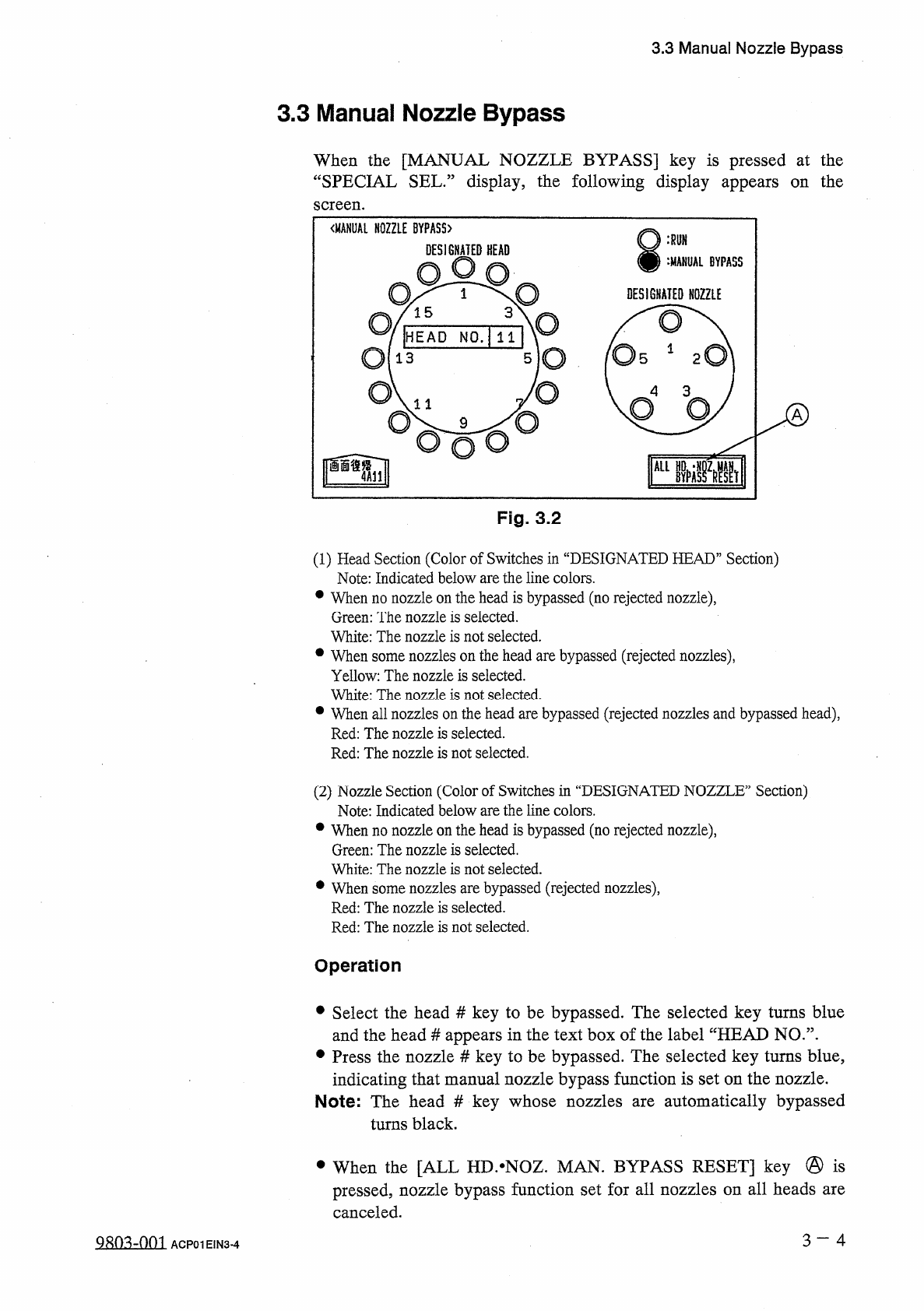
When
the
[
MANUAL
NOZZLE
BYPASS
]
key
is
pressed
at
the
“
SPECIAL
SEL
•
”
display
,
the
following
display
appears
on
the
screen
.
Fig
.
3.2
(
1
)
Head
Section
(
Color
of
Switches
in
“
DESIGNATED
HEAD
”
Section
)
Note
:
Indicated
below
are
the
line
colors
.
•
When
no
nozzle
on
the
head
is
bypassed
(
no
rejected
nozzle
)
,
Green
:
The
nozzle
is
selected
.
White
:
The
nozzle
is
not
selected
.
•
When
some
nozzles
on
the
head
are
bypassed
(
rejected
nozzles
)
,
Yellow
:
The
nozzle
is
selected
.
White
:
The
nozzle
is
not
selected
.
•
When
all
nozzles
on
the
head
are
bypassed
(
rejected
nozzles
and
bypassed
head
)
,
Red
:
The
nozzle
is
selected
.
Red
:
The
nozzle
is
not
selected
.
(
2
)
Nozzle
Section
(
Color
of
Switches
in
“
DESIGNATED
NOZZLE
”
Section
)
Note
:
Indicated
below
are
the
line
colors
.
•
When
no
nozzle
on
the
head
is
bypassed
(
no
rejected
nozzle
)
,
Green
:
The
nozzle
is
selected
.
White
:
The
nozzle
is
not
selected
.
•
When
some
nozzles
are
bypassed
(
rejected
nozzles
)
,
Red
:
The
nozzle
is
selected
.
Red
:
The
nozzle
is
not
selected
.
Operation
•
Select
the
head
#
key
to
be
bypassed
.
The
selected
key
turns
blue
and
the
head
#
appears
in
the
text
box
of
the
label
“
HEAD
NO
.
”
.
•
Press
the
nozzle
#
key
to
be
bypassed
.
The
selected
key
turns
blue
,
indicating
that
manual
nozzle
bypass
function
is
set
on
the
nozzle
.
Note
:
The
head
#
key
whose
nozzles
are
automatically
bypassed
turns
black
.
•
When
the
[
ALL
HD
.
^
NOZ
.
MAN
.
BYPASS
RESET
]
key
@
is
pressed
,
nozzle
bypass
function
set
for
all
nozzles
on
all
heads
are
canceled
.
3
-
4
g
^
-
nm
ACP
01
EIN
3
-
4