00196803-02_VD_SIPLACE_Pro_9.3_DE EN.pdf - 第41页
Software Version sbeschreibun g Programmiersy stem SIPLACE Pro 9.3 Software Version Description Programming Sys tem SIPLAC E Pro 9.3 41 4 Ne w Functions in SIPLACE Pro 9.3 4.1 SIPLAC E Pro LED Pair ing SIPLACE Pro LED Pa…

Software Versionsbeschreibung Programmiersystem SIPLACE Pro 9.3
Software Version Description Programming System SIPLACE Pro 9.3
40
Note:
SPI.NET based applications have to be migrated to SIPLACE OIB.
Software Versionsbeschreibung Programmiersystem SIPLACE Pro 9.3
Software Version Description Programming System SIPLACE Pro 9.3
41
4 New Functions in SIPLACE Pro 9.3
4.1 SIPLACE Pro LED Pairing
SIPLACE Pro LED Pairing supports the programming process when using LEDs in electronic
assemblies. The LEDs to be used can often have different brightness classes. To achieve
homogenous brightness, these differences need to be compensated by fitting adjusted series resistors
in the circuits. On the software side, the compatible types need to be defined in the board and
optimized setup.
The LED Pairing tool supports description of these types in three individual steps:
1) Import and assignment of LED matrix files (LRX files), each placement list can have an LED
matrix file assigned to it.
2) Prepare: generate and optimize the job, recipe and setup templates, based on previously
optimized reference jobs and the assigned LED matrix file.
3) Produce: select the available LED brightness classes on the basis of the LED matrix file, then
automatic generate the recipes and setups used for production, on the basis of a recipe
template (for recipe changeover) or a real recipe (for new definition after change to another
LED brightness class).
The SIPLACE Pro LED Pairing tool is a licensed Windows application, which can also be started from
SIPLACE Pro Desk.
The LED matrix file format is described in the Online Help.
4.2 Improved sequence of nozzles on the head
The "Random Setup" feature (available since SIPLACE Pro 9.2) enables you to configure components
on another track of the same table or on another table in the line.
During the integrity check, SIPLACE Pro 9.3 optimizes the sequence of nozzles on the head. The aim
is to minimize the travel distances in accordance with the actual setup. This procedure also has a
beneficial effect on conventional optimization.
4.3 Improved user guidance for EDM Difference Editor
The comparison of two component shapes with line-specific Vision data in the SIPLACE EDM
Difference Editor has been improved. When applying modified data from the clearing pool to the
master data bank, any differences are now shown more clearly.
4.4 Setups have fewer empty tracks
When configuring a setup in the past, individual empty tracks could occur between configured feeders
or empty garages (e.g. when using 2x8 mm X feeders) sometimes arose. The Optimizer has added an
extra calculation step to ensure that significantly fewer empty tracks or garages occur.
Software Versionsbeschreibung Programmiersystem SIPLACE Pro 9.3
Software Version Description Programming System SIPLACE Pro 9.3
42
4.5 Nozzle usage shown for cluster jobs
After successful optimization of cluster jobs, which have been calculated with SiCluster Professional,
the nozzles needed for production can be shown.
This view can be accessed via the Nozzle Usage tab in the Statistics dialog of the Run & Results
tab.
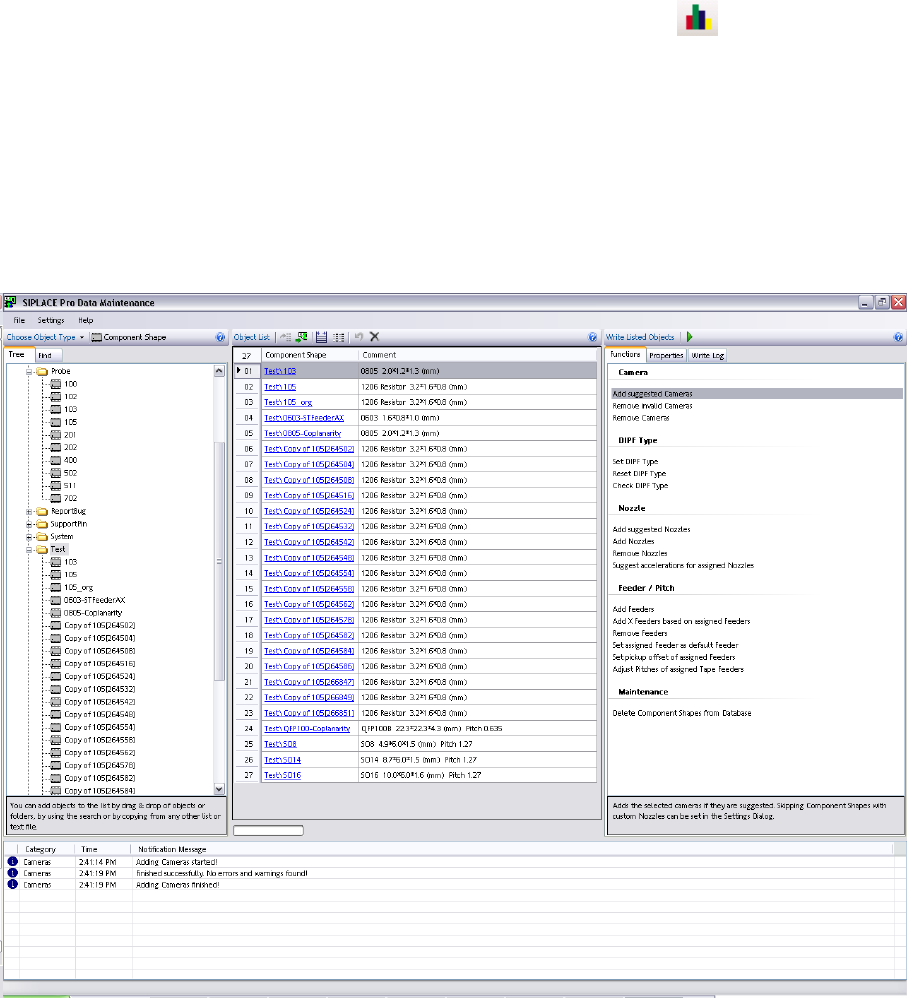
4.6 Data Maintenance Tool
The upgrade tool for component shapes and fiducials has been revised and renamed to Data
Maintenance Tool. It now offers a state-of-the-art, intuitive user interface.
Component shapes, components, fiducials, setups and trays can be processed with this tool. The
interface now enables you to locate, display and modify objects based on specific criteria.
For details, refer to the Online Help.
4.7 Multiple trays per level for MTC
When creating new setups for the matrix tray feeder (MTC), multiple trays per level were possible as a
default. The checkbox "Support Multiple Trays Per Level" in the Setup Editor was always enabled as a
default. In future, this checkbox is disabled as a default, to reduce any negative influence on the
production process. This setting will only affect new setups.