00196803-02_VD_SIPLACE_Pro_9.3_DE EN.pdf - 第43页
Software Version sbeschreibun g Programmiersy stem SIPLACE Pro 9.3 Software Version Description Programming Sys tem SIPLAC E Pro 9.3 43 4.8 Setup names The way in which setup nam es for jobs or SiCluster jobs are f ormed…
Software Versionsbeschreibung Programmiersystem SIPLACE Pro 9.3
Software Version Description Programming System SIPLACE Pro 9.3
42
4.5 Nozzle usage shown for cluster jobs
After successful optimization of cluster jobs, which have been calculated with SiCluster Professional,
the nozzles needed for production can be shown.
This view can be accessed via the Nozzle Usage tab in the Statistics dialog of the Run & Results
tab.
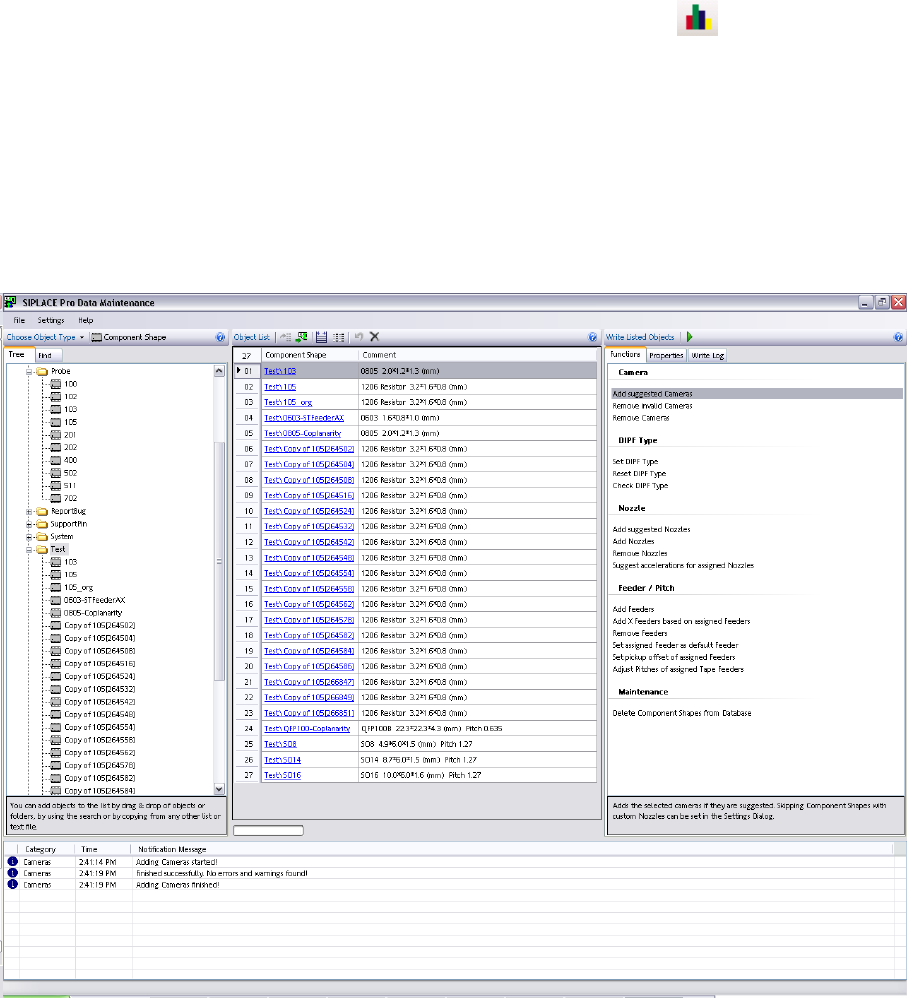
4.6 Data Maintenance Tool
The upgrade tool for component shapes and fiducials has been revised and renamed to Data
Maintenance Tool. It now offers a state-of-the-art, intuitive user interface.
Component shapes, components, fiducials, setups and trays can be processed with this tool. The
interface now enables you to locate, display and modify objects based on specific criteria.
For details, refer to the Online Help.
4.7 Multiple trays per level for MTC
When creating new setups for the matrix tray feeder (MTC), multiple trays per level were possible as a
default. The checkbox "Support Multiple Trays Per Level" in the Setup Editor was always enabled as a
default. In future, this checkbox is disabled as a default, to reduce any negative influence on the
production process. This setting will only affect new setups.

Software Versionsbeschreibung Programmiersystem SIPLACE Pro 9.3
Software Version Description Programming System SIPLACE Pro 9.3
43
4.8 Setup names
The way in which setup names for jobs or SiCluster jobs are formed can be individually set. The
names are either derived from the name of the initial setup or from the name of the job/cluster job.
This setting is offered in a new tab in the optimizer parameters dialog.
4.9 Multiple selection in the optimizer toolkit tables
Entries and settings now affect all selected lines. This makes work with recurring entries easier. The
cells, lines or columns can be selected with the standard Windows functions (mouse and Ctrl key).
4.10 Flexible feeder type use of 8 mm X and 2x8 mm X
From SIPLACE Pro 9.3 onwards, the station allows you to use similar feeder types without the need to
modify the setup accordingly in the programming system. For example, it supports not only the
2x8 mm X feeder but also the 8 mm X feeder.
Note
In this case, you can only accept the modified feeder pitch and the angle in the
SIPLACE Pro database when uploading feeder data.
Other feeder data, such as offsets, pickup position (PuP) and feeder speed can only be
accepted if the setup concerned is described as it has been actually configured.
4.11 More than 255 fiducials
More than 255 different fiducials can now be described in SIPLACE Pro, although machines with
station SW versions 505 (and earlier) only support fiducials with numbers less than 256.
Fiducials which are not within the number range 1-255 are only supported by machines with SIPLACE
Vision systems i.e. all machines with station SW 60x and higher.
4.12 Operating modes I-Placement and board barcode
The placement mode I-Placement (or virtual I-Placement) can now also be used in board barcode
mode.
4.13 Select target folder for sub-objects when copying
When copying, e.g. a setup, the target folder can be selected for the tables to be copied. This also
applies to a component and the component shape to be copied plus to a board and the placement lists
to be copied.
4.14 Selection of column width in reports
The column width for the data shown in the report is now automatically calculated, although it can also
be manually calculated, increased or reduced in size as required.

Software Versionsbeschreibung Programmiersystem SIPLACE Pro 9.3
Software Version Description Programming System SIPLACE Pro 9.3
44
4.15 Show head steps in 3D
The Recipe-Analyzer allows viewing the optimized head steps in a 3D view. This view can be
accessed using the symbol of the Recipe-Analyzer’s Head Steps tab.