00198371-01_UM_SWS-EN.pdf - 第70页
3 Technical data and assemblies User manual SIPLACE Wafer System (SWS) 3.4 Description of the SWS modules Edition 04/2018 70 3.4.2 Flip unit 3 Fig. 3.4 - 2 Flip head - view from front (1) Nozzle o r tool suppor t, segme …
User manual SIPLACE Wafer System (SWS) 3 Technical data and assemblies
Edition 04/2018 3.4 Description of the SWS modules
69
3.4 Description of the SWS modules
3.4.1 Supply unit
3
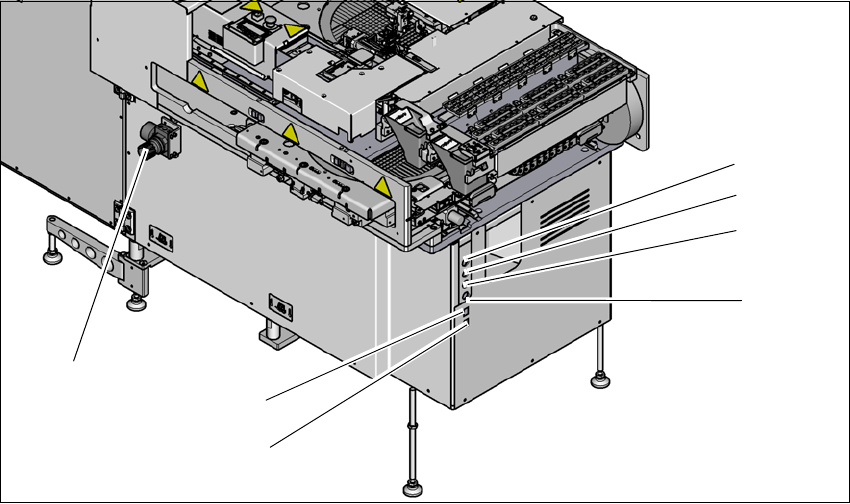
Fig. 3.4 - 1 Supply unit (example SWS 2/4)
3
(1) Setting the air blast for flip head segments
or die attach segments
(2) Voltage supply
(3) Interface safety cutoff with SIPLACE CA4
V2
(4) CAN bus (for SW 605.x only)
(5) Opening for compressed air hose from the
SIPLACE CA4 V2
(6) LAN1 - communication with external map
server
(7) LAN2 - communication with SIPLACE CA4
V2 and possible with other SWS
(1)
(2)
(3)
(4)
(6)
(7)
(5)
3 Technical data and assemblies User manual SIPLACE Wafer System (SWS)
3.4 Description of the SWS modules Edition 04/2018
70
3.4.2 Flip unit
3
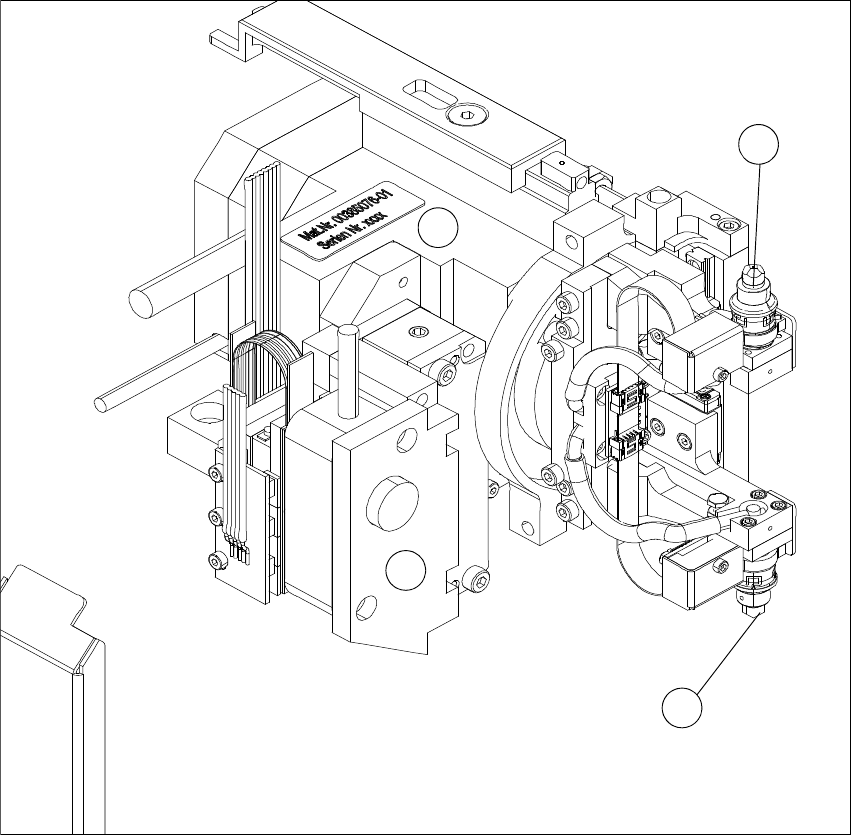
Fig. 3.4 - 2 Flip head - view from front
(1) Nozzle or tool support, segment 1
(2) Nozzle or tool support, segment 2
(3) Motor for Z-axis flipper
(4) Motor for flipper rotation axis
The flip unit takes the ejected die from the wafer foil. In flip chip mode, it rotates the die by 180°
into the pickup position for the placement head. In die attach mode, the flip unit rotates the die by
approx. 130° into the transfer position for the die attach unit.
1
3
4
2
User manual SIPLACE Wafer System (SWS) 3 Technical data and assemblies
Edition 04/2018 3.4 Description of the SWS modules
71
The flip unit has two nozzles arranged at 180° to one another. This enables the system in flip chip
mode to pick up a new die from the wafer at the same time as the placement head performs
pickup.
The flip unit can use both the standard SIPLACE nozzles (9xx) and the special adapters for the
die bonding tool. As in the case of other SIPLACE placement machines, the dies are attached to
the nozzles by a vacuum.
The flip unit has a rotation axis and a Z axis, driven by a linear motor. In the optional die attach
mode, a further linear motor is included to transfer the dies to the die attach head and an additional
rotary axis is included for the die attach head. The rotary axis is responsible for the rotation into
the 180° position (flip chip mode) or 130° position (die attach mode). The Z-axis moves the seg-
ment during the pick process. The optional linear motor in the die attach mode moves the segment
for transfer of the die to the die attach head.
3.4.3 Wafer Camera System
The wafer camera is aligned to the wafer surface. The camera image is used by the Vision system
to recognize the defined pattern for the die to be placed (also known as reference die), for ink spot
recognition, calculation of the die position and for wafer edge recognition. After positioning the wa-
fer on the next die to be ejected, the Vision model is checked and the die position determined. If
the deviation from the target value is too great (tolerance can be defined) the wafer table will be
repositioned to optimize the ejection position.
Wafer edge recognition is needed to compensate any deviation of the wafer position relative to
the wafer frame, between different wafers of the same type.
Specification for standard camera system
The standard camera system is used for dies of size 0.8 to 12 mm.
The camera's field of vision is around 10.5 x 6.7 mm.