OPERATING MANAUAL(FOR ENGINEERS) - 第60页
Page 2-4 F 1F 2F 3F 4F 5F 6F 7F 8 F 1F 2F 3F 4F 5F 6F 7F 8 F 1F 2F 3F 4F 5F 6F 7F 8 Functions of the Engineer Mode 2-1-3 Functions of the Menu T ree Pressing the key on any screen displays the following figure of menu. P…
Page 2-3
BASIC OPERATION
2
Production
Data modify
Functions of the Engineer Mode
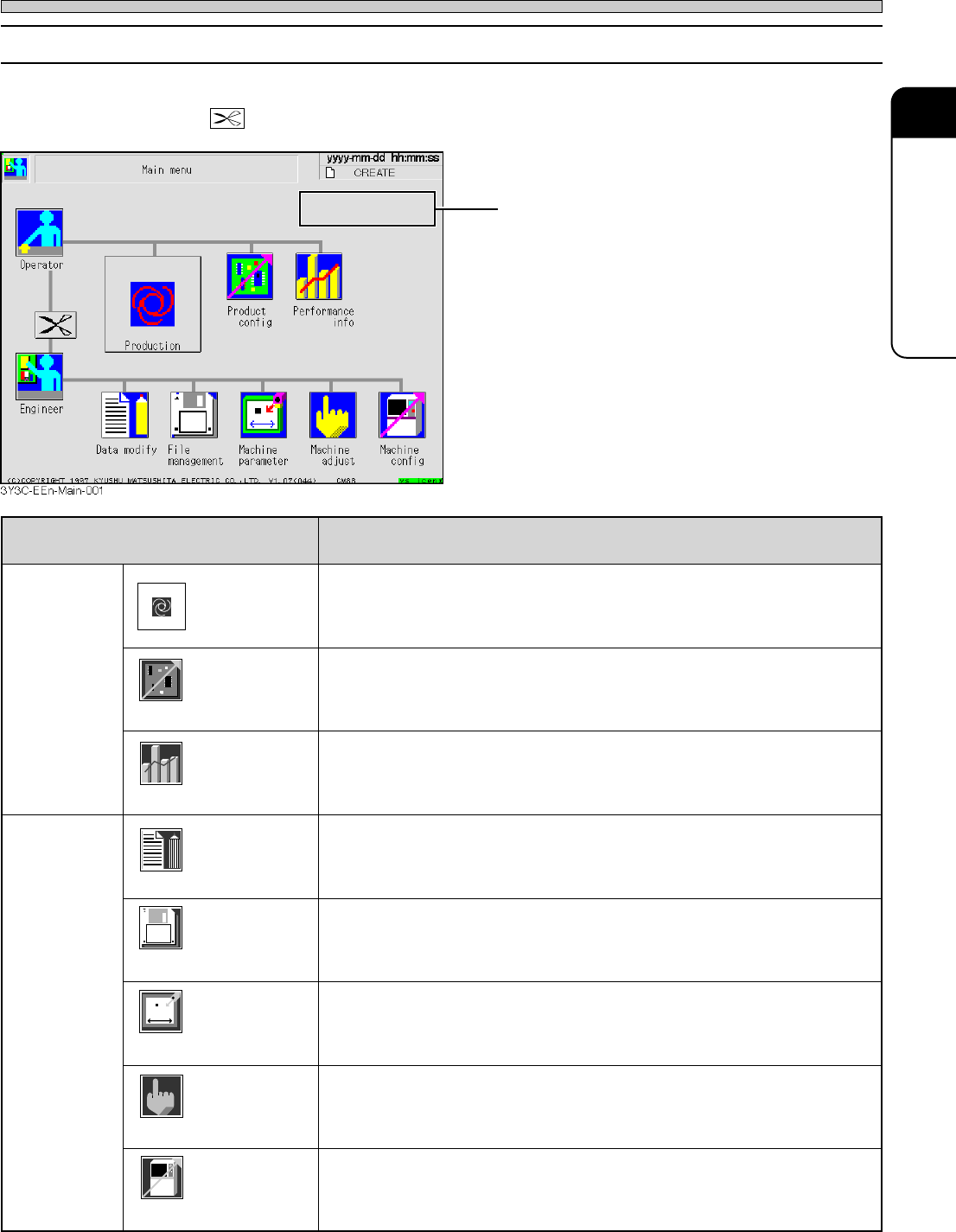
2-1-2 Functions of the Main Menu
Pressing the icon to select in main menu can start that operation menu.
• Pressing displays the main menu for operator mode.
Check period indicator
• When it comes near to the routine check period
(when 90 % of cycle is passed), the message
in green appears.
Passing that period, it turns out yellow.
smetI noitcnuF
rotarepO
noitcudorP.strats)noitcudorp(noitarepocitamotuA
tcudorP
gifnoc
.tessinoitcudorprofgnittestsaelehT
ecnamrofreP
ofni
.teserdnadeyalpsidsinoitamrofninoitcudorP
reenignE
yfidomataD.thguatdnadetcerrocsiatadnoitcudorP
eliF
tnemeganam
ybdedaoldnadevaseraretemarapenihcamdnaatadnoitcudorP
.ksidyppolfdna001TP
enihcaM
retemarap
.thguatdnadetcerrocsiretemarapenihcaM
enihcaM
tsujda
.detsujdasienihcamfotnemevomhcaE
enihcaM
gifnoc
.tessiatadnoitcudorpfotnednepedniatadetatsenihcaM
3Y3C-037TE
3Y3C-E-EMD02-A01-01
File
managment
Machine
parameter
Machine
config
Machine
adjust
Performance
info
Product
config
Page 2-4
F 1F 2F 3F 4F 5F 6F 7F 8
F 1F 2F 3F 4F 5F 6F 7F 8
F 1F 2F 3F 4F 5F 6F 7F 8
Functions of the Engineer Mode
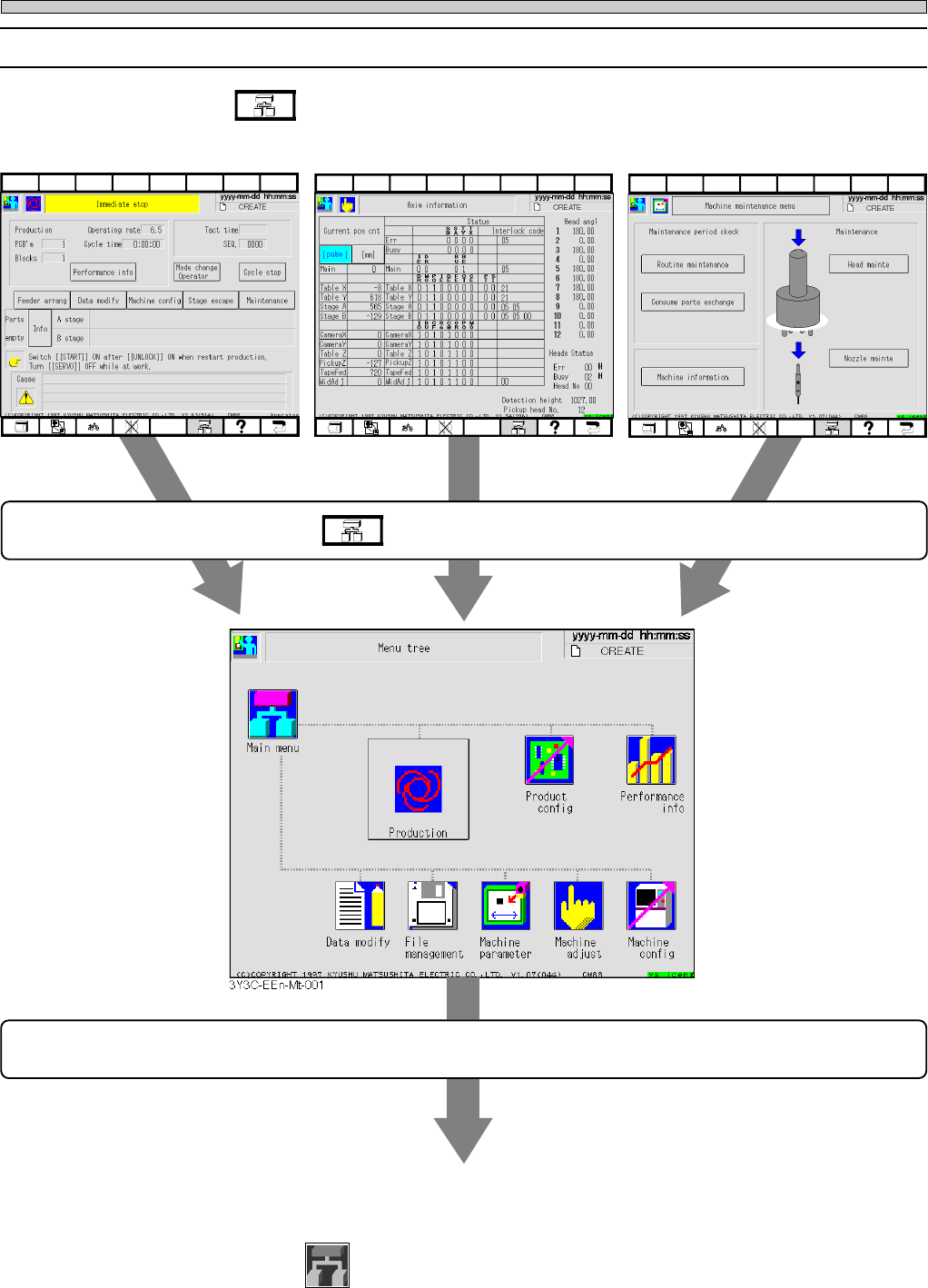
2-1-3 Functions of the Menu Tree
Pressing the key on any screen displays the following figure of menu. Pressing the icon to
be selected on the menu tree screen displays that operation menu.
Press the key at the lower part of screen.
Press icon to be selected.
Operation menu for selected icon starts.
(See the previous page for details.)
Pressing
Main menu
displays the main menu for engineer mode.
3Y3C-E-EMD02-A01-02
4G3C-EEn-PrIs-001
3Y3C-EEn-MaAi-002
3Y3C-EEn-MpMm-001
Page 2-5
BASIC OPERATION
2
Functions of the Engineer Mode
2-1-4 Changing the Password
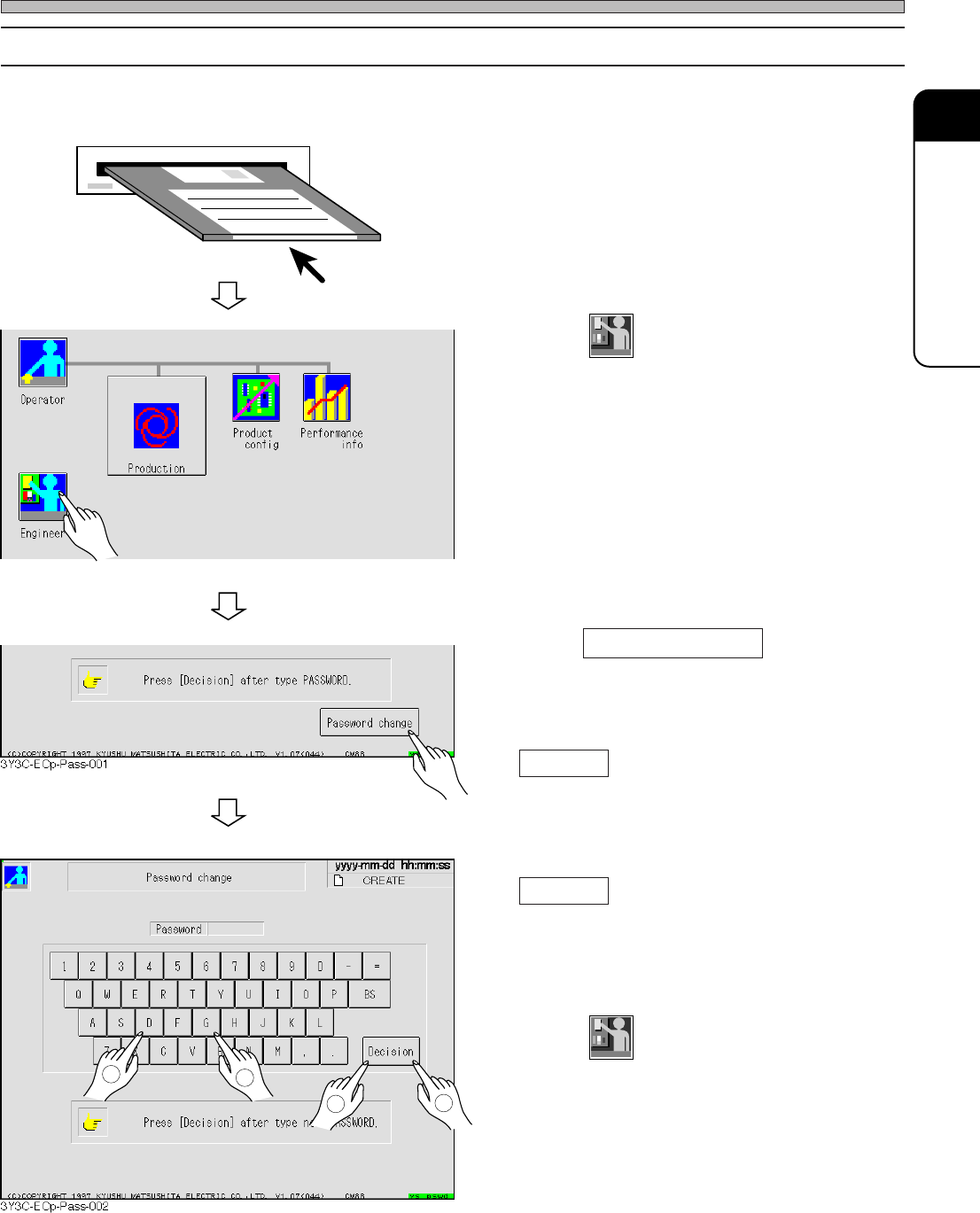
∗ Key floppy disk for changing the password is needed to change (set) the password.
1. Set the key floppy disk for changing
the password into the disk drive.
2. Press
Engineer
in the main menu for
operator mode.
3. Press Password change .
4. Enter a new password and press
Decision .
5. Reenter a new password and press
Decision .
• When reentered password corresponds to the
former one, the password is changed and main
menu for operator mode reappears.
6. Press
Engineer
and check that engineer
mode starts with the new password.
∗ If it does not, repeat the operation from proce-
dure 3.
7. Take out the key floppy for changing
password from floppy disk drive.
2
1
3
4
3Y3C-EOp-Main-001
3Y3C-E-EMD02-A01-00