TR7500_Maintenance_en
T R 7 5 0 0 M a i n t e n a n c e M a n u a l V . 1 . 0
TR7500 Maintenance Manual
V.1.0

1
Content
MECHANISMS MAINTENANCE......................................................................................................................................2
1 MONTH MAINTENANCE........................................................................................................................................2
1.1 CLEANSE OPTICAL SENSORS ..................................................................................................................................2
1.2 CLEANSE THE COMPUTER DUST FILTER...................................................................................................................2
1.3 CLEANSE CONVEYOR CIRCULAR BELTS...................................................................................................................5
1.4 CLEANSE THE REFERENCE SIDE OF CONVEYOR........................................................................................................6
1.5 CLEANSE THE BOARD WIDTH ADJUSTING BALL SCREW AND LINEAR GUIDEWAYS.......................................................6
2 QUARTER MAINTENANCE....................................................................................................................................7
2.1 X-Y TABLE CLEAN AND LUBRICATION ..................................................................................................................8
2.2 Y-AXIS CLEAN AND LUBRICATION .....................................................................................................................10
2.3 Z-AXIS CLEAN AND LUBRICATION .....................................................................................................................14
2.4 THE ASSISTANCE LINEAR GUIDEWAY CLEAN AND LUBRICATION ............................................................................14
2
Mechanisms maintenance
l In order to keep the equipment’s normal operation and prolong its lifespan, please follow
suggests below and shorten the maintenance cycle when it is necessary.
1 Month Maintenance
1.1 Cleanse optical sensors
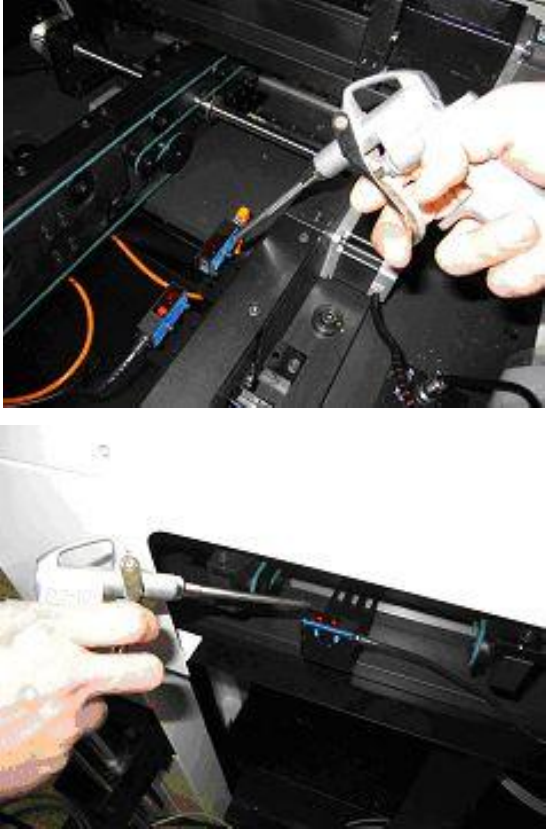
l Use the air pump driven by compressor air to remove dusts on the surface of optical sensors
In order to avoid malfunction of optical sensors.
1.2 Cleanse the computer dust filter
l Take out the computer dust filter and use an air pump driven by compressed air to remove
dust in order to prevent the computer from overheating.