DECAN_S1_Operation_EN.pdf - 第40页
DE CAN S 1 Ope ra tio n Han db oo k 3 -2 1 Chap ter 3 This chapter describes the production procedure. Pr oduction Nex t Generation, Multi- Funct ional Placer Pr epara tion F or Oper atio n Ⅱ > Chec k and tea ch posi …
DECAN S1 Operation Handbook
3-20
Chapter 3
This chapter describes the production procedure.
Production
Next Generation, Multi-Functional Placer
Preparation For Operation Ⅱ > Check and teach positions
Preparation For Operation Ⅱ
Production
4. Check and teach positions
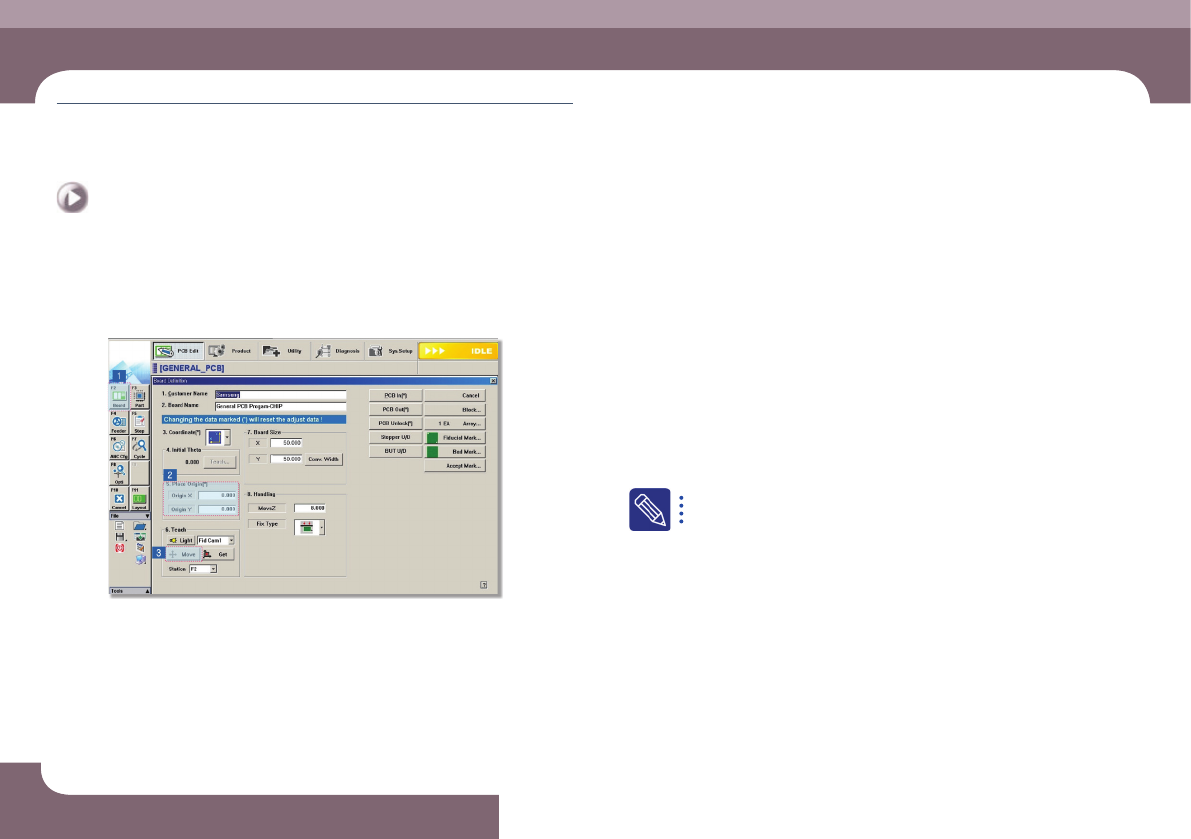
1. Check the PCB origin
Step 1.
Check the currently set PCB origin
① Select the 'Board Define' submenu in the 'PCB Edit' menu
② Select <5. Place Origin> group
③ Select the <Move> Button
④ Check the placement origin of the currently set PCB
Step 2.
Teach PCB origin
If the currently set placement origin position is incorrect, teach the placement
origin again.
For further details, refer to '6.1. Basic Setup' in the Administrator's
Guide.
DECAN S1 Operation Handbook
3-21
Chapter 3
This chapter describes the production procedure.
Production
Next Generation, Multi-Functional Placer
Preparation For Operation Ⅱ > Check and teach positions
Preparation For Operation Ⅱ
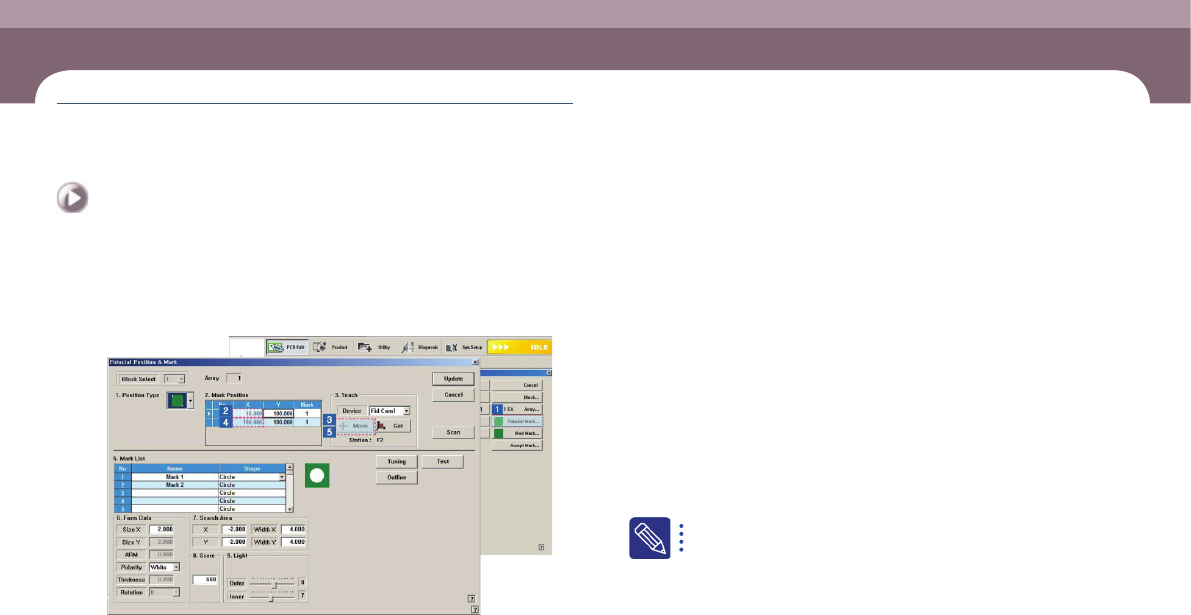
2. Check PCB fiducial mark position
Step 1.
Check the currently set PCB fiducial position
① Click the <Fiducial Mark> button
② Select the first fiducial mark in the <2. Mark Position> group
③ Click the <Move> button
④ Select the second fiducial mark in the <2. Mark Position> group
⑤ Click the <Move> button
⑥ Check the second PCB fiducial mark position
Step 2.
Teach the PCB fiducial mark position
If the current fiducial mark setup is incorrect, teach the fiducial mark again.
For further details, refer to “6.3.1. Fiducial Mark Setup Order” in the
Administrator's Guide.
DECAN S1 Operation Handbook
3-22
Chapter 3
This chapter describes the production procedure.
Production
Next Generation, Multi-Functional Placer
Preparation For Operation Ⅱ > Check and teach positions
Preparation For Operation Ⅱ
Production
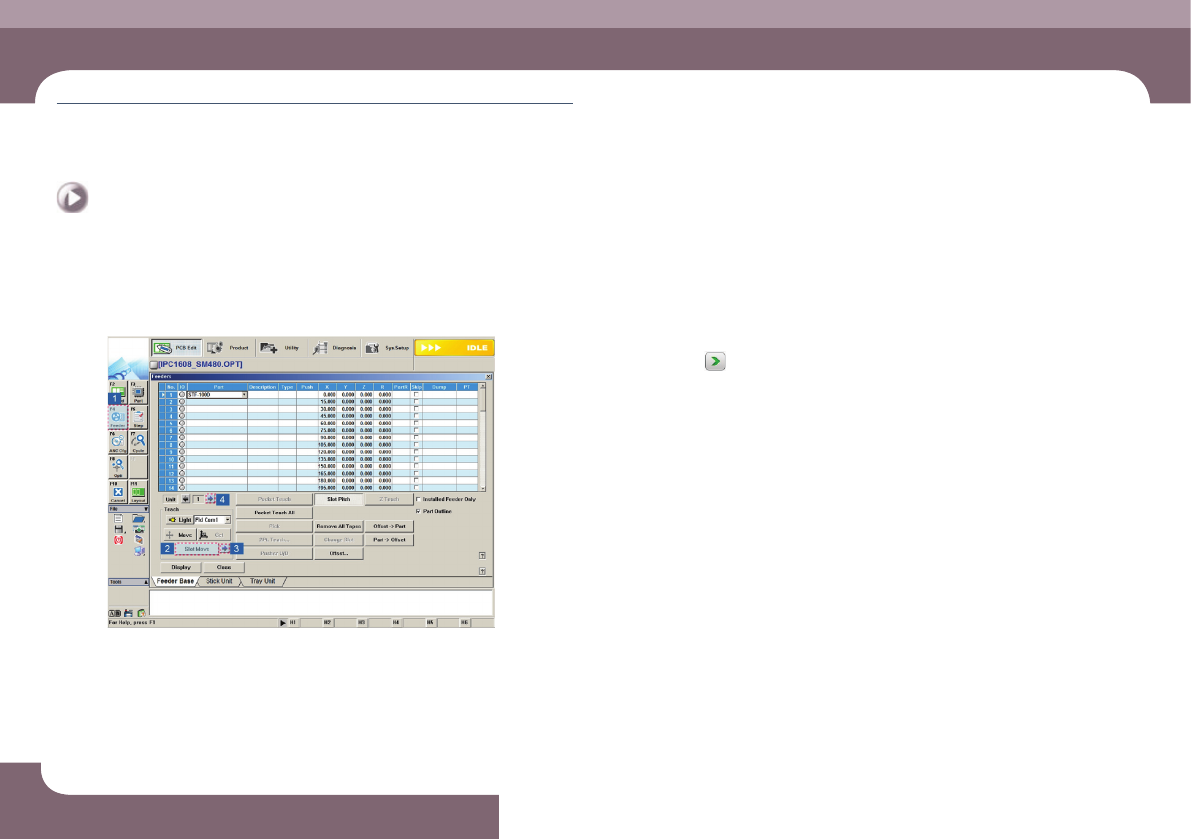
3. Check pickup point
Step 1.
Check the feeder pickup position
① Select the 'Feeder' submenu in the 'PCB Edit' menu.
② Select the 'Feeder' submenu
③ Click the
button to check the pickup point of the installed feeder.
④ Once the pickup point of the current feeder base has been checked, click the
arrow button in the <Unit> group to check the pickup points of the feeders
installed in other feeder bases in the same manner.
⑤ Check the pickup points of feeders other than the tape feeder
Step 2.
Teach the pickup point
If the current feeder's pickup point setup is incorrect, teach the pickup point again.