DECAN_S1_Operation_EN.pdf - 第65页
Fini sh p r oduction and chang e w o rk Chap ter 5 Nex t Generation, Multi- Funct ional Placer DE CAN S 1 Ope ra tio n Han db oo k 5 -2 This chapter describes the method to finish production and change t he work to new w…
Finish production and change work
Chapter 5
Next Generation, Multi-Functional Placer
DECAN S1 Operation Handbook
5-1
This chapter describes the method to finish production and change the
work to new work as well as the method to turn off the power supply
to the machine after finishing production and keeping the area around
the machine clean and tidy.
Finishing Production > Finishing the Production and shutting down the machine
Finishing Production
Chapter 5
Finish production and change work
This chapter describes the method to finish production and change the work to new work as well as the method to turn off the power supply to the
machine after finishing production and keeping the area around the machine clean and tidy.
1. Finishing the Production and shutting down the
machine
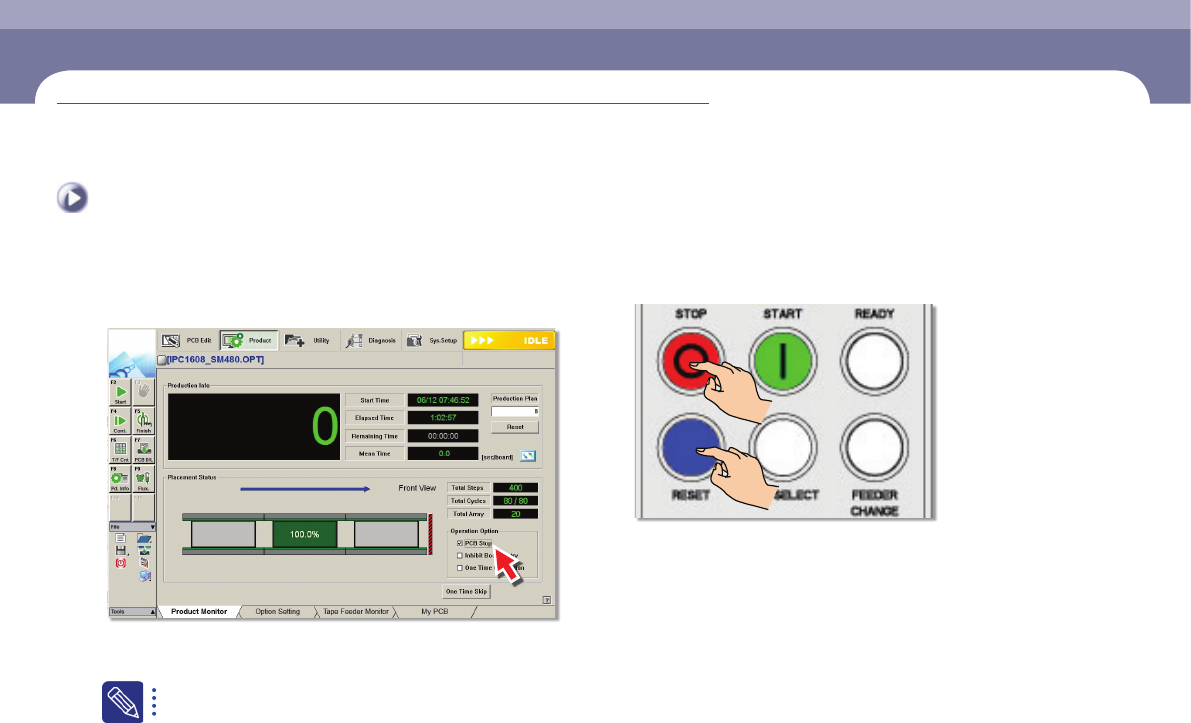
Step 1.
Select the <PCB Stop> check box
ㆍ Clicking <PCB Stop> button during production will stop the production after finishing
the Production of the PCB on work.
When production is started after setting the PCB production quantity,
the machine stops automatically after PCBs as many as set are
produced even though the 'PCB Stop' button is not pressed.
Step 2.
Press the 'STOP', 'RESET' button
ㆍ Changes the machine status into the 'IDLE' mode
Finishing Production
Finish production and change work
Chapter 5
Next Generation, Multi-Functional Placer
DECAN S1 Operation Handbook
5-2
This chapter describes the method to finish production and change the
work to new work as well as the method to turn off the power supply
to the machine after finishing production and keeping the area around
the machine clean and tidy.
Finishing Production > Finishing the Production and shutting down the machine
Finishing Production
Finish production and change work
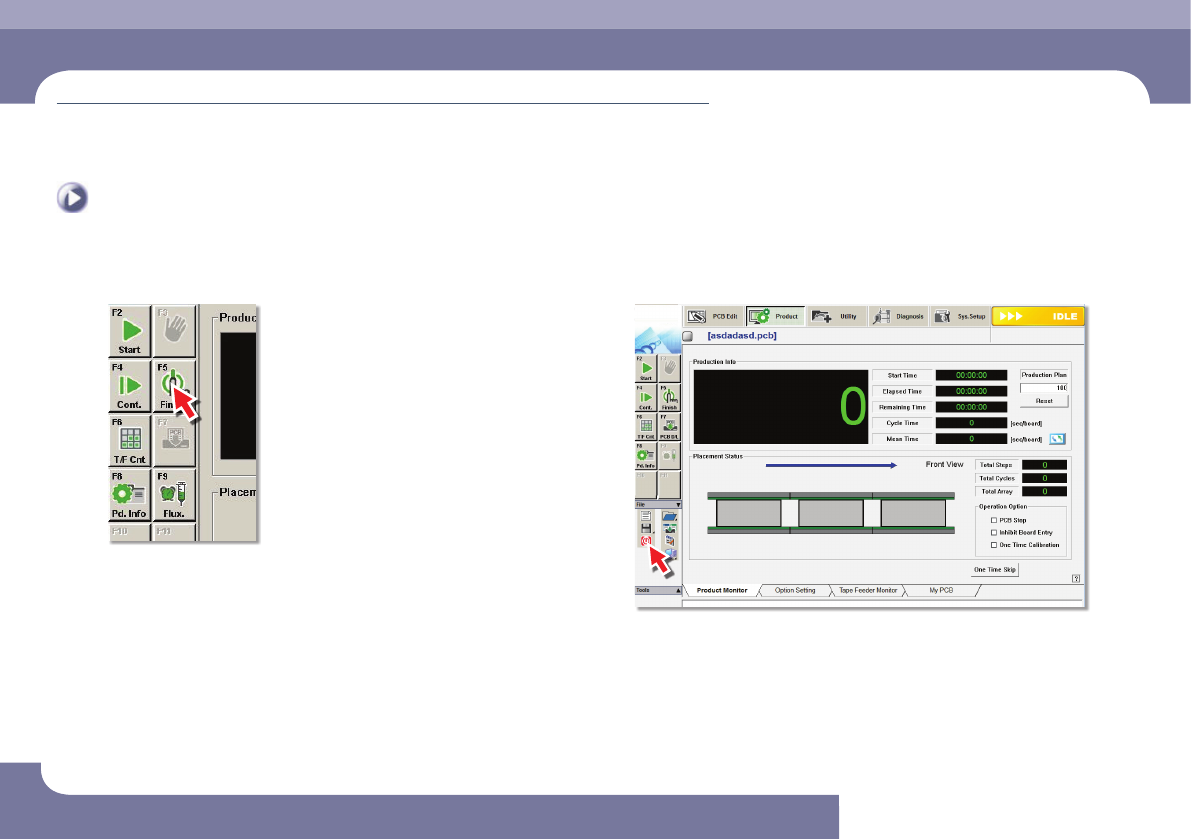
Step 3.
Press the <Finish> button.
Step 4.
Click the 'Exit' icon in the 'File' menu
ㆍ Click the 'Exit' icon in the 'ETC' menu to close the MMI.

Finish production and change work
Chapter 5
Next Generation, Multi-Functional Placer
DECAN S1 Operation Handbook
5-3
This chapter describes the method to finish production and change the
work to new work as well as the method to turn off the power supply
to the machine after finishing production and keeping the area around
the machine clean and tidy.
Finishing Production > Finishing the Production and shutting down the machine
Finishing Production
Step 5.
Shut down the machine
ㆍ To save the changes and exit MMI, click <Yes> button.
Step 6.
Turn off the main switch
ㆍ Turn off the main switch on the front of the machine when the power of PC is off.