YSI_Prog_E - 第131页
3-8 3 Step screen Inspection status Item Details Shape Check Offset Limit N - W (mm) Set based on the parts size and pattern design. Inspection Shape • Size Performs inspection by comparing the recognition area dimension…
3-7
3
Step screen
Inspection status Item Details
Character Recognition
Inspection Character
String
Enter the character string written on the correct parts.
OCR Type
Select the character type written on the correct parts from "Cap.&Num.",
"Cap.", or "Num." (alphanumeric, alphabet, numeric.) In the case of alphabet
characters, only upper case characters are recognized.
Match Type
• Complete
An OK result is judged if the recognized character string matches the
inspection character string completely.
• Partial
An OK result is judged if the recognized character string contains the
inspection character string.
Min Score
By pressing the [Detail] button following a step test, a list of recognized
characters is displayed with the recognition score for each character. Enter
the minimum recognition score. 1st-Candidate: Inspects characters with
highest score.
Acceptable Rotation
• NON
Performs inspection only at the angle registered at the "Basic" tab. This is
also used as a polarity check.
• Permit 180°
Select this setting for parts such as chip resistors where a 180° rotation
presents no problem.
• Permit All
Use to recognize the presence of an inspection character string,
regardless of the character string angle.
User Font Group Specifies the referenced font group.
Brightness level
Min Luminance Level Enter the minimum luminance level for OK parts.
Max Luminance Level Enter the maximum luminance level for OK parts.
Measure Method
(luminance level)
Selects the luminance level calculation method.
Memory No.
Selects the memory No. when performing calculation with subsequence
comparison steps.
Brightness Level
Correction
Measure Method Selects the luminance level calculation method.
Correct Level
Enter the standard luminance level. Offsets the difference between the
standard level and measured luminance level with a level correction step.
Comparison
Memory No1, 2
Specifies the luminance level steps being compared.
The luminance value for the number set at memory No. 2 is subtracted from
the luminance value for the number set at memory No. 1.
Target of Compare
• Luminance
Performs inspection with the difference in luminance between two
luminance level steps.
• Thickness
Performs a comparison with the difference in the thickness measurement
results for steps set at the memory No. settings.
Minimum, Maximum
Sets the minimum and maximum values for the OK parts luminance and
thickness.
Set between 0 and 255 if the comparison target is luminance.
(Unit: Luminance level)
Set between 0 and 2 mm if the comparison target is thickness (YSi-X).
(Unit: mm)
3-8
3
Step screen
Inspection status Item Details
Shape Check
Offset Limit N - W (mm) Set based on the parts size and pattern design.
Inspection Shape
• Size
Performs inspection by comparing the recognition area dimensions with
step dimensions.
• Circularity (roundness)
Inspects how much the detection area contour deviates from perfect
roundness.
• Convexity
Inspects the smoothness of the detection area contour.
• Aspect ratio
Inspects the percentage of the detection object vertical length relative to
the horizontal length (horizontal = 100%).
Min Match Ratio (%) Enter the minimum match ratio for OK parts.
Max Match Ratio (%) Enter the maximum match ratio for OK parts.
Tolerance X, Y (mm)
These settings are valid for the size selected at "Size". The result will be OK
if the maximum dimension of the recognition area is within the dimension for
which the tolerance has been increased or decreased for the step size.
Code Recognition
Algorithm Type Selects the code type from "Unset", "QRcode", "D-matrix", or "Barcode".
Start Data Column
Specifies the starting digits used as the ID code from the extracted character
string.
End Data Column
Specifies the ending digits used as the ID code from the extracted character
string.
Cell Number Specifies the size of the extracted characters.
Foreign Object Judge Size Condition
• Two-Side-Size
An NG result occurs if both the object size X and Y directions are NG.
• One-Side-Size
An NG result occurs if either the object size X or Y directions is NG.
Ball Joint Check
Judge Size X, Y Min. Sets the minimum size for judging foreign objects.
Judge Size X, Y Max. Sets the maximum size for judging foreign objects.
Std Area (mm
2
)
This is calculated automatically from the pad diameter based on the original
ball joint area.
Ball Radius (mm)
This is calculated automatically from the pad diameter based on the original
ball joint area.
Position Check
Sets the allowable displacement from the center of the step to the center of
the recognition area.
Void Check
Max Accept Size X, Y
(mm)
This is the maximum allowable void X direction size relative to the detected
void.
Max Void Num. Sets the number of allowable detected voids.
Max Void Occupancy (%)
Sets the allowable occupancy rate for the area of all detected voids relative
to the standard area.
[OCR Reg.] button
Registers an original character font as the character recognition font for each user. For details on the character registration
method, see section 2.2, "Registering user characters", in this chapter.
[All Set] button
Pressing this button sets the selected displacement value for other directions also.
3-9
3
Step screen
1.5 Option parameters
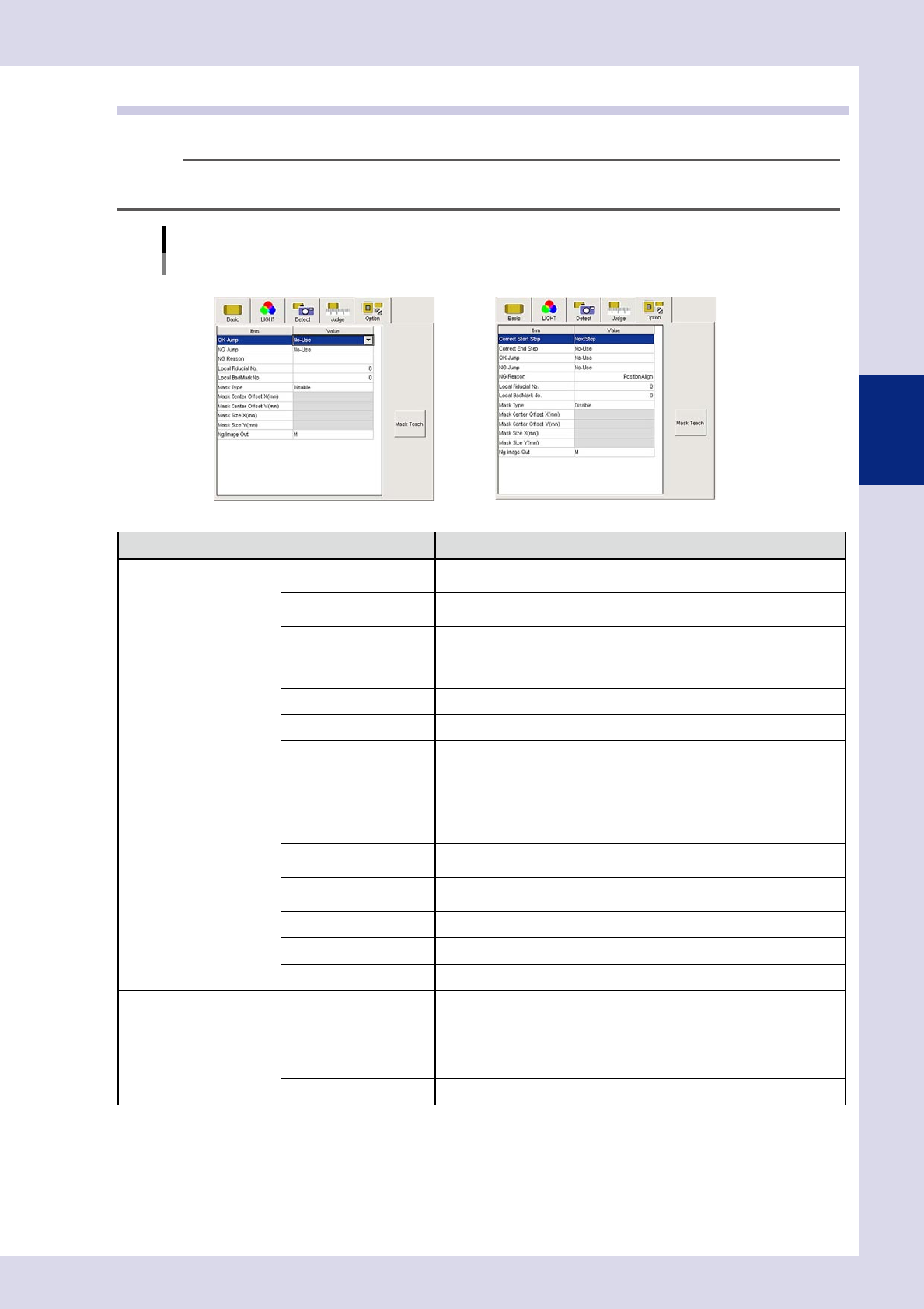
These parameters specify option settings for inspection steps.
TIP
The displayed parameters differ depending on the inspection status. For details on parameter settings for each status,
see Chapter 4, "Inspection status", in this manual.
Option parameters
Inspection status "Electrode Check", "Position Align" example
NElectrode Check NPosition Align
24305-P6-00
Inspection status Item Details
STD.
Parts Check
Electrode Check
Polarity Check
Character Recognition
Solder quantity check
Lead Check
Position Align
Brightness level
Brightness Level Correction
Comparison
Shape Check
Height Measure
Code Recognition
Foreign Object
Ball Joint Check
Void Check
OK jump
Specify the step No. to be inspected next when the judgment result is
"OK".
NG jump
Specify the step No. to be inspected next when the judgment result is
"NG".
NG Reason
Enter the NG (fail) reason to display during automatic inspection when the
judgment result is "NG".
Maximum number of characters: 14 alphanumeric characters or 7 full-width
characters
Local Fiducail No. Sets the local Fid No.
Local BadMark No. Sets the local Bad No.
Mask Type
• Disable
Does not perform inspection mask function.
• Include
Always detects areas enclosed with a mask.
• Exclude
Does not include areas enclosed by mask in the inspection.
For details, see section 2.3, "Mask function", in this manual.
Mask Center Offset
X(mm)
Sets the X offset amount from the step center position to the mask center
position.
Mask Center Offset
Y(mm)
Sets the Y offset amount from the step center position to the mask center
position.
Mask Size X(mm) Sets the inspection mask X direction size.
Mask Size Y(mm) Sets the inspection mask Y direction size.
Ng image Out Sets the lighting when sent to the Repair Station (option).
Polarity Check Inspect Only First Parts
This setting can only be specified for "Character Recognition" and
"Electrode Check".
Inspection steps set to "Enable" are only inspected on the first board after
reading the inspection program.
Position Align
Correct Start Step Specifies the first step No. in the range subject to alignment.
Correct End Step Specifies the last step No. in the range subject to alignment.
[Mask Teach] button
Moves the mask area and changes the size of it. For details on operation, refer to section 2.3, "Mask function", in this
chapter.