YSI_Prog_E - 第214页
5-9 5 Inspection machine settings 2.1 Installation settings Installation settings are used to specify default machine settings. "Machine settings" screen "Setting" m "Machine Information" m…
5-8
5
Inspection machine settings
2. Machine settings
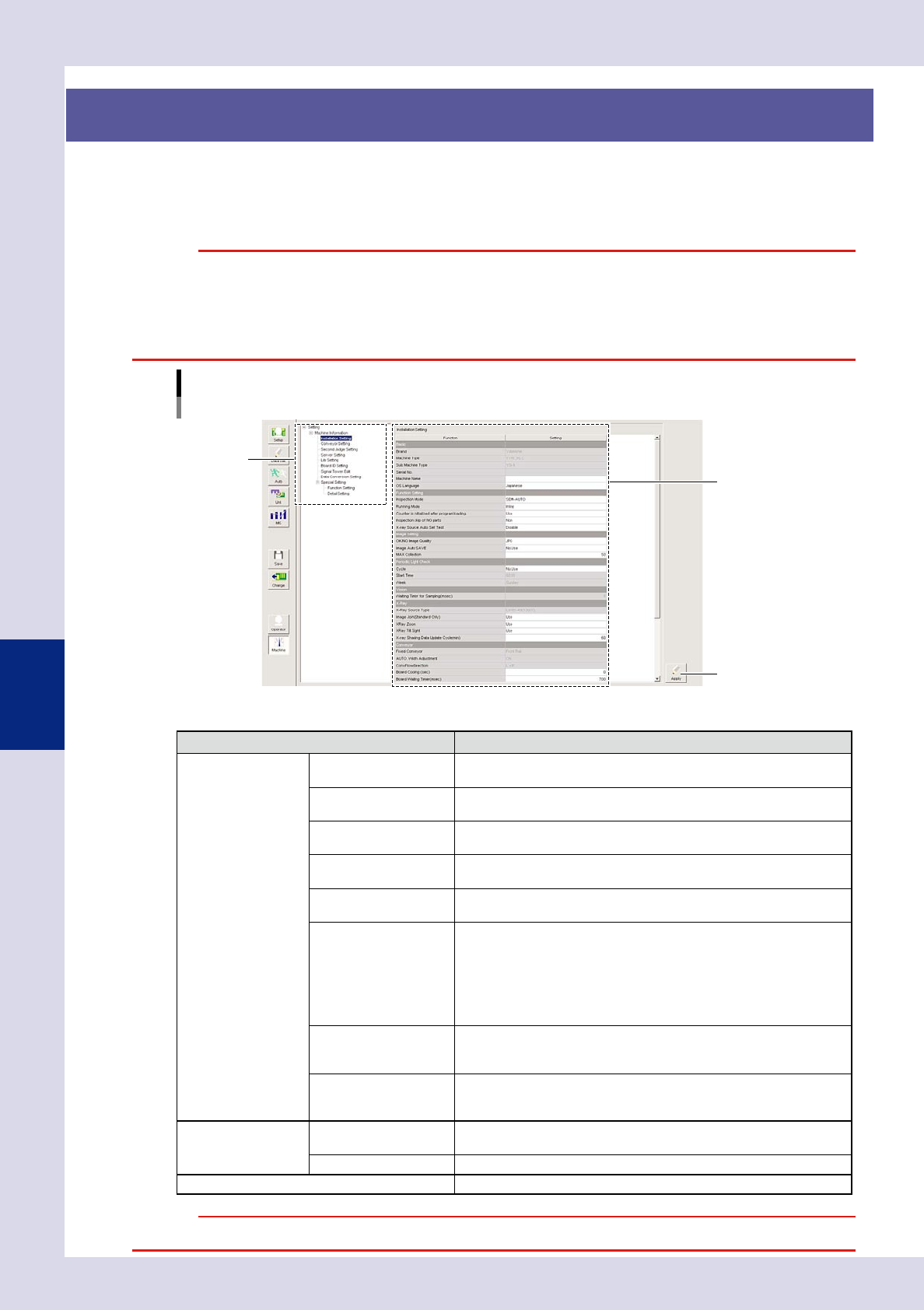
Press the [Machine] button in the button area to specify default settings for all machine functions and to
specify detailed settings. This section describes the tree view items and operation buttons in the machine
settings screen. The settings that appear when tree view items are selected are described from section 2.1,
"Installation settings".
c
"Machine settings" screen
Tree view
Setting items
[Apply] button
24509-P6-00
n
Tree view items and operation buttons
Item Details
MaChing Information Installation Setting
Specifies machine installation settings. (See 2.1, Installation settings",
in this chapter.)
Conveyor Setting
Sets the board loading and unloading positions. (See 2.2, Conveyor
transfer settings", in this chapter.)
Second Judge Setting
Specifies secondary judgment settings. NG reasons can also be edited.
(See 2.3, Secondary judgment settings", in this chapter.)
Server Setting
Specifies option software settings and data save path settings.
(See 2.4, Server settings", in this chapter.)
Lib Setting
Specifies library settings.
(See 2.5, Library settings", in this chapter.)
Board ID Setting
Specifies settings when the machine is equipped with optional Repair
Station or marking unit.
• If the machine is equipped with a Repair Station, the board ID
when transmitting inspection results is specified.
• If the machine is equipped with a marking unit, the board ID
written on the board is specified.
Refer to the respective operation manuals for details.
Signal Tower Edit
Specifies signal tower and buzzer settings based on the machine
operation and inspection status.
(See 2.6, Editing signal tower settings", in this chapter.)
Data Conversion Setting
Sets conditions when converting mount data (YGX) to inspection
machine data.
(See 2.7, Data conversion settings", in this chapter.)
Special Setting Function Setting
Special functions can be added, and the use or non-use of functions
can be specified.
Detail Setting Specifies details for special settings.
[Apply] button Press the [Apply] button to save the changed content.
c
5-9
5
Inspection machine settings
2.1 Installation settings
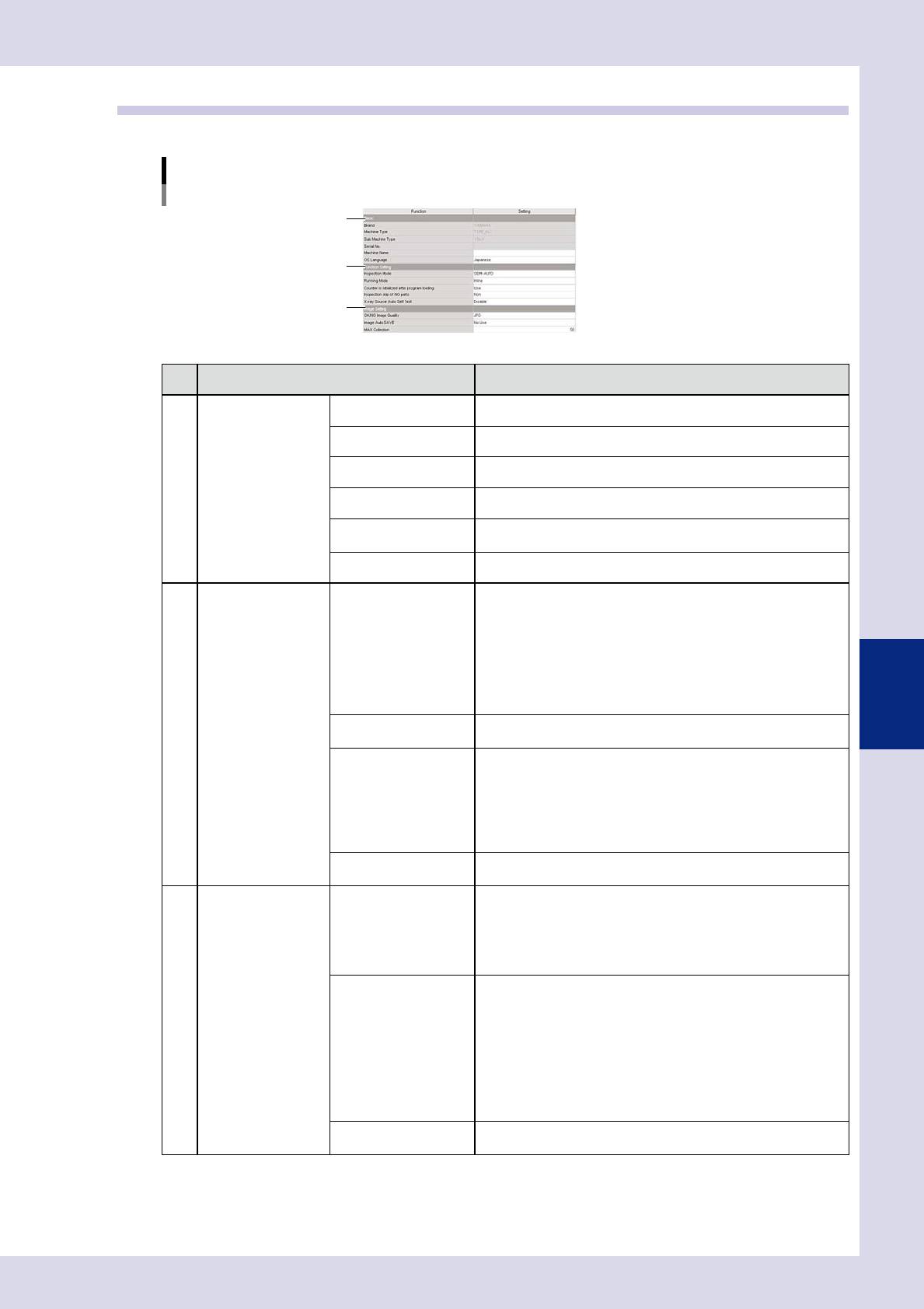
Installation settings are used to specify default machine settings.
"Machine settings" screen
"Setting" m "Machine Information" m"Installation Setting" 1/2
3
1
2
24510-P6-00
Item Details
1
Basic Brand Displays the brand name of this machine.
Machine Type Displays the machine type.
Sub Machine Type Displays the sub machine type.
Serial No. Displays the machine serial No.
Machine Name
Enter the machine name appended to data sent to the Repair
Station (option).
OS Language Sets the OS language used.
2
Function Setting Inspection Mode
Select the inspection mode for automatic inspection from "AUTO" or
SEMI-AUTO".
• AUTO
Performs board inspection to the end, and then displays details of
any defects.
• SEMI-AUTO
Inspection is terminated the moment a defect is detected during
board inspection, and the defect location displays on the NG
monitor. Judgment is made while viewing defect location images.
Counter is initialized
after program loading
When set to "Use", the total production quantity is initialized to "0"
when reading inspection data.
Inspection skip of NG
parts
Selects the steps to be skipped when an NG occurs.
• NON
Inspection is not skipped.
• Ref unit
Steps from the same Ref. No. onward are skipped.
• Pin unit
Steps from the same Pin. No. onward are skipped.
X-ray Source Auto Self
Test
When set to "Enable", a self test is performed after the X-ray source
warm-up is complete.
3
Image Setting OK,NG Image Quality
Selects the file format for saving images from "JPG" or "BMP".
"JPG" should normally be selected. If "BMP" is selected, inspection
images can be saved as is, however, the time required to save
images is longer than that for "JPG", and more space is required.
Inspection will stop if there is insufficient backup space, and
therefore caution is advised.
Image Auto SAVE
Select whether to automatically save inspection images from "No
Use", "Ng Image", or "All".
• No Use
Does not automatically save inspection images.
• Ng Image
Saves NG view images and fiducial mark images to the
"NgImage" folder contained in the inspection data folder when an
NG occurs.
• All Image
Saves all view images and fiducial mark images.
MAX Collection
Sets the maximum number of boards that can be saved to a
program.
5-10
5
Inspection machine settings
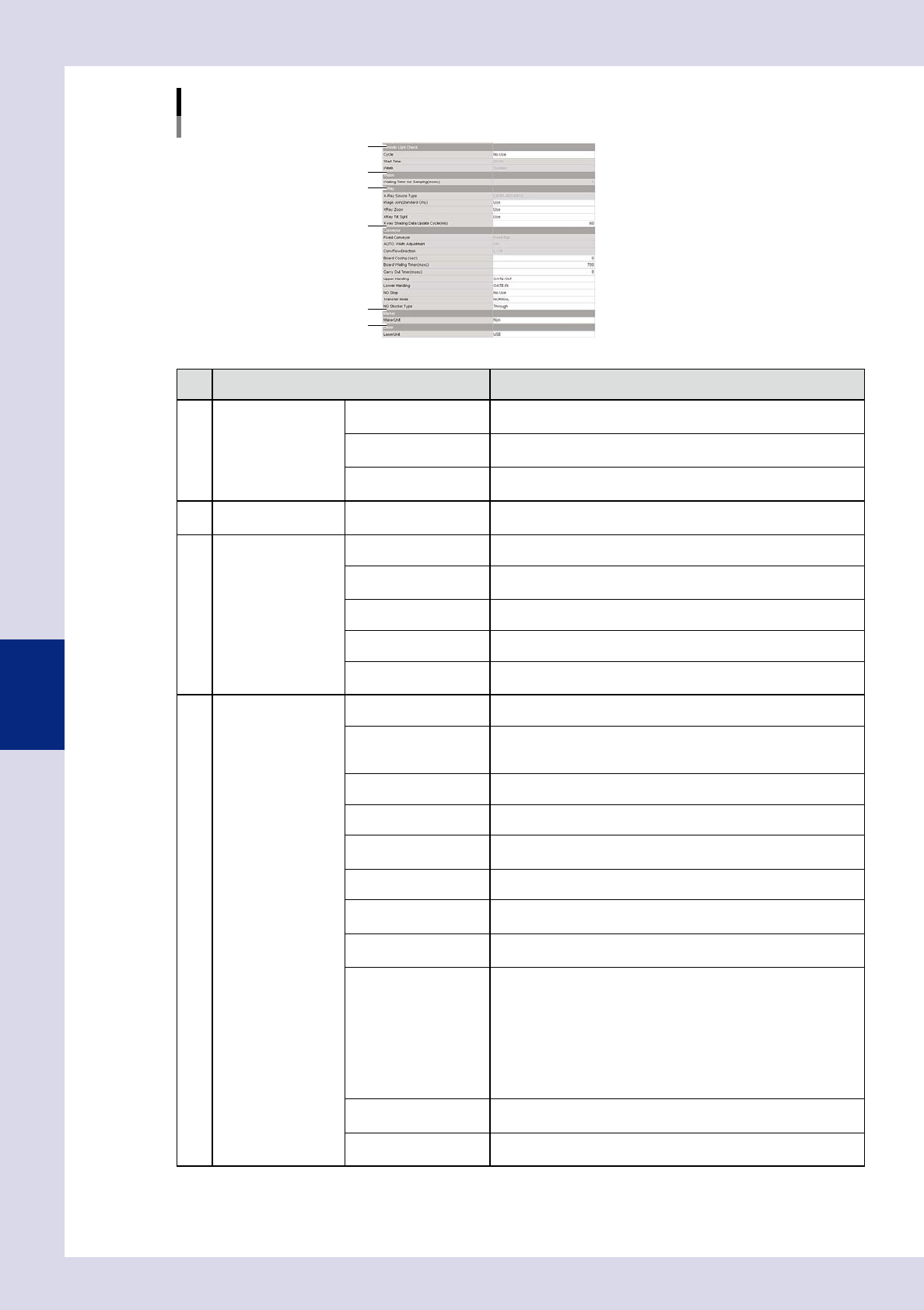
"Machine settings" screen
"Setting" m "Machine Information" m "Installation Setting" 2/2
5
6
4
7
8
9
24511-P6-00
Item Details
4
Periodic Light Check Cycle
Set to perform a periodic lighting check. Select from "No Use",
"Daily", or "Weekly".
Start Time
Specifies the lighting check start time when "Daily" or "Weekly" is
selected for the "Cycle".
Week
Specifies the day on which the lighting check is performed when
"Weekly" is selected for the "Cycle".
5 Vision
Wating Timer for
Sampling (mm)
Displays the time until image capture is started after the camera or
conveyor (YSi-X) moves.
6
X-Ray (YSi-X) X-Ray source Type Displays the X-ray source installed on the machine.
Image Join (Standard
Only)
Enables multiple X-ray image composition when set to "Use".
X-Ray Zoom Enables the capture of enlarged X-ray images when set to "Use".
X-Ray Tilt sight Enables the capture of tilted X-ray images when set to "Use".
X-Ray Shading Data
Update Cycle (min)
Sets the cycle for X-ray shading.
7
Conveyor Fixed Conveyor Displays the standard conveyor when changing the conveyor width.
AUTO Width Adjustment
If "ON" is displayed, the conveyor width is changed when reading
the program. If "OFF" is displayed, the conveyor width is not
changed when reading the program.
ConvFlowDirection Displays the conveyor flow direction.
Board Cooling (sec) Sets the waiting time at the conveyor entrance for board cooling.
Board Wating Timer
(msec)
Specifies the conveyor idling time until the board is clamped after
hitting the stopper when performing board loading.
Carry Out Timer (msec) Specifies the conveyor idling time when unloading boards.
Upper Handing
Sets the specification for the transfer of board signals with the
upstream machine.*
Lower Handing
Sets the specification for the transfer of board signals with the
downstream machine.*
NG Stop
Stops the machine and sets the timing of the message output when
an NG board occurs during automatic inspection.
Select from "No Use", "Before Export", and "After Export".
• No Use
This function is not used.
• Before Export
Displays a message at the inspection position.
• After Export
Displays a message after unloading the board from the machine.
Transter Mode
Sets the board transfer method from "NORMAL", "DEMO U-TURN",
or "DEMO Fixed".
NG Stocker Type
Selects the NG stocker type if equipped with an NG stocker. Select
"Through" if not equipped with an NG stocker.