YSI_Prog_E - 第216页
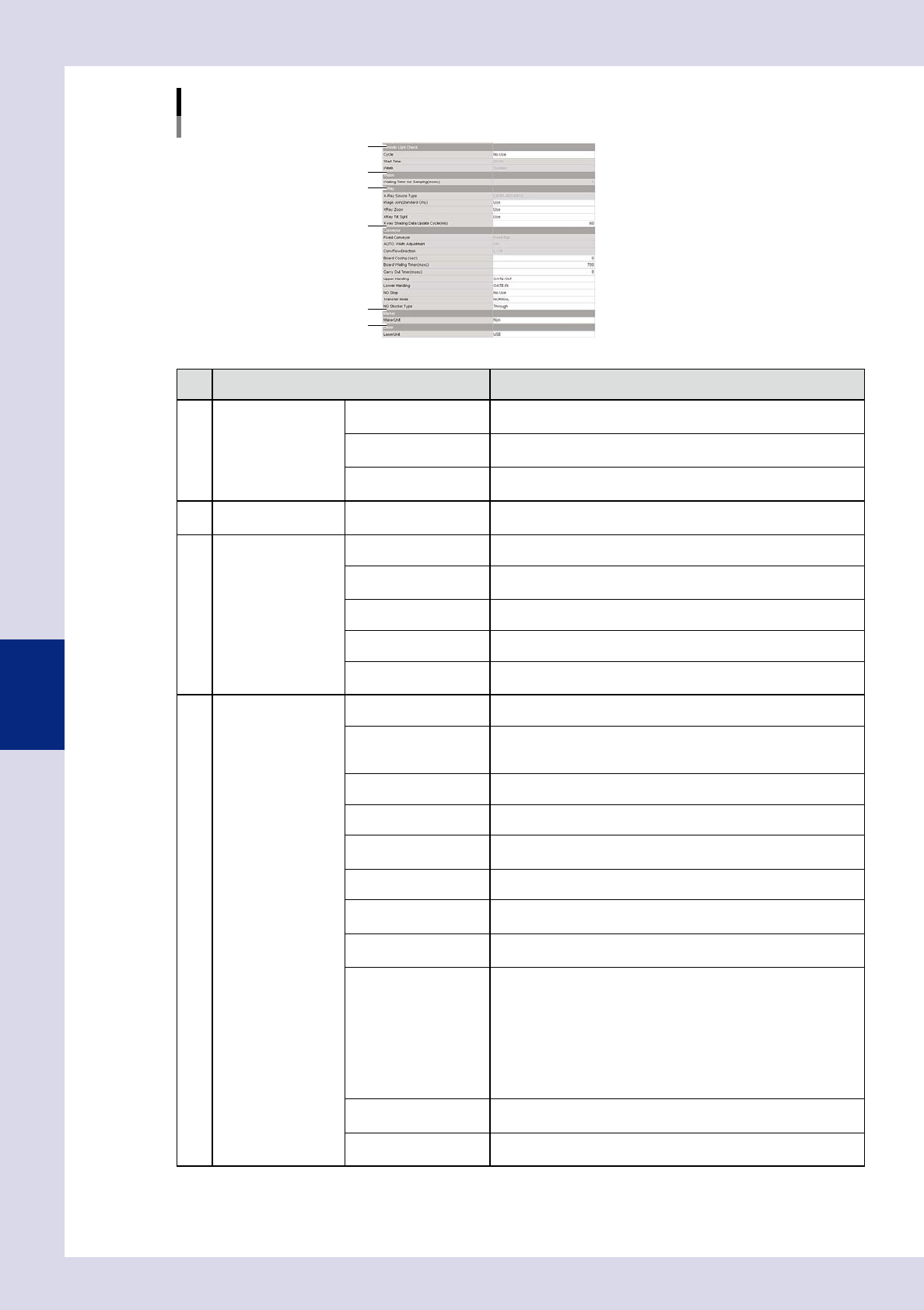
5-11 5 Inspection machine settings Item Details 8 Maker Maker Unit Set to "Use" if the machine is equipped with a marking unit (option). Maker Unit T ype Sets the existence of a pen cap. Ink Check Interval (mar…
5-10
5
Inspection machine settings
"Machine settings" screen
"Setting" m "Machine Information" m "Installation Setting" 2/2
5
6
4
7
8
9
24511-P6-00
Item Details
4
Periodic Light Check Cycle
Set to perform a periodic lighting check. Select from "No Use",
"Daily", or "Weekly".
Start Time
Specifies the lighting check start time when "Daily" or "Weekly" is
selected for the "Cycle".
Week
Specifies the day on which the lighting check is performed when
"Weekly" is selected for the "Cycle".
5 Vision
Wating Timer for
Sampling (mm)
Displays the time until image capture is started after the camera or
conveyor (YSi-X) moves.
6
X-Ray (YSi-X) X-Ray source Type Displays the X-ray source installed on the machine.
Image Join (Standard
Only)
Enables multiple X-ray image composition when set to "Use".
X-Ray Zoom Enables the capture of enlarged X-ray images when set to "Use".
X-Ray Tilt sight Enables the capture of tilted X-ray images when set to "Use".
X-Ray Shading Data
Update Cycle (min)
Sets the cycle for X-ray shading.
7
Conveyor Fixed Conveyor Displays the standard conveyor when changing the conveyor width.
AUTO Width Adjustment
If "ON" is displayed, the conveyor width is changed when reading
the program. If "OFF" is displayed, the conveyor width is not
changed when reading the program.
ConvFlowDirection Displays the conveyor flow direction.
Board Cooling (sec) Sets the waiting time at the conveyor entrance for board cooling.
Board Wating Timer
(msec)
Specifies the conveyor idling time until the board is clamped after
hitting the stopper when performing board loading.
Carry Out Timer (msec) Specifies the conveyor idling time when unloading boards.
Upper Handing
Sets the specification for the transfer of board signals with the
upstream machine.*
Lower Handing
Sets the specification for the transfer of board signals with the
downstream machine.*
NG Stop
Stops the machine and sets the timing of the message output when
an NG board occurs during automatic inspection.
Select from "No Use", "Before Export", and "After Export".
• No Use
This function is not used.
• Before Export
Displays a message at the inspection position.
• After Export
Displays a message after unloading the board from the machine.
Transter Mode
Sets the board transfer method from "NORMAL", "DEMO U-TURN",
or "DEMO Fixed".
NG Stocker Type
Selects the NG stocker type if equipped with an NG stocker. Select
"Through" if not equipped with an NG stocker.
5-11
5
Inspection machine settings
Item Details
8
Maker Maker Unit Set to "Use" if the machine is equipped with a marking unit (option).
Maker Unit Type Sets the existence of a pen cap.
Ink Check Interval
(markings)
Sets the friction check interval with the number of boards.
9 Laser Laser Unit
Set to "Use" if the machine is equipped with a laser height sensor
(option).
* Signals can be checked during automatic inspection at the [Auto] - "Conveyor" tab. Furthermore, "T01000" can be output at
the conveyor at the [Unit] - "I/O" tab.
2.2 Conveyor transfer settings
Conveyor transfer settings are used to set the board loading and unloading positions and so on.
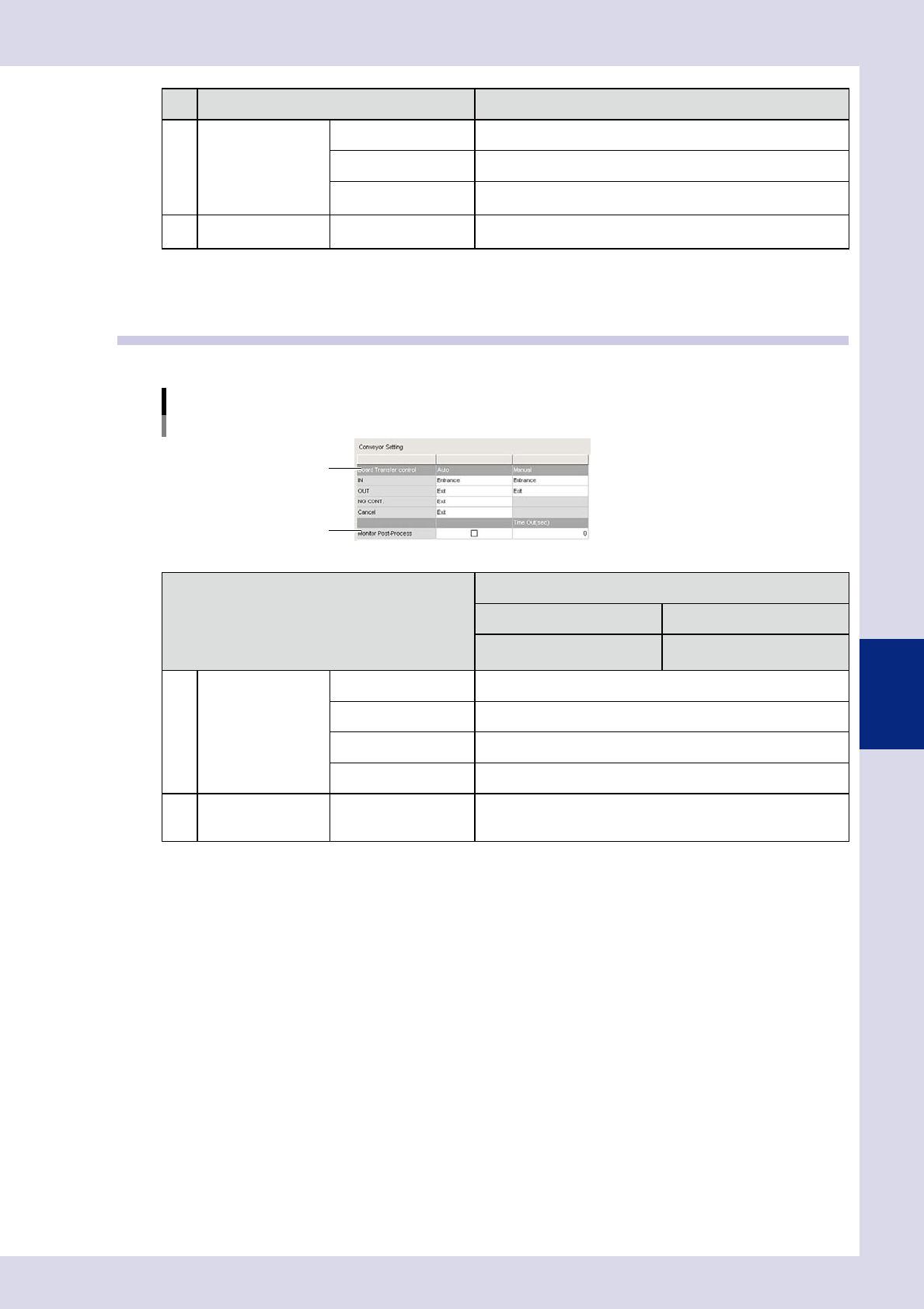
"Machine settings" screen
"Setting" m "Machine Information" m "Conveyor Setting"
1
2
24512-P6-00
Item
Details
Auto Manual
When performing automatic
inspection
When performing manual
inspection
1
Board Transter
control
IN Sets the board entrance.
OUT Sets the board exit.
NG CONT Sets the board exit when NG results continue.
Cancel Sets the board exit when inspection is canceled.
2 Monitor Post-Process
Downstream signals are monitored when the check box is selected.
An alarm occurs if no "Busy In" signal is input from downstream
even when the timeout time is exceeded.
5-12
5
Inspection machine settings
2.3 Secondary judgment settings
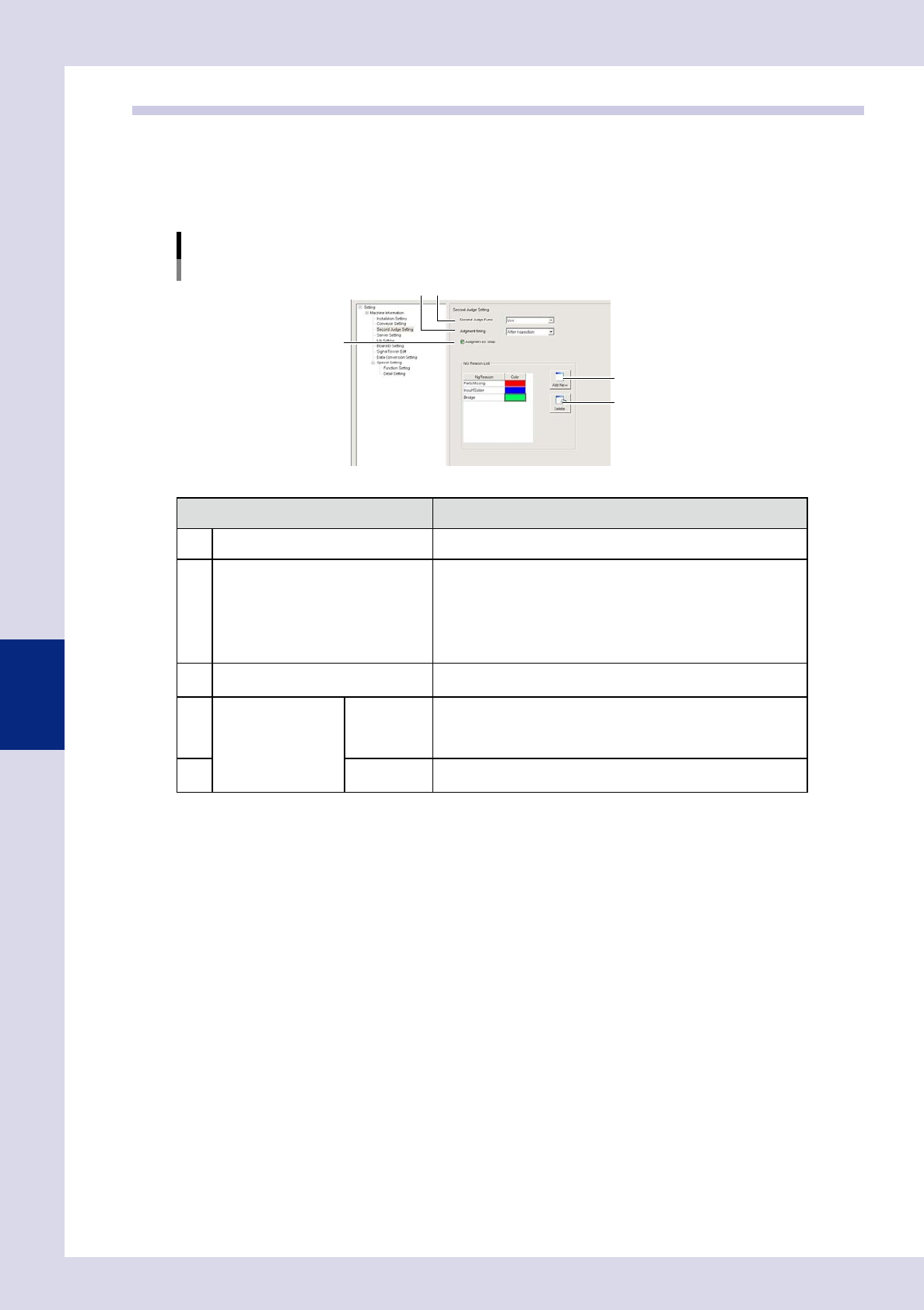
By setting "Second Judge Func" to "Use", a "Judge" tab is added to the "Auto" screen, and an OK or NG result is
judged for all NG steps when board inspection is complete. Furthermore, by registering the NG reason and
color in the "NG Reason List", the NG reasons used when performing judgment can be changed. The position
of the parts on the board image displays with a line in the registered color. For details on the "Judge" tab, see
section 1.5, ""Judge" screen", in Chapter 1.
"Machine settings" screen
"Setting"m"Machine Information"m"Second Judge Setting"
1
4
5
2
3
24513-P6-00
Item/button name Details
1 Second Judge Func Select "Use" to use the secondary judgment function.
2 Judgment timing
Select the timing at which secondary judgment is performed from
"After Carry out" or "After Inspection".
• After Carry out
Performs judgment after unloading the board from the inspection
machine.
• After Inspection
Performs judgment after performing automatic inspection.
3 Judgment by Step
By selecting this check box, OK/NG judgment is possible in step
units. If not selected, judgment is performed in parts units.
4
NG Reason List
Add New
Press this button to register a new NG reason.
By selecting a registered NG reason and pressing this button, a
new entry row is added below the selected NG reason.
Enter a new NG reason in the added row, and then select a color.
5 Delete
Press this button to delete a registered NG reason.
Select the NG reason to be selected and press the [Delete] button.