YSI_Prog_E - 第97页
2-26 2 Creating inspection pr ograms 2.5.2 Bad mark settings 1 Pr ess the [Data Edit] button and open the "Fiducial" tab. 2 Set bad marks Open the tab for which fiducials are to be s et, and set the fiducial fu…
2-25
2
Creating inspection programs
n
Bad mark screen
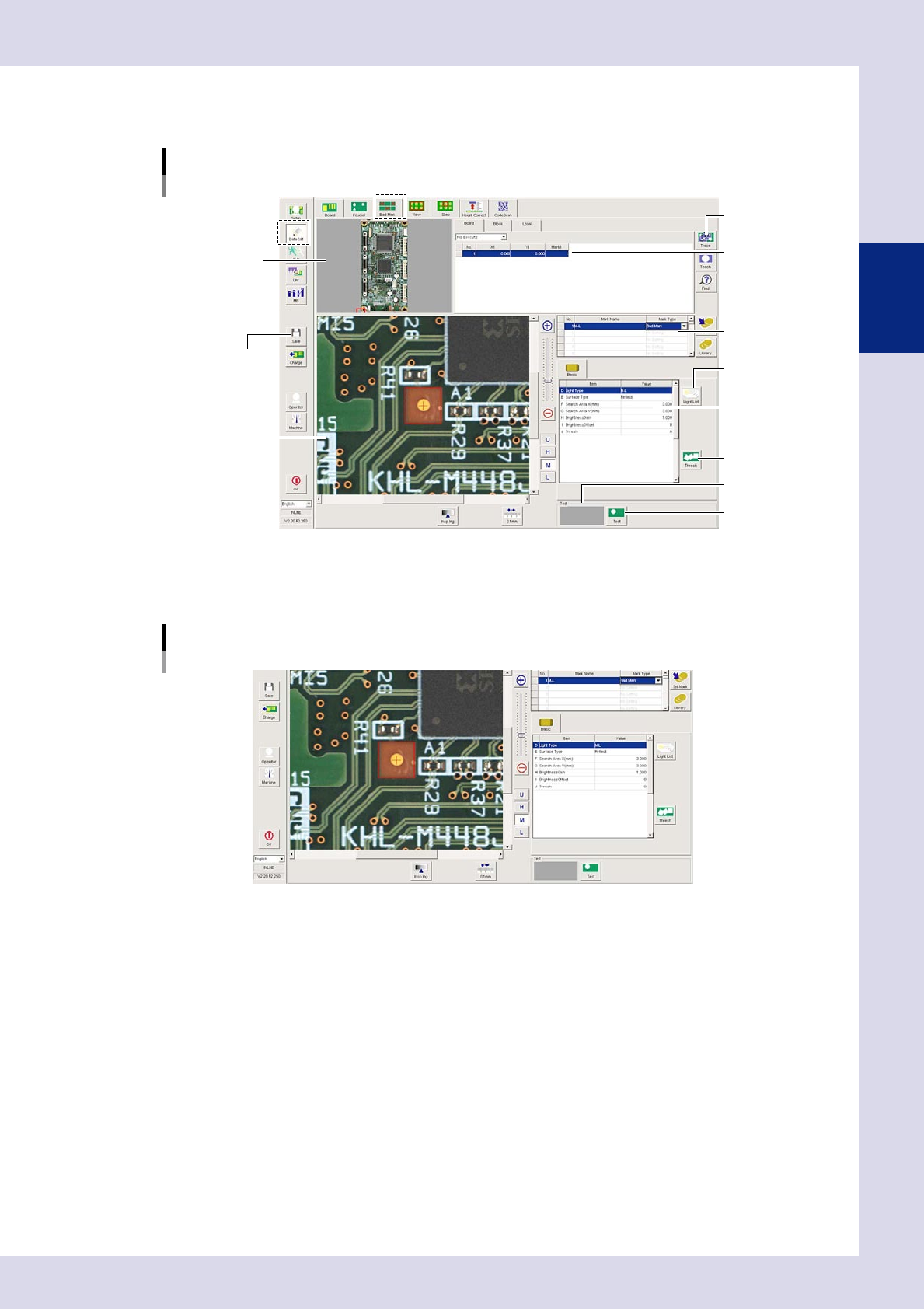
By pressing the [Data Edit] button and opening the "Bad Mark" tab, the following bad mark setting screen appears.
[Bad Mark] tab screen
[Trace] button
[Light List] button
[Thresh] button
[Test] button
[Save] button
Recognition results
Field-of-view image
Basic parameters
Mark data list
Mark list
Board image
24221-P6-00
2.5.1 Basic parameters
Basic parameters
24256-P6-00
D. Light Type
Selects the lighting used to recognize the mark.
E. Surface Type
Select "Reflect" or "Non-reflect" from the drop-down list based on the mark being used.
F, G. Search Area X, Y (mm)
Sets the size of the area in which to search for the mark. The value can be entered from 0.00 to 150.00 (unit: mm). The
presence of bad marks is judged based on whether the inside of the detection range is reflective or non-reflective, and
therefore a range smaller than the size of the mark is set.
H. Brightness Gain
Adjust this value to brighten the entire image so that the mark is easily recognized.
I. Brightness Offset
Adjust this value to make the entire image darker so that the mark is enhanced.
J. Thresh
Press the [Thresh] button to set the threshold value for mark detection.
2-26
2
Creating inspection programs
2.5.2 Bad mark settings
1
Press the [Data Edit] button and open the "Fiducial" tab.
2
Set bad marks
Open the tab for which fiducials are to be set, and set the fiducial function to "Execute".
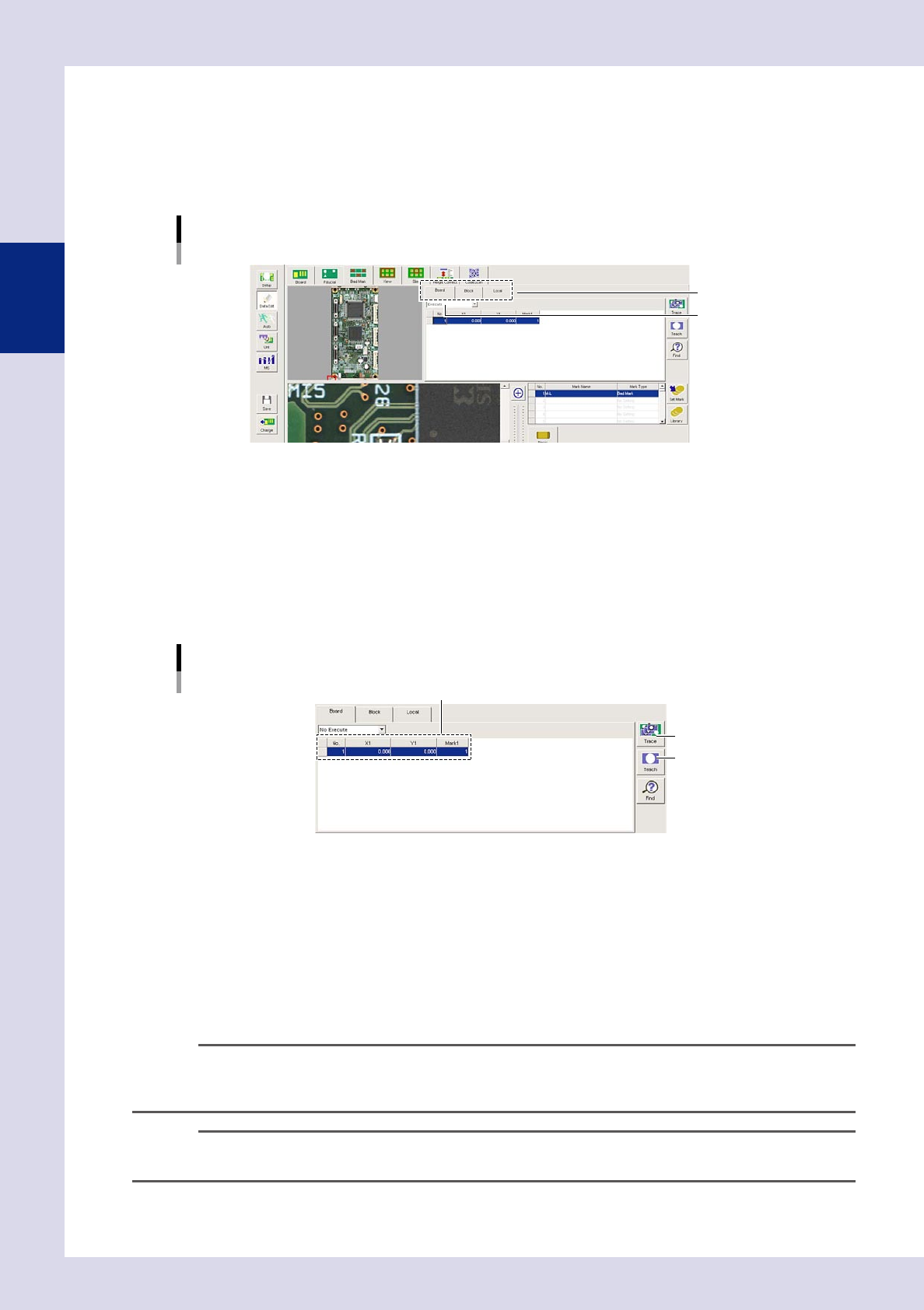
Bad mark settings
Select a tab.
Set to "Execute".
24222-P6-00
"Board" tab (board bad mark)
Set when using the block bad mark or local bad mark function.
"Block" tab (block bad mark)
Skips inspection of each block.
"Local" tab (local bad mark)
Skips inspection of arbitrary steps.
3
Set the mark list.
Mark list settings
[Teach] button
XY coordinates, mark Nos.
[Trace] button
24223-P6-00
X1, Y1
Enter the bad mark coordinates. If bad mark coordinates are unknown, coordinates can be entered by
teaching. After clicking the bad mark on the board image, click the center of the bad mark in the
field-of-view image. After setting the mark parameters, press the [Teach] button when the test result is
"OK". The recognized center coordinates are entered.
Mark 1
This number corresponds to the number in the mark data list, and therefore a mark No. for which no
fiducial mark has been set should be entered.
n
NOTE
• Ifsettingblockbadmarks,setthebadmarkinthelineforeachblockNo.
• Ifsettinglocalbadmarks,settherespectivelocalducialmarks.Setthemarklistnumberforthe"G.LocalBad
Mark No." optional parameter for the relevant step.
TIP
If the bad mark is unclear, use the U, H, M, or L lighting buttons to change the lighting so that the mark becomes
clearer.
2-27
2
Creating inspection programs
4
Move the camera to the fiducial mark position.
Select a mark from the mark list and press the [Trace] button. The camera moves to the fiducial mark
position.
5
Enter the mark data list.
Set for the mark No. set in mark 1 in the mark list.
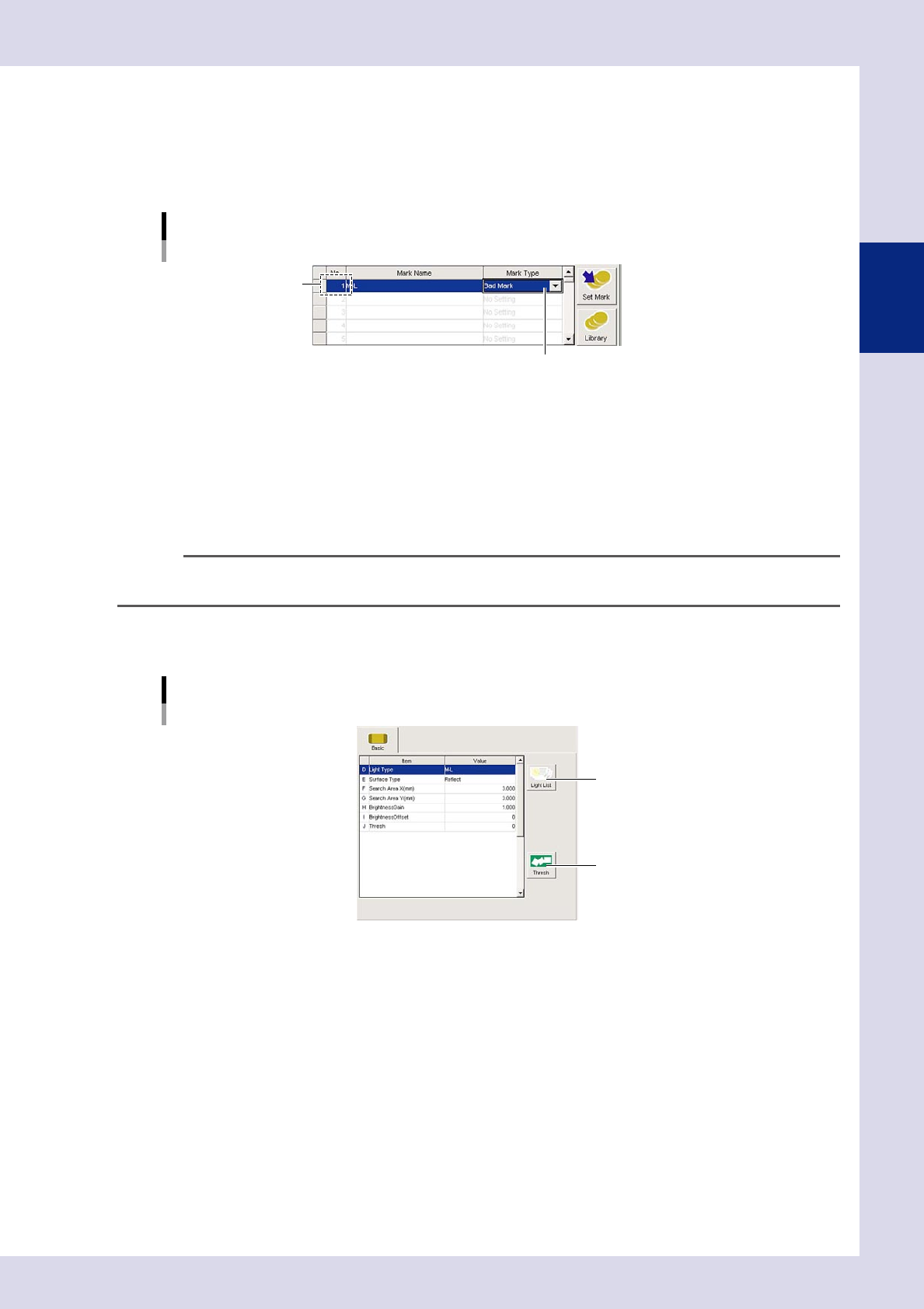
Mark data list settings
Select bad mark.
Set for mark 1 No.
24224-P6-00
No.
This number corresponds to the mark No. set in mark 1 in the mark list.
Mark Name
Enter an easily distinguishable name up to nineteen single-byte alphanumeric characters for each mark.
Spaces cannot be entered.
Mark Type
Select "Bad Mark" from the drop-down list.
TIP
"Fiducial", "Bad Mark", and "Code Scan" can be set in the mark list, and so the code No. should be changed when
registering.
6
Set the basic parameters.
Set the following parameters.
[Bad Mark] tab screen
Basic parameter
[Light List] button
[Measure] button
24225-P6-00
E. Surface Type
Select from the drop-down list based on the bad mark being used.
F, G. Search Area X, Y (mm)
Enter the size of the area in which to search for the mark.
H. Brightness Gain, I. Brightness Offset
Set so that the marks on the board are clearly visible.