00197597-02_IM_Station_Programming_1.1_EN.pdf - 第7页
Station Programmi ng 1.1 / Installation M anual 05/2015 Edition 7 3 Requirements – The station software must be install ed on the station comput er BEFORE the Stat ion Programming software is installed . Please refer to …
Station Programming 1.1 / Installation Manual 05/2015 Edition
6
2 Scope of Delivery
SIPLACE E-Series Media Package V1.1, item no.: [00117771-xx]. This package contains:
● Station Programming Media Package V1.1, item no.: [00117775-xx]
– Software DVD Station Programming V1.1
– License/product certificate
– Software Installation Manual "Station Programming 1.1" (English), item no.: [00197597-xx]
– Packaging
● Standard package: Software SIPLACE Station 708.1 Basic, item no.: [00140055-xx]
– Software DVD Station Software V708.1
– License/product certificate
– Software Installation Manual V708.1 D+E, item no.: [00197624-xx]
– Packaging
2.1 Languages
The GUI of the Station Programming installation program is provided in English. The GUI of Station
Programming itself and the Online Help are available in German, English and Simplified Chinese.
Station Programming 1.1 / Installation Manual 05/2015 Edition
7
3 Requirements
– The station software must be installed on the station computer BEFORE the Station
Programming software is installed. Please refer to the Installation Manual for the 708.1 station
software, item no.: [00197624-xx].
– The machine is operated in stand-alone mode (no connection to a line computer).
Station Programming 1.1 / Installation Manual 05/2015 Edition
8
4 Installing Station Programming
The required SIPLACE software packages are integrated in Station Programming and will be
installed automatically by the Station Programming installation program.
If you want to update / upgrade to a new Station Programming version this will be performed
automatically when the new setup is executed.
► Log in as administrator using the ASM_Admin account on the station computer.
► Insert the installation DVD into the DVD drive.
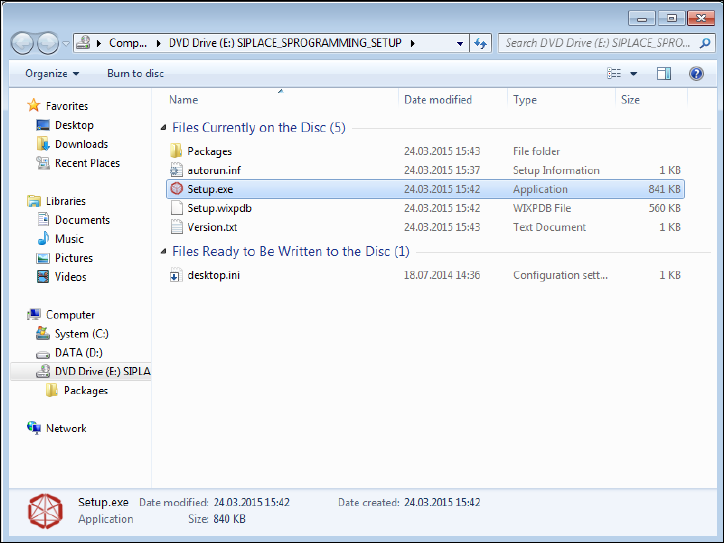
► Open Windows Explorer.
Figure 4-1: Opening installation file
► Double-click the Setup.exe file under drive E: to start installing Station Programming.