00195044-12_UM_VisionTeachStation_DE EN.pdf - 第169页
Vision Teach Station User Manual 10 Exchange of data between the vision teach station and the production line 05/2014 Edition 10.1 Package form descriptions 169 10 Exchange of data between the vision teach station and th…
9 Using the vision teach station on the SIPLACE LAN Vision Teach Station User Manual
9.4 Handling computers without an additional network card 05/2014 Edition
168
9
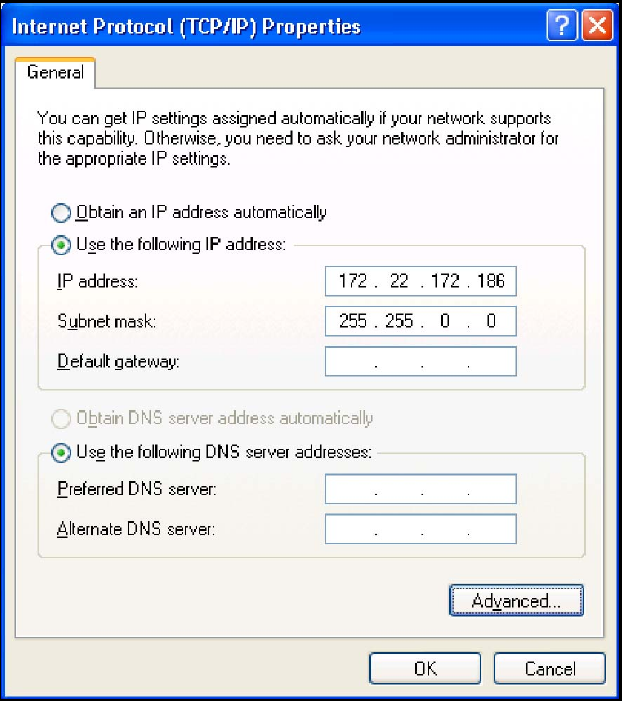
Fig. 9.4 - 4 Entry for the IP address and subnet mask
If you need connections to both your company network and the SIPLACE LAN, please
contact SIPLACE Service. 9
Vision Teach Station User Manual 10 Exchange of data between the vision teach station and the production line
05/2014 Edition 10.1 Package form descriptions
169
10 Exchange of data between the vision
teach station and the production line
NOTE:
To ensure a smooth exchange of data, the SIPLACE Pro version on the vision teach station
should be the same as the version on the production lines, otherwise the exchange may be limited
or not possible at all. 10
10.1 Package form descriptions
10.1.1 Exchanging data by XML export/import
In the previous versions of the vision teach station, it was only possible to exchange data by me-
ans of an XML export. The XML export is described in detail in the "Guideline for
XML Export - Import.pdf" document (see the "SIPLACE Pro Application" setup CD in the "Docu-
mentation" directory).
NOTE:
If you want to transfer a component shape that was generated on the vision teach station to the
production line, the SIPLACE Pro version on the vision teach station must be the same as or ear-
lier than the version used in production. 10
10.1.2 Access via the SIPLACE LAN
The vision teach station version V3.51 allows you to work directly on the database for a production
line via the SIPLACE LAN, provided that SIPLACE Pro 5.0 SP1 or later is installed on the LAN.
The following rules apply:
Tab. 10.1 - 1 Whether a package form can be edited during access via the SIPLACE LAN
SIPLACE Pro version:
vision teach station and line Behavior
VTS = Line Can be edited without restriction
VTS > Line
Features that are supported by the later VTS version cannot be
saved to the SIPLACE Pro database on the line.
VTS < Line
If a package form contains features that the VTS does not recog-
nize, this package form cannot be edited.
10 Exchange of data between the vision teach station and the production line Vision Teach Station User Manual
10.2 Measurement contexts 05/2014 Edition
170
10.2 Measurement contexts
The vision teach station allows you to analyze measurement contexts that the station generates
by default when vision measurements fail.
10.2.1 Saving measurement contexts in 60x station version
From station software version 604 onwards, you can save measurement contexts on the station
directly to an external data medium. Follow these steps:
Insert a memory stick into a USB port on the station computer.
Select the "Vision measurement contexts" option from the "View" menu in the main view. You
will need "Line engineer" operator level to do this.
Select the required measurement context and click the "Save as" button.
Select the drive and click OK to confirm.
10.2.2 Saving measurement contexts in 70x station version
In the 70x station software you will find a list of the measurement contexts that are saved on the
station in the messages view.