00195346-0302_SM_WPC4_EN.pdf - 第18页
Replacing Spare Parts Drive Unit – Lifting Axis Replacing t he Lifting Axis Drive Motor [03047846-xx] 18 Ser vice Manual SIPLACE WPC4 3.3.2 Replacing the Lif ting Axis Drive Motor [03047846-xx] Removal The drive motor (3…
Replacing Spare Parts
Preparations Drive Unit – Lifting Axis
Service Manual SIPLACE WPC4
17
3.3 Drive Unit – Lifting Axis
3.3.1 Preparations
Tools required
Water pump pliers
Belt tension device [00326015-01] with instruction guide
Standard tool with set of Allen wrenches
Required preparations
X Move the tower into the refill position.
X Remove all waffle pack tray carriers (WPTCs) from the tower.
X Move the tower downwards.
SITEST => menu
Functions
=> button
Transport position
.
X Switch the WPC4 off at the main switch.
X Unplug from the power supply and secure the WPC4 to prevent unauthorized reactivation. Refer to
the WPC4 operating manual for details.
X Undock the WPC4 from the SIPLACE machine and move it to a suitable position for service work.
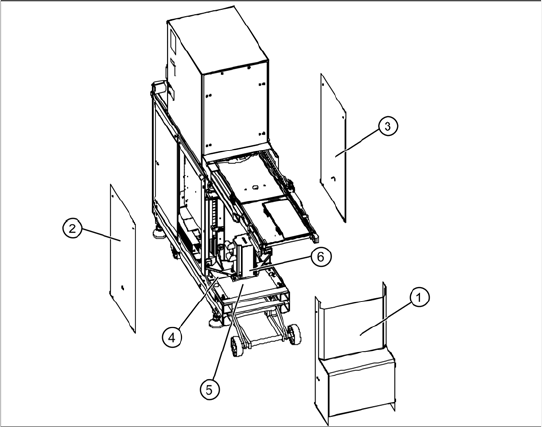
The drive motor (6) of the lifting axis is located
behind the front cover (1). If the drive motor is
disconnected from the power supply, the drive is
fixed with a brake.
X Remove the front cover (1).
X Remove the two side covers (2) + (3).
X Loosen the 4 fastening screws in each case
and remove the two bottom safety covers (4) +
(5). The rear cover plate can be pulled out
towards the front.
Replacing Spare Parts
Drive Unit – Lifting Axis Replacing the Lifting Axis Drive Motor [03047846-xx]
18 Service Manual SIPLACE WPC4
3.3.2 Replacing the Lifting Axis Drive Motor [03047846-xx]
Removal
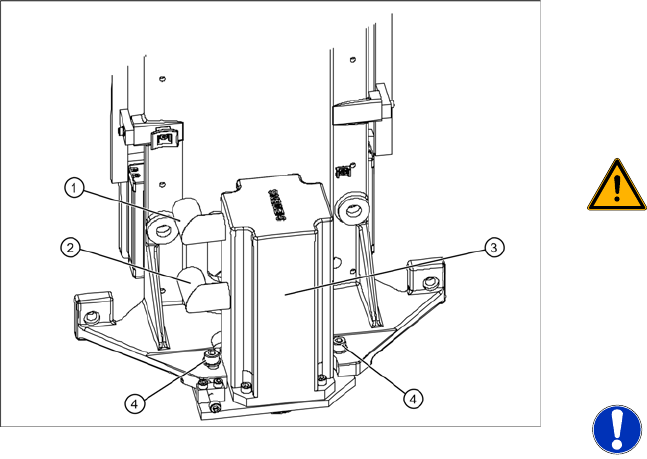
The drive motor (3) of the lifting axis is located
behind the front cover. If the drive motor is
disconnected from the power supply, the drive is
fixed with a brake.
WARNING: Do not move the motor
against the brake.
Do not move the lifting axis motor shaft
against the brake. This could impair the
braking function or damage the brake.
X Unscrew the electrical connections (1) + (2).
X1 orange cable = power cable
X2 green cable = control cable
NOTE: Screw joints difficult to
loosen
Each screw joint has an O-ring seal.
This can make opening the screw joint
difficult.
X Use a pair of water pump pliers to
help you unscrew the connection.
X Make sure that the O-rings do not fall
out of the screw joint and that they
are not damaged.
X When refitting, grease the thread
and the O-rings with a little Vaseline.
X Loosen the two motor support fastening
screws (4) sealed with locking varnish.
Replacing Spare Parts
Replacing the Lifting Axis Drive Motor [03047846-xx] Drive Unit – Lifting Axis
Service Manual SIPLACE WPC4
19
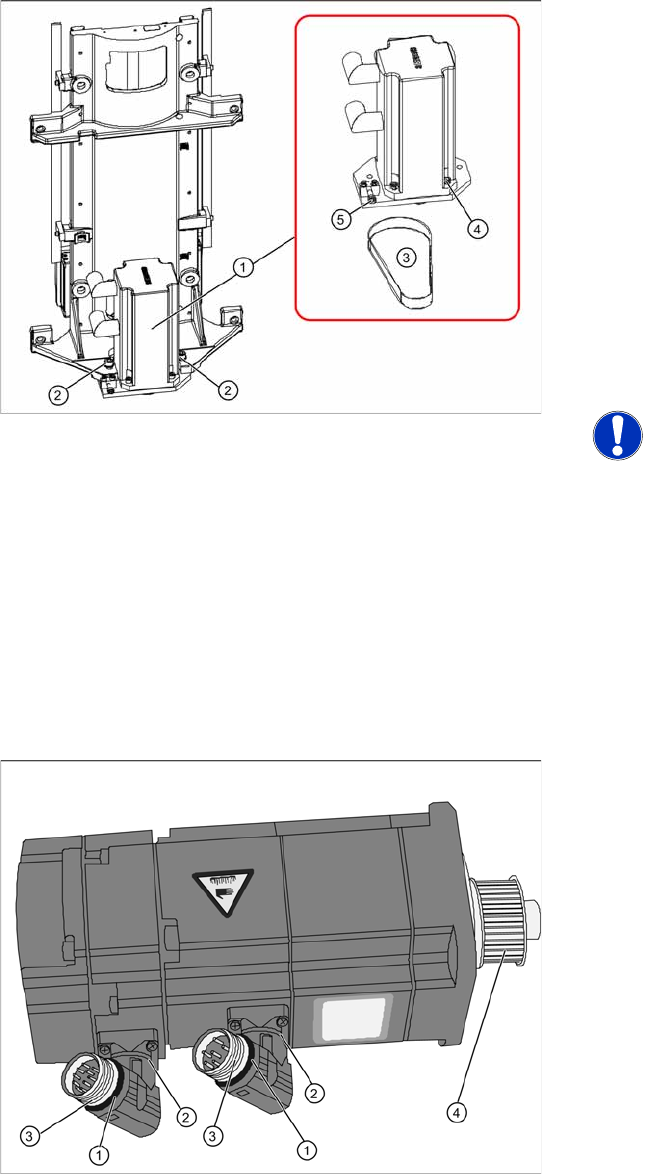
1. Lifting axis drive motor
2. 2 x motor support fastening screws with drive
motor
3. Drive toothed belt
4. 4 x drive motor fastening screws
5. Tensioning screw
X Loosen (do not remove) the tensioning screw
(5) on the tensioning device. This relaxes the
drive toothed belt.
X Loosen and remove the 2 fastening screws (2)
and then remove the drive motor with motor
support. Make sure that the drive toothed belt
is not buckled or damaged.
NOTE: Tower moves down
The tower moves down about 1 mm, to
the bottom, red bumper.
X Remove the toothed belt.
X Mark the installation position of the drive motor
on the motor support.
X Loosen the 4 drive motor fastening screws (4)
on the motor support.
X Fit the new drive motor with the 4 fastening
screws (4) to the motor support. Observe the
original installation position.
Overview of motor
1. O-ring
2. Rotary connection
3. Thread
4. Motor pinion
X The motor connections can be rotated by
hand. Rotate the connections to the position
the motor was installed in before.
X Grease the thread (3) and the O-rings (1) with
a little Vaseline.