00195346-0302_SM_WPC4_EN.pdf - 第68页
Calibration and Settings Machine Data Initialization 68 Ser vice Manual SIPLACE WPC4 4.3 Machine Dat a 4.3.1 Initialization Each WPC4 has a serial numbe r. This is stamped onto the type plate. Initialization is necessary…
Calibration and Settings
Measuring the Transfer Position Feed Axis
Service Manual SIPLACE WPC4
67
4.2.5 Measuring the Transfer Position
4.2.5.1 Calibrating the Feed Axis Limit Switch on Tower Side
See the service manual (3.6.7 Replacing the Feed Axis Limit Switch on Tower Side [03047276-xx]
J
53) .
4.2.6 Calibrating the Zero Point Correction
X Open the SITEST main view and select the function=>
SITEST Settings
.
X In the input area Axis, select the radio button
Feed axis
.
X In the input area Functions, select the button
Zero point correction...
.
X Follow the instructions as you are guided through this menu. The zero point correction will be
automatically determined.
See also:
J
3.6 Limit Switches, Sensors and Light Barriers [
J
42]
J
3.6.1.3 Requirements for Settings [
J
44]
Overview
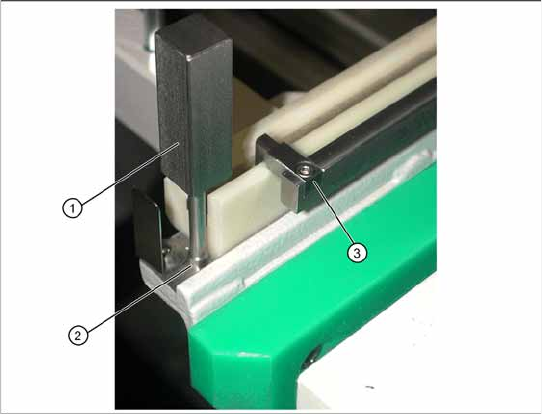
1. Catch
2. Drilling for setting gauge
3. Setting gauge [03052363-02]
X Insert the small setting gauge (3) into the
drilling (2) at the front, on the feed axis.
X Hold the waffle pack tray ready.
X Open the SITEST main view and select the
function=>
SITEST Settings
.
X In the input area Axis, select the radio button
Feed axis
.
X In the input area Functions, select the button
Measure transfer position...
.
X Follow the instructions as you are guided
through this menu. The transfer position will be
automatically determined.
Calibration and Settings
Machine Data Initialization
68 Service Manual SIPLACE WPC4
4.3 Machine Data
4.3.1 Initialization
Each WPC4 has a serial number. This is stamped onto the type plate.
Initialization is necessary, for example, when the controller board is replaced.
Follow the instructions below to perform initialization:
X Open the SITEST submenu
Machine data
and select the button
Initialize….
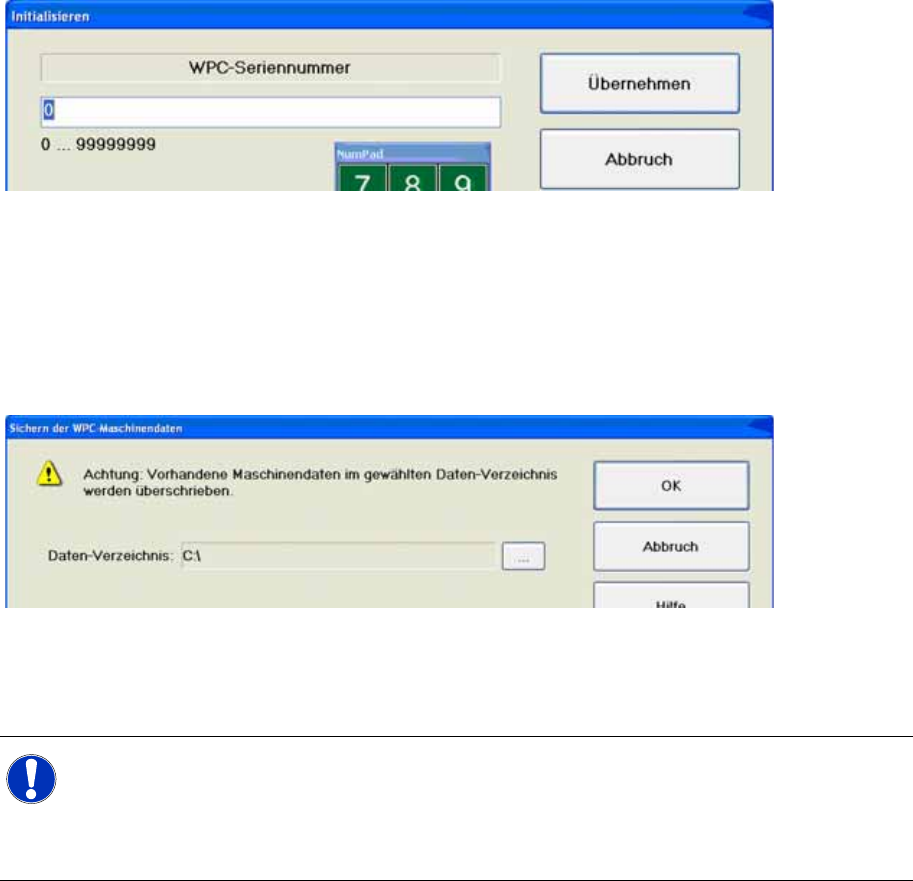
The dialog
box
Initialization
will open.
X Enter the WPC4 serial number in the input field.
Number from 0 to 9 are permitted.The serial number can have a maximum length of eight numbers.
X Select the button
Accept.
4.3.2 Saving the Machine Data
X Open the SITEST submenu
Machine data
and select the button
Save WPC machine data…
.The
dialog box
Save WPC machine data
will open.
X Specify the target folder in the dialog box.The file name will assigned automatically.
X Select the button
OK
. The WPC machine data will be saved.
We recommend that you save the machine data after each calibration run.
NOTE: Path
The path can be selected as required. However, it is advisable to save the WPC4 machine data
in the same folder as the placement machine data.
X Save the WPC4 machine data at:
C:\SRDaten\Srcma
Calibration and Settings
Restoring Machine Data Machine Data
Service Manual SIPLACE WPC4
69
4.3.3 Restoring Machine Data
If a new controller board has been installed in the WPC4 control unit, the machine data saved can be
restored to the controller board. This function checks whether the serial number in the file matches the
current serial number on the WPC controller board. If the WPC4 does not have a current serial number
(in this case, the serial number will be 000000000), this will be evaluated as an invalid serial number and
the transfer will be canceled. You then need to create a valid serial number in the WPC4 (see
Initialization) before you can restore the machine data. If you are unsure, check the serial number
against that stamped on the type plate.
X Open the SITEST submenu
Machine data
and select the button
Restore WPC machine
data….
The dialog box
Restore WPC machine data
will open.
X In the dialog box, specify the source folder in which the machine data file is saved.
X Select the button
OK
. The WPC machine data will now be transferred to the WPC.
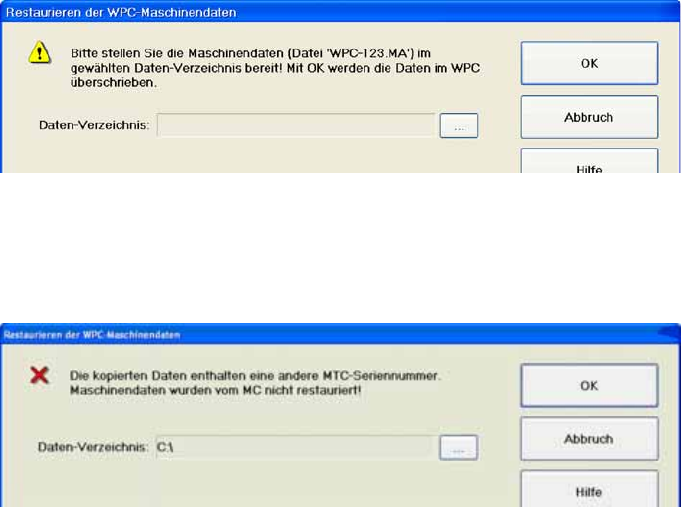
If the serial number in the file does not match the current serial number on the WPC controller board, the
following message will appear:
4.3.4 Standard Values
If you are unable to calibrate the WPC4 anymore, due to incorrect axis parameters, the saved machine
data can be copied from the station computer to the WPC (restoration of machine data). If there is no
backup file available, create a standard machine file as the defined basic state. From this basic state,
the WPC4 can and must be recalibrated.
Saving machine data with invalid values
X Start SITEST.
X Open the menu:
SITEST Machine data
X Click on the selection button:
Save WPC machine data …
.
X Select the data folder.
X Click on OK.
Editing machine data
X Close SITEST
X Switch over to the operating system level.
X Open the machine file with a text editor (e.g. Notepad)
Windows: Start - Programs - Accessories - Notepad