00195346-0302_SM_WPC4_EN.pdf - 第97页
SITEST for WPC4 Zero Point Correction SITEST Lifti ng Axi s Setti ngs Service Manual SIPLACE WPC4 97 5.9 SITEST Lif ting Axis Settings Menu field: Axis, This where you can select the WPC axis to be checked or se t. Fee…
SITEST for WPC4
SITEST Feed Axis Settings Zero Point Correction
96 Service Manual SIPLACE WPC4
5.8.2 Zero Point Correction
The feed axis zero point correction is automatically measured for the WPC4. This requires that the lifting
axis has been correctly set. The tower can be completely filled with waffle pack tray carriers.
X Open the menu Feed Axis, Settings and select
Zero point correction …
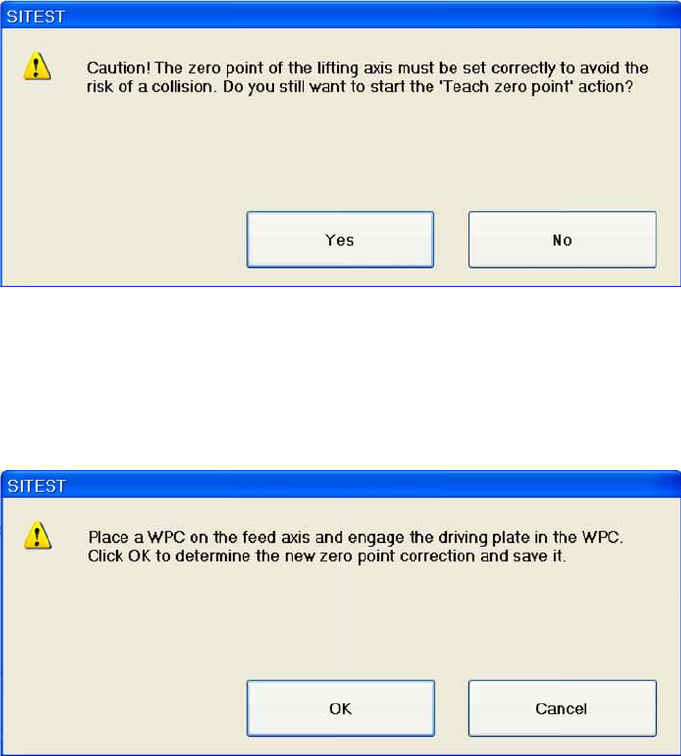
The following message will be shown:
Confirm with
Yes
and the "Zero point correction" procedure will continue.
X Select
OK
. The following message will be shown:"Reference run is being started".
X Select
OK.
The feed axis performs a reference run.
The following message will be shown: "Reference run is being executed".
The following message will then be shown:
X Place a waffle pack tray carrier on the feed axis.
X Select
OK
. The feed axis moves into the tower, against the locking strip and measures the zero point
correction. The following message will be shown: "Function is being executed."
X The following message will be shown: "Reference run is being started".
X Select
OK.
The feed axis performs a reference run.
The following message will be shown: "Reference run is being executed".
SITEST for WPC4
Zero Point Correction SITEST Lifting Axis Settings
Service Manual SIPLACE WPC4
97
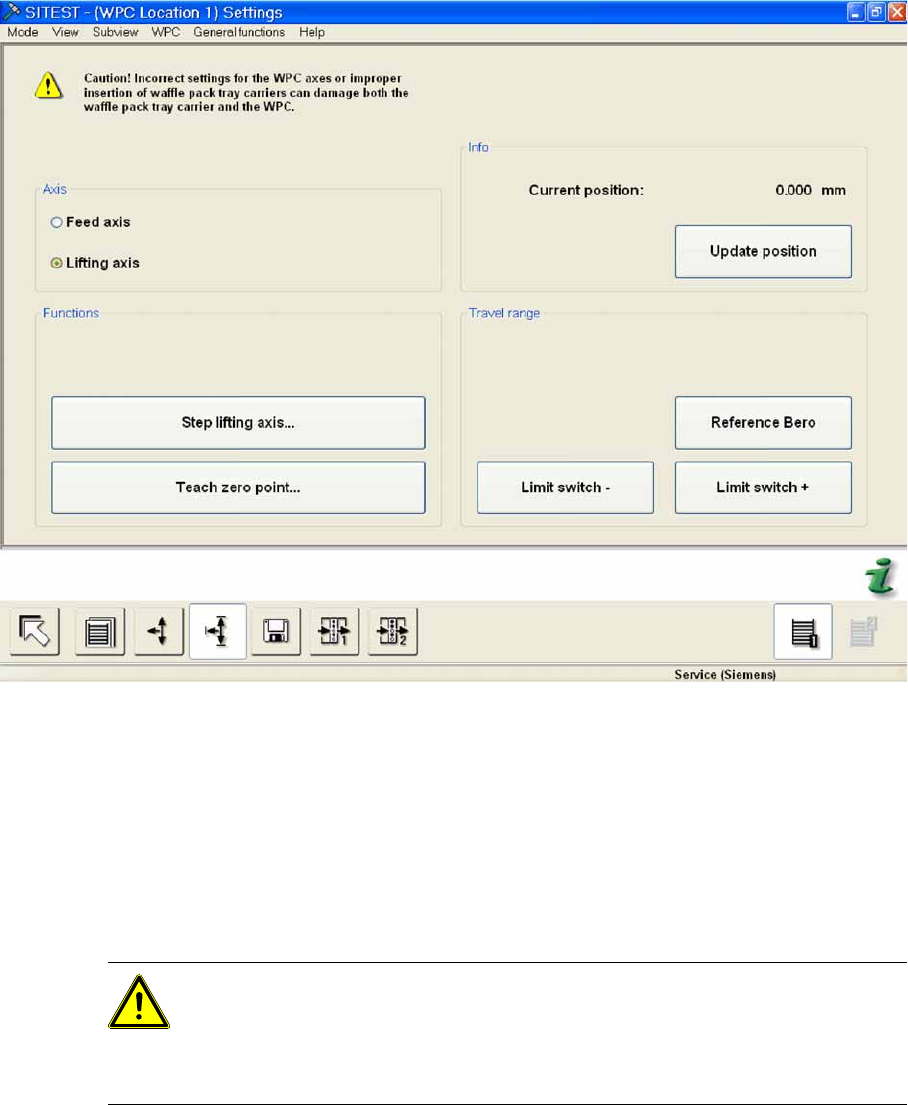
5.9 SITEST Lifting Axis Settings
Menu field: Axis,
This where you can select the WPC axis to be checked or set.
Feed axis: Performs the selected functions for the feed axis.
Lifting axis: Performs the selected functions for the lifting axis.
Menu field: Functions
Step lifting axis... Opens a dialog box with a warning. Acknowledge this with
OK
and a dialog box
will open with which you can move the lifting axis stepwise.
Teach zero point... Opens a dialog box with a warning. Acknowledge this with
OK
and a dialog box
will open in which you can correct (teach) the zero point.
Menu field: Info
Current position: Shows the current position of the activated axis in mm.
Update position: Updates the position shown for the activated axis.
ATTENTION: This function can damage the WPC and waffle pack tray carrier.
The function
Step lifting axis
is only available if you are logged in as a Service
(SIPLACE) user.
This function may only be used if a mechanical error prevents normal movement
of the lifting axis!
SITEST for WPC4
SITEST Lifting Axis Settings Zero Point Correction
98 Service Manual SIPLACE WPC4
Menu field: Travel range
Reference bero: Moves the selected axis to the reference proximity switch so that the position of
the proximity switch can be redetermined. The position determined is then shown in a dialog box.
Select
OK
and another dialog box will open in which you can select
OK
to start a reference run of
the axis.
Limit switch -: Moves the selected axis to the limit switch so that the minimum approach position
can be redetermined. The position determined is then shown in a dialog box. Select
OK
and another
dialog box will open in which you can select
OK
to start a reference run of the axis.
Limit switch +: Moves the selected axis to the limit switch so that the maximum approach position
can be redetermined. The position determined is then shown in a dialog box. Select
OK
and another
dialog box will open in which you can select
OK
to start a reference run of the axis.