00194994_01.pdf - 第29页
SIPLACE Software Guide Version 408.xx 3 Graphical user interface Issue 03/06 EN 3.3 User interface - vie ws and menus 29 The next two menu options belong to the group of vision functions . These functions ar e used to te…

3 Graphical user interface SIPLACE Software Guide Version 408.xx
3.3 User interface - views and menus Issue 03/06 EN
28
Error F3 3
Errors are differentiated by type and each error type is presented in a separate table. You can call
separate tables for track errors, conveyor errors, machine errors and general errors.
The last error to have occurred is always displayed at the top of the table. Identical errors are cu-
mulated in the error counter ("#E" column). 3
Feeders F4 3
Here you can use a variety of functions to display and fill empty tracks for vibratory stick feeders
or to display and modify component levels for magazines and wafflepack changers. 3
3
The following 3 menu options belong to the group of
single functions.
The single functions are used to execute specific actions following fatal errors as well as to set up
and test the machine since they allow you to address the various functional modules in a defined
manner. 3
SF gantry 1 F5 3
This is used to call the single functions for gantry 1. These can be used to, for example, test the
functions of the pick&place head. 3
NOTE
Each of the two gantries of the SIPLACE CS and S23 can be addressed separately.
The functions are identical for both gantries. 3
SF gantry 2 F6 (only for SIPLACE CS and S23) 3
Single functions for gantry 2 3
Conveyor 1 F7 3
This is used to call the single functions for PCB conveyor. These are used to test and set the func-
tional modules for PCB conveyor as well as to set the conveyor width. 3
NOTE
The SIPLACE S23 and F5 HM machine support the dual conveyor. Therefore 2 conveyor
functions (right, left) are available in the toolbar. The functions are identical for both. 3
3

SIPLACE Software Guide Version 408.xx 3 Graphical user interface
Issue 03/06 EN 3.3 User interface - views and menus
29
The next two menu options belong to the group of vision functions.
These functions are used to teach and test fiducials, measure components and change compo-
nent package form data.
The vision functions cannot be executed at the "Operator" access level. 3
Teach fiducial F8 3
This menu item is used to call the functions for the processing of fiducials for PCB position recog-
nition.
For a more extensive description of the procedure refer to the "Vision functions" section of the op-
erating instructions and in the online Help system. 3
Test component F9 3
This menu item is used to call the functions for the processing of component package forms for
component centering.
For a more extensive description of the procedure refer to the "Vision Functions" section of the
operating instructions. 3
Start SITEST F10 3
This automatically starts the SITEST test program for machine set-up and calibration.
The user interface, together with the procedure for the execution of the functions, is described in
the separate User’s Manual for the SITEST test program. 3
NOTE
The SITEST test program cannot be started from the "Operator" access level. 3
3 Graphical user interface SIPLACE Software Guide Version 408.xx
3.3 User interface - views and menus Issue 03/06 EN
30
3.3.2.3 "Options" menu
The "Options" menu is only available in the main view. This menu contains all the supplementary
functions. 3
Æ Click the required menu item and then make the appropriate settings or selections in the cor-
responding windows or dialog boxes.
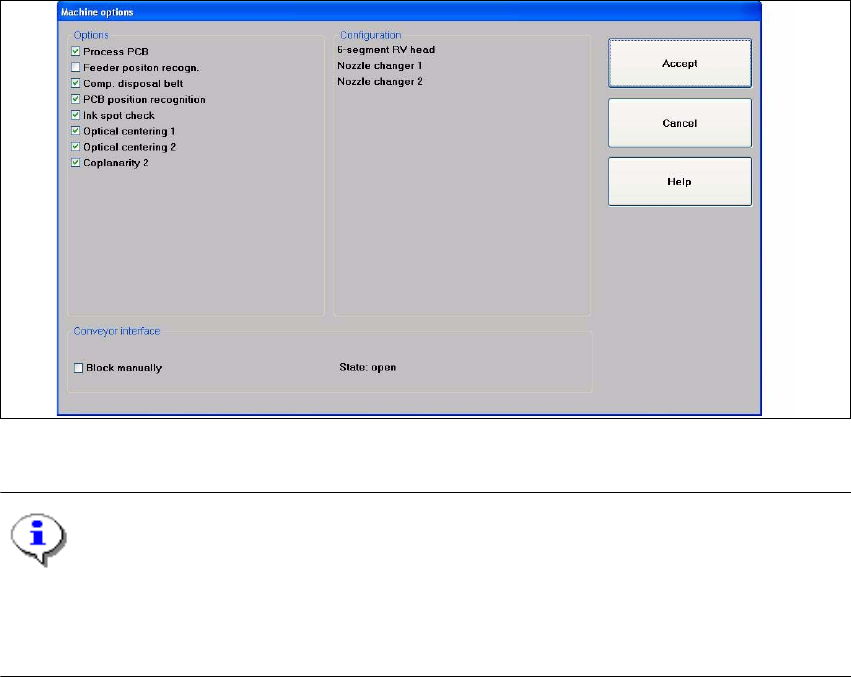
Machine options... 3
Depending on access level, you can obtain information about the station configuration ("Opera-
tor") or activate or deactivate the displayed machine options ("Line engineer", "Service"). 3
Æ Click the Machine options... menu item (or the appropriate button in the working area of the
main view). The following window is displayed.
3
Fig. 3.3 - 3 "Machine options" dialog box (example: SIPLACE CF)
NOTE
Only those machine options are displayed which are configured at the current station.
This dialog box may contain different information and check boxes depending on the type of
SIPLACE machine being used. 3