00197674-01-UM-E-Series-EN-02-2015.pdf - 第250页
5 Working with the machine User manual SIPLACE E 5.16 Docking the changeover table in or out From software versio n SC 708.0 12/2 014 Edition 250 I 5 5 Connect the power cable an d the D-sub conn ection cable of t he c…
User manual SIPLACE E 5 Working with the machine
From software version SC 708.0 12/2014 Edition 5.16 Docking the changeover table in or out
249
5.16.4 Docking the changeover table
5
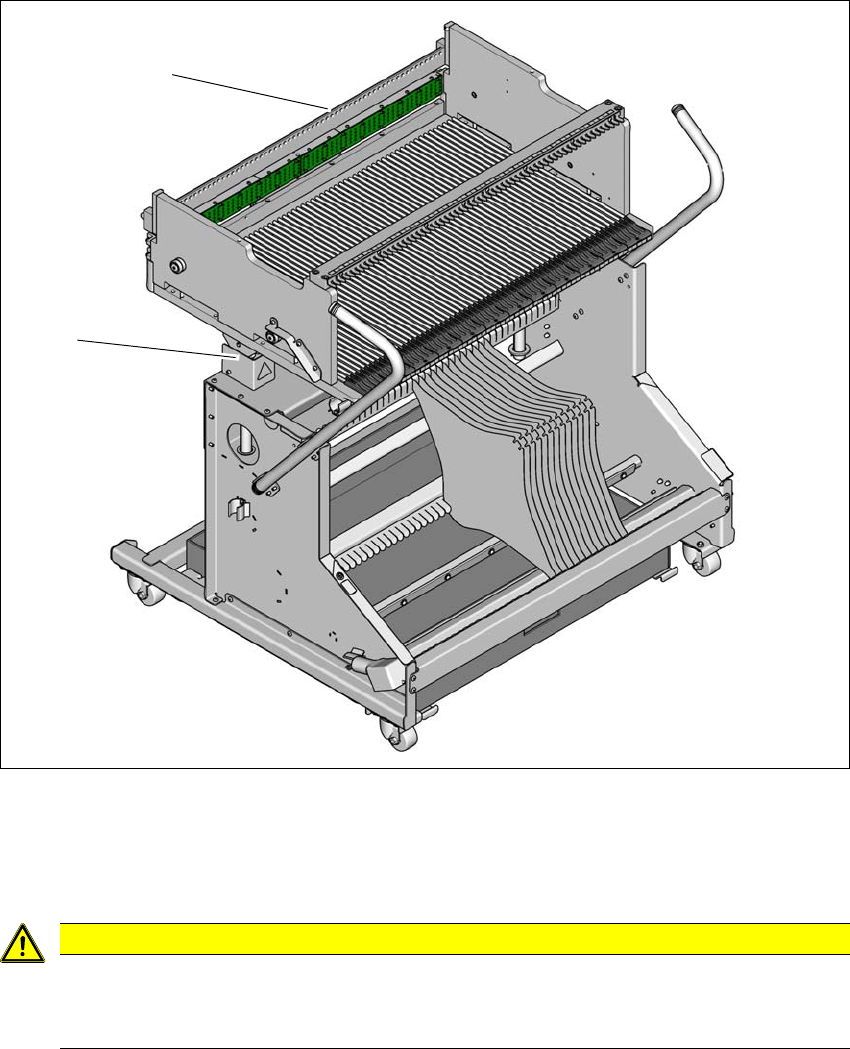
Fig. 5.16 - 3 Docking the changeover table
(1) Centering bar
(2) Height setting to the machine height
5
CAUTION
Pushing in changeover table!
When pushing the changeover table into the machine, make sure that you do not hit
obstacles with the centering bar.
(2)
(1)
5 Working with the machine User manual SIPLACE E
5.16 Docking the changeover table in or out From software version SC 708.0 12/2014 Edition
250
I 5
5
Connect the power cable and the D-sub connection cable of the changeover table to the ma-
chine
Carefully push the changeover table into machine as far as the stop.
5
5
5
5
Go to the main view of the station software and select the Feeder module... icon and
then the
Locations icon.
Click on the icon to lock the respective location and wait until the trolley has docked
completely. For further information, refer to the station software Online Help.
PLEASE NOTE
Cut tapes flush
If you do not cut tapes off flush at the front end of the SIPLACE SmartFeeder E, the emp-
tied tapes will not enter the empty tape duct.
Cut the tapes off flush, before you dock the changeover table into place.
CAUTION
Position of placement head!
Check that the placement head is outside the range of the changeover table.
CAUTION
Risk of head crash!
When dismantling one of the two brackets (left and right side) for the table height check,
there is a risk of a head crash due to changeover tables being too high.
Do not dismantle the brackets.
PLEASE NOTE
Close the protective covers since the changeover table can only be docked in if the
covers are closed.

User manual SIPLACE E 6 Station extensions
From software version SC 708.0 12/2014 Edition 6.1 Nozzle changer
251
6 Station extensions
For the relevant configurations and other options, refer to the individual specifications for the SI-
PLACE E machines.
6.1 Nozzle changer
Nozzle changers can greatly increase the flexibility of the placement heads for processing differ-
ent types of component. If the placement program requires a nozzle change, then the placement
head automatically returns the old nozzle to the nozzle holder and picks up the new nozzle. Noz-
zles that were separated out during the vacuum check can also be quickly changed.
It is significantly more exact and faster to pick up nozzles from a nozzle changer than would be
possible manually. When placing small components, it is essential to minimize the radial eccen-
tricity during nozzle rotation.
The basic design of the nozzle changer is identical for the Collect&Place heads
(SIPLACE CP14/12/6). However, make sure that you always use the correct nozzle magazines
for the specific head.