00195722-0102_UM_X-Serie_SR605_EN.pdf - 第291页
User Manual SIPLACE X-Series 4 Setting up and commissioning From software version SR.605.xx 07/2008 EN Edition 4.3 Setting up the placement machine 291 4.3.12 Inst alling the axis unit 4.3.12.1 Axis unit X3, X4 (gantry 1…

4 Setting up and commissioning User Manual SIPLACE X-Series
4.3 Setting up the placement machine From software version SR.605.xx 07/2008 EN Edition
290
4.3.11.3 Box PC unit X2, X3 and X4 - plug-in connectors on the rear panel
4
4
4.3.11.4 Fitting the box PC unit
→ Plug in the plug-in connectors on the rear panel of the box PC unit (see Section 4.3.11.3, page
290
).
→ Carefully lift the box PC unit onto the rail in the extension kit.
→ Make sure that you do not squash any cables.
→ Push the box PC unit into the extension kit as far as the stop.
→ Plug in the plug-in connectors on the front panel of the box PC unit (see Section 4.3.11.2
,
page 289
).
→ Fix the cables to the front panel with cable ties.
→ Secure the box PC unit with the fillister head screw.
→ Fix the grounding cable to the doors (item 2 in Fig. 4.3 - 15
, page 282),
as shown in Fig. 4.3 - 16
on page 285.
→ Lock the doors.
PLEASE NOTE 4
On X2 placement machines, continue from Section 4.3.11.5
"Fitting the side plates".
On X3 and X4 placement machines, continue from Section 4.3.12
"Installing the axis unit" on
page 291.
4.3.11.5 Fitting the side plates
→ Fix the grounding cable to each side plate (item 6 in Fig. 4.3 - 15, page 282), as shown in Fig.
4.3 - 16
page 285.
→ Fix the side plate to the machine frame with 6 fillister head screws.
→ Continue from Section 4.3.13
"Fitting the indicator lamp", page 293.
Box PC unit, rear panel
(Fig. 4.3 - 19
, page 288)
Plug
Connecting cable NOTE
Plug Cable
PE1 Cable ring Grounding cable
Fix as shown in Fig. 4.3 - 16
,
page 285
.
X1rz X1rz 03051757 Insert as far as the stop
X3rz X3rz 03050907 Insert as far as the stop
X1pd X1pd 03051751 Insert as far as the stop
X2pd X2pd 03051752 Insert as far as the stop
X3pd X3pd 03051753 Insert as far as the stop
X4pd X4pd 03051754 Insert as far as the stop
User Manual SIPLACE X-Series 4 Setting up and commissioning
From software version SR.605.xx 07/2008 EN Edition 4.3 Setting up the placement machine
291
4.3.12 Installing the axis unit
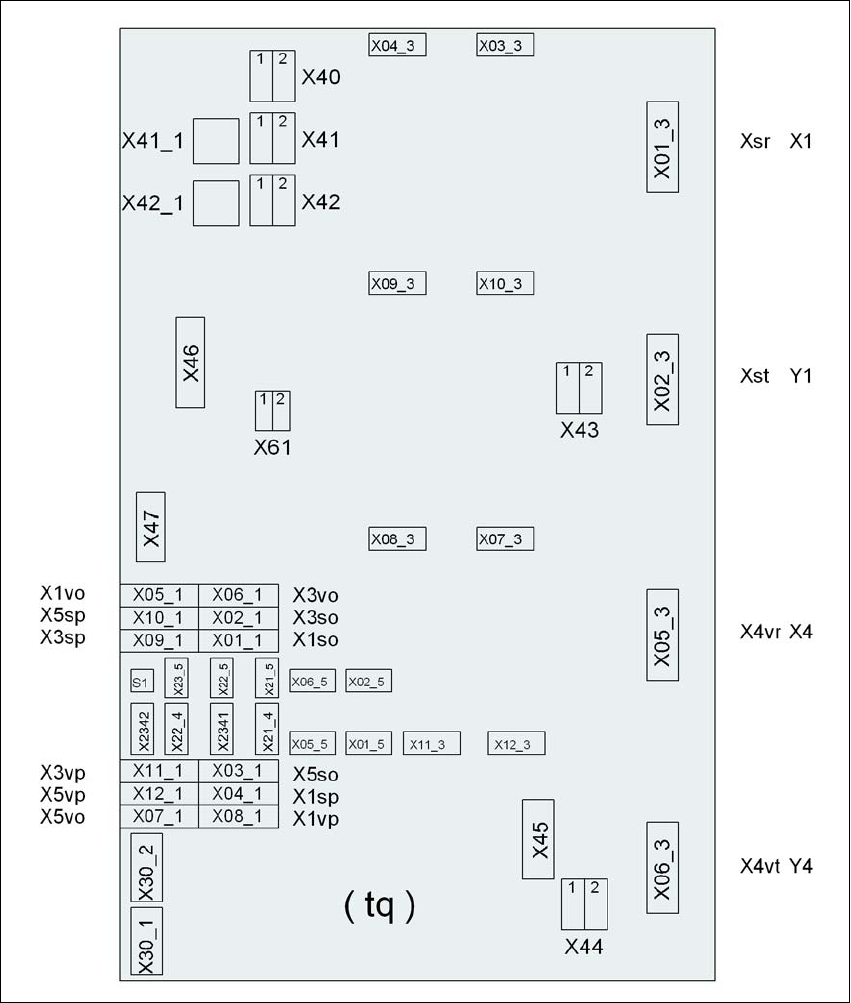
4.3.12.1 Axis unit X3, X4 (gantry 1 and gantry 4) - electrical connection points
4
Fig. 4.3 - 20 Axis unit X3, X4 (gantry 1 and gantry 4), rear panel - connecting the plugs
Plug
Plug
Plug

4 Setting up and commissioning User Manual SIPLACE X-Series
4.3 Setting up the placement machine From software version SR.605.xx 07/2008 EN Edition
292
4.3.12.2 Axis unit X3, X4 (gantry 1 and gantry 4) - connecting the plugs
→ Connect the power cable as shown in the following diagram:
4
Axis unit, plugs Connecting cable NOTE
Plug Cable
X41_1tq X41_1tq 03050919 Snap connector into place
X42_1tq X42_1tq 03050919 Snap connector into place
X45tq X45tq 03050920-W1 Snap connector into place
X46tq X46tq
03050920-W2
03050920-W3
Snap connector into place
X47tq X47tq
03050920-W4
03050920-W5
Snap connector into place
X01_3tq X4sr 03050881 Snap connector into place
X02_3tq X4st 03050882 Snap connector into place
X05_3tq X4vr 03050911 Snap connector into place
X06_3tq X4vt 03050912 Snap connector into place
X01_1tq X1so 03009771 Insert as far as the stop
X02_1tq X3so 03009772 Insert as far as the stop
X03_1tq X5so 03009773 Insert as far as the stop
X04_1tq X1sp 03009774 Insert as far as the stop
X05_1tq X1vo 03009831 Insert as far as the stop
X06_1tq X3vo 03009832 Insert as far as the stop
X07_1tq X5vo 03009833 Insert as far as the stop
X08_1tq X1vp 03009834 Insert as far as the stop
X09_1tq X3sp 03009775 Insert as far as the stop
X10_1tq X5sp 03009776 Insert as far as the stop
X11_1tq X3vp 03009835 Insert as far as the stop
X12_1tq X5vp 03009836 Insert as far as the stop
X03_3tq X03_3tq 03050883 Snap connector into place
X04_3tq X04_3tq 03050884 Snap connector into place
X07_3tq X07_3tq 03050913 Snap connector into place
X08_3tq X08_3tq 03050914 Snap connector into place