00195722-0102_UM_X-Serie_SR605_EN.pdf - 第355页
User Manual SIPLACE X-Series 5 Tasks for the operating personnel From software version SR.605.xx 07/2008 EN Edition 5.9 Avoiding track errors 355 5.9 A voiding track errors 5.9.1 General → Make sure that the areas aro un…
5 Tasks for the operating personnel User Manual SIPLACE X-Series
5.8 Changing the set-up From software version SR.605.xx 07/2008 EN Edition
354
PLEASE NOTE 5
Remove the component tape before a reference run.
5.8 Changing the set-up
5.8.1 Printing out the conversion instructions before changing the set-up
Before a change of set-up, print out the conversion instructions on the printer for the SIPLACE Pro
computer as described in the "SIPLACE Pro" manual or in the online help.
5.8.2 What you should note when changing the feeder modules
→ Handle the feeder modules carefully when you insert them into or remove them from the com-
ponent table. Make sure that the X feeder modules do not bump against the centering bar
(see item 5 in Fig. 5.6 - 3
, page 341) of the component table.
→ Vacuum the supporting surfaces of the feeder modules and clean the surface of the compo-
nent table when necessary according to the instructions in the preventive maintenance man-
ual.
→ Remove loose components using a
brush or a vacuum cleaner with a suitable nozzle.
CAUTION 5
Avoid removing components from the component table with your fingers. You may hurt your-
self with tiny splinters of metal.
ParNotSaved! Red Parameters were not saved Default parameters are loaded automatical-
ly, i.e. the most recent operator settings are
overwritten -> The settings (e.g. increment)
will have to be made again. Replace the
control board if this error occurs frequently.
ParWrongSave Red Wrong or incomplete param-
eters were saved
BootFlashErr
FlashDataErr
Red Can no longer write to boot
or application memory cor-
rectly
Replace the feeder module or control board
Text on the
LCD display
Status
display
Meaning Trouble-shooting

User Manual SIPLACE X-Series 5 Tasks for the operating personnel
From software version SR.605.xx 07/2008 EN Edition 5.9 Avoiding track errors
355
5.9 Avoiding track errors
5.9.1 General
→ Make sure that the areas around the feeder modules are clean and that there are no loose
components in the feeder area or under the feeder modules.
→ Ensure that the supporting surfaces of the S feeder modules, and particularly the magnetic
rails of the component tables (HF-series), are clean and level.
→ Refill promptly with components.
→ Splice the tapes early. This generally means that you are to prepare the splicing material
when there is still approximately 1.5 m of tape on the reel.
→ Handle the feeder modules carefully when you insert them into or remove them from the com-
ponent table as these are high-precision devices.
→ Close the pick-up window on the S feeder module as it could easily be damaged if you leave
it open.
→ For X feeder modules, lower the pick-up window since it can easily be damaged when raised.
PLEASE NOTE 5
A raised pick-up window leads to noticeably impaired pick-up quality.
→ Check that the pick-up position is set correctly for the components on the feeder modules.
→ Check that the S feeder module connectors are plugged into the communication interface
correctly.
5
5
5
5
5.9.2 Avoiding track errors with the tape container
→ Insert the separating plates correctly (see Fig. 5.5 - 4, page 336).
→ For the SIPLACE HF component trolley, store tape reels that are 15"
(381 mm) or more in diameter on spindles.
5 Tasks for the operating personnel User Manual SIPLACE X-Series
5.9 Avoiding track errors From software version SR.605.xx 07/2008 EN Edition
356
5.9.3 Component coordinate system and pick-up angle
5
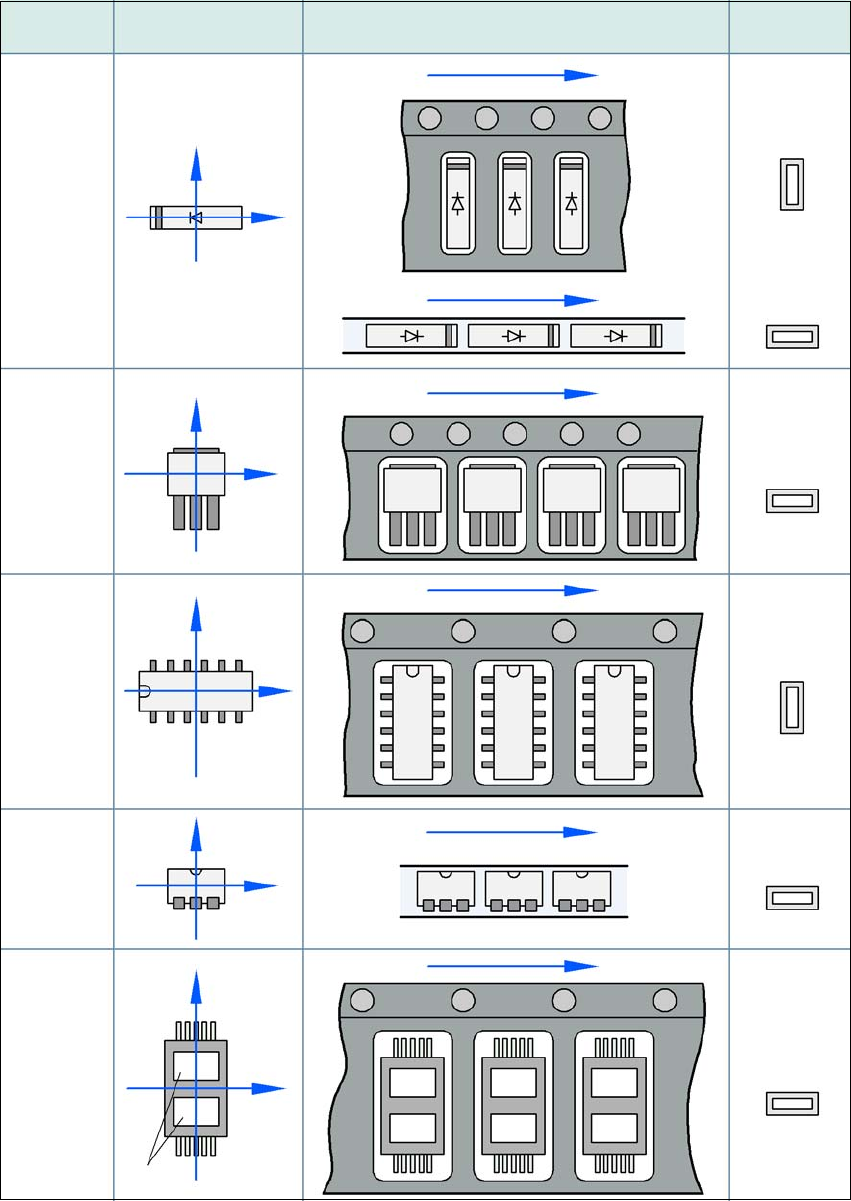
Fig. 5.9 - 1 Position of the component and its pick-up angle
Special
component
Stick
magazine:
Chip-
components
with polarity
0402
2220
The anode must be
aligned with the +X
coordinate.
Package form Coordinate system
Position in the feeder module
Pick-up angle/
nozzle angle
Tape:
SOT 23
Stick
magazine:
Tape:
Tape:
SO-IC
DIL-IC
SOT 194
Tape:
Holes
Y
X
Y
X
Y
X
Y
X
Y
X
90°
90°
0°
90°
-90°
0°