00195722-0102_UM_X-Serie_SR605_EN.pdf - 第376页
6 Station extensions User Manual SIPLACE X-Series 6.1 Nozzle changer From software version SR.605.xx 07/2008 EN Edition 376 WA R N I N G 6 Any lever that is protruding over th e magazine (item 1 in Fig. 6.1 - 6 ) can res…
User Manual SIPLACE X-Series 6 Station extensions
From software version SR.605.xx 07/2008 EN Edition 6.1 Nozzle changer
375
6.1.1.7 Notes on operation
→ When you fill a magazine with a certain nozzle type for the first time, attach an adhesive label
to identify the type.
PLEASE NOTE 6
Fill the magazines off the machine and always replace complete magazines. 6
→ Open the locking plate and place the nozzles in the nozzle holders.
→ Close the locking plate so that the nozzles cannot drop out of the magazines.
CAUTION 6
Before you fill magazine, make sure that all the nozzles on the Collect&Place head have
been returned to their magazines. 6
PLEASE NOTE 6
Do not allow components to drop onto the magazines. If they do, they could jam the locking
plate. You should therefore regularly clean the magazines and free locations.
→ Programming the nozzle changer is described in the SIPLACE Pro user manual.
6.1.1.8 Changing the magazine
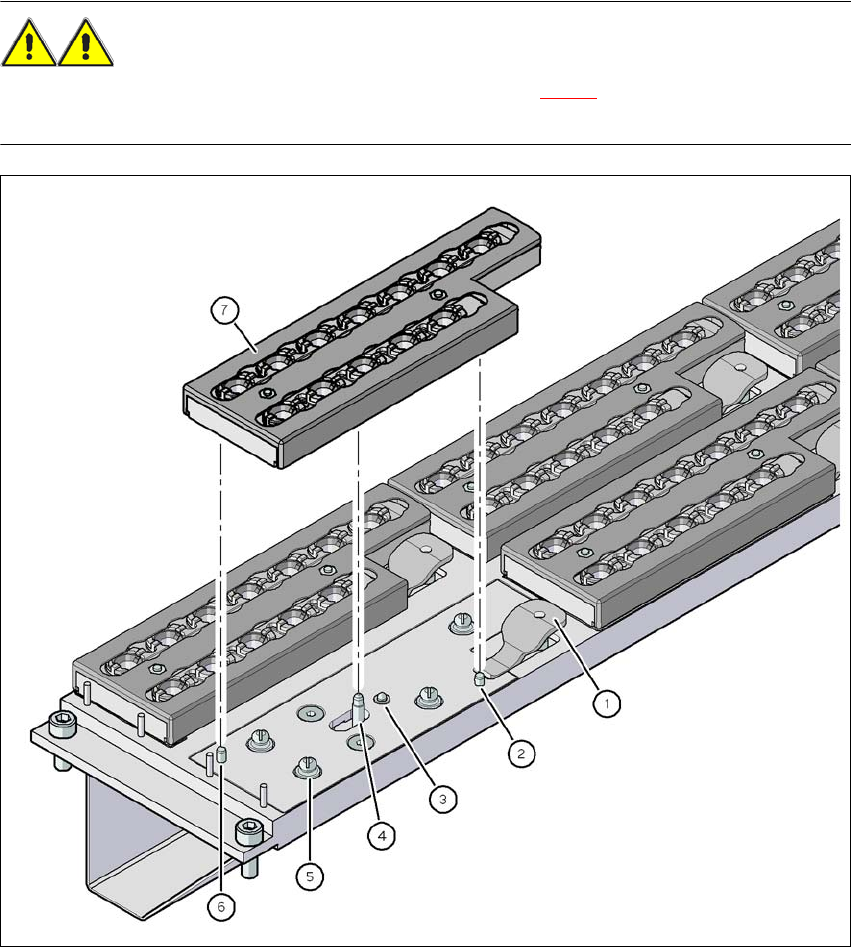
→ Press the lever (item 1 in Fig. 6.1 - 6, page 373 to release the magazine from the balls of the
snap fasteners (item 5 in Fig. 6.1 - 6
, page 373). Lift the magazine off the base.
6 Station extensions User Manual SIPLACE X-Series
6.1 Nozzle changer From software version SR.605.xx 07/2008 EN Edition
376
WARNING 6
Any lever that is protruding over the magazine (item 1 in Fig. 6.1 - 6
) can result in a head crash.
You should therefore make sure that the lever does not protrude over the magazines.
6
Fig. 6.1 - 6 Changing the magazine
(1) Lever for raising the magazine
(2) Parallel pin, engages in the hole in the magazine
(3) Spring pin for triggering the microswitch
(4) Pin of the slide mechanism, moves the locking plate
(5) Ball of snap fastener
(6) Parallel pin, engages in the slot in the magazine
(7) Locking plate in the "Magazine locked" position
User Manual SIPLACE X-Series 6 Station extensions
From software version SR.605.xx 07/2008 EN Edition 6.1 Nozzle changer
377
PLEASE NOTE 6
– Move the locking plate into the "Magazine locked" position.
– Before inserting, align the magazine so that the centering pins (item 2 and 6 in Fig. 6.1 - 6
,
page 376) slide into the centering holes and slot (item 6 in Fig. 6.1 - 6, page 376).
→ Place the magazine on the snap fastener balls (item 5 in Fig. 6.1 - 6
, page 376).
→ Press the magazine down evenly so that the snap fastener balls engage in all the snap fasten-
ers at the same time.
6.1.1.9 Position detection
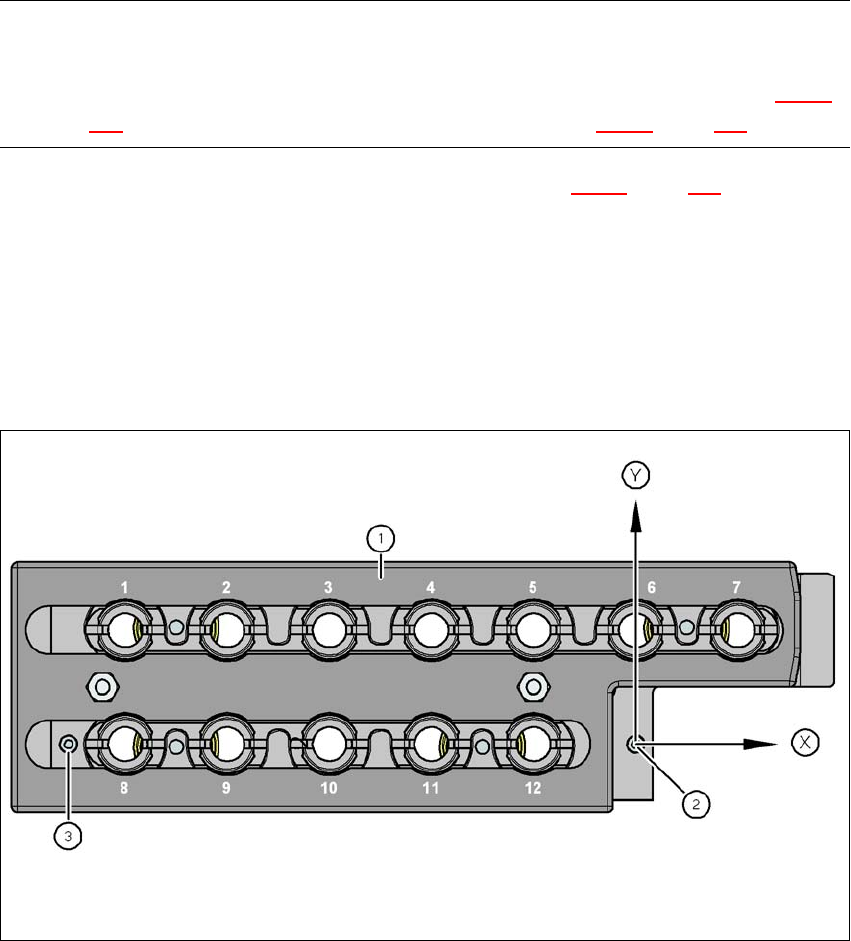
Each magazine of the nozzle changer has two fiducials: one for determining the position and one
for determining the angular position.
6
Fig. 6.1 - 7 Nozzle magazine - holder numbering, fiducials for determining the position and angular position
(1) Locking plate in the "Magazine open" position
(2) Fiducial for determining the position
(3) Fiducial for determining the angular position