SECS GEM Manual.pdf - 第107页
GEM Manual for DEK Printers Equipment Variables Issue 1.6 January 22, 2018 Page 107 of 171 6.1 Introduction A set of variable definitions is provided to enable the host to monitor and sometimes alter, the behaviour of th…
GEM Manual for DEK Printers Equipment Variables
Issue 1.6 January 22, 2018 Page 106 of 171
6 Equipment Variables
INTRODUCTION 7.1
EQUIPMENT CONSTANTS 7.2
STATUS VARIABLES 7.3
DISCRETE DATA VARIABLES 7.4
VARIABLES FOR LIMITS MONITORING 7.5
PROCESS ATTRIBUTES 7.6
GEM Manual for DEK Printers Equipment Variables
Issue 1.6 January 22, 2018 Page 107 of 171
6.1 Introduction
A set of variable definitions is provided to enable the host to monitor and sometimes alter, the
behaviour of the equipment. These are known as machine variables.
Machine variables are divided into the following three categories.
Equipment Constants: Allow the host to modify certain aspects of the equipment’s
behaviour. See section 5.5 for a discussion on the use of EC’s.
Status Variables: As the name suggests, these variables track continuous system
status values. The host can interrogate the equipment at any time
and can programme the equipment to transmit values on a
regular schedule. The host cannot change these values.
See section 5.2 for a discussion on data collection methods.
Discrete Data Variables: Are similar to Status Variables except that their values are valid
only when specific events occur. The host should not interrogate
these values, but should include them in reports linked to
collection events.
See section 5.2 for a discussion in on data collection methods.
Process Attributes: These variables are used to request name and value information
about the currently loaded printer product.
The machine variables are listed by category in the following sections.
GEM Manual for DEK Printers Equipment Variables
Issue 1.6 January 22, 2018 Page 108 of 171
6.2 Equipment Constants
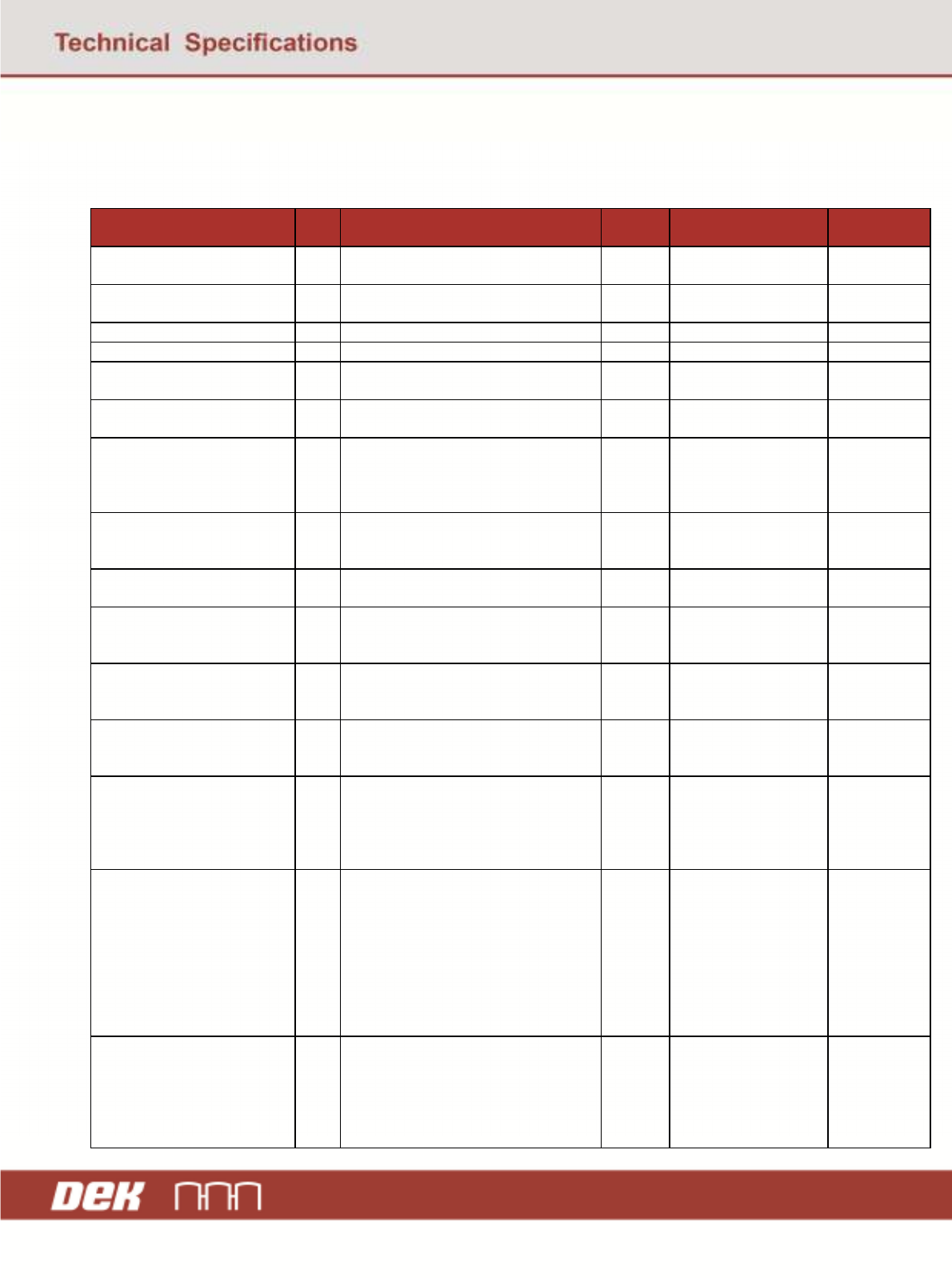
The equipment constants are defined in the table below:
Note: Default values are shown bold.
NAME ECI
D
DESCRIPTION Type Value Range S2F15
Compatible
GemConfigConnect 1 Select establish communications
type.
U1 1 = S1F13 Yes
DeviceName 2 Equipment name as defined by the
host.
A20 20 characters Yes
GemEstabCommDelay 3 Time between each S1F13 poll. U2 0-60-1800 s Yes
GemPollDelay 4 Time between each S1F1 poll. U2 0-60-1800 s Yes
GemInitCommState 5 Initial communications state. U1 1 = Enable
0 = Disable
Yes
GemInitControlState 6 Initial control state. U1 1 = OFF-LINE
2 = ON-LINE
Yes
GemOfflineSubstate 7 Set default control sub-state when
equipment is OFF-LINE.
U1
1 = Equipment Off-
Line
2 = Attempt On-Line
3 = Host Off-Line
Yes
GemOnlineFailed 8 Default sub-state following ON-
LINE failure.
U1
1 = Equipment Off-
Line
2 = Host Off-Line
Yes
GemOnlineSubstate 9 Default sub-state when entering ON-
LINE state.
U1
4 = Local
5 = Remote
Yes
received_mode 10 Set System Mode. This constant is
volatile and defaults to Auto on
machine power up.
U1
1 = Auto
3 = Pass Through
Yes
InspectRate 11 Number of print cycles between
board inspections. 0 indicates no
inspection
F8 0 – 100 Yes
BatchLimit 12 Number of boards to be printed in a
production batch. O indicates no
batch limit
U4 0 - 99999 Yes
process_adjustments 13 Enables/disables adjustment of the
current printing process while the
machine is running.
U1
0 = Enabled
1 = Operator disabled
2 = Remote
command disabled
3 = Both disabled
Yes
MaxSpoolTransmit 14 The maximum number of messages
that the equipment will transmit from
the spool in response to a
S6F23”Transmit spooled Messages”
request. If MaxSpoolTransmit is set
to zero, no limit is placed on the
messages sent from the spool. Multi-
block inquire/grant messages are not
counted in this total.
U4
Minimum = 0
Maximum = value of
SpoolCountActual
Yes
OverWriteSpool 15 Tells the printer to overwrite data in
the spool area or stop spooling
whenever the spool area limits are
exceeded.
B1
1 = TRUE to
overwrite spooled
data
0 = FALSE to stop
spooling when limits
are exceeded.
Yes