00197961-01_UM_JTF-MW_on_SIPLACE_E_en - 第37页
Setting up and Commissioning Configuration of SIPLACE JTF-MW in SIPLACE Pro User Manual JTF-MW on SIPLACE E 37 ► For the dimensions, re fer to the data sheet of t he manufacturer . ► After defining a JEDEC tray you must …
Setting up and Commissioning
Configuration of SIPLACE JTF-MW in SIPLACE Pro
36 User Manual JTF-MW on SIPLACE E
4.7.1
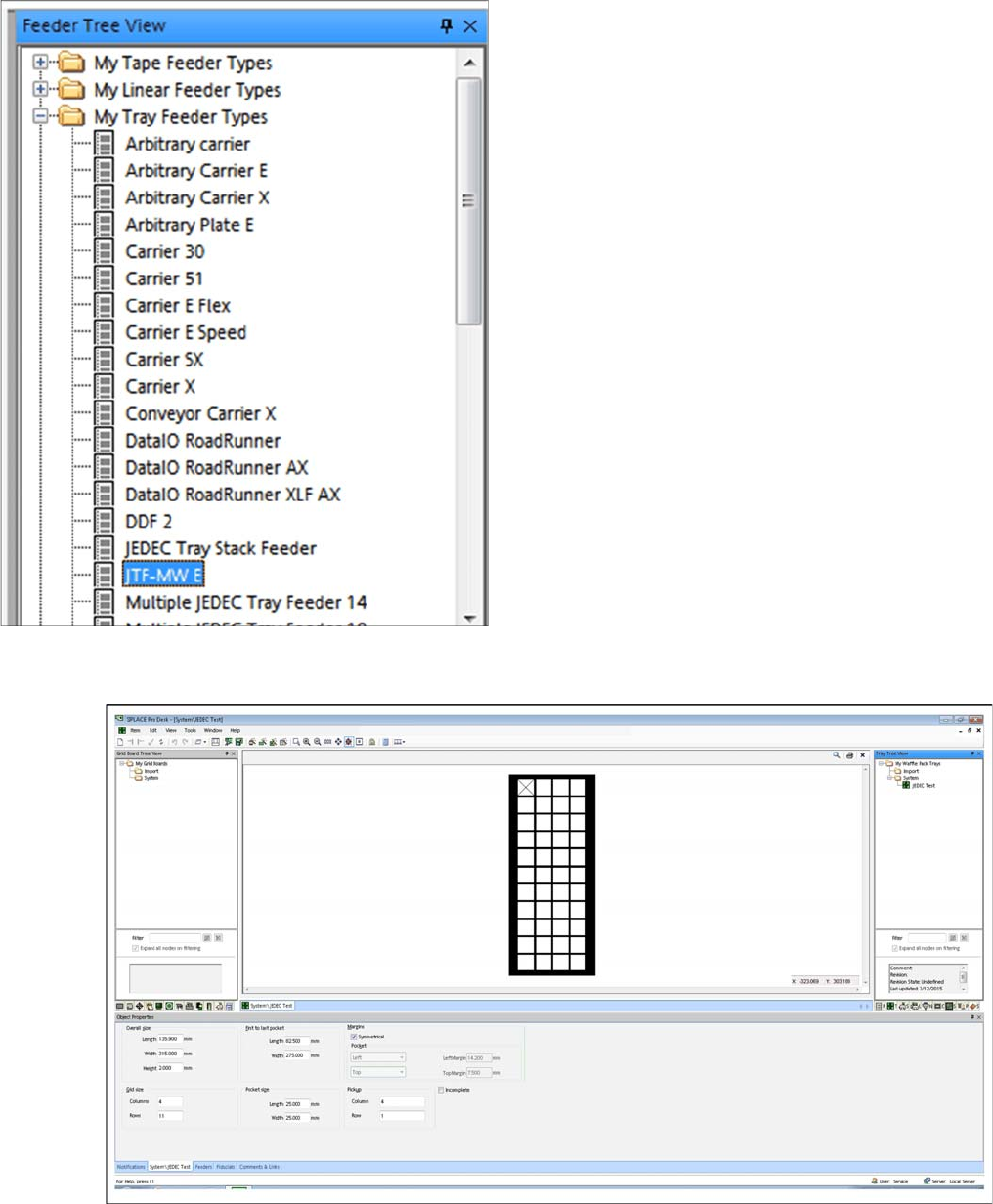
4.7.1 SIPLACE JTF-MW in SIPLACE Pro – Feeder Tree View
SIPLACE JTF-MW in SIPLACE Pro – Feeder Tree View
4.7.2
4.7.2 JEDEC Tray Description – Tray Tree View
JEDEC Tray Description – Tray Tree View
► Define one JEDEC tray with dimensions that comply with the JEDEC tray standard.
In the Feeder Tree View, the SIPLACE JTF-MW is dis-
played as JTF-MW E (Multiple JEDEC tray feeder with 15
levels).

Setting up and Commissioning
Configuration of SIPLACE JTF-MW in SIPLACE Pro
User Manual JTF-MW on SIPLACE E 37
► For the dimensions, refer to the data sheet of the manufacturer.
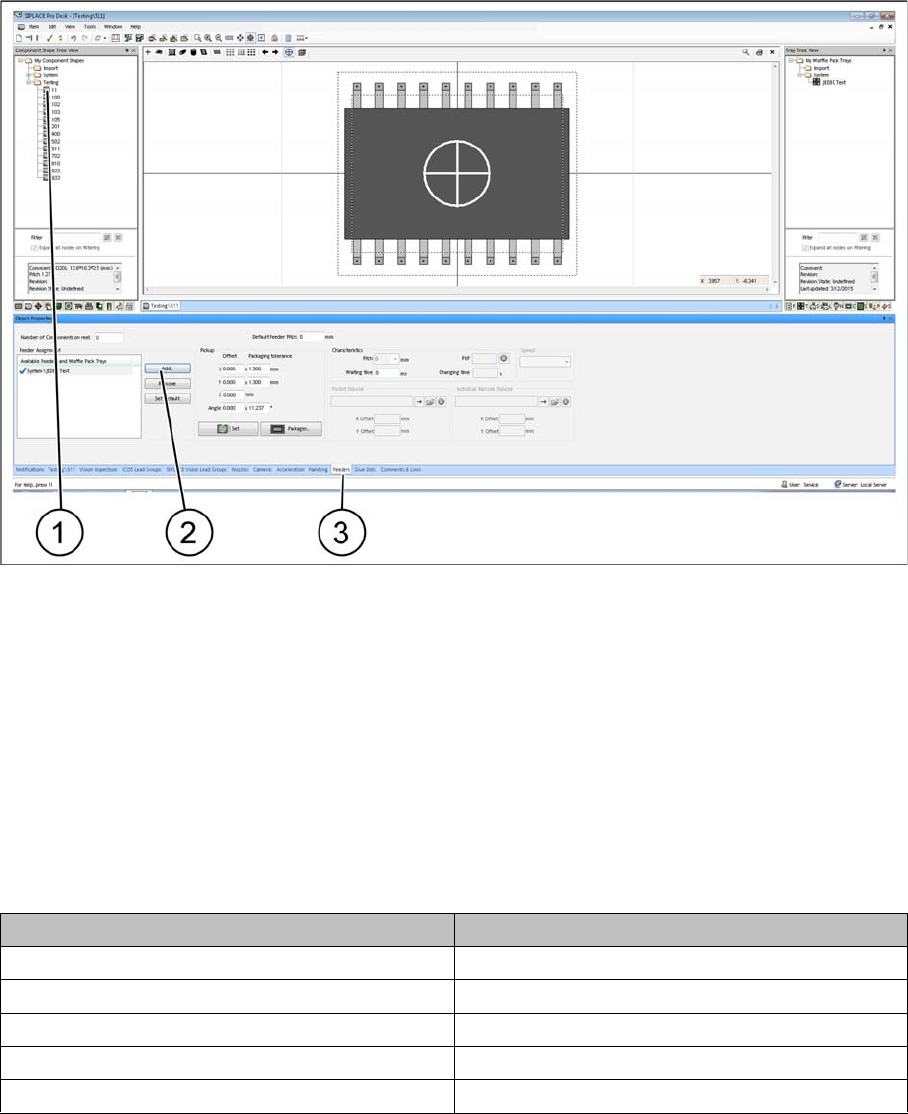
► After defining a JEDEC tray you must assign it to a feeder. Select the relevant SIPLACE JTF feeder
type.
► Select the Feeder tab (1).
► Select Add to add a feeder or Remove to remove a feeder (2).
► Select the relevant SIPLACE JTF feeder(s) (multiple selection is possible) and confirm with OK. As-
signed SIPLACE JTF feeders (3) are displayed in the Assignment window.
4.7.3
4.7.3 Assignment of JEDEC Tray to the Component Shape – Component Shape Tree View
Assignment of JEDEC Tray to the Component Shape – Component Shape Tree View
To be able to place a component with the SIPLACE JTF-S, SIPLACE JTF-M later on, you must assign
a JEDEC tray to the component shape.
NOTICE
JEDEC tray standard
In order to be used in a SIPLACE JTF-S, SIPLACE JTF-M feeder, the dimensions must comply
exactly with the JEDEC tray standard. In the example, a JEDEC tray with the name JEDEC
Test was defined.
Setting up and Commissioning
Configuration of SIPLACE JTF-MW in SIPLACE Pro
38 User Manual JTF-MW on SIPLACE E
► (1) Select the component shape.
► (3) Select the Feeders tab.
► (2) Select Add to add the JEDEC tray.
► Select an appropriate JEDEC tray from the list. The selected JEDEC tray is displayed under
Assignment.
4.7.4
4.7.4 Configuration of the Setup – Setup Tree View
Configuration of the Setup – Setup Tree View
4.7.4.1
4.7.4.1 Head Configurations for SIPLACE E
Head Configurations for SIPLACE E
The SIPLACE JTF-M can only be set up on location 2.
The following head configurations are possible:
4.7.4.2
4.7.4.2 Table Configuration
Table Configuration
After you have configured one of the heads mentioned in "4.7.4.1 Head Configurations for SIPLACE E"
[ ➙ 38], select the table that is the prerequisite for setting up a JTF-MW.
Head 1 Head 2
SIPLACE CP14 -
SIPLACE CP12
SIPLACE CP12 SIPLACE PP
SIPLACE CP6 SIPLACE PP
- SIPLACE TH