00197469-02_SM_Twin_Kunde_EN.pdf - 第68页
5 Boards and cables 5.1 Replacing the head main board 68 Service Manual SIPLACE TwinStar (Twin, Twin HF, Twin VHF) 07/2020 Fig.126: Head main board (example of Twin VHF shown) ► Carefully attach the new head main board…
5 Boards and cables
5.1 Replacing the head main board
Service Manual SIPLACE TwinStar (Twin, Twin HF, Twin VHF) 07/2020 67
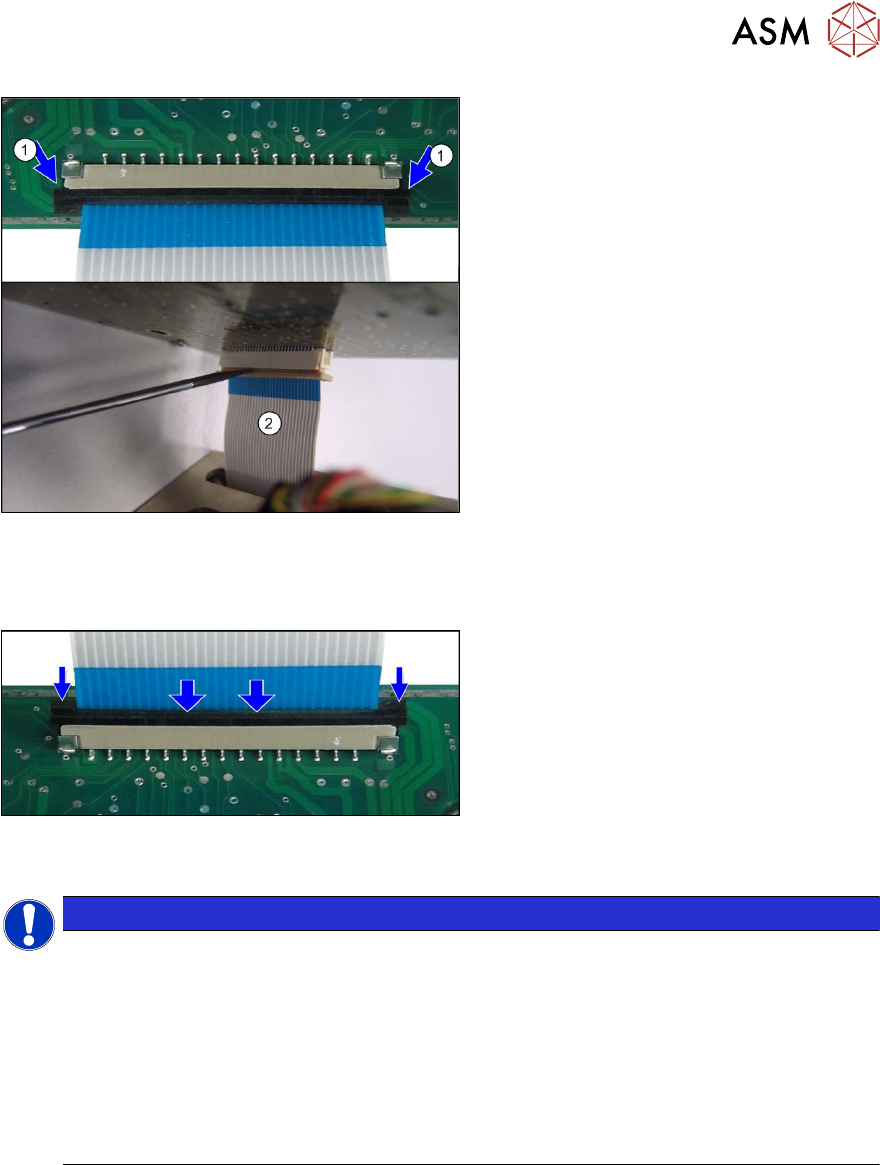
Fig.124: Disconnecting the control cable (example of Twin /
TwinHF shown)
► Release the connector lock on the con-
trol cable(1)
.
► (2) Use a screwdriver to lever the con-
nector lock very carefully
out.
Incorrect handling could cause the
cable clamp to break.
Installation
Fig.125: Attaching the control cable (example of Twin /
TwinHF shown)
► Connect the new control cable to the
head main board.
Pull up the connector fixtures or put in
a new connector fixtures.
Insert the control cable until the con-
tacts fully engage.
NOTICE
Connector fixtures
Observe the correct installation position of the control cable.
Carefully press in the connector fixtures.
The connector lock may not protrude upwards in the center.
The locking bracket must be mounted straight and click into place tightly. If the locking
bracket is mounted at an angle, it might break.
► Spare parts:
In the event of cable damage see5.5
"Replacing the control cable" [}76]:
In the event of bracket damage: locking bracket SAMTEC [03104052-xx]
► Press the two locking handles down. The control cable should now sit firmly on the connector
plug.
► Push the PRV upwards and tighten the fastening screws.
5 Boards and cables
5.1 Replacing the head main board
68 Service Manual SIPLACE TwinStar (Twin, Twin HF, Twin VHF) 07/2020
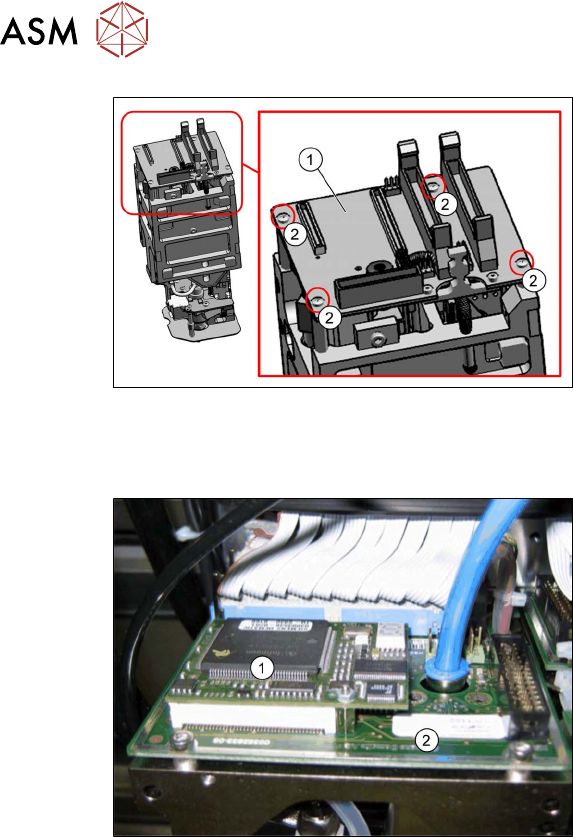
Fig.126: Head main board (example of Twin VHF shown)
► Carefully attach the new head main
board(1)
. This also reconnects the
vacuum generator.
► Fit the fastening screws (2) (with the
spacer sleeves for Twin /Twin HF).
► Reestablish all connections to the elec-
tricity supply.
Follow the removal instructions in reverse order for further installation. Also observe the following
instructions:
Fig.127: TQM module on the head main board (example of
Twin / Twin HF shown)
1. TQM167 SIPLACE Embedded Module
[03003536‑xx] (can also be ordered as
a spare part)
2. Head main board
A TQM module could be located on the
head main board when operating older
machines.
► If a TQM module was fitted to an older
head, fit this to the head main board of
the new head.
► Observe the installation instructions in the following sections:
5.7 "Replacing the strain relief for the Z encoder Twin" [}80]
5.5 "Replacing the control cable" [}76]
5.4 "Replacing the flat ribbon holder, Twin VHF (Twin VHF only)" [}75]
► Transfer the head data to the machine data at the station.
5 Boards and cables
5.1 Replacing the head main board
Service Manual SIPLACE TwinStar (Twin, Twin HF, Twin VHF) 07/2020 69
5.1.1 Head main board C600
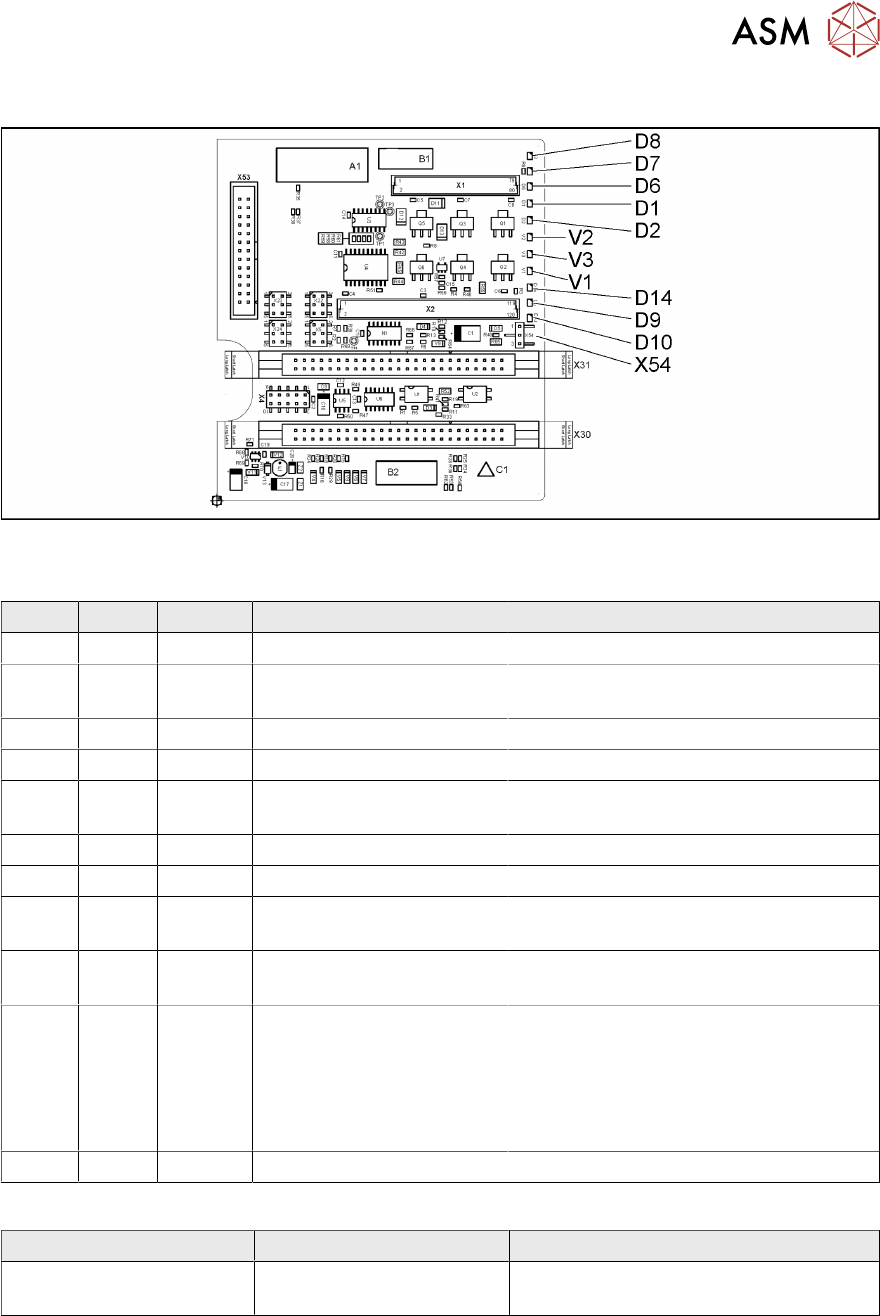
Fig.128: Head main board C600 [00352833-xx]
LEDs [00352833-09]
LED Color Status Signal name Description
D1 YE OFF Z_PRESSURE Not used
D2 YE ON/OFF Z_CLAMPING ON: Z axis clamping activated
OFF: return unit in upper position
D6 GN OFF Z_REFERENCEBERO Not used
D7 GN ON - Return cylinder moved out
D8 GN OFF Q3_OUT Flashes shortly when the return unit is
moved out
D9 GN OFF Q1_OUT Not used
D10 GN ON VCC_PROPVALVE +24VDC for vacuum generator OK
D14 RD OFF SPI_PROP_VALVE_ALAR
M_N
ON: vacuum generator defective
V1 GN ON Z_TEMPERATURE-
SENSOR
Z motor temperature OK
V2 GN ON/OFF V_OUT Signalizes the 15V power supply for the
D axes track signals
OFF: Jumper X54 set to ON for the old
force measuring board
ON: Jumper X54 set to OFF for the new
force measuring board
V3 GN ON V_OUT +15VDC for the D axes track signals
Jumper [00352833-09]
Jumper Status Description
X54 OFF New force measuring board: LED V2
ON