00197469-02_SM_Twin_Kunde_EN.pdf - 第74页
5 Boards and cables 5.3 Replacing the board with cable (Twin HF only) 74 Service Manual SIPLACE TwinStar (Twin, Twin HF, Twin VHF) 07/2020 5.3 Replacing the board with cable (Twin HF only) Parts ● Board with cable [03038…
5 Boards and cables
5.2 Transferring the head specific data
Service Manual SIPLACE TwinStar (Twin, Twin HF, Twin VHF) 07/2020 73
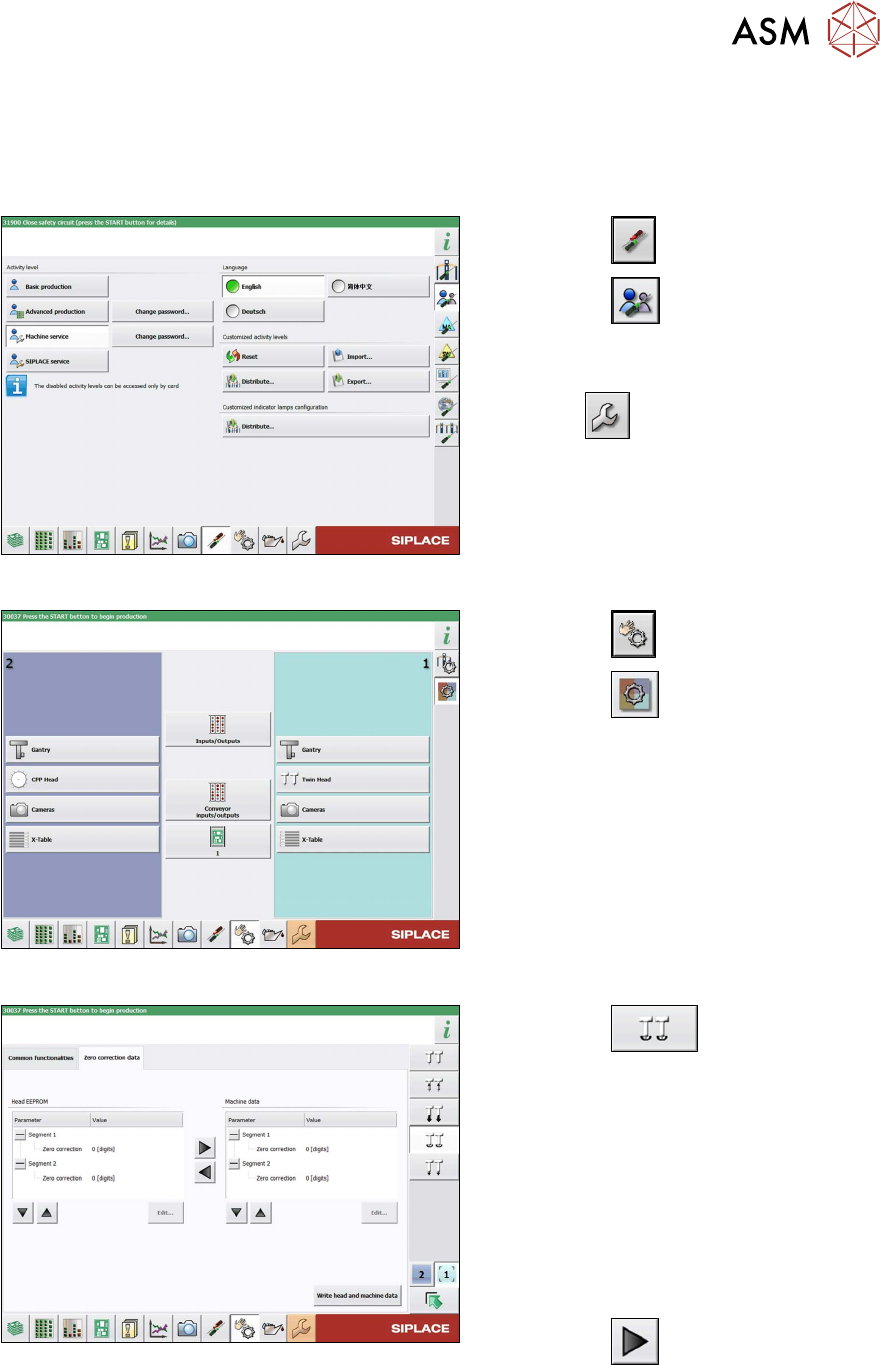
5.2.2 Transferring the head specific data (from SW701)
After changing the head hardware, the new head data needs to be made available from the head
EPROM of the software:
► Switch on the machine.
Fig.131: Select operator level
► Select the button.
► Select the button.
► Switch over to the operator level Ma-
chine service.
ð The button will be shown.
Fig.132: Sensors and Functions menu
► Select the button
► Select the button.
► Select the placement head.
Fig.133: Zero point correction data
► Select the button.
► Switch over to the Zero point correc-
tion data(2) tab.
This is where the star axis data can be written
from the head EPROM to the machine data.
Depending on the head type, you can also
write the rotary axis data from the machine
data to the head EPROM.
► In the left section, go to the Zero cor-
rection line and select the relevant
Segment
(Twin module).
► Select the button to move the
value from the head EPROM to the
machine data.
► Select Write head and machine data.
5 Boards and cables
5.3 Replacing the board with cable (Twin HF only)
74 Service Manual SIPLACE TwinStar (Twin, Twin HF, Twin VHF) 07/2020
5.3 Replacing the board with cable (Twin HF only)
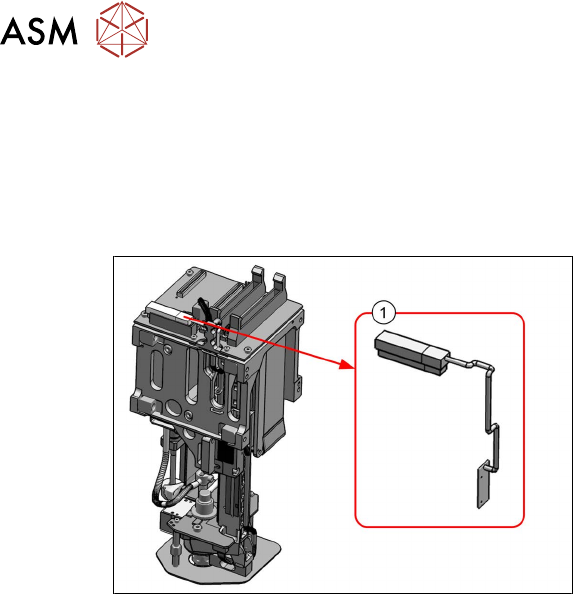
Parts
●
Board with cable [03038856-xx]
Overview
Fig.134: Board with cable
1. Board with cable [03038856-xx]
Preparation
► Remove the head from the machine. For details about removing and fitting the placement
head, refer to the service manual for your machine.
Removal
► Disconnect the cable.
► Unthread the cable as far as the board.
► Remove the fastening screws of the board and then remove the board.
Installation
Follow the removal instructions in reverse order for installation. Also observe the following instruc-
tions:
► Replace any cable ties which you have removed.
5 Boards and cables
5.4 Replacing the flat ribbon holder, Twin VHF (Twin VHF only)
Service Manual SIPLACE TwinStar (Twin, Twin HF, Twin VHF) 07/2020 75
5.4 Replacing the flat ribbon holder, Twin VHF (Twin VHF only)
Parts
●
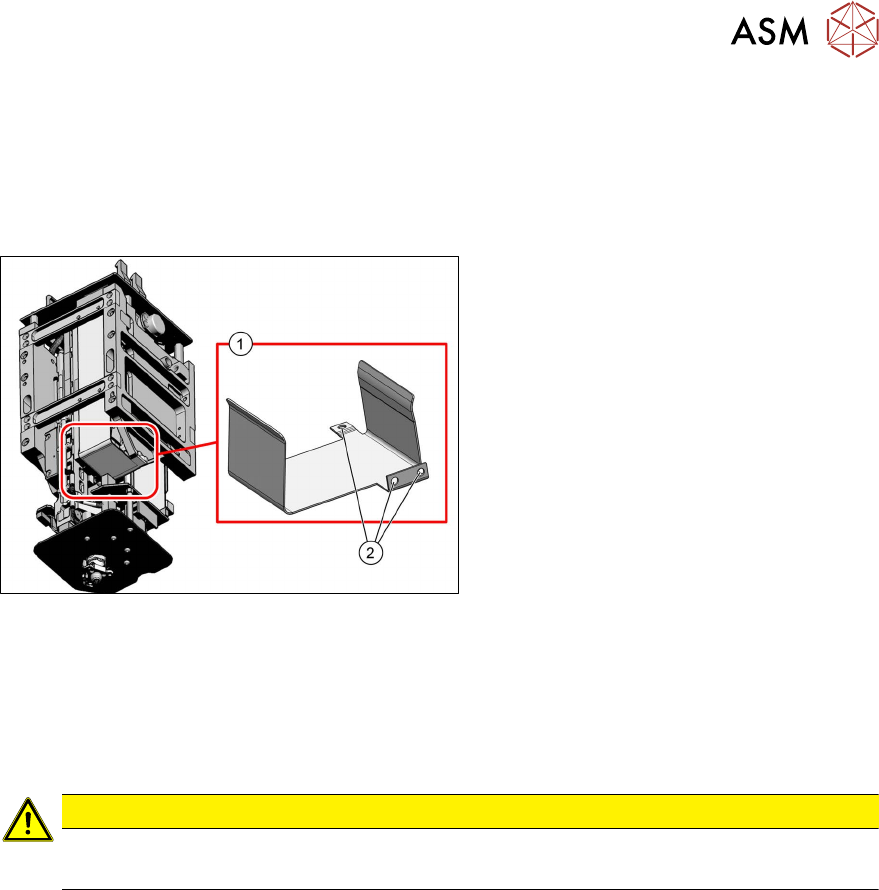
Flat ribbon holder, Twin VHF [03104023‑xx]
Overview
Fig.135: Flat ribbon holder, Twin VHF
1. Flat ribbon holder, Twin VHF
[03104023‑xx]
2. Three screws fastening the flat ribbon
holder
Preparation
► Remove the head from the machine. For details about removing and fitting the placement
head, refer to the service manual for your machine.
Removal
CAUTION
Do not damage the control cable
► Take care not to damage the control cable.
► Remove the three screws fastening the flat ribbon holder and remove the flat ribbon holder.
Installation
Follow the removal instructions in reverse order for installation.