00197469-02_SM_Twin_Kunde_EN.pdf - 第87页
6 Parameter and Calibrations 6.2 Parameters and calibrations SW6xx.x Service Manual SIPLACE TwinStar (Twin, Twin HF, Twin VHF) 07/2020 87 6.2.5.2 Checking the zero calibration ► Start the SITEST program . ► Select the bu…
6 Parameter and Calibrations
6.2 Parameters and calibrations SW6xx.x
86 Service Manual SIPLACE TwinStar (Twin, Twin HF, Twin VHF) 07/2020
6.2.5 Calibration of vacuum generator on the TwinHead
The vacuum generator is part of a segment on the Twin module (segment) and creates the vacuum
and air blast for the pick up and placement process. The zero calibration of the vacuum generator
should be performed on initial setup at the customer site and after exchanging the vacuum gener-
ator or Twin module.
If you don‘t calibrate the vacuum generator, incorrect threshold values will be used to calculate "No
component on the nozzle or nozzle is dirty".
With the aid of the zero point calibration, the motor of the vacuum generator is positioned in a cent-
ral or neutral position, so that there is no vacuum or air blast on the nozzle.
6.2.5.1 Zero point calibration of vacuum generator
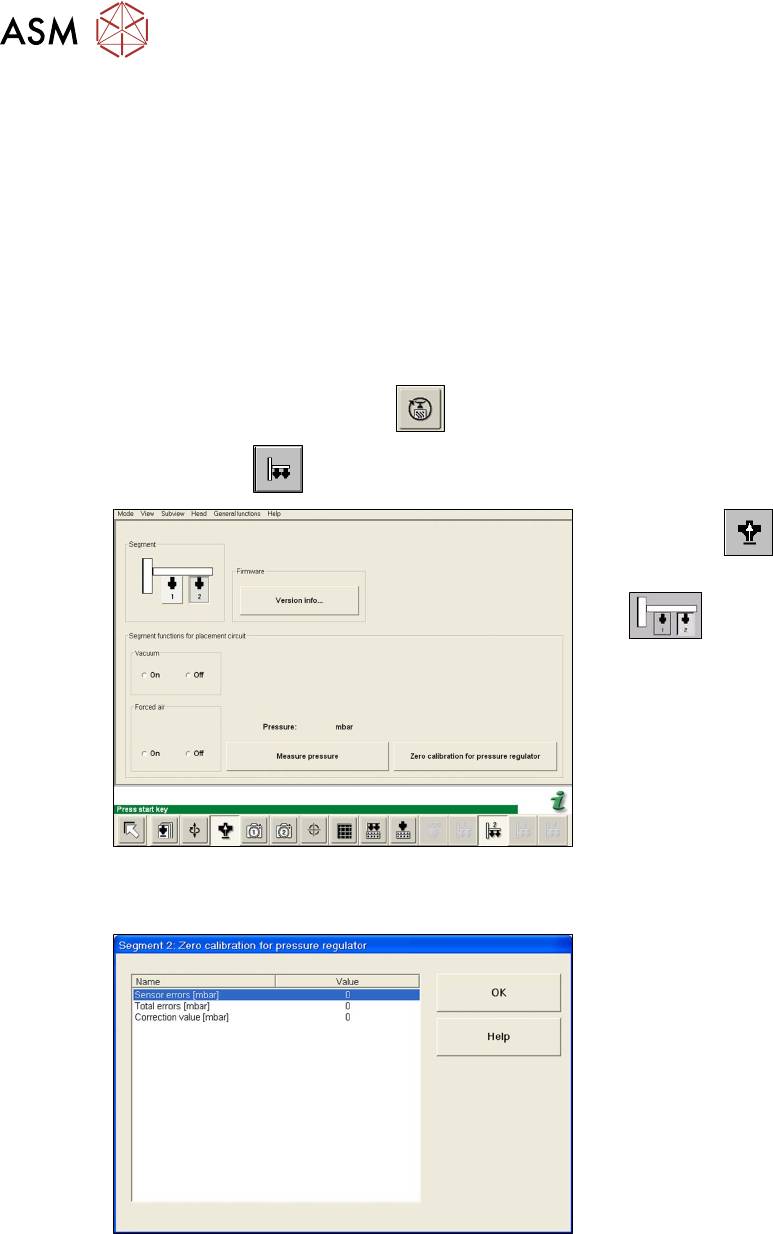
► Start the SITEST program .
► Select the button.
Fig.144: SITEST functions for head board
► Select the button.
► Select the Twin module (segment)
.
► Close the nozzle of the appropriate
Twin module (e.g. by sealing it with
your finger tip).
► Select Zero calibration pressure reg-
ulator.
The following dialog field shown the correction value calculated.
Fig.145: Correction values for zero calibration
► Click OK.
The correction value will be accepted. The
pressure controller reference value is there-
fore now calibrated to the ambient pressure.
6 Parameter and Calibrations
6.2 Parameters and calibrations SW6xx.x
Service Manual SIPLACE TwinStar (Twin, Twin HF, Twin VHF) 07/2020 87
6.2.5.2 Checking the zero calibration
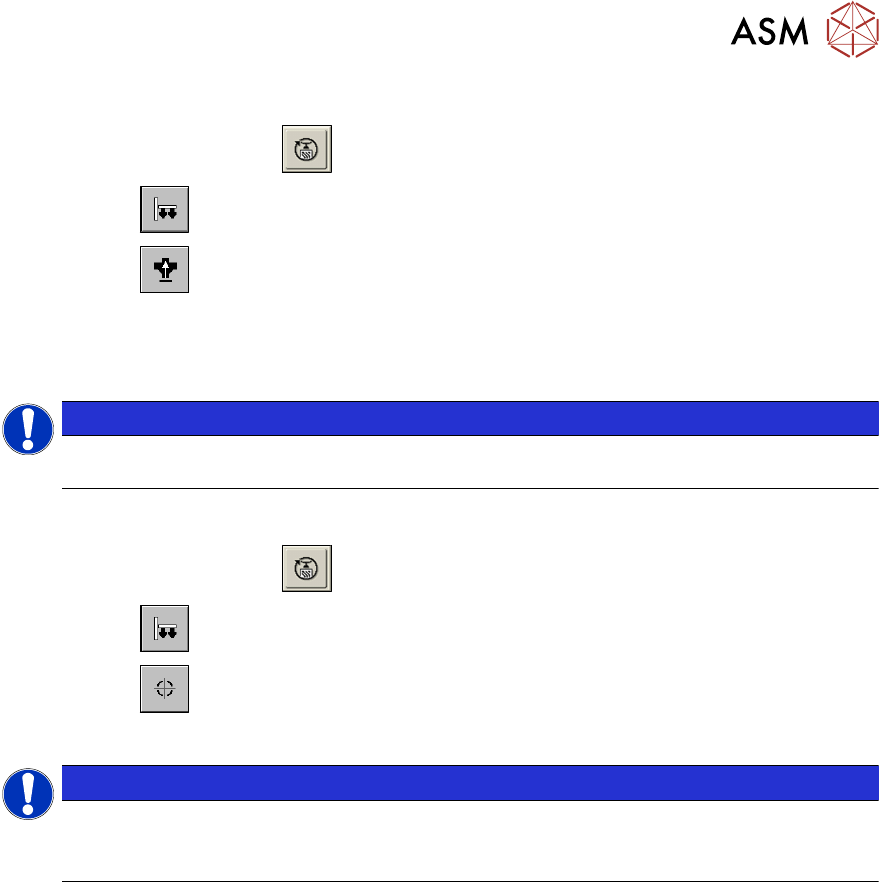
► Start the SITEST program .
► Select the button.
► Select the button.
► Confirm Measure pressure.
The zero calibration is performed with disabled vacuum and air blast (see 6.2.5.1 "Zero point cali-
bration of vacuum generator" [}86]).
NOTICE
The pressure deviation to the ambient pressure at 0-mbar (zero calibration) should not ex-
ceed +/10mbar
.
6.2.5.3 Calibrating the closed vacuum
► Start the SITEST program .
► Select the button.
► Select the button.
► Select Calibrate closed vacuum.
NOTICE
The value Closed vacuum is measured and stored for both Twin modules. A dialog box
shows the old and the new values.
The term Closed vacuum corresponds to Threshold value closed.
6 Parameter and Calibrations
6.2 Parameters and calibrations SW6xx.x
88 Service Manual SIPLACE TwinStar (Twin, Twin HF, Twin VHF) 07/2020
6.2.5.4 Checking the pressure tightness of the vacuum system
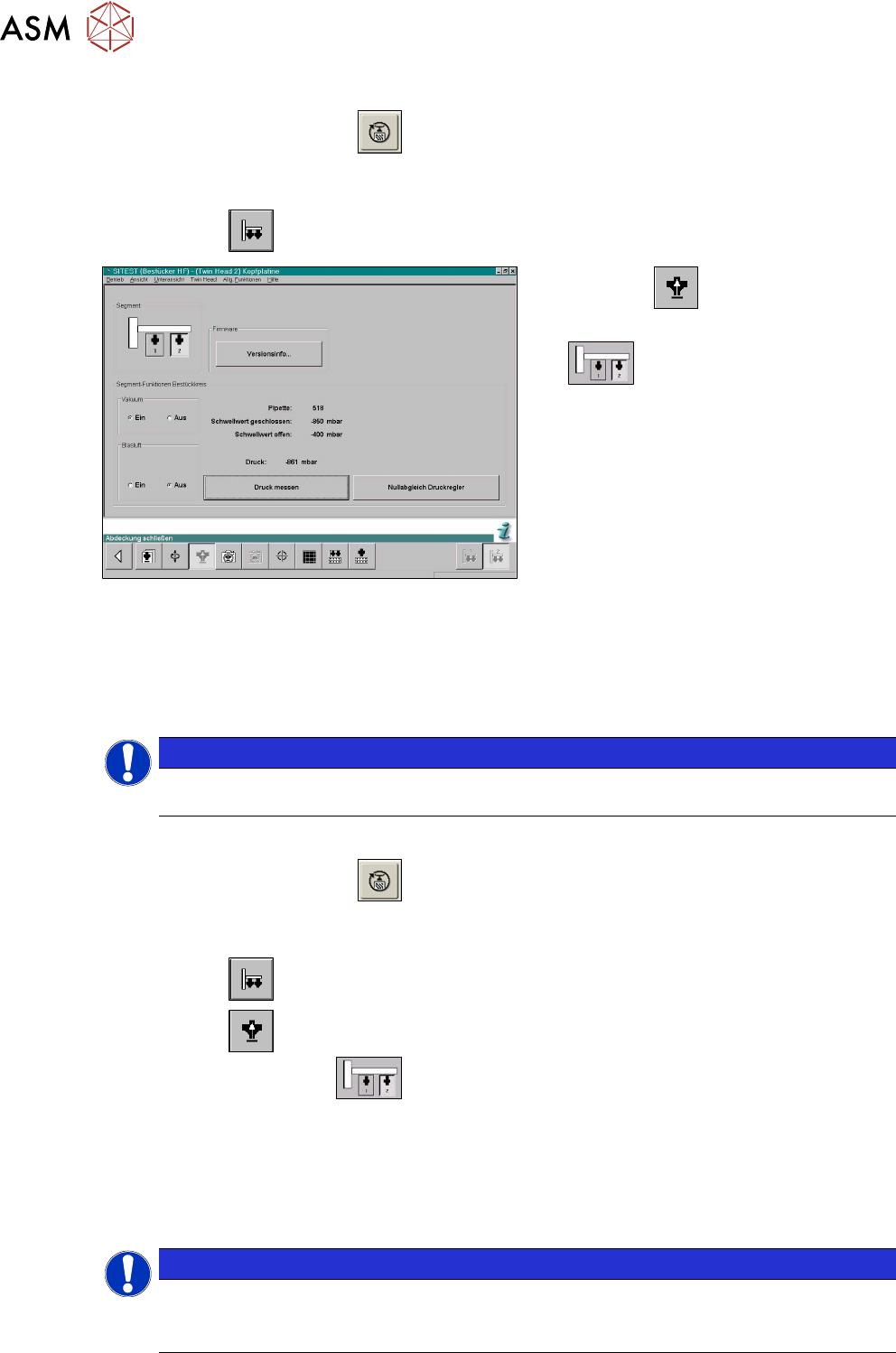
► Start the SITEST program .
► Move the gantry so that you can easily reach the nozzle with one and the keyboard with the
other hand.
► Select the button.
Fig.146: SITEST functions for head board
► Select the button.
► Select the Twin module (segment)
.
► Switch the vacuum on and the air blast off.
► Close the nozzle of the appropriate Twin module (e.g. by sealing it with your finger tip).
► Click on the Measure pressure button.
► The displayed value should correspond to the Closed vacuum.
NOTICE
The Closed vacuum values is determined in the Calibrate TwinHead → Calibrate closed
vacuum menu.
6.2.5.5 Checking the air blast
► Start the SITEST program .
► Move the gantry so that you can easily reach the nozzle with one and the keyboard with the
other hand.
► Select the button.
► Select the button.
► Select the Twin module.
► Switch the air blast On.
► Close the nozzle of the appropriate Twin module (e.g. by sealing it with your finger tip).
► You can edit and modify the value for the air blast pressure or leave the standard value.
► Select Measure pressure.
► The measured value should correspond (approx.) with the given value.
NOTICE
The air blast value can be edited to a value between 0 and 400 mbar, with the SIPLACE
Service password.
► Default setting: 400mbar